A social media approval workflow is the agreed path a post takes from draft to publish: who reviews it, what they check, how quickly they respond and what happens if they do not. The best workflows use as few approval steps as the risk requires, keep every post's status visible in one place, and set a written turnaround time so the calendar never waits on silence.

Approval problems look small but compound quickly. A post waiting on feedback misses its slot. Feedback spread across email, chat and document comments gets lost or contradicts itself. A version approved on Monday is not the version that went out on Thursday. This guide covers why approvals break, a seven-step design method, approval paths by risk, team type, industry and content type, compliance rules for regulated businesses and paid partnerships, how to handle AI-drafted content, templates you can copy and how to measure whether your workflow is working.
Key findings
- Trust is the core problem. In the 2025 Sprout Social Index, 41% of 900 social practitioners said their greatest fear is leadership not trusting them to publish the best-performing content. A clear approval workflow builds that trust instead of slowing everything down.
- Regulators expect pre-approval in some cases. FINRA's social media guidance says most static content from broker-dealers must be approved by a registered principal before use, and records must be kept for not less than three years.
- Agencies and brands share disclosure duties. The FTC's endorsement guidance says companies that pre-approve paid posts should review them for compliance, and that for short-lived content such as Stories, paid posts should not be made without advance approval.
- AI content is under scrutiny. On 15 September 2026, LinkedIn announced classifiers that limit low-quality AI content and said views of content classified this way fell by 40%. Human review of AI drafts is now a reach issue as well as a brand issue.
- Approval features often sit on higher tiers. Agorapulse lists one-step approvals from its Professional plan and multi-step approvals on Custom; Hootsuite lists approvals on Advanced and Enterprise.
- AI is everywhere in drafting. Hootsuite's 2026 trends report says 79% of social media managers use AI daily, which puts more drafts through review than ever.
- Delays cost consistency. Buffer's 26-week study found consistent posters earned about 450% more engagement per post than sporadic ones. Every post stuck in review is a gap in that streak.
What's changed for approvals in 2026
AI drafts need a human gate
With most social managers using AI daily and LinkedIn actively limiting distribution of low-quality AI content, the approval step is where teams catch invented details, generic phrasing and tone drift. LinkedIn is even replacing its "enhance your post" feature with proofreading and clarity tools that do not change a member's voice, a signal of where platforms are heading.
Collaboration now happens on the platform too
LinkedIn's Collaborative Posts, announced on 23 July 2026, let an author add up to five members or Company Pages as collaborators, who review the post and appear only if they accept. That is a second approval moment, after publishing, which needs planning: tell collaborators before the post goes live.
Originality checks belong in review
Meta's July 2025 update on unoriginal content reduces distribution for accounts that repeatedly reuse others' content without meaningful changes. Reviewers should now ask "is this ours?" as well as "is this right?".
Approvals moved from email to tools
Approval workflows have become a standard feature in scheduling tools, with pricing that often scales by approval depth. Planable, for example, prices per workspace and offers more approval levels on higher plans. Email approvals are increasingly the exception.
Why approval workflows break
- No owner: nobody is clearly responsible for the final yes.
- No deadline: reviewers have no turnaround time, so posts wait indefinitely.
- Too many reviewers: every extra person adds delay and conflicting opinions.
- Scattered feedback: comments arrive in five channels and some are missed.
- Out-of-context review: reviewers see a caption in a document without the image, the network version or the date.
- Version drift: edits after approval are not re-approved, or the approved version is not the one scheduled.
- One speed for everything: a desk-stretch tip goes through the same three-step chain as a pricing announcement.
Each of these has a simple fix, and the seven steps below address them in order.
Step 1: Classify posts by risk
Not every post needs the same scrutiny. A tip about desk stretches from a physiotherapy clinic is low risk. A post about pricing, a legal or medical topic or a sensitive news event is high risk. Matching approval depth to risk keeps routine posts fast.
| Risk level | Examples | Approval path | Target turnaround |
|---|---|---|---|
| Low | Evergreen tips, behind the scenes, reshares of approved content, posts from pre-approved templates | Creator plus one reviewer | 1 business day |
| Medium | Promotions, product announcements, customer stories, executive posts | Creator, reviewer, then brand owner or client | 2 to 3 business days |
| High | Pricing, legal, medical or financial claims, crisis responses, sensitive topics, paid partnerships | Creator, reviewer, brand owner, plus legal or compliance | 3 to 5 business days, never auto-approved |
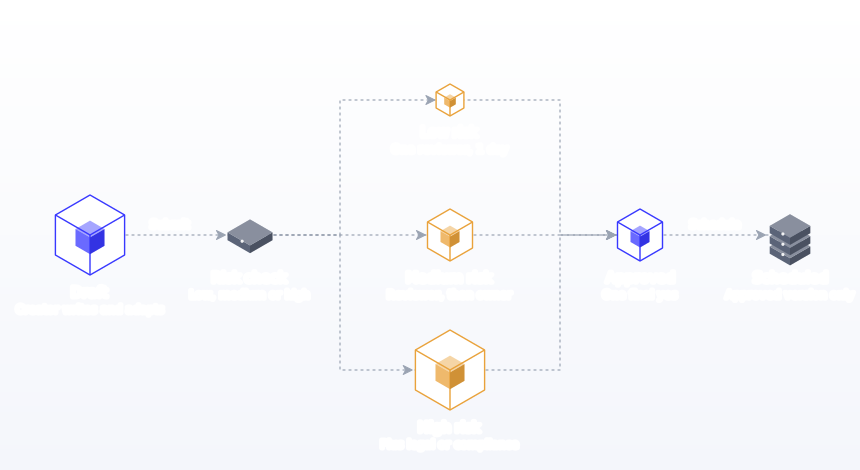
When a post could fit two levels, use the higher one until you have enough examples to decide. Write the classification down with examples. When everyone knows which posts need the long route, the short route stays short.
Step 2: Define roles
- Creator: drafts the post, adapts it for each network and submits it for review.
- Reviewer: checks quality, accuracy and brand fit. Usually a senior team member or account lead.
- Approver: gives the final yes. For agencies, usually the client. For in-house teams, often the marketing lead.
- Specialist reviewer: legal, compliance or subject expert, only for high-risk posts.
- Publisher: schedules the approved version. Often the same person as the creator.
Write these roles down next to each person's name, even in a team of two. Most approval arguments come from people assuming they had the final say when someone else thought they did. Name one approver per brand, not a committee. If several people must be consulted, the approver collects their views and returns one consolidated response. Name a backup approver for holidays.
Mapping roles to tool permissions
Approval roles should match access. Platforms and tools have permission systems built for this. LinkedIn Pages separate Super admin, Content admin and Analyst roles; YouTube offers Owner, Manager, Editor and Viewer permissions. In Postprism, workspaces have Owner, Admin, Editor and Viewer roles: Editors draft and submit posts for review, Owners and Admins approve or request changes, and Viewers can see the calendar without editing.
| Workflow role | Postprism role | Can do |
|---|---|---|
| Creator, publisher | Editor | Draft, edit, submit for review |
| Reviewer, approver | Admin | Approve, request changes with a note, schedule |
| Agency owner or brand owner | Owner | Everything, including team and workspace settings |
| Stakeholder who only needs to see the plan | Viewer | See the calendar and posts |
Step 3: Choose single or multi-level approval
Single-level approval means one reviewer says yes or no. It suits small teams, solo freelancers and low-risk content. It is fast and simple.
Multi-level approval means a post passes through several reviewers in order, for example an internal reviewer and then the client, or marketing and then compliance. It suits agencies, regulated industries and larger brands. It is slower, so reserve the extra levels for posts that need them.
| Factor | Single-level | Multi-level |
|---|---|---|
| Speed | Hours to a day | Days |
| Best for | Solo, small teams, low risk | Agencies, regulated, high risk |
| Main risk | Errors slip through | Bottlenecks and conflicting feedback |
| Mitigation | Reviewer checklist | Deadlines per level and one consolidated response |
A hybrid works well for most teams: single-level for low risk, multi-level for medium and high. If your tool supports one level, you can still run a second level by having the internal reviewer approve in the tool and the client approve from a shared calendar or a structured monthly review.
Step 4: Set turnaround times and a silence rule
Every review step needs a deadline, and the workflow needs a rule for what happens when nobody responds.
Example rule: "The month's posts are shared for approval by the 15th. Feedback is due within three business days. Posts with no feedback by then are treated as approved, except high-risk posts, which are held until explicitly approved."
Agencies should put this rule in the contract. In-house teams should put it in the team's working agreement. It feels formal, but it removes the most common source of missed posts and awkward conversations. Our agency workflow guide shows where the rule fits in a monthly cycle.
Step 5: Review in context, in one place
Reviewers should see the post as it will appear: the network version, the image or video, the scheduled date and the link. Reviewing loose captions in a document leads to surprises. Using one tool for drafting, review and scheduling also solves version drift, because the approved post is the one that publishes.
Give reviewers a checklist so feedback is consistent:
- Accurate? Names, prices, dates, claims.
- On brand? Voice, terminology, visual style.
- Right for the network? Format, length, hashtags. Our social media character counter checks limits.
- Links and tags working? UTM parameters consistent, landing page live.
- Original? Our own idea, not a lightly edited copy of someone else's.
- Disclosed? Paid partnerships and gifts labelled.
- Safe? Anything that could be misread, cause offence or clash with current events.
Step 6: Give feedback that can be acted on
"Not quite right" costs a round trip. Good feedback names the problem and suggests a direction: what to change, why, and optionally a suggestion.
| Unhelpful feedback | Actionable feedback |
|---|---|
| Make it pop more | The first line is too slow. Lead with the 15-minute fix rather than the background. |
| Not sure about the image | The image shows the old packaging. Use the autumn range photos from the shared folder. |
| Too long | Cut the second paragraph; the offer is lost below the fold on Instagram. |
| Can we change the tone? | This reads as formal. Our customers respond to a warmer voice, like the September tips series. |
| Legal might not like this | "Guaranteed results" is a claim we cannot make. Use "most clients see" and add the standard disclaimer. |
| Feels generic | This could be any firm. Add the example from last week's client call so it is clearly ours. |
Step 7: Re-approve after edits
Any meaningful change after approval should go back to the approver, even for a quick confirmation. Small typo fixes can be exempt if the rule says so. This prevents the classic problem of an approved post being edited into something the approver never saw. In Postprism, an approved or changes-requested post returns to draft, so edits happen before it is scheduled rather than after.
Approval workflows by team type
| Team | Typical workflow | Watch out for |
|---|---|---|
| Solo freelancer with clients | Draft, client approval, schedule | Clients who never reply; use the silence rule |
| In-house team of 2 to 5 | Draft, peer review, marketing lead approval for medium and high risk | Everything escalating to the lead |
| Agency | Draft, internal review, client approval, schedule | Client feedback outside the tool |
| Enterprise brand | Draft, team lead, brand, legal for high risk, schedule | Too many levels for routine posts |
| Regulated business | Draft, review, compliance approval, schedule, archive | Compliance becoming a bottleneck; pre-approve templates and claims |
Solo freelancers
Your workflow is short, but your approver is outside your control. Batch the month, send one approval request, and enforce the silence rule politely but firmly.
In-house teams
The risk is the marketing lead becoming the bottleneck. Delegate low-risk approval to a peer and keep the lead for medium and high risk only.
Agencies
Run internal review before the client sees anything, so clients only review polished work. Keep each client in a separate workspace so nobody sees another brand's drafts. See team collaboration and our page for agencies.
Enterprise brands
Map levels to risk, not to the org chart. Pre-approve a library of messages and claims so legal reviews the library once rather than every post.
Approval workflows by industry
Financial services
FINRA distinguishes static content, which usually needs a registered principal's approval before use, from interactive content such as real-time conversations, which can be supervised like correspondence instead. Keep records for at least three years. Build a high-risk lane for every post that mentions products, performance or recommendations.
Healthcare
Treat any post that could read as medical advice as high risk, with clinical review. Patient stories need written consent before drafting, not just before publishing.
Legal
Explainers about the law need a qualified reviewer. A short library of approved disclaimers speeds up partner review.
Consumer brands with creators
Paid partnerships need disclosure checks. The FTC says advertisers should instruct partners on clear disclosures and that platform disclosure tools do not automatically meet the standard. In the UK, the ASA and CMA influencer guide, now in its third edition from March 2023, is written to be useful for brands and agencies as well as influencers.
Local businesses
Usually one approver: the owner, who is also running the business and has little time for reviews. Keep it simple, with a weekly approval window and pre-approved templates for routine posts like opening hours and daily specials.
B2B and executive posts
Posts published from an executive's personal profile need that executive's approval, even when the company drafts them. Add a second approver lane for executive content.
Approval paths by content type
| Content type | Default risk | Extra check |
|---|---|---|
| Evergreen tip or how-to | Low | Accuracy |
| Behind the scenes | Low | Consent from people shown |
| Customer story or testimonial | Medium | Written permission; claims are typical |
| Promotion or offer | Medium | Prices, dates, terms |
| Product launch | Medium | Embargo date, product details |
| Paid partnership | High | Disclosure |
| News reaction or sensitive topic | High | Tone, timing, brand risk |
| Crisis response | High | Pre-agreed crisis approvers, fast lane |
| Comment replies | Low (if within guidelines) | Escalate complaints and anything legal |
Comment replies deserve a note. Requiring approval for every reply kills response times, and Buffer's 2026 engagement report links replying with about 30% more engagement on LinkedIn and 42% on Threads. Pre-approve reply guidelines instead, and escalate only the exceptions.
Working backwards from the publish date
Most approval delays are planning delays. If drafts reach reviewers two days before they publish, any feedback at all puts the slot at risk. Work backwards from each publish date instead.
| Milestone | Low-risk post | Medium-risk post | High-risk post |
|---|---|---|---|
| Draft ready for review | 3 business days before publish | 7 business days before | 10 business days before |
| Internal review done | 2 days before | 5 days before | 8 days before |
| Client or owner approval | 1 day before | 3 days before | 6 days before |
| Specialist or compliance | n/a | n/a | 3 days before |
| Scheduled | Same day as approval | Same day as approval | Same day as approval |
The simplest way to hit these dates is to batch. When the whole month is drafted in one block and sent for approval in one request, every post has the same generous lead time. Our batch content creation guide covers the production side, and our content calendar templates include status and approval columns if you are still planning in a spreadsheet.
Why slow approvals hurt results, not just schedules
A post that misses its slot is not just late. If it was the only post that week, the account goes quiet. Buffer's Instagram study of 2.1 million posts found that accounts gained less follower growth in weeks with no posts than in weeks with even one or two, and its 2026 engagement report describes the same "no-post penalty" across networks. Approval bottlenecks are one of the most common causes of those silent weeks in teams, because the content exists but is stuck in someone's inbox.
The fix is a buffer of approved evergreen posts. Keep two to four posts approved in advance and unscheduled, ready to fill a slot when a planned post is held up in review. Our guide on how to stay consistent on social media explains how to build and refill one.
Reviewing multi-network posts
One idea published to five networks is five versions to approve: different lengths, formats, hashtags and sometimes different images. Reviewing them one by one is slow; approving only the "main" version is risky, because the shortened X version may lose the disclaimer that the LinkedIn version had.
- Approve the core message first. Agree the claim, offer and tone on the primary version.
- Then check each adaptation for what changed: cut disclaimers, altered claims, cropped images.
- Keep the versions together. In Postprism, each post holds its per-platform versions in one editor, so the reviewer sees all of them side by side, whether they were written by hand or suggested by optional AI content adaptation.
Our guide to adapting content for each platform covers what typically changes between versions.
Fast-lane approvals for news and crises
Some posts cannot wait three days: a response to breaking news, an outage notice, a correction. Agree a fast lane before you need it.
- Name two fast-lane approvers who can be reached by phone or message.
- Define what qualifies: service outages, safety notices, corrections, time-critical news that affects customers.
- Pre-write holding statements ("We are aware of the issue and will update here by [time]") that are already approved.
- Pause scheduled posts during a crisis. A cheerful promotion going out in the middle of a problem is the most common avoidable mistake. Check the calendar for the next 48 hours as the first step.
- Log the decision afterwards: who approved, when and why.
Fast lanes only stay fast if they are rare. If more than a couple of posts a month go through them, your normal planning horizon is too short. Our guide on creating a social media strategy covers building crisis plans into your wider approach.
How to set up an approval workflow: a step-by-step method
- List your last month's posts and tag each as low, medium or high risk.
- Write the risk definitions with three examples each.
- Name the roles: creator, reviewer, approver, specialist, publisher, plus a backup approver.
- Choose single or multi-level for each risk level.
- Set deadlines per level and write the silence rule.
- Write the reviewer checklist and the feedback format.
- Set up the tool: workspaces per brand, roles matching approval rights, drafts submitted for review.
- Agree the re-approval rule for edits after approval.
- Pre-approve templates and claims for recurring posts.
- Run one month, then measure time to approval and rounds of changes, and fix the slowest step.
Measuring your approval workflow
Track four numbers monthly.
| Metric | How to calculate | Healthy sign | If it is off |
|---|---|---|---|
| Time to approval | Average days from submit to approved | Within your deadline | Check missing deadlines or too many reviewers |
| First-pass approval rate | Posts approved without changes / posts submitted | Rising over time | Brief or brand guidelines unclear |
| Rounds of changes | Average change requests per post | One or fewer | Feedback not actionable; use the format |
| Posts published late | Posts that missed their slot due to review | Zero | Enforce the silence rule; plan further ahead |
If many posts need several rounds, fixing the brief or guidelines upstream saves far more time than faster reviewing. For the performance metrics that sit alongside these process metrics, see social media metrics and KPIs.
Running approvals in Postprism
Postprism's approval workflow keeps drafting, review and scheduling in one place, so reviewers see each post with its network versions, media and date, and the approved post is the one that publishes. An Editor submits a post for review; an Owner or Admin approves it or requests changes with a note; the post then returns to draft so it can be fixed or scheduled. Each brand or client has its own workspace, and the content calendar and kanban board show what is drafted, scheduled and published. Freelancer and Agency plans include approval workflows; see pricing for details. Schools and colleges use the same step so department posts are checked before they reach parents; see our social media scheduler for schools and colleges.
If you draft with an AI assistant connected to Postprism through its MCP server, ask it to create drafts rather than scheduled posts. Drafts never publish on their own, so they go through exactly the same approval path as anything a person wrote. Our ChatGPT and Claude guides show how. For a comparison of tools with approval features, read the best social media approval workflow tools.
Approval features in scheduling tools compared
If you are choosing a tool partly for approvals, compare where approvals sit in each vendor's plans. Prices below are from each vendor's pricing page as of October 2026.
| Tool | Approvals | Price model |
|---|---|---|
| Postprism | Submit for review, approve or request changes with a note, on Freelancer and Agency plans, with Owner, Admin, Editor and Viewer roles | Freelancer $49/month, Agency $99/month, flat |
| Planable | None or optional on Basic; none, optional or required on Pro; multi-level on Enterprise | About $33 or $49 per workspace per month |
| Agorapulse | One-step approvals from Professional; bulk approve on Advanced; multi-step on Custom | About $79 to $149 per user per month billed annually |
| Hootsuite | Approvals on Advanced and Enterprise | Plans start at about $99, $199 and $399 a month |
| Sprout Social | Check with Sprout; its pricing page does not list approvals by plan | From about $79 per seat per month billed annually |
Per-seat and per-workspace pricing adds up quickly for agencies with many clients or reviewers, so count the people who need to approve, not just the people who post. Sprout's figures come from its pricing page.
Onboarding new reviewers
A new approver who does not know the rules will either rubber-stamp everything or rewrite everything. Spend 20 minutes with each new reviewer on four things: the risk classification with examples, the reviewer checklist, the feedback format, and the deadlines and silence rule. Share three past posts with the feedback they received, one good, one that needed changes and one that was held. That short session prevents most of the "make it pop" feedback that costs teams whole rounds of revisions.
Approvals and AI-drafted content
As more teams draft with AI, approvals matter more, not less. AI drafts can contain confident errors, invented details or a slightly off tone, and LinkedIn's classifiers now limit how far low-quality AI content travels. Treat AI drafts like any other draft:
- They enter the workflow as drafts, never as scheduled posts.
- They go through the same risk classification and the same approvers.
- Reviewers check every fact, name and number against a source.
- Reviewers ask whether the post sounds like the brand and says something specific.
Our guide to AI agent access to social media covers the wider guardrails.
Templates you can copy
Monthly approval request
"Hi [name], next month's posts for [brand] are ready for review in [tool]. There are [n] posts across [networks]. Please approve or leave comments on each by [date]. Posts without feedback by then will be scheduled as planned, except the two marked high risk, which we will hold until you confirm. Thank you!"
Reminder, two days before the deadline
"Quick reminder that [n] posts for [brand] are waiting for review, with feedback due on [date]. The first post goes live on [date]. If anything needs a call, I have time on [options]."
Changes requested, response
"Thanks for the feedback. I have updated the three posts you commented on: [summary]. They are back in review, and I will schedule them once you confirm."
Reviewer checklist (paste into your tool or doc)
"Accurate: names, prices, dates, claims. On brand: voice, terms, visuals. Network fit: format, length. Links: working and tagged. Original: our idea and our words. Disclosed: partnerships labelled. Safe: nothing that could be misread today."
Worked example: a regulated business
Halden Legal, an employment law firm, needs every post that touches legal advice checked by a partner. Their workflow:
- Classification: firm news and team posts are low risk; explainers about the law are high risk.
- Low risk: the marketing coordinator drafts, the office manager reviews, scheduled within a day.
- High risk: the coordinator drafts from a partner's notes, the partner approves the substance, and a second partner spot-checks one post a month.
- Pre-approved language: a short library of approved disclaimers and phrasings speeds up partner review.
- Record keeping: approved posts, approvers and dates stay with the post in the scheduler.
Routine posts move quickly while sensitive ones get the scrutiny they need, without every post waiting on a partner's calendar. After three months, their first-pass approval rate on high-risk posts rose because the disclaimer library removed the most common change request.
Worked example: an agency with three clients
A small agency runs a coffee roaster, a physio clinic and a software company. The roaster's owner approves everything in one weekly pass. The clinic needs clinical review for treatment posts. The software company needs the CEO's approval for posts from her personal LinkedIn profile. The agency runs one internal review for all three, then three different client paths, each with its own silence rule. Because each client lives in its own workspace, the clinic's clinician never sees the roaster's drafts, and the agency's account lead checks pending approvals in each workspace in one short morning pass.
Signs your approval workflow needs fixing
- Posts regularly miss their planned date because they are still in review.
- Reviewers ask for the same type of change again and again.
- Feedback arrives through three or more channels.
- Nobody can say, without checking, which posts next week are approved.
- Posts are edited after approval without anyone re-checking.
- Comment replies wait hours for sign-off.
If two or more apply, revisit roles, deadlines and tooling before adding more reviewers. Adding a reviewer to a slow workflow almost always makes it slower; removing ambiguity about who decides and by when almost always makes it faster.
Keeping a record of approvals
For agencies and regulated businesses, a record of who approved what and when is valuable if questions arise later, and for broker-dealers it is a regulatory requirement. Keep approvals inside the tool where posts are scheduled rather than in email, so the history stays attached to the post. At minimum, the record should show the approved version, the approver and the date. If your rules require long retention, export records periodically to your own archive. A simple monthly export works: one row per published post with the final text, the network, the publish date, the approver and the approval date. It takes ten minutes, it answers almost any question a client, auditor or new team member might ask later, and it means your record does not depend on any single tool staying in place for years.
Common approval workflow mistakes
- One path for every post. Routine posts wait as long as risky ones. Fix: classify by risk.
- Approval by committee. Conflicting feedback and delays. Fix: one named approver who consolidates views.
- No deadline. Posts wait indefinitely. Fix: turnaround times per level.
- No silence rule. Silence blocks the calendar. Fix: written rule, with high risk excluded.
- Reviewing captions out of context. Surprises at publish time. Fix: review the post as it will appear.
- Feedback in five channels. Comments get lost. Fix: feedback only in the tool.
- Vague feedback. Extra rounds. Fix: what, why and a suggestion.
- Edits after approval. The approver never saw what went out. Fix: re-approval rule.
- Approving every comment reply. Slow responses cost engagement. Fix: pre-approved reply guidelines and escalation rules.
- Scheduling AI drafts directly. Errors reach the feed. Fix: AI output always starts as a draft.
- Skipping disclosure checks. Regulators hold brands responsible. Fix: disclosure on the reviewer checklist.
- No measurement. Bottlenecks stay invisible. Fix: track time to approval and first-pass rate monthly.
Approval workflow checklist
- Posts classified by risk, with an approval path for each level
- One named approver per brand, plus a backup
- Turnaround times and a silence rule in writing
- Review in context: network versions, media, date and link
- A reviewer checklist including originality and disclosure
- An actionable feedback format
- Re-approval for meaningful edits
- Pre-approved templates, claims and reply guidelines
- A monthly check of time to approval and first-pass rate
Plan Your Whole Strategy in One Calendar
Draft, approve and schedule in one place, so the approved post is the one that publishes on all 6 networks.

Frequently Asked Questions
What is a social media approval workflow?
It is the agreed process a post follows from draft to publication, including who reviews it, what they check, how quickly they must respond, and what happens if they do not. It protects quality and accuracy without letting reviews delay the calendar.
How many approval steps should social media posts have?
As few as the risk requires. Low-risk posts can need just one reviewer, while posts with legal, pricing or sensitive content may need several. Classifying posts by risk keeps routine content fast.
How do I get clients to approve social media posts on time?
Send the whole month in one request, in one place, with a clear deadline and a written silence rule in the contract. Send a reminder two days before the deadline, and highlight the few posts that need the client's attention most.
What is the difference between single-level and multi-level approval?
Single-level approval has one reviewer giving the final yes. Multi-level approval passes a post through several reviewers in order, such as an internal reviewer, the client and compliance. Multi-level is safer for high-risk content but slower.
Should edited posts be re-approved?
Yes, for any meaningful change. Your rule can exempt typo fixes, but changes to claims, offers, images or tone should go back to the approver so the published post is the one they approved.
Do comment replies need approval?
Usually not individually. Pre-approve reply guidelines and escalation rules, then let the community manager reply within them. Regulated businesses should follow their own rules; FINRA, for example, allows interactive content to be supervised like correspondence rather than pre-approved.
Who should approve social media posts in a small business?
Usually the owner or marketing lead for medium and high-risk posts, with a trusted team member approving low-risk posts. Name one approver and one backup.
Can AI-drafted posts go through the same approval workflow?
Yes, and they should. In Postprism, an AI assistant connected through the MCP server can create drafts, which then follow the same submit, review and approve path as any other post before they are scheduled.