AI agents get access to social media in one of three ways: directly through each network's API, through a scheduling tool's API with an API key, or through an MCP server that exposes a scheduler's actions as tools the agent can call after you sign in. For most businesses, MCP or a scheduler API is the practical route, because the scheduler already handles each network's approval, formats and publishing, and you keep a human review step.

Agents are moving from writing posts in a chat window to putting them on a calendar. That is useful, and it raises real questions. Which accounts can the agent reach? Can it publish without anyone checking? What happens if it reads a web page with hidden instructions? This guide explains how access works under the hood, what each network's own rules impose, which route suits which job, and the guardrails worth setting before you connect anything.
Key findings: AI agent access to social media in 2026
- MCP became the common connector. Anthropic introduced the Model Context Protocol on 25 November 2024. The MCP documentation now lists support in Claude, ChatGPT, Visual Studio Code and Cursor, among others.
- Remote MCP sign-in uses OAuth 2.1. The MCP authorization specification bases its flow on OAuth 2.1 and requires servers to "validate that access tokens were issued specifically for them".
- Direct platform access is gated. TikTok says "All content posted by unaudited clients will be restricted to private viewing mode"; LinkedIn's Community Management API is a "Vetted Product"; Instagram caps accounts at 100 API-published posts in 24 hours.
- Some APIs now charge per post. X's API pricing page lists pay-per-use pricing, with "Post: Create" at $0.015 per request and $0.200 for a post containing a URL, as of October 2026.
- Prompt injection is the main agent risk. In Anthropic's Claude for Chrome testing, prompt-injection attacks succeeded 23.6% of the time before mitigations and 11.2% after, across 123 test cases.
- Security bodies recommend a human in the loop. OWASP's guidance on prompt injection recommends least privilege and "human-in-the-loop controls for privileged operations".
- Postprism's MCP server has 11 tools and a 200 requests per hour limit. It works on every plan and signs in with OAuth, so the assistant never sees your social passwords or network tokens.
The single most important guardrail: agents create drafts, people schedule them. Everything else on this page reduces risk; that one removes most of it.
What has changed for AI agent access in 2026
Assistants moved from chat to tools
MCP gives assistants a standard way to call external tools. The MCP documentation describes it as "a USB-C port for AI applications", connecting them to data sources, tools and workflows. For social media, that means an assistant can list your connected accounts, create a post with a version for each network, and read analytics, all from a conversation, without you copying text between windows.
Remote servers and OAuth replaced pasted keys
Early MCP setups often meant pasting an API key into a config file. The current specification defines an OAuth-based authorization flow for HTTP transports: the client opens a browser, you sign in to the service and approve access, and the client receives a token issued for that server only. The spec says MCP servers "MUST NOT accept or transit any other tokens", which rules out a server simply forwarding your token to someone else's API. Claude Code's MCP documentation describes the same pattern from the user's side: run /mcp, "follow the steps in your browser to log in", with tokens "stored securely and refreshed automatically".
Assistant vendors added warnings and controls
Anthropic's custom connectors guide warns that connectors "allow you to connect Claude to arbitrary services that have not been verified by Anthropic", that malicious servers may hide instructions, and that you should click "Allow always" only for tools you trust to run unsupervised. Google's Gemini CLI documentation notes that its trust option "bypasses all tool call confirmations for this server" and should be used only for servers you completely control. The defaults now lean towards asking before acting.
Platform APIs got stricter and more expensive
Networks continue to gate publishing access behind app review and, in X's case, per-request pricing. Building an agent that talks directly to every network is now a substantial project rather than a weekend script, which pushes most teams towards a scheduler that already holds the approvals.
Regulation arrived for AI-generated content
Article 50 of the EU AI Act, which applies from 2 August 2026 according to the Act's text, requires disclosure of deepfakes and of AI-generated text published to inform the public on matters of public interest, unless it has had human review with someone holding editorial responsibility. An agent publishing without review removes that exemption.
The three routes compared
| Route | How it works | Strengths | Costs and risks | Best for |
|---|---|---|---|---|
| Direct platform APIs | Your code or agent calls each network's API with its own developer app and permissions | Full control, platform-specific features | Separate app review, rate limits and maintenance per network | Building a product that publishes for many users |
| Scheduler REST API | Your code or automation tool calls one scheduler API with an API key; the scheduler publishes to each network | One integration for many networks, works with automation tools | The key is powerful and must be kept secret | Automations: RSS to drafts, form to post, spreadsheet rows |
| MCP server | An assistant connects to the scheduler's MCP server, you sign in with OAuth, and it calls tools such as create_post | No code, works from chat, results visible immediately | Prompt injection and over-trusting tool approvals | Drafting and scheduling from Claude, ChatGPT, Cursor or Gemini CLI |
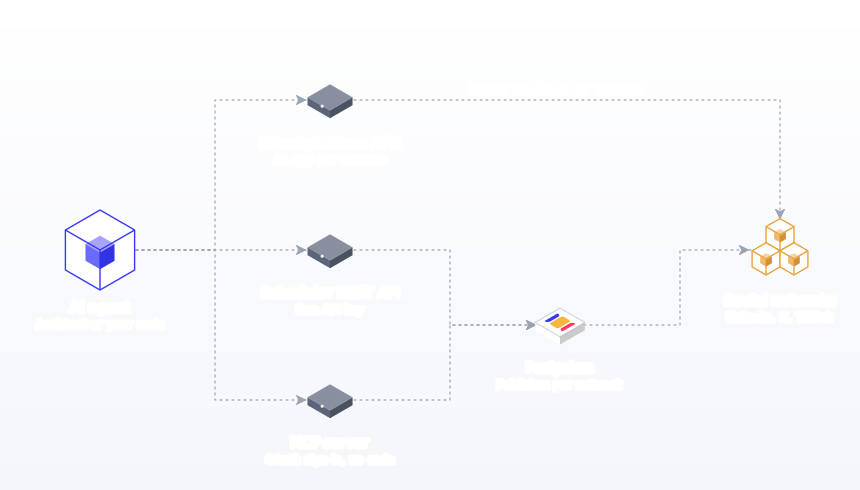
Route 1: direct platform APIs
Every major network has its own publishing API, and each has its own approval process, limits and quirks. An agent built on these APIs needs a developer app per network, credentials per account, and code that handles each network's formats and errors. Here is what the networks' own documentation says.
Meta's Instagram content publishing documentation says publishing works for Instagram professional accounts and that "Instagram accounts are limited to 100 API-published posts within a 24-hour moving period". Media "must be hosted on a publicly accessible server at the time of the attempt", and "JPEG is the only image format supported". An agent calling this API directly must host files publicly, convert images and track the quota itself.
Threads
Meta's Threads posting documentation sets a limit of 250 published posts per profile in 24 hours, caps text posts at 500 characters, and uses a two-step process: create a media container, then publish it, waiting about 30 seconds on average between the two.
TikTok
TikTok's Content Posting API guide requires apps to be approved for the video.publish scope, and states: "All content posted by unaudited clients will be restricted to private viewing mode." Public posting requires passing an audit against TikTok's terms.
X
X's API uses "pay-per-usage pricing", with no subscription. Its pricing page lists "Post: Create" at $0.015, "Post: Create (with URL)" at $0.200 and reads capped at 3 million posts per monthly billing cycle on pay-per-use plans, as of October 2026. Prices are subject to change, so check X's developer console before building on them.
YouTube
Google's YouTube Data API documentation gives projects a default of 100 videos.insert calls per day and 10,000 quota units per day for other endpoints, and notes that the default "is subject to change".
LinkedIn's Community Management API is listed as a "Vetted Product with development and standard tiers". The Development tier has limited call volume; the Standard tier requires a screencast demonstrating each use case. Some member permissions are closed to new applications.
| Network | Access gate | Published limit or cost | Notable requirement |
|---|---|---|---|
| Meta app review, professional account | 100 API-published posts per 24 hours | Publicly hosted media; JPEG images | |
| Threads | Meta app review | 250 posts per profile per 24 hours | Two-step container and publish |
| TikTok | App approval plus audit for public posts | Unaudited posts are private | video.publish scope |
| X | Developer account | $0.015 per post, $0.200 with a URL (October 2026) | Pay-per-use billing |
| YouTube | Google Cloud project | 100 videos.insert calls per day by default | Quota can change |
| Vetted Community Management access | Tiered call volume | Screencast for Standard tier |
None of this is a reason to avoid platform APIs if you are building a social media product. It is a reason not to build one just so an assistant can post to your own accounts.
Route 2: a scheduler's REST API
A scheduler API lets your code or an automation platform create posts in one place. You authenticate with an API key, send the post and its per-network versions, and the scheduler publishes to the connected networks at the scheduled time. The scheduler holds the platform approvals, handles formats and retries, and shows every post on a calendar.
Postprism's REST API is available on the Freelancer and Agency plans. Keys start with pp_live_, are created on the Developer page and are shown once. The authentication docs are direct about the risk: a key "can create, change and delete posts in every workspace you belong to. Treat it like a password." They recommend calling the API only from a server, script or automation tool, storing keys in environment variables or a secret store, and creating one key per integration so you can revoke one without breaking the others. Automation tools such as n8n call the API with an HTTP request node; our n8n guide shows a workflow that turns a new blog post into a draft.
Route 3: MCP servers
An MCP server describes a set of actions, and a compatible assistant can call them when a conversation needs them. Postprism's hosted MCP server uses Streamable HTTP and signs in with OAuth through your Postprism account, so there is no key to paste. It works on every plan, including the 7-day free trial.
| Tool | Read or write | What it does |
|---|---|---|
| list_platforms | Read | The social accounts connected to a workspace |
| list_workspaces, get_workspace_info | Read | Workspaces you belong to; the current workspace and plan |
| list_posts, get_post | Read | Posts by status (draft, scheduled, published); a single post |
| get_analytics, get_post_analytics | Read | Analytics records by post or platform |
| create_post | Write | A post with per-platform versions; a draft without scheduled_at, scheduled with it |
| update_post | Write | Copy, versions, media or scheduled time |
| delete_post | Write | Deletes a post |
| upload_media | Write | JPEG, PNG, GIF, WebP, MP4 or MOV up to 10 MB; returns a URL to attach |
Setup guides cover Claude Desktop, Claude Code, ChatGPT (on plans that allow custom MCP connectors in developer mode), Cursor and Gemini CLI. The full reference, including the REST equivalent of each tool, is in the MCP server documentation.
What an agent can publish to each network through Postprism
An agent working through a scheduler can publish whatever the scheduler publishes, under each network's own rules. Asking for formats the scheduler handles avoids failed posts. This is what Postprism publishes to each network, whether a person or an agent created the post.
| Network | What publishes | Tell your agent |
|---|---|---|
| X | Single posts with up to 4 images | "Keep the X version under 280 characters." |
| Text, a single image or a video, to profiles and Company Pages | "Write the LinkedIn version for a professional audience." | |
| TikTok | Video and photo posts, as a direct post or an inbox draft | "Upload the video before creating the TikTok version." |
| YouTube | Video with title, description, tags, privacy, playlist and thumbnail; short vertical videos become Shorts | "Write a title and description for the YouTube version." |
| Bluesky | Text with links, mentions and hashtags | "Keep the Bluesky version under 300 characters." |
| Image Pins with board, title, description and link | "Give the Pin a searchable title and the destination link." |
The platform guides in the docs list each network's fields and media requirements in detail, and are written so an agent can read them too. Each version is written separately in platform_content, which is the text that publishes, so ask the agent for a tailored version per network rather than one caption copied everywhere.
Access by agent type
Chat assistants
Claude Desktop, ChatGPT and similar apps are where most marketers start. They suit planning and drafting in conversation. Access is through MCP with OAuth sign-in, and each tool call can be approved individually. Keep approvals on for write tools until you trust the setup.
Coding agents
Claude Code, Cursor and Gemini CLI run in a developer's environment and are good at turning changelogs and documentation into launch posts. They can also read files and the web, which makes prompt injection more relevant. Claude Code's documentation warns that servers that fetch external content "can expose you to prompt injection risk". Add the scheduler at user or project scope deliberately, and keep confirmation prompts on.
Automation platforms
n8n, scripts and internal tools run without a person in the loop, so they use the REST API with a key. They should create drafts, not scheduled posts, unless the content is fully templated and low risk, such as a fixed-format "new episode" announcement.
Browser agents
Agents that drive a browser and click through a network's own interface are the riskiest route for publishing. They act with your full logged-in session, and Anthropic's own testing shows prompt injection is a measurable risk for browser agents even after mitigations. For social publishing, a scheduler's API or MCP server gives the agent a narrower, auditable set of actions instead.
| Agent type | Recommended route | Default setting | Main risk |
|---|---|---|---|
| Chat assistant | MCP with OAuth | Drafts; confirm write tools | Over-trusting "allow always" |
| Coding agent | MCP with OAuth | Drafts; project or user scope chosen deliberately | Injection from files or web content |
| Automation platform | REST API key per integration | Drafts unless fully templated | Leaked keys |
| Browser agent | Avoid for publishing; use a scheduler instead | Ask before every action | Full session access plus injection |
Prompt injection in plain language
Prompt injection is when instructions hidden in content an agent reads change what it does. OWASP distinguishes direct injection, where a user's own input alters the model's behaviour, from indirect injection, which "occur[s] when an LLM accepts input from external sources, such as websites or files". For social media, the realistic scenario is indirect: you ask an agent to turn a web article, an email or a customer message into a post, and that content contains text telling the agent to post something else, or to delete your scheduled posts.
Anthropic's Claude for Chrome research gives a sense of scale. Across 123 test cases covering 29 attack scenarios, attacks succeeded 23.6% of the time without safety mitigations and 11.2% with them; on a browser-specific challenge set, mitigations brought success from 35.7% to 0%. Anthropic says the goal is to get these numbers "much closer to zero". The point is not that any one assistant is unsafe; it is that no defence is complete, which is why OWASP says its measures "mitigate impact rather than eliminate the risk" and recommends human approval for high-risk actions.
Practical defences for social media agents:
- Create drafts, not scheduled posts, whenever the agent has read outside content.
- Keep confirmation prompts on for write tools (create, update, delete).
- Give the agent access only to the workspaces it needs.
- Read every draft built from outside content before scheduling it.
- Check the calendar after an agent session for anything you did not ask for.
The guardrails that matter
1. Draft-first by default
In Postprism, a post created without scheduled_at is a draft that waits on the calendar and never publishes on its own. The publishing docs say it plainly: "For automations you are still testing, and for anything an AI writes, start with drafts." Ask the agent for drafts, and schedule them yourself.
2. Approvals for teams and clients
On the Freelancer and Agency plans, editors submit posts for review and owners or admins approve them. Combine draft-first agents with that review step so agent output and human output pass the same check. See team collaboration for roles.
3. Confirm before write actions
Most assistants ask before calling a tool. Leave that on for create_post, update_post and delete_post. Allowing read tools such as list_posts and get_analytics without prompts is a reasonable convenience.
4. Scope by workspace
Posts, connected accounts and analytics belong to a workspace. An agent can act only in workspaces you belong to, and Postprism's workspace docs note that a workspace you do not belong to returns "Workspace not found" and that Postprism "never falls back to your default workspace, so a post can't land in the wrong client's calendar".
5. Connect accounts only through the network
An agent can publish only to accounts already connected in Postprism. Connecting a new account always happens in Postprism through each network's own sign-in, so an agent cannot quietly add an account you did not intend to use.
6. Revoke when you are done
Every connected assistant is listed on the Developer page in Postprism, where Revoke access disconnects it. API keys can be revoked there too and stop working immediately. Removing someone from a workspace also stops their keys from reaching it.
7. Respect rate limits
Postprism's rate limits are 200 requests per hour per user for the API and the MCP server, and 30 media uploads per hour on the REST API. That is ample for a month of posts and a deliberate brake on runaway loops.
8. Keep facts and claims human-checked
Access controls stop an agent posting where it should not. They do not stop it posting something untrue. Pew Research Center found 66% of US adults highly concerned about people getting inaccurate information from AI. A person checks every number, name and claim before scheduling.
Choosing the right route by team
Solo founders and creators
You want an assistant that turns your notes into a week of posts with minimal setup. MCP in Claude Desktop or ChatGPT is the right fit: one config snippet or connector, a browser sign-in, and drafts on your content calendar. You do not need an API key or a developer.
In-house marketing teams
Teams want assistants for drafting and automations for routine posts, with one approval step for both. Use MCP for people working in chat, a REST key per automation (for example, new blog posts become drafts), and approvals so every post, whoever drafted it, passes the same review.
Agencies
Agencies need separation between clients above all. One workspace per client, one assistant Project or instruction set per client, and a rule that the agent names the workspace in every session. Our agency page covers the plan with the most workspaces.
Developers and product teams
Developers often want launch posts from the terminal and occasionally a custom integration. Claude Code or Cursor with MCP covers the first; the REST API covers the second, starting from the API quick start. Direct platform APIs make sense only if you are building a product that posts on behalf of many users.
| Need | Route | Plan needed in Postprism |
|---|---|---|
| Draft and schedule from a chat with Claude or ChatGPT | MCP server | Any plan |
| Turn release notes into launch posts from the terminal | MCP server in Claude Code, Cursor or Gemini CLI | Any plan |
| Create drafts automatically when something happens elsewhere | REST API with an automation tool | Freelancer or Agency |
| Work across many client brands | MCP or REST with workspace_id | Freelancer or Agency for multiple workspaces |
| Build a product that publishes for many users | Direct platform APIs | Not applicable |
What happens when something goes wrong
Even with guardrails, assume one day an agent will create something you did not want. A short response plan makes that a five-minute problem.
- Stop the post. If it is scheduled, change it back to a draft or delete it. In Postprism, sending status draft with scheduled_at null unschedules a post, and deleting it also stops it.
- Check the calendar. List scheduled posts for the next two weeks and look for anything else unexpected.
- Revoke access. Disconnect the assistant or revoke the key from the Developer page; it stops working immediately.
- Find the cause. Was it an ambiguous instruction, an "allow always" setting, or content the agent read? Fix that before reconnecting.
- Check failed posts. A post that a network rejected moves to failed with the reason shown on the post; the errors guide explains common causes.
- If something published, handle it like any mistake. Delete or correct it on the network, and post a correction if people saw it.
Agents and automation together
The most useful setups combine both kinds of access. An automation creates drafts from predictable events (a new blog post, a new podcast episode, a product launch in your changelog), and an assistant helps a person polish and schedule them. Because both routes write to the same workspace, everything ends up on one calendar, in one approval queue, with one set of analytics. The automation never schedules; the assistant asks before writing; a person approves. That division keeps speed and control in the same place. It also makes auditing simple: if something unexpected appears on the calendar, you know which route could have created it, because automations only ever create drafts and assistants only act while someone is in the conversation.
Where agent access is heading
Three trends are worth watching. The MCP authorization model is moving towards finer-grained scopes: the MCP security best practices recommend "a progressive, least-privilege scope model" with low-risk read access first and elevation only when a privileged operation is attempted. Assistant vendors are adding more confirmation controls and clearer warnings for unverified connectors. And platforms continue to tighten direct API access while regulators add disclosure duties for AI-generated content. All three point the same way: narrow, documented, revocable access through a tool you trust, with a person approving what publishes.
The step-by-step method: connect an agent safely
- Decide the job. Drafting from conversation (MCP), automation from another system (REST API), or a product for many users (platform APIs).
- Connect your social accounts in the scheduler first. Only the accounts you want the agent to reach, in the right workspaces.
- Check plan access. Postprism's MCP server works on every plan; REST keys need Freelancer or Agency.
- Add the server or create a key. For MCP, follow your assistant's guide and sign in with OAuth. For REST, create one key per integration and store it in a secret store.
- Verify with a read call. Ask the agent to list connected platforms. Confirm it sees what you expect and nothing more.
- Set defaults in your instructions. "Always create drafts. Never schedule unless I say the word schedule. Never delete posts."
- Keep confirmations on for write tools. Allow read tools if you like.
- Run a test week. Ask for a week of drafts, review them on the calendar, and note every edit.
- Add approvals for teams. Route drafts through the same review step as human posts.
- Review access monthly. Revoke clients and keys you no longer use, and check the calendar for anything unexpected.
Worked example: setting up an agent for an agency
A four-person agency manages social media for six clients in Postprism, one workspace each. The founder wants Claude to draft each client's monthly plan.
- She adds the Postprism MCP server to Claude Desktop and signs in. Claude can now see the workspaces she belongs to.
- She keeps one Claude Project per client with voice rules and example posts, and starts each session with "Work only in the [client] workspace. Create drafts only."
- Claude calls list_workspaces and list_platforms, then create_post for each slot, with no scheduled_at, so every post is a draft.
- Account managers review drafts on each client's calendar, attach approved images, and send them for sign-off; the agency lead approves them as Owner or Admin.
- After approval, a person schedules the posts. The agent never schedules or deletes anything.
- When a client leaves, she removes them from the workspace list and revokes any keys used for that client's automations.
Questions to ask any tool before connecting an agent
| Question | Good answer | Postprism |
|---|---|---|
| Does the agent ever see my social passwords or network tokens? | No; it signs in to the tool, not the networks | OAuth sign-in to Postprism; network tokens stay in Postprism |
| Can I make the agent create drafts only? | Yes, drafts never publish on their own | A post without scheduled_at is a draft |
| Can I limit which brands it touches? | Yes, by workspace | Acts only in workspaces you belong to; no fallback |
| Can I see and revoke connected agents? | Yes, in one place | Developer page lists clients and keys with revoke |
| Are there rate limits? | Yes, documented | 200 requests per hour per user |
| Is the tool list documented? | Yes, with read and write actions clear | 11 documented MCP tools |
Common mistakes when giving agents social media access (and fixes)
- Letting the agent schedule from day one. Fix: drafts only until you have reviewed several weeks of output.
- Clicking "allow always" on write tools. Fix: allow read tools; confirm create, update and delete.
- Pasting API keys into chats or front-end code. Fix: keys live in a server-side secret store; assistants use OAuth.
- One key shared across every integration. Fix: one key per integration, named after where it is used.
- Connecting servers you have not vetted. Fix: connect only servers from organisations you trust, as Anthropic advises.
- Turning untrusted content into posts unread. Fix: read every draft built from web pages, emails or messages.
- Giving the agent every workspace. Fix: name the workspace in your instructions and check the calendar afterwards.
- Using browser agents to post. Fix: use a scheduler's API or MCP server, which offers a narrower set of actions.
- Building direct integrations you do not need. Fix: use a scheduler unless you are building a product.
- Forgetting media rules. Instagram needs an image or video; TikTok and YouTube need video. Fix: upload media before scheduling.
- Never revoking access. Fix: review connected clients and keys monthly.
- Skipping the fact check. Fix: a person verifies every claim before scheduling.
A plain-language glossary
| Term | Meaning |
|---|---|
| API | A way for software to talk to a service directly |
| API key | A secret string that proves a script or tool is allowed to use an API |
| OAuth | A sign-in flow where you approve access in your browser and the app receives a limited token instead of your password |
| MCP | Model Context Protocol, an open standard for connecting AI assistants to tools |
| MCP server | A service that exposes actions an assistant can call |
| Tool call | The assistant asking to run one of those actions, such as create_post |
| Prompt injection | Hidden instructions in content that try to change what an agent does |
| Scope | The specific permissions a token grants, such as reading posts but not deleting them |
| Rate limit | The maximum number of requests allowed in a period, which stops runaway loops |
| Draft | A post saved on the calendar that does not publish until scheduled |
| Workspace | A separate set of posts, accounts and team members, usually one per brand or client |
For hands-on workflows, see how to use Claude for social media and our comparison of the best AI agents for social media.
Give Your AI Assistant a Calendar, Not the Keys
Connect Claude, ChatGPT or Cursor to Postprism and review every draft on one calendar before it publishes to any of 6 networks.

Frequently Asked Questions
Can an AI agent post to my social media accounts?
Yes, through a connected tool. With Postprism's MCP server or REST API, an agent can create drafts or scheduled posts for accounts already connected in your Postprism workspace, and Postprism publishes scheduled posts to X, Bluesky, LinkedIn, TikTok, YouTube and Pinterest at the set time.
Is it safe to give an AI agent access to social media?
It can be, with guardrails: OAuth sign-in instead of passwords, drafts by default, confirmation before write actions, workspace scoping, human approval and the ability to revoke access. Prompt injection cannot be ruled out completely, so a person should review anything an agent drafts from outside content.
What is the difference between an API and an MCP server?
An API is for code: scripts and automation tools call it with an API key. An MCP server is for AI assistants: it describes actions as tools the assistant can call during a conversation, and remote servers sign you in with OAuth. Postprism's MCP tools call the same REST API, so limits and validation are identical.
Do I need a developer to connect an AI agent to social media?
No. Connecting Claude Desktop, Cursor or Gemini CLI means pasting one config snippet and signing in; Claude Code takes one terminal command. Only REST API automations need an API key and some setup in a tool such as n8n.
Can an AI agent connect new social accounts on its own?
With Postprism, connecting a social account always happens in Postprism through the network's own sign-in, so an agent works only with accounts you have already connected in that workspace.
Why not let an agent use each platform's API directly?
You can, but each network has its own approval and limits: TikTok restricts unaudited apps to private posts, LinkedIn's API is vetted, Instagram caps API posts at 100 per 24 hours, and X charges per post. A scheduler already handles those, which is simpler for posting to your own accounts.
What happens to agent access if someone leaves the team?
Remove them from the workspace, which also stops their API keys from reaching it, and revoke any assistants or keys they connected from the Developer page in Postprism. Keys stop working immediately.
How many requests can an AI agent make to Postprism?
The MCP server and REST API allow 200 requests per hour per user, and the REST API allows 30 media uploads per hour. That is enough to plan a month of posts; going over returns a "Too many requests" error, and agents should wait and retry.