Postprism vs Tailwind: a Tailwind alternative for Pinterest and five more networks
Tailwind is a Pinterest specialist, priced per Pinterest account with monthly credits. Postprism schedules Pinterest alongside LinkedIn, X, TikTok, YouTube and Bluesky for a flat $19 a month, with unlimited posts and one AI request that writes a version for every network.

Postprism vs Tailwind, in short
Prices and features checked
Choose Postprism if
Pinterest is one of several networks you post to, you want unlimited posts for one flat price instead of credits per Pinterest account, or you want every network’s version written in a single AI request.

Choose Tailwind if
Pinterest is your main traffic channel and you want Pinterest-only tools such as automatic Pin creation, SmartSchedule time slots, Pinterest keyword research and Communities.
Which one is right for you?
Tailwind is a good fit if you:
Grow mainly through Pinterest and post to it heavily
Want Tailwind to create and write Pins from your website
Want SmartSchedule time slots and Pin spacing
Use Pinterest keyword research, Turbo Pins or Communities
Postprism is the better fit if you:
Post to Pinterest and other networks and want one calendar for all of them
Want unlimited posts for one flat price instead of credits per Pinterest account
Want a version for every network from one AI request
Run several brands or a small team that needs approvals
Want an AI agent to upload media, schedule posts and read analytics on every plan


Postprism vs Tailwind
Feature

Postprism
Tailwind
Pricing
Solo $19 a month: all 6 networks, unlimited posts, 7-day free trial
Solo $19, Freelancer $49, Agency $99 a month paid
Solo $19 a month: all 6 networks, unlimited posts, 7-day free trial
Free to start; the allowance is not listed on the pricing page
Per Pinterest account: Pin Scheduling & Creation $17.99 a month billed yearly or $29.99 monthly, Pinterest SEO and Pinterest Engagement $11.99 each billed yearly, Bundle $29.98 (checked October 2026) paid
Best for
Brands, creators and teams posting to Pinterest and other networks from one calendar
Bloggers, shops and creators who grow mainly through Pinterest
How you pay
Flat per plan: Solo $19, Freelancer $49, Agency $99 a month. Each workspace connects one account per network, all six included, with unlimited posts
Per Pinterest account, per product: Pin Scheduling & Creation $17.99 a month billed yearly ($29.99 monthly) with 300 credits; Pinterest SEO and Pinterest Engagement $11.99 each; Bundle $29.98
Cost for one brand on Pinterest only
Solo, $19 a month
Pin Scheduling & Creation, $17.99 a month billed yearly or $29.99 monthly
Cost for one brand on Pinterest plus 4 other networks
Solo, $19 a month for all five
Pin Scheduling & Creation at $17.99 a month covers Pinterest; the other networks need a second tool
Cost for 3 brands, small team
Freelancer, $49 a month: 3 workspaces, 3 members, an approval step and all six networks in each
3 Pinterest accounts on Pin Scheduling & Creation, $53.97 a month billed yearly, Pinterest only
Post volume
Unlimited posts on every plan
Credit based: scheduling a Pin uses 1 credit, 300 credits a month on Pin Scheduling & Creation, extra credits $10 per 100
Networks
LinkedIn profiles and Pages, X, TikTok, YouTube, Bluesky and Pinterest
Pinterest. Tailwind’s plans, scheduler and tools are built around Pinterest accounts
Pinterest-specific tools
Image Pins scheduled from the same calendar as every other network
Automatic Pin creation, SmartSchedule time slots and Pin spacing, Pinterest keyword research, Turbo Pins, Communities and a browser extension
AI writing
Enhance with AI returns a version for every selected network in one request, ready to edit. 150 to 2,000 adaptations a month by plan
Ghostwriter copywriting AI and SmartPin write Pins for Pinterest, drawing on your monthly credits
AI agents (MCP) and API
MCP server with 11 tools on every plan: create, update and delete posts, upload media, read analytics, list platforms and workspaces. REST API on Freelancer and Agency
REST API and MCP server for scheduling Pins, listing boards and reading SmartSchedule time slots
Team and approvals
Owner, Admin, Editor and Viewer roles. An approval step on Freelancer (3 members) and Agency (10 members)
Not listed on Tailwind’s pricing page, which prices plans per Pinterest account
Free start
7-day free trial on every plan
You can start Tailwind for free, without paying, before subscribing to a product
Schedule everything, post everywhere
- Schedule to 6 platforms
- One content calendar
- AI adapts every post
Built for creators and teams
Independent reviews
What users say about Tailwind
Ratings from independent review platforms, not from us.
Tailwind ratings
Trustpilot
3.4/5
303 reviews
View reviewsG2
4.3/5
130+ reviews
View reviews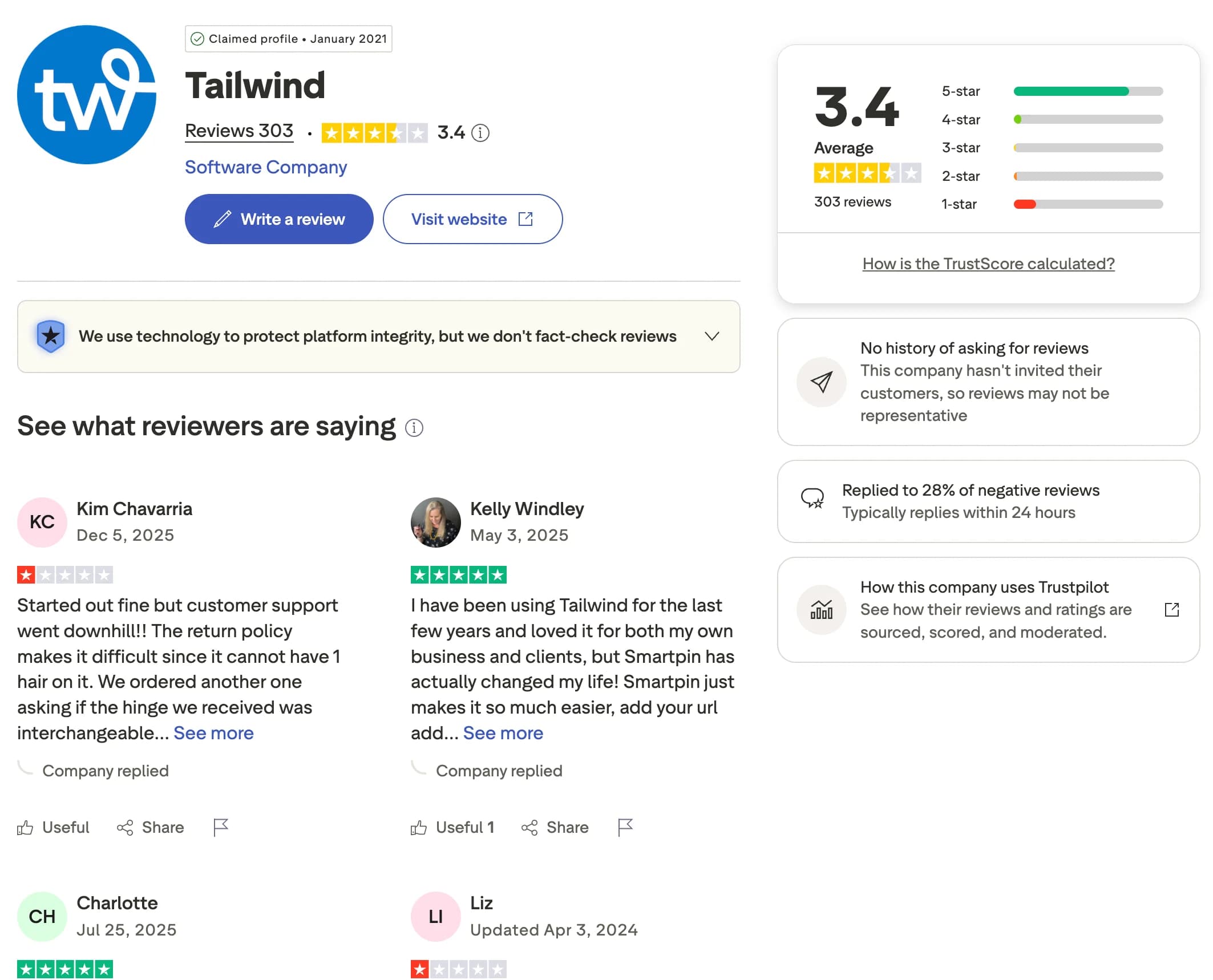
Why users switch from Tailwind
Tailwind is one of the most capable Pinterest tools available. When Pinterest becomes one network among several, a few things push people to look elsewhere.
Pinterest and everything else in one place
Tailwind is built around Pinterest. Postprism schedules Pinterest alongside LinkedIn, X, TikTok, YouTube and Bluesky from one calendar.
No credits to count
Tailwind prices per Pinterest account and uses a credit for each scheduled Pin, with 300 a month on Pin Scheduling & Creation. Every Postprism plan has unlimited posts at a flat price.
Every network’s version in one request
In Postprism, one Enhance with AI request writes a version for each network you selected, ready to edit side by side before you schedule.
Several brands and a team at a flat price
Postprism Freelancer is $49 a month for 3 workspaces and 3 members with an approval step. Agency is $99 for 10 of each.
You can also read what real users think in Tailwind reviews on G2.
Postprism vs Tailwind: Pros & Cons
Tailwind
Pros
Deep Pinterest tooling: Pin creation, SmartSchedule and keyword research
Communities and Turbo Pins for extra Pinterest reach
Free to start
REST API and MCP server for Pinterest scheduling
Cons
Built around Pinterest, so other networks need another tool
Priced per Pinterest account and per product
Credits limit how many Pins you schedule each month
Postprism
Pros
Six networks, including Pinterest, in every workspace
Unlimited posts at a flat price
One Enhance with AI request writes every network’s version
MCP server with 11 tools on every plan
Approvals from Freelancer at $49 a month
Cons
A 7-day trial rather than a free start
Who Should Use Tailwind vs Postprism?
Tailwind is best for:
Bloggers and shops that get most of their traffic from Pinterest
Pinterest marketers who want keyword research and automatic Pin creation
Anyone who uses Tailwind Communities to grow reach
Postprism is best for:
Brands and creators posting to Pinterest and other networks
Anyone who wants unlimited posts without counting credits
Anyone who wants each network’s version written in one AI request
Small teams and agencies that want approvals at a flat price
People who want an AI agent to run their schedule
Content calendar
Pinterest and five more networks on one calendar.
See every scheduled post in month, week or day view, filter by network, and reschedule from the post. A kanban board of Drafts, Scheduled and Published sits alongside it.
Try it freeEnhance with AI
Write once. Get a version for every network.
Write your post once and choose Enhance with AI. One request returns a version for each network you selected, Pinterest included, ready to edit before you schedule.
Try it freeTeam collaboration
Roles, approvals and workspaces.
Invite your team as Owners, Admins, Editors or read-only Viewers. On Freelancer and Agency, Editors submit posts and an Owner or Admin approves them before they go out.
Try it freeRun Postprism from your AI agent
Postprism’s MCP server works on every plan, so Claude, ChatGPT, Cursor and other MCP clients can schedule and report on your posts.
Uses your image
upload_media adds the photo so every post can carry it.
Checks your accounts
list_platforms confirms Pinterest and the other networks are connected first.
Schedules the posts
create_post puts one post per network on your calendar at the time you asked for.
Reports back
get_analytics reads impressions, reach and engagement for last month.
Upload this recipe photo, schedule it as a Pin and on X and LinkedIn for Thursday at 7:00 PM, and tell me how last month’s posts did.
Postprism tools it usesupload_mediaUpload an image or video (JPEG, PNG, GIF, WebP, MP4, MOV, up to 10 MB) and get a URL to attach to a post.list_platformsThe social accounts connected to a workspace.create_postCreate a post from base content, target platforms and optional per-platform versions. Without a date it is saved as a draft; with scheduled_at it is scheduled.get_analyticsList analytics records, filtered by post or platform.
How to Switch from Tailwind to Postprism
Moving your social media workflow takes minutes, not days.
Start your free trial
Sign up for Postprism and start the 7-day free trial. Your workspace is ready straight away.
Connect your accounts
Connect Pinterest, LinkedIn, X, TikTok, YouTube and Bluesky on the Platforms page.
Bring over your schedule
Copy your upcoming Tailwind Pins into a CSV with content, scheduled_at and media_url, then upload it with Bulk Upload. Or paste a post into the composer and choose Enhance with AI for every network’s version.
Cancel Tailwind when you are ready
Once your posts are going out from Postprism, cancel your Tailwind subscription from your Tailwind account settings.
Learn More About Tailwind
How Tailwind Compares to Other Tools
Postprism vs Tailwind — frequently asked questions
Sources for this Postprism vs Tailwind comparison
Tailwind's own pricing and help pages, and Postprism's plan and feature pages.
Compare Postprism to market leaders

Alternative to Buffer

Alternative to Hootsuite

Alternative to Later

Alternative to Sprout Social

Alternative to Metricool

Alternative to Publer

Alternative to SocialPilot

Alternative to Planable

Alternative to SocialBee

Alternative to Loomly

Alternative to CoSchedule

Alternative to Agorapulse

Alternative to Sendible

Alternative to Zoho Social

Alternative to Iconosquare

Alternative to Vista Social
Make the switch from Tailwind
Import your schedule, connect your accounts, and start posting in minutes.