A reliable social media workflow for agencies runs on a fixed monthly cycle: plan each client's month, produce content in batches across clients, get client approval in one place, schedule everything at least a week ahead, manage community at set times, and report monthly against agreed KPIs. Run the same cycle for every client, each in a separate workspace, and a small team can handle many brands without chaos.

Most agency problems are workflow problems in disguise. Late approvals push posts to the last minute, feedback scattered across email and chat causes errors, and one person's sick day breaks three clients' schedules. This guide lays out a complete process, from onboarding a new client and setting up account access the right way to the monthly report, with timings, role tables, capacity planning, a tools comparison, templates and the mistakes that eat agency margins.
Key findings
- Clients notice silence. In the 2025 Sprout Social Index, 73% of 4,044 consumers said they would buy from a competitor if a brand does not respond on social. Community management is part of the service, not an extra.
- Social teams are stretched. The same Index found 94% of 900 practitioners feel they must be "chronically online", and over a third feel more creative fatigue than a year ago. A batched workflow is a retention strategy for your own staff.
- Trust is the real deliverable. 41% of practitioners said their greatest fear is leadership not trusting them to publish the best-performing content, and only 57% of marketing leaders said executives trust their social teams.
- Consistency drives results you report. Buffer's 26-week study found people who posted in 20 or more weeks earned about 450% more engagement per post than those who posted in 4 weeks or fewer. Working a month ahead protects that streak for every client.
- Replies lift engagement. Buffer's 2026 report found replying was associated with about 42% more engagement on Threads, 30% on LinkedIn and 21% on Instagram.
- Agencies share responsibility for disclosures. The FTC's endorsement guidance says delegating promotion to an outside company "doesn't relieve you of responsibility", and that companies pre-approving paid posts should review them for compliance.
- Native roles replace shared passwords. LinkedIn Pages offer Super admin, Content admin and Analyst roles, and YouTube offers Owner, Manager, Editor and Viewer permissions, according to their help centres. There is no reason to hold client passwords.
What's changed for agency workflows in 2026
More networks per client
A typical retainer used to mean Facebook, Instagram and maybe LinkedIn. Now clients ask about Threads, TikTok, YouTube Shorts, Bluesky and Pinterest too. Pew's 2025 survey shows why: 84% of US adults use YouTube, 71% Facebook, 50% Instagram and 37% TikTok. More networks per client multiplies the adaptation and approval work, which is why batching and a single calendar per client matter more than ever.
Approvals moved into tools
Approval workflows are now standard in agency tools, though often on higher tiers. Agorapulse lists one-step approvals from its Professional plan and multi-step approvals on Custom; Planable builds its plans around approval levels per workspace. Email approvals are increasingly a sign of an agency that has not updated its process.
AI drafts, humans approve
Hootsuite's 2026 trends report says 79% of social media managers use AI daily. AI shortens production, but it raises the stakes on review: clients notice when posts stop sounding like them. The approval step is where agencies protect brand voice.
Disclosure and compliance scrutiny
The FTC's guidance expects companies to train and monitor the people who promote them, and says that for short-lived content like Stories, paid posts should not be made without advance approval. Agencies running creator campaigns need that check in their workflow.
The monthly cycle at a glance
| When | Stage | Output | Client involvement |
|---|---|---|---|
| Week 1 of the previous month | Plan | Monthly plan: themes, key dates, post slots | 30-minute call or async review |
| Week 2 | Produce | All posts drafted and designed in batches | Provides assets, answers questions |
| Week 3 | Approve | Client reviews the month in one pass | Approves or requests changes within an agreed window |
| Week 4 | Schedule | Every approved post queued | None |
| During the month | Engage and adjust | Community management, timely posts | Escalations only |
| First days of the next month | Report | One-page report and next month's changes | Report review, combined with planning |
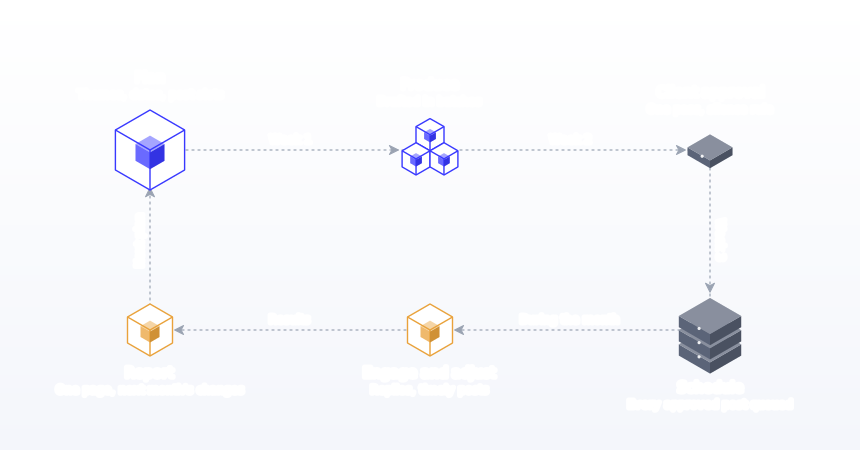
Working a month ahead is the key. It gives a buffer for late approvals and means a bad week on your side never reaches the client's feed.
Stage 0: Client onboarding
Onboarding sets the rules every later stage depends on. Do it properly once and the monthly cycle runs smoothly.
Audit and baseline
Run a social media audit to set the baseline that future reports compare against: posting frequency, engagement, follower growth and top content for the last three months.
Goals and KPIs
Agree one primary goal and three KPIs in writing. See our guide to social media metrics and KPIs. Changing KPIs mid-contract is how agencies lose trust.
Scope
Networks, posts per week per network, formats, community management hours, revisions per post, and what is out of scope. Write it as a table in the contract.
Brand voice
Tone, words to use and avoid, example posts the client loves, and topics that are off-limits. In Postprism, each client can have a brand voice profile so optional AI suggestions stay in that client's tone.
Approval rules
Who approves, how long they have, what happens if they do not respond, and what can go out without approval (for example replies to comments). Write the silence rule into the contract: "Content is shared for approval on the 15th. If no feedback is received within three business days, content is considered approved." This one clause prevents most late-publishing disputes. Our social media approval workflow guide has templates.
Access, the right way
Connect each client account through the network's own sign-in, with the client remaining the owner. Never collect passwords by email. Every major network has a role system built for this.
| Network | Native access option | Role to request for an agency |
|---|---|---|
| LinkedIn Page | Page admin roles: Super admin, Content admin, Analyst | Content admin (plus Analyst for reporting); the client keeps Super admin. Source: LinkedIn Help |
| YouTube | Channel permissions: Owner, Manager, Editor, Editor (Limited), Viewer | Editor or Editor (Limited); invites expire after 30 days. Source: YouTube Help |
| Facebook and Instagram | Partner access through the client's Meta business portfolio | Content and insights access to the specific Page and account |
| Other networks | Account connection through official sign-in (OAuth) in your scheduler | Client signs in once; no password shared |
Postprism connects every network through its official sign-in flow, so the client signs in once and your team never sees the password. Offboarding is then a matter of disconnecting, not rotating credentials.
Assets and escalation
Collect logos, fonts, photo libraries and product information in a shared folder, and agree who to call if something goes wrong: a negative comment storm, a post published in error, a crisis that means pausing the schedule.
Stage 1: Monthly planning
Plan each client's month in a consistent format with three parts:
- Themes and key dates: launches, promotions, events and seasonal moments.
- Slot plan: each post slot by date and network, with a pillar and a one-line idea.
- Asks: anything you need from the client, such as photos, product details or a quote.
Keep the plan short enough to read in five minutes. Clients who are sent a 20-page deck skim it and then object to finished posts later; clients who are sent one page with clear slots actually engage with it. Share the plan, not finished posts, for early feedback. Changing direction at the plan stage costs minutes; changing it after production costs hours. Our free content calendar templates include a multi-client board you can use for this.
Stage 2: Production in batches
Batch by task across clients, not client by client. Writing all captions for three clients in one block, then doing all designs in another, is faster than switching between writing and design for each client. Within each batch:
- Write the core post for each slot, starting with the hook.
- Adapt it for each network: format, length, hashtags and call to action. Our guide to adapting content for each platform covers the rules.
- Create visuals from client-specific templates.
- Run a quality check: spelling, links with UTM tags, image sizes and character limits.
AI can speed up production, optionally, by drafting platform versions in each client's brand voice. The human edit stays mandatory.
Stage 3: Client approval
Approvals cause more agency friction than anything else. Three rules fix most of it:
- One place: clients review posts as they will appear, with platform versions and images, not in a document of loose captions.
- One pass: share the whole month at once with a deadline, rather than drip-feeding posts daily.
- Clear states: each post is approved, changes requested or waiting. Nobody should have to read an email thread to know.
In Postprism, a team member submits a post for review, and an Owner or Admin approves it or requests changes with a note; the post then returns to draft so it can be fixed or scheduled. Clients can sit in their own workspace with the role you choose, so they see their brand and nobody else's. See team collaboration for how roles work.
Stage 4: Scheduling
Schedule every approved post as soon as it is approved, not the day before. Then check each client's calendar for gaps, clashes with key dates and posts going out at odd times in the client's time zone. A calendar view per client, plus a status board showing drafts, scheduled and published posts, makes this check a few minutes per client.
For timing, start with research and then test. Sprout Social's 2026 analysis of nearly 2 billion engagements found Tuesdays and Wednesdays, late morning to early evening local time, strongest overall, with weekends weakest. Postprism lets you choose the time zone when you schedule, so each client's posts go out in their local time. For large batches, bulk scheduling imports a CSV, XLSX or JSON file with a preview table before anything is queued.
Stage 5: Community management and adjustments
Scheduling frees the team to engage. Set a daily rhythm per client: check comments and messages at set times, reply within the agreed window, and escalate anything sensitive. Buffer's reply data and the Sprout Index finding on unanswered brands make the business case. Keep some capacity for timely posts, which go through a fast approval route agreed at onboarding.
| Client type | Check-ins per day | Response target | Escalate when |
|---|---|---|---|
| Local business | 2 | Same business day | Complaints, refund requests |
| Ecommerce | 3 | A few hours in business hours | Order problems, product safety |
| B2B | 2 | Same business day | Sales enquiries, press |
| Regulated (health, finance, legal) | 2 | Holding reply same day, full reply after review | Any advice request |
Stage 6: Monthly reporting
A good client report fits on one page and answers three questions: is it working, why, and what are we changing next month?
| Section | Content |
|---|---|
| Summary | One or two sentences on progress against the goal |
| KPIs | The three agreed KPIs, this month vs last month vs baseline |
| Highlights | Top three posts with a short note on why they worked |
| Learnings | What underperformed and the hypothesis |
| Delivered vs scope | Posts delivered per network, any extras |
| Next month | Two or three specific changes to the plan |
| Appendix | Per-network detail for clients who want it |
Combine the report review with next month's planning call. It saves a meeting and connects results to decisions. Postprism's analytics show reach, engagement and growth per workspace and export to CSV, which gives you the raw numbers for each client's report. If the client asks about return on investment, our social media ROI guide shows how to calculate it honestly.
Workflows by agency size
Solo freelancer (1 to 4 clients)
You are every role. The cycle still applies, but compress it: plan all clients on one day, produce on two, and send approvals together. Keep community management to two fixed windows a day or it will swallow your week.
Small agency (2 to 5 people, 5 to 15 clients)
Split into an account lead and production. Batch by task across clients. One person owns the Friday calendar check for every client.
Growing agency (6 to 20 people)
Pods of an account lead, a writer and a designer per group of clients. Standardise templates, report formats and onboarding checklists so pods work the same way. Add a quality reviewer before client approval.
Larger agencies
Formal multi-step approvals (internal review, then client), service-level agreements for response times and dedicated community managers. At this size, tool cost per seat becomes a real line item; see the comparison below.
Workflows by client type
Local businesses
Short approval chains, often the owner alone. Content depends on photos from the business, so the "asks" list in the plan is critical. Facebook and Instagram usually carry most of the work.
Ecommerce brands
Campaign-heavy calendars around launches and sales. Add a stock check before promotional posts go live, and plan campaign timelines backwards from launch dates.
B2B companies
LinkedIn-led, with posts from both the company Page and executives. Executive posts need the executive's own approval, so add a second approver for those.
Regulated industries
Health, finance and legal clients need compliance review. Build two approval steps (marketing, then compliance) and keep a record of who approved what and when.
Creator and influencer campaigns
Add disclosure checks. The FTC guidance says advertisers should tell partners how to disclose connections clearly, and that platform disclosure tools do not automatically meet the standard. Review paid posts before they go live.
Roles in a small agency
| Role | Responsibilities | Often combined with | Postprism role |
|---|---|---|---|
| Account lead | Client relationship, planning calls, reports, final approval | Strategist | Admin |
| Content writer | Captions, platform versions, hooks | Social manager | Editor |
| Designer or video editor | Visual assets and templates | Freelancer | Editor |
| Social manager | Scheduling, quality checks, community management | Content writer | Editor |
| Client | Approvals, assets, escalations | n/a | Viewer or Admin, depending on who approves |
| Agency owner | Billing, workspaces, team | Account lead | Owner |
Capacity planning: how many clients per person?
There is no universal number, because scope varies so much. Plan capacity in hours, not clients. Here is a simple model for one client posting to three networks.
| Task per client per month | Hours |
|---|---|
| Planning and planning call | 2 |
| Writing and adapting 36 posts (3 networks, 3 a week each) | 6 |
| Visuals | 4 |
| Approval rounds and fixes | 1.5 |
| Scheduling and checks | 1 |
| Community management (20 minutes a weekday) | 7 |
| Reporting and report call | 2 |
| Total | 23.5 |
At about 120 productive hours a month per person, that model supports roughly five such clients per person, fewer if community management is heavy and more if clients share formats. Track actual hours for two months and update the model; it is the basis for pricing as well as hiring. Our guide to social media management costs covers how agencies price retainers.
Tools for an agency workflow
The workflow needs four capabilities: separate workspaces per client, a calendar and status view, approvals, and team access with roles. Here is how the main options compare on price as of October 2026, from each vendor's pricing page.
| Tool | Pricing model | Approvals | Best for |
|---|---|---|---|
| Postprism | Freelancer $49/month (3 client workspaces, 3 team members); Agency $99/month (10 workspaces, up to 10 team members) | Submit for review, approve or request changes | Agencies that want one calendar per client across 6 networks at a flat price |
| Planable | About $33 or $49 per workspace per month | Approval levels vary by plan; multi-level on Enterprise | Approval-heavy teams with few workspaces |
| Agorapulse | About $79 to $149 per user per month billed annually | One-step from Professional; multi-step on Custom | Inbox-heavy community management |
| Sprout Social | From about $79 per seat per month billed annually ($99 monthly), up to $399 | Check with Sprout | Larger teams with big budgets |
| Hootsuite | Plans start at about $99, $199 and $399 a month | On Advanced and Enterprise | Enterprises standardised on Hootsuite |
Prices come from the Planable, Agorapulse, Sprout Social and Hootsuite pricing pages; check them for current terms. Per-seat pricing grows with your team, which matters for agencies hiring. Postprism's agency plan is a flat monthly price; see pricing and Postprism for agencies. For a wider comparison, read our roundup of the best social media tools for agencies.
Agencies that use AI assistants can also connect Claude, ChatGPT or Cursor to Postprism through its MCP server, available on all plans. The assistant can list your workspaces and create drafts in the right client's workspace, which then go through your normal approval step.
Worked example: onboarding a new client in ten working days
Northside Physio, a two-clinic physiotherapy practice, signs with a small agency for Instagram, Facebook and LinkedIn, three posts a week each, with weekday community management. Here is how the agency gets from signed contract to a scheduled first month in ten working days.
| Day | Task | Owner | Output |
|---|---|---|---|
| 1 | Kickoff call using the onboarding questionnaire | Account lead | Goals, three KPIs, approver and backup named |
| 2 | Audit of the last three months | Social manager | Baseline for reach, engagement and enquiries |
| 2 | Accounts connected through official sign-in; workspace created | Client and social manager | Calendar ready, no passwords shared |
| 3 | Brand voice notes and visual templates | Writer and designer | Voice profile, three post templates |
| 4 | First monthly plan sent for async review | Account lead | Themes, key dates, 36 slots |
| 5 to 7 | Batch production | Writer and designer | All posts drafted and checked |
| 8 | Month submitted for client approval | Account lead | One request, three-day window |
| 10 | Approved posts scheduled; gaps checked | Social manager | First month live in the calendar |
The clinic's owner approved 33 of 36 posts on the first pass and asked for changes on three that mentioned treatment outcomes, which needed softer wording for a health business. Because the approval rule and the silence clause were agreed on day one, there was no back-and-forth about timing, only about content. From month two onward the same cycle takes a fraction of the time, because the templates, voice and baseline already exist.
Scoping posts per network
Scope is where agency profit is won or lost, and network choice drives it. Use research-based frequencies as a starting point when you write the scope table, then adjust to the client's budget.
| Network | Starting scope per week | Evidence | Production note |
|---|---|---|---|
| 3 feed posts | Buffer's study of 2.1 million posts found 3 to 5 a week is where growth starts | Carousels and single images schedule cleanly | |
| 2 to 3 posts | Buffer's LinkedIn study: 2 to 5 a week added 1,182 impressions per post vs once a week | Company Page and executive profiles count separately | |
| 3 to 5 posts | Hootsuite recommends 1 to 2 a day | Photos, albums, links, video and Reels | |
| Threads | 3 to 5 posts | Hootsuite recommends 2 to 3 a day | Text-first; reuse LinkedIn ideas in a shorter form |
| TikTok | 2 to 3 videos | Hootsuite recommends 3 to 5 a week | Production-heavy; scope editing hours separately |
| YouTube | 1 video or Short | Production-led | Titles, descriptions, thumbnails and playlists add time |
| 2 to 5 Pins | Brands average 1 Pin a week in Sprout's benchmarks | Board, title, description and link per Pin | |
| X and Bluesky | 3 to 5 posts | Conversational networks; frequency matters more | Short text; quick to adapt |
A common agency mistake is quoting the same price for "3 posts a week" on Instagram and on TikTok. The posting count is the same; the production hours are not. Scope by hours per network, then translate to posts for the client.
Quality control before client approval
Clients lose confidence fastest over small errors: a typo, a broken link, a cropped logo. A two-minute check per post before it goes to the client saves rounds of revisions.
- Spelling and names: client name, product names, people tagged.
- Character limits for each network. Our social media character counter checks them all at once.
- Links: working, pointing to the right page and tagged with UTM parameters from the client's naming convention. The UTM builder keeps them consistent.
- Images: right size for each network, no cropped text, alt text written.
- Dates and offers: prices, dates and deadlines match the client's brief.
- Disclosures: paid partnerships and gifted products are labelled.
- Voice: read it aloud. Does it sound like the client?
Using AI responsibly in an agency workflow
AI is now part of most agency production, and used well it frees hours for strategy and community work. Three rules keep it safe for clients.
- AI drafts, people approve. Every AI-assisted post goes through the same internal check and client approval as any other.
- Keep it original. Meta's July 2025 update on unoriginal content reduces distribution for accounts that repeatedly reuse others' content without meaningful changes. Use AI to adapt the client's own ideas, not to rework someone else's.
- Protect client data. Only share with AI tools what the client's contract allows, and keep each client's material in its own workspace.
Postprism's AI adaptation is optional and uses each workspace's brand voice profile, so suggested platform versions start in the right tone. If your team works in an AI assistant, the MCP server documentation and our Claude guide show how to create drafts in the right client workspace from a chat.
Templates you can copy
Onboarding questionnaire (short version)
- What is the one business result social should help with this year?
- Which three posts from the last year did you like most, and why?
- Which topics, words or competitors should we never mention?
- Who approves posts, and who is the backup when they are away?
- Who do we call if something goes wrong outside business hours?
- Which dates matter next quarter: launches, events, sales, holidays?
Monthly approval request
"Hi [name], November's posts for [brand] are ready for review in your workspace: [number] posts across [networks]. Please approve or request changes by [date, three business days away]. As agreed, posts without feedback by then will be scheduled as planned. The two posts we would most like your eyes on are [post] and [post]."
Monthly report email
"Hi [name], here is October in one page. Headline: [one sentence on the goal]. Our three KPIs: [KPI, change]. Best post: [post] because [reason]. Next month we will [change one] and [change two]. Happy to walk through it on our planning call on [date]."
A week in the life of a three-person agency
Here is how the cycle becomes a working week for an agency with eight clients: an account lead, a writer who also schedules, and a part-time designer.
| Day | Account lead | Writer and scheduler | Designer |
|---|---|---|---|
| Monday | Two client planning calls; review last week's metrics | Batch captions for three clients | Templates for a new client |
| Tuesday | Send next month's plans for async review | Adapt posts per network; quality checks | Batch visuals for three clients |
| Wednesday | Approval follow-ups; one report review | Schedule approved posts; community management | Video edits |
| Thursday | New business call; strategy for one client | Batch captions for remaining clients | Batch visuals for remaining clients |
| Friday | Check every client's next two weeks on the calendar | Schedule, check failed posts, refill buffers | Asset library tidy-up |
Notice what is missing: nobody is writing a post on the day it goes out, and nobody is chasing an approval for something publishing tomorrow. Two things make this sustainable: production is batched by task across clients, and community management happens at fixed times rather than constantly. The Friday calendar check catches gaps and clashes before they reach a client's feed.
How to set up your agency workflow in two weeks: a step-by-step method
- Write the monthly cycle with dates for your agency: plan by the 7th, produce by the 14th, approvals by the 18th, scheduled by the 25th.
- Create an onboarding checklist covering audit, KPIs, scope, voice, approval rules, access, assets and escalation.
- Add the silence rule and scope table to your contract template.
- Set up one workspace per client in your scheduler, with the client's brand voice, and note the time zone you will schedule in.
- Connect accounts through official sign-in, with clients as owners. Request native roles where needed.
- Assign roles to your team and decide how each client approves.
- Build templates: plan, report, approval request email, visual templates per client.
- Block batching time in everyone's calendar, by task across clients.
- Set community management windows and response targets per client.
- Run one full cycle, then hold a 30-minute retrospective and fix the slowest stage. Most agencies find the slowest stage is approval, and the fix is almost always a clearer deadline rather than more reminders.
Scope creep and how to contain it
Agency margins disappear through small extras: another network, a quick Story, a last-minute sale post. Protect the workflow with three habits:
- Scope in the contract: networks, posts per week per network, formats, community hours and revisions.
- A change request rule: anything outside scope is quoted before it is done, even if the quote is small.
- A monthly scope line in the report: clients who see the extras are more open to adjusting the retainer.
Handling urgent requests without breaking the cycle
Clients will always have urgent posts: a flash sale, breaking news, a last-minute event. Saying no to all of them damages the relationship, and saying yes to all of them destroys the cycle. Agree a fast lane at onboarding, for example same-day turnaround for up to two urgent posts a month, with a named approver available by message. Anything beyond that goes into the next available slot or is quoted as extra work.
Offboarding cleanly
Every client relationship ends eventually, and a clean exit protects your reputation, because former clients are a common source of referrals. Agree the exit steps in the original contract so nobody has to negotiate them at an awkward moment. Hand back a summary of results, the content calendar, all assets and templates you created, and confirm their accounts remain under their ownership. Because connections were made through official sign-in with the client as owner, there are no shared passwords to rotate. Remove the client's workspace after an agreed period, once they confirm they have everything they need.
Common agency workflow mistakes
- Working week to week. Any delay reaches the client's feed. Fix: plan and approve a month ahead.
- Drip-feeding approvals. Daily approval requests train clients to ignore them. Fix: one monthly pass with a deadline.
- No silence rule. Posts wait forever for a reply. Fix: a written rule in the contract.
- Approvals by email. Versions drift and decisions get lost. Fix: approvals in your scheduling tool.
- Holding client passwords. A security and offboarding risk. Fix: native roles and official sign-in.
- Batching by client instead of by task. Constant context switching. Fix: write for all clients, then design for all clients.
- Unscoped community management. It quietly eats the retainer. Fix: hours and response targets in the contract.
- Changing KPIs mid-contract. Reports stop being comparable. Fix: agree three KPIs at onboarding.
- Reports without decisions. Clients see numbers, not value. Fix: end with next month's changes.
- Nobody checks failed posts. A failed post is a silent gap. Fix: a named person checks daily.
- Ignoring disclosure on paid creator posts. The FTC holds advertisers responsible. Fix: a disclosure check in approvals.
- Pricing by posts, not hours. Community-heavy clients become unprofitable. Fix: track hours per client and reprice yearly.
Agency workflow checklist
- Every client has an audit baseline, written goals and three KPIs.
- Scope, approval rules and escalation contacts are in the contract.
- Each client has a separate workspace, calendar and asset folder.
- Accounts are connected through official sign-in, with clients as owners.
- Next month is planned by the end of week one.
- Production is batched by task across clients.
- Clients approve the month in one pass, in one place.
- Approved posts are scheduled immediately.
- Community management happens at fixed times with response targets.
- Failed posts are checked daily by a named person.
- Reports fit on one page and end with next month's changes.
Plan Your Whole Strategy in One Calendar
Give every client their own workspace, calendar and approval flow, and publish across all 6 networks from one tool.

Frequently Asked Questions
What is a social media workflow for agencies?
It is the repeatable process an agency uses for every client: onboarding, monthly planning, batched production, client approval, scheduling, community management and reporting. A fixed monthly cycle keeps many clients on track with a small team.
How far ahead should an agency schedule social media posts?
Plan a month ahead and have each month approved and scheduled before it starts. That absorbs late approvals and sick days without affecting what clients see.
How do agencies handle client approvals for social media?
Share the whole month for review in one place, with a deadline and a written rule for what happens if no feedback arrives. Each post should have a clear state: approved, changes requested or waiting.
How many clients can one social media manager handle?
Plan in hours, not clients. A client on three networks with daily community management can take over 20 hours a month, which puts a full-time manager at around five such clients. Track actual hours to refine the number.
What should be in a social media client report?
A short summary, the three agreed KPIs against last month and baseline, top posts and why they worked, what underperformed, delivered work against scope, and the changes planned for next month.
Should agencies have access to client passwords?
No. Use native roles, such as LinkedIn's Content admin or YouTube's Editor permission, and connect accounts to your scheduler through official sign-in with the client as owner.
What tools does an agency need for social media?
A scheduler with separate client workspaces, a calendar and status view, approvals and team roles; a design tool with client templates; shared asset storage; and analytics for reporting.
How does Postprism support agency workflows?
Each client gets a workspace with its own calendar across 6 networks and its own brand voice, and you choose the time zone when scheduling. Team members have Owner, Admin, Editor or Viewer roles, posts can be submitted for review and approved, and analytics export to CSV for client reports.