Postprism vs Later: a Later alternative for X, LinkedIn and full YouTube
Postprism suits you better if you post one brand to X, LinkedIn, Bluesky and YouTube as well as TikTok. It is a flat $19, $49 or $99 a month with unlimited posts, and one Enhance with AI request writes a version for every network. Later is built around visual Instagram and TikTok planning.

Postprism vs Later, in short
Prices and features checked
Choose Postprism if
You post to X, Bluesky or full-length YouTube alongside TikTok, want unlimited posts on every plan, want every network’s version written in one AI request, or want an AI agent to schedule for you over MCP.

Choose Later if
You plan an Instagram or TikTok feed visually, schedule Reels, Stories or Snapchat, want a social inbox and link in bio, or need up to two years of analytics history.
Which one is right for you?
Later is a good fit if you:
Plan an Instagram or TikTok feed visually before it goes live
Schedule Reels, Stories or Snapchat
Want a social inbox, link in bio and a mobile app
Need one or two years of analytics history
Postprism is the better fit if you:
Post to X, LinkedIn, Bluesky or full YouTube as well as TikTok
Want unlimited posts on every plan
Want a version for every network from one AI request
Want an AI agent to upload media, schedule posts and read analytics on every plan
Run several brands with a small team at a flat price


Postprism vs Later
Feature

Postprism
Later
Pricing
Solo $19 a month: all 6 networks, unlimited posts, 7-day free trial
Solo $19, Freelancer $49, Agency $99 a month paid
Solo $19 a month: all 6 networks, unlimited posts, 7-day free trial
14-day free trial on every plan
Starter $18.75, Growth $37.50, Scale $82.50 a month, billed yearly (checked October 2026) paid
Best for
Creators, businesses and teams posting one brand to many networks, including X, LinkedIn and Bluesky, with a tailored version per network
Instagram and TikTok-first creators and brands who plan their feed visually
How you pay
Flat per plan: Solo $19, Freelancer $49, Agency $99 a month. Each workspace connects one account per network, all six included
Per plan with Social Sets: Starter $18.75, Growth $37.50, Scale $82.50 a month, billed yearly. Extra Social Sets $11.25 and users $3.75 a month on Growth and Scale
Posts per month
Unlimited on every plan
30 per profile on Starter, 180 on Growth, unlimited on Scale
Cost for one brand on 5 networks
Solo, $19 a month with unlimited posts
Starter, $18.75 a month billed yearly, with 30 posts per profile a month and 1 user
Cost for 3 brands, team of 3
Freelancer, $49 a month with approvals
Growth plus one Social Set and one user: $52.50 a month billed yearly
Cost for 10 brands, team of 10
Agency, $99 a month with approvals and analytics CSV export
Scale plus four Social Sets and six users: $150 a month billed yearly
Networks
LinkedIn profiles and Pages, X, TikTok, YouTube, Bluesky and Pinterest
Instagram, Facebook, TikTok, Pinterest, LinkedIn, YouTube Shorts, Threads and Snapchat. X is not in a Social Set
YouTube
Full video uploads with title, tags, privacy, playlist, thumbnail and made-for-kids
YouTube Shorts
AI writing per network
Enhance with AI returns a version for every selected network in one request, ready to edit. 150 to 2,000 adaptations a month by plan
Caption Writer and post ideas on a shared credit pool: 5 credits a month on Starter, 50 on Growth, 100 on Scale
Visual feed planning
Month, week and day calendar with a platform filter, plus a Drafts, Scheduled and Published kanban
Visual planner that previews your Instagram feed, with drag-and-drop rearranging
AI agents (MCP) and API
MCP server with 11 tools on every plan, plus a REST API on Freelancer and Agency
No MCP server or public API listed on Later’s pricing or product pages
Team and approvals
Owner, Admin, Editor and Viewer roles. An approval step on Freelancer (3 members) and Agency (10 members)
Content approvals on Growth (2 users) and Scale (4 users). Starter is one user
Analytics
Impressions, reach, clicks and engagement rate per network, 30, 60 or 90 days on every plan. CSV export on Agency
History of 3 months on Starter, 1 year on Growth and 2 years on Scale, with shareable reports on Scale
Inbox, link in bio and mobile app
Web app focused on writing, scheduling and reporting
Link in Bio and iOS and Android apps on every plan. Social inbox for Instagram, Facebook and TikTok on Growth and Scale
Free trial
7-day free trial on every plan
14-day free trial on every plan
Schedule everything, post everywhere
- Schedule to 6 platforms
- One content calendar
- AI adapts every post
Built for creators and teams
Independent reviews
What users say about Later
Ratings from independent review platforms, not from us.
Later ratings
Trustpilot
1.4/5
344 reviews
View reviewsG2
4.5/5
380+ reviews
View reviews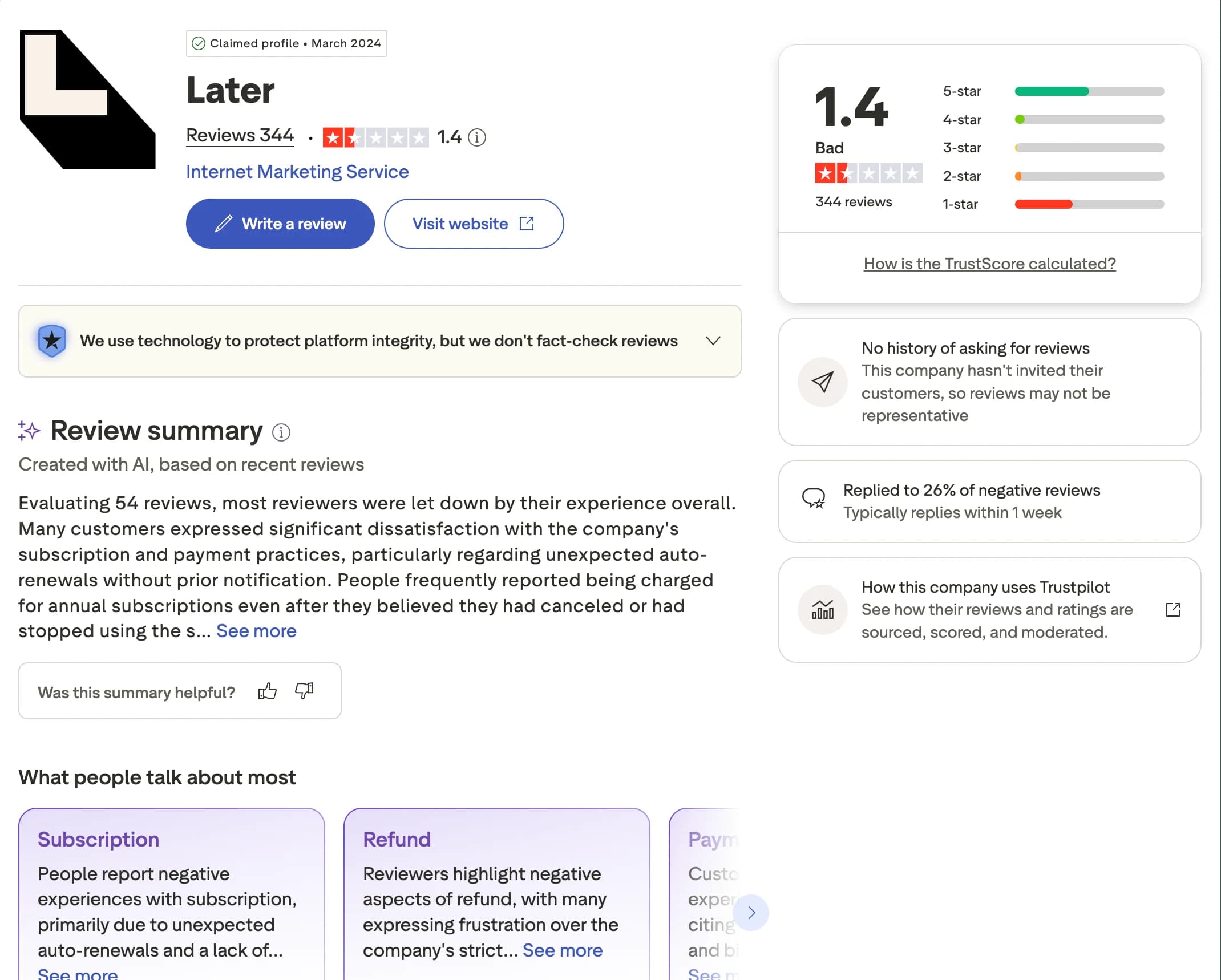
Why users switch from Later
Later is a strong visual planner for Instagram and TikTok. Once you post seriously to X, LinkedIn, Bluesky or YouTube, or run several brands, a few things push people to look elsewhere.
X and Bluesky in the same workspace
A Later Social Set covers Instagram, Facebook, TikTok, Pinterest, LinkedIn, YouTube, Threads and Snapchat. Postprism publishes to X and Bluesky alongside LinkedIn, TikTok, YouTube and Pinterest, so all your networks sit in one calendar.
No post count to watch
Later allows 30 scheduled posts per profile a month on Starter and 180 on Growth. Every Postprism plan has unlimited posts, from Solo at $19 a month.
Every network’s version in one request
Later’s AI runs on 5 to 100 credits a month. In Postprism, one Enhance with AI request writes a version for each network you selected, with 150 to 2,000 a month by plan.
More brands and people for less
Ten brands and ten people cost $150 a month on Later Scale with add-ons, billed yearly. Postprism Agency is $99 a month for 10 workspaces and 10 members with approvals.
You can also read what real users think in Later reviews on G2.
Postprism vs Later: Pros & Cons
Later
Pros
Visual planner with an Instagram feed preview
Reels, Stories and Snapchat scheduling
Link in Bio and iOS and Android apps on every plan
Up to two years of analytics history on Scale
Cons
X is not part of a Social Set
Post limits per profile on Starter and Growth
AI credits of 5 to 100 a month
No MCP server or public API listed
Postprism
Pros
Flat price per plan with unlimited posts
One Enhance with AI request writes every network’s version
X, Bluesky and full YouTube uploads
MCP server with 11 tools on every plan
Approvals from Freelancer at $49 a month
Cons
A 7-day trial, shorter than Later’s 14 days
Who Should Use Later vs Postprism?
Later is best for:
Instagram and TikTok-first creators who plan their grid visually
Brands that schedule Reels, Stories or Snapchat
Teams that want a social inbox and long analytics history
Postprism is best for:
Creators and businesses posting to X, LinkedIn and Bluesky as well as TikTok
Anyone who wants each network’s version written in one AI request
Video teams uploading full YouTube videos
Small teams and agencies running several brands at a flat price
People who want an AI agent to run their schedule
Six networks
X, LinkedIn, Bluesky and more.
Connect LinkedIn, X, TikTok, YouTube, Bluesky and Pinterest in one workspace, and schedule to all of them from one composer.
Try it freeEnhance with AI
Write once. Get a version for every network.
Write your post once and choose Enhance with AI. One request returns a version for each network you selected, ready to edit before you schedule.
Try it freeRun Postprism from your AI agent
Postprism’s MCP server works on every plan, so Claude, ChatGPT, Cursor and other MCP clients can schedule and report on your posts.
Uses your media
upload_media adds the photos so the posts can carry them.
Checks your accounts
list_platforms confirms which networks are connected first.
Schedules the posts
create_post puts one post per network on your calendar at the time you asked for.
Reports back
get_analytics reads impressions, reach and engagement for last month.
Upload these three product photos, schedule them as one launch post on X and as Pins on Pinterest for Thursday at 10:00 AM, then tell me which of last month’s posts got the most reach.
Postprism tools it usesupload_mediaUpload an image or video (JPEG, PNG, GIF, WebP, MP4, MOV, up to 10 MB) and get a URL to attach to a post.list_platformsThe social accounts connected to a workspace.create_postCreate a post from base content, target platforms and optional per-platform versions. Without a date it is saved as a draft; with scheduled_at it is scheduled.get_analyticsList analytics records, filtered by post or platform.
How to Switch from Later to Postprism
Moving your social media workflow takes minutes, not days.
Start your free trial
Sign up for Postprism and start the 7-day free trial. Your workspace is ready straight away.
Connect your accounts
Connect LinkedIn, X, TikTok, YouTube, Bluesky and Pinterest on the Platforms page.
Bring over your schedule
Copy your upcoming Later posts into a CSV with content, scheduled_at and media_url, then upload it with Bulk Upload. Or paste a caption into the composer and choose Enhance with AI for every network’s version.
Cancel Later when you are ready
Once your posts are going out from Postprism, cancel your Later subscription from your Later account settings.
Learn More About Later
Postprism vs Later — frequently asked questions
Sources for this Postprism vs Later comparison
Later's own pricing and help pages, and Postprism's plan and feature pages.
Compare Postprism to market leaders

Alternative to Buffer

Alternative to Hootsuite

Alternative to Sprout Social

Alternative to Metricool

Alternative to Publer

Alternative to SocialPilot

Alternative to Planable

Alternative to SocialBee

Alternative to Loomly

Alternative to CoSchedule

Alternative to Agorapulse

Alternative to Sendible

Alternative to Tailwind

Alternative to Zoho Social

Alternative to Iconosquare

Alternative to Vista Social
Make the switch from Later
Import your schedule, connect your accounts, and start posting in minutes.