A social media audit is a structured review of every account you run: whether profiles are complete and secure, what content performs, how the work gets done and how you compare with competitors. A practical audit takes three to four hours, covers five stages and 40 checks, and should end with no more than five prioritised actions.

The goal is not a long report. It is a short list of changes you can make next week. Most audits drift because they collect data without forcing decisions, so this checklist pairs every stage with a score and ends with an action list. It also reflects how the networks changed in 2025 and 2026: stricter rules on duplicate content, new link and format limits, and AI-slop filters. Run it once a quarter, and whenever you take over an account, start with a new client, rebrand or feel that social has stalled.
Key findings
- Quarterly is the standard rhythm. Both Sprout Social and Hootsuite recommend a full audit every quarter, with lighter monthly check-ins for high-volume teams.
- Complete profiles get seen more. LinkedIn says Pages with complete information get 30% more weekly views.
- Measurement is the common gap. Only 44% of marketing leaders rate their teams as expert at measuring social's business impact, per Sprout's 2025 Impact of Social Media Report.
- Gaps hurt growth. Buffer found accounts that skip a week underperform their own baseline follower growth, so cadence is a core audit check.
- Unanswered comments cost customers. In the 2025 Sprout Social Index, 73% of consumers said they would buy from a competitor if a brand does not respond on social.
- Recycled content now loses reach. Meta reduces distribution for duplicate and unoriginal content and says captions with no more than five hashtags perform best.
What's changed in 2026
Originality checks belong in every audit
Meta's 14 July 2025 update says Pages and profiles get the most distribution when they mainly share original content, and asks creators to avoid third-party watermarks and recycled content. Instagram's ranking explainer says Reels that are watermarked, low-resolution or already posted on Instagram are shown less. An audit that only counts posts misses whether those posts are being quietly down-ranked.
AI-generated filler is now flagged
LinkedIn said on 15 September 2026 that it had reduced views of AI slop by 40%, and that authors now see a private tip in post analytics when enough members flag a post. If your team uses AI, your audit should check for posts that read as generic.
Format and link limits tightened
Threads rejects API posts with more than 5 unique links from 22 December 2025 and caps text at 500 characters. Instagram's API accepts only JPEG images and up to 10 carousel items. Failed or cropped posts often trace back to these limits.
Compliance and AI rules joined the checklist
Hootsuite's July 2026 audit guide now includes a compliance step covering platform policies, regulatory requirements, access permissions, record-keeping and AI usage rules. Sprout's August 2026 guide adds reviewing access, permissions, integrations and compliance. Both reflect a simple reality: more people, more tools and more AI touch brand accounts than ever.
Before you start: gather four things
- A list of every account. Include old or forgotten profiles; search your brand name on each network.
- The last 90 days of data. Export native insights or use your scheduler's analytics. Ninety days smooths out one-off spikes and lines up with a quarterly rhythm. Sprout's guide suggests matching the window to the job: the last 30 days for monthly reviews, the last quarter for campaign wrap-ups and year-over-year comparisons for seasonal shifts.
- Your current goal. If you do not have a written goal, write one sentence now. Our guide on how to create a social media strategy covers this.
- Your web analytics. Sessions and conversions from social, ideally from UTM-tagged links.
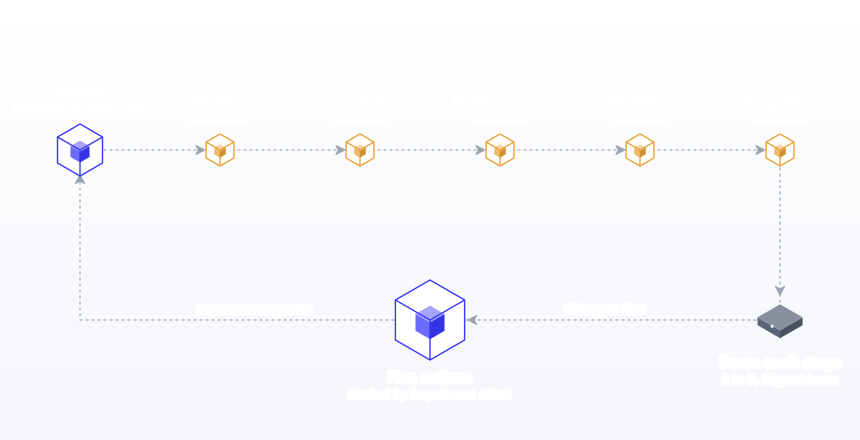
Stage 1: Profiles, presence and security (10 checks)
This is the quickest stage and often has the easiest wins. Go through each account and check:
- The handle is consistent across networks, or as close as availability allows.
- The profile photo is the current logo or a recognisable face, sized correctly.
- The cover or banner image is current, not last year's campaign.
- The bio says who you help and what you do in plain words, within the network's limit.
- The link in bio goes to a working, relevant page, tagged with UTM parameters.
- Contact details, location, hours and business category are correct.
- Pinned or featured posts are still relevant.
- Abandoned or duplicate accounts are revived with a plan or closed.
- Login access is owned by the business and at least two people can get in.
- Two-factor authentication is on, and roles follow least privilege.
Why checks 9 and 10 matter most
Losing access because the only admin left the company is one of the most painful and avoidable social problems. Facebook recommends two-factor authentication with a security key, an authentication app or text codes. LinkedIn Pages separate access into super admin, content admin and analyst roles, so a freelancer can post without being able to remove admins or deactivate the Page. Audit who holds each role on every network. Tools like our Instagram bio generator and LinkedIn bio generator help if several bios need rewriting.
Stage 2: Content (10 checks)
Look at the last 30 to 50 posts on each active account. You are looking for patterns, not judging individual posts.
- Posts map to clear content pillars, rather than a random feed.
- The mix of value and promotional posts is reasonable; roughly four value posts per offer is a common starting point.
- Formats match what each network rewards: carousels and video on Instagram, strong opening lines on LinkedIn, vertical Pins on Pinterest.
- Content is adapted per network, not identical copies with hashtags and links that do not fit.
- Content is original: no third-party watermarks, no reposted Reels, no recycled posts from other apps.
- Images and videos use the right size and aspect ratio. Check against our social media image sizes guide.
- Captions stay within limits, and the important part is visible before truncation; hashtags are relevant and few.
- Brand voice is consistent across networks and team members, and AI-assisted posts still sound like you.
- Accessibility basics are in place: alt text on images, captions on video, readable contrast.
- Sponsored and partner posts carry a clear disclosure at the start of the post.
The disclosure check
If you work with creators or post paid partnerships, check 20 is a legal question, not a style one. The FTC's guidance says a disclosure in the middle or at the end of a post is easier to miss, that a disclosure only in the comments is not clear and conspicuous, and that platform disclosure tools do not shift responsibility away from the brand and the influencer.
Stage 3: Performance (8 checks)
Now look at the numbers against your goal. Keep this stage focused: you want to know what works, not to describe everything.
- Posting cadence over 90 days: consistent or bursty, and how many weeks had no posts.
- Average engagement rate per network, calculated the same way for each.
- Top 10 posts by your goal metric, and what they share.
- Bottom 10 posts, and what they share.
- Best-performing pillar and format on each network.
- Traffic from social to your website, using UTM parameters.
- Conversions or enquiries attributed to social.
- Follower growth trend, read as context rather than as the goal.
Benchmarks to compare against
Your own trend matters more than any industry number, but benchmarks help you spot a network that is clearly under-delivering. Buffer's 2026 report, based on more than 52 million posts, gives these approximate 2025 medians:
| Network | Median engagement rate (2025) | Strongest format in Buffer's data |
|---|---|---|
| About 6.2% | Carousels, 21.77% | |
| About 5.6% | Images, 5.20% | |
| About 5.5% | Carousels, 6.90% of reach | |
| TikTok | About 4.6% | Video, 3.39% |
| About 4.0% | Video, 5.75% | |
| Threads | About 3.6% | Video, 5.55% |
| X | About 2.5% | Text, 3.56% |
Buffer notes some figures differ slightly between its summary and body text, so treat them as ranges. Our engagement rate calculator helps you compute your own the same way each quarter.
The most useful single output of stage three is a one-line description of your top 10 posts, for example "short how-to carousels about home brewing, posted Tuesday mornings". That sentence usually tells you what to make more of.
Stage 4: Workflow (6 checks)
Many accounts underperform not because of content choices but because the process is fragile.
- There is a content calendar, and it is up to date at least two weeks ahead.
- Posts are batched and scheduled in advance, rather than written the same day.
- There is a review or approval step for anything client-facing or sensitive.
- Someone owns replies to comments and messages, with a target response time.
- Logos, templates and approved images live in one shared place.
- Results are reviewed on a regular rhythm, and the review leads to changes.
Why the workflow stage scores lowest
In our experience, workflow is the stage most small teams score lowest on, and the one with the biggest payoff. A missing calendar shows up later as bursty cadence in stage three; a missing approval step shows up as off-brand posts in stage two. Sprout's audit guide notes that 58% of teams rated as experts at measuring social's business impact rely on social media management tools. Our guides to approval workflows and batch content creation fix the two most common gaps.
Stage 5: Competitors (6 checks)
Pick three accounts: one direct competitor, one aspirational account in your space and one adjacent account your audience follows. For each, note:
- Which networks they prioritise.
- Their posting frequency.
- Their main pillars and formats.
- Which recent posts got clearly above-average engagement.
- What they do that you do not, such as a recurring series or a format you have not tried.
- What you do better, so you protect it.
Do not copy competitors. Use them to spot gaps and confirm what the audience responds to.
The access and security audit in detail
Stage 1 includes two security checks, but for any business with more than one person touching social, access deserves its own pass. Most networks now separate "can post" from "can control the account", and the audit should confirm you use that separation.
| Network | Roles to check | What to confirm |
|---|---|---|
| LinkedIn Pages | Super admin, content admin, analyst, plus paid media roles | Only owners are super admins, who can add and remove admins and deactivate the Page; agencies and freelancers are content admins; reporting stakeholders are analysts |
| Facebook and Instagram | Business portfolio access and Page access | Two-factor authentication is on for every admin, with recovery codes stored safely |
| YouTube | Channel permissions | The channel belongs to a business account, not an employee's personal login |
| Business account and claimed website | The website is claimed by the business account, so Pins from your site are attributed to you | |
| Your scheduler | Tool roles and connected integrations | Former staff and old integrations are removed; reviewers have view or approve access only |
Sprout's guide recommends reviewing who has access to each profile, removing outdated permissions and checking for inactive users and old integrations, and says teams in regulated industries should give this step extra weight. Hootsuite's guide adds archiving and record-keeping where your industry requires it, and clear team rules for using AI tools to create or schedule content. In Postprism, roles run Owner, Admin, Editor and Viewer: Editors create posts and submit them for approval, Owners and Admins approve, and Viewers get read-only access to posts and analytics, which suits stakeholders who only need to see the plan. See team collaboration for how roles and approvals fit together.
The response audit: comments and messages
Replies are where social becomes customer service, and they are easy to forget in an audit that looks only at posts. The cost of silence is real: in the 2025 Sprout Social Index, based on a survey of consumers in September 2024, 73% said they would buy from a competitor if a brand does not respond on social. Add these checks to stage 4:
- Sample 20 recent comments and messages per network and note how many got a reply and how long it took.
- Find the questions that repeat, such as prices, opening hours or delivery times, and write saved answers for them.
- Check who owns replies at weekends and during holidays, when gaps are most common.
- Look for complaints that moved to another channel, such as a review site, because nobody answered on social.
Set a target response time you can actually keep, such as within one working day, and measure against it next quarter.
Network-specific checks
Each network has its own rules that commonly cause problems. Add these to stage 2 for the networks you use.
| Network | Check | Source of the rule |
|---|---|---|
| No watermarked or reposted Reels; carousels within 10 items; JPEG images | Instagram ranking explainer; Instagram publishing API | |
| Mostly original content; captions relevant, few links, no more than five hashtags | Meta's July 2025 originality update | |
| Page information complete; at least weekly posting; posts have a clear point of view | LinkedIn Pages best practices; LinkedIn's AI slop update | |
| Threads | Posts under 500 characters and no more than 5 unique links | Threads API documentation |
| 2:3 vertical images; key words in the first 40 characters of titles | Pinterest creative best practices | |
| TikTok | Strong opening seconds; captions, sounds and hashtags describe the video | TikTok's recommendation explainer |
| YouTube | Scheduled uploads keep a fixed rhythm; titles and descriptions are complete | YouTube scheduled publishing help |
Score each stage
Give each stage a score from 1 to 5 and note the single biggest issue. This turns the audit into something you can compare quarter to quarter.
| Stage | Score (1 to 5) | What 5 looks like | Biggest issue found |
|---|---|---|---|
| Profiles, presence and security | Every profile complete, consistent, secure and owned by the business | ||
| Content | Clear pillars, native and original formats, adapted per network | ||
| Performance | Steady cadence, clear winners, metrics tied to the goal | ||
| Workflow | Calendar, batching, approvals and reply ownership all in place | ||
| Competitors | You know where you lead and where you lag |
Turn the audit into five actions
The audit is only useful if it changes what happens next. Choose up to five actions, ranked by impact and effort. A typical result for a small business:
| Action | Impact | Effort | Owner and date |
|---|---|---|---|
| Fix link in bio and add UTM tags on all profiles | Medium | Low | Marketing lead, this week |
| Make two how-to carousels a week, the top format in the audit | High | Medium | Designer, from next Monday |
| Stop posting identical copies to Facebook and LinkedIn; adapt instead | Medium | Low | Social manager, ongoing |
| Move from same-day posting to a weekly batch and schedule | High | Medium | Social manager, from next week |
| Turn on two-factor authentication and add a second admin everywhere | High | Low | Owner, this week |
Audit depth: monthly, quarterly and annual
Monthly check (30 minutes)
Cadence against plan, top and bottom three posts, traffic and conversions from social, and any unanswered messages. Sprout suggests lighter monthly check-ins if you publish at high volume, handle customer care on social, onboard new people or run paid campaigns.
Quarterly audit (3 to 4 hours)
All five stages and 40 checks, scored, ending in five actions. This is the core rhythm both Sprout and Hootsuite recommend.
Annual review (a day)
The quarterly audit plus bigger questions: are we on the right networks, should we add one such as Threads or Bluesky, is our goal still right, and are our tools and budget fit for next year? Hootsuite's guide suggests reallocating budget and sharing findings with leadership after an audit.
Audit variations by situation
| Situation | Focus on | Can shorten |
|---|---|---|
| Taking over an account | Access and ownership, workflow, what was promised to followers | Detailed competitor review |
| Onboarding an agency client | Baseline metrics, goals, brand voice, approval rules | Nothing; this sets the reporting baseline |
| Before a rebrand | Profiles, pinned content, templates, handles | Deep performance analysis |
| Results have stalled | Performance, content patterns, cadence, originality | Profile cosmetics if already complete |
| Quarterly routine | Performance against goals, workflow friction | Stages that scored 5 last quarter |
Audit focus by business type
Local businesses
Prioritise stage 1: hours, locations, booking links and reviews must be right, because local customers act on them directly. Pew's 2025 survey found about half of US adults visit Facebook daily, with daily use peaking at 58% among 30 to 49 year olds, so a stale Facebook Page costs real visits.
Ecommerce brands
Prioritise stage 3: tie posts to sales with UTM-tagged links. Google Analytics recommends always including utm_source, utm_medium and utm_campaign; our UTM builder makes them consistent. Check product imagery against each network's specs.
B2B companies
Prioritise stage 2 on LinkedIn: are posts substantial and opinionated, or generic? Check whether founders and employees post alongside the Page.
Agencies
Run the full audit at the start of every client relationship, because it sets the baseline later reports are measured against. Our agency workflow guide shows how audits fit into onboarding.
Audit focus by account size
Solo founders and creators (1 to 3 accounts)
Keep the audit to two hours. Stages 1 and 3 matter most: fix the profile basics, then find the one format that clearly works and do more of it. The workflow stage is usually a single question: do you have posts queued for next week? If not, that is your first action. Our guide to a content calendar for solo founders shows a lightweight setup.
Small businesses (3 to 6 accounts, 1 to 3 people)
Run the full 40 checks but keep the competitor stage short. The biggest wins tend to be in stage 4: a shared calendar, one person owning replies and a weekly batching session. LinkedIn says companies that post weekly see a 2x lift in engagement, so cadence gaps on a company Page are worth fixing first.
In-house teams (several brands or regions)
Audit each brand separately, then compare scores across brands. Differences usually point to process, not talent: the brand with an approval step and a calendar two weeks ahead tends to score higher on content too. Add a governance check for AI use, which Hootsuite's guide now includes.
Agencies (many clients)
Use one template for every client so scores are comparable, and store each audit with the client's onboarding record. The first audit becomes the baseline for every later report. Our metrics and KPIs guide covers which numbers to put in that baseline.
A copy-ready audit spreadsheet
A spreadsheet with one row per account and these columns covers the whole audit. Fill it in stage by stage, then sort by score to see where to start.
| Column | What to enter | Example |
|---|---|---|
| Network and handle | The account being audited | Instagram, @northsidephysio |
| Owner and admins | Who controls the account and how many admins | Owner plus 1 admin, 2FA on |
| Profile score (1 to 5) | Stage 1 result | 3: link in bio broken |
| Posts in last 90 days | Count and number of empty weeks | 31 posts, 3 empty weeks |
| Engagement rate | Same formula on every network | 4.8% |
| Top format | The format behind most of the top 10 posts | Short exercise videos |
| Traffic and conversions | Sessions and goals from UTM-tagged links | 212 sessions, 9 bookings |
| Reply rate and time | From the 20-message sample | 15 of 20, average 1 day |
| Biggest issue | One line | No posts queued ahead |
| Action, owner, date | What will change and who does it | Batch on Mondays, Sam, from 3 March |
Keep the same columns every quarter. The value of an audit compounds when you can compare this quarter's sheet with the last one.
How to present audit findings
Most audits fail at the last step, when a long document lands on someone's desk and nothing changes. Hootsuite's guide recommends a short, scannable summary covering what is working, what is underperforming and where to increase or decrease investment. A one-page format that works:
- One sentence on the goal and whether social is moving it.
- The five stage scores compared with last quarter.
- The one-line description of your top 10 posts.
- Three things to stop, such as a network that gets no traction or a format that never works.
- The five actions, each with an owner and a date.
Leadership rarely needs the full checklist. They need to know what will change and what it will cost in time or money.
Worked example: auditing a physiotherapy clinic
Here is a condensed audit of Northside Physio, a two-location clinic that posts on Instagram and Facebook and has an inactive LinkedIn page.
| Stage | Score | Key findings |
|---|---|---|
| Profiles and security | 2 | Instagram bio lists one location; link in bio goes to a closed booking page; LinkedIn last posted two years ago; only a former receptionist had Facebook admin access; no two-factor authentication |
| Content | 3 | Good exercise videos, but the feed mixes in generic quote graphics; identical captions on Instagram and Facebook; no alt text |
| Performance | 3 | Bursty cadence: 14 posts in March, 2 in April, three weeks with no posts. Top posts were short exercise demos; bottom posts were quote graphics |
| Workflow | 1 | No calendar; posts written on the day; nobody owned replies, and some booking questions went unanswered for days |
| Competitors | 3 | Two nearby clinics post weekly education carousels; neither uses short video well, which is an opening |
The resulting action list
- This week: transfer Facebook admin to the owner's business login, add a second admin, turn on two-factor authentication, fix the bio and booking link.
- Next two weeks: stop quote graphics; film eight short exercise demos in one afternoon.
- From next month: three Instagram posts a week with adapted Facebook versions, scheduled every Monday on one calendar.
- Ongoing: the front desk replies to comments and messages twice a day.
- Decide: revive LinkedIn for recruiting with one post a fortnight, or close it.
Notice how few actions there are, and how each traces back to a specific finding. That is what makes an audit useful.
What to pull from each network's analytics
Stage 3 goes faster if you know in advance which numbers to export. Each network names its metrics differently, so decide on one goal metric per network and pull the same fields every quarter.
| Network | Pull these | Goal metric for most businesses |
|---|---|---|
| Reach, saves, shares, profile visits and link taps by post | Saves and shares per post | |
| Reach, reactions, comments, shares and link clicks | Link clicks or messages started | |
| Impressions, reactions, comments, reposts and Page follower growth | Comments and qualified profile or Page visits | |
| Impressions, saves, Pin clicks and outbound clicks from a business account | Outbound clicks | |
| TikTok | Views, average watch time, shares and follows by video | Average watch time |
| YouTube | Views, watch time, click-through rate from impressions and subscribers gained | Watch time |
| X, Threads and Bluesky | Impressions or views, replies, reposts and link clicks | Replies and link clicks |
Whatever you pull, calculate engagement rate one way across every network, for example interactions divided by reach, and write the formula at the top of your audit sheet so next quarter's numbers are comparable.
The originality and AI check, step by step
Because Meta, Instagram and LinkedIn all now reduce the reach of duplicated, watermarked or generic content, it is worth running a dedicated pass on stage 2. It takes about 20 minutes per network.
- Pick the last 20 posts on each network and open them side by side with the same posts on your other networks.
- Mark identical copies. Same caption, same image crop and the same hashtags on every network are the clearest sign of copy-and-paste publishing.
- Mark recycled media. Any video with another app's watermark, or a Reel posted before, goes on the fix list.
- Read the captions aloud. Flag any that could belong to any brand in your industry. Those are the posts readers and ranking systems most often ignore.
- Check for LinkedIn feedback tips. LinkedIn says authors may see a tip in post analytics when enough members give feedback, so open analytics on your weakest posts.
- Decide the rule going forward, such as "every network gets its own opening line and crop", and add it to your brief.
The fix is usually a workflow change rather than more effort. In Postprism, each post holds a separate version for each network, so the LinkedIn version can carry a story while the TikTok version leads with a short video, and optional AI adaptation drafts those versions in your saved brand voice for you to edit. Our guide to cross-posting and reach explains the trade-offs.
A year of audits at a glance
| When | Type | Extra focus |
|---|---|---|
| January | Annual review plus Q1 audit | Networks, goals, tools and budget for the year |
| April | Quarterly audit | Did Q1 actions work; plan for summer campaigns |
| July | Quarterly audit | Access and security pass; prepare autumn and holiday content |
| October | Quarterly audit | Holiday readiness; content queued at least four weeks ahead |
| Every month | 30-minute check | Cadence, top and bottom posts, unanswered messages |
How to run the audit: an 8-step method
- Book three to four hours and gather the four inputs: account list, 90 days of data, your goal and web analytics.
- Work through stage 1 account by account, fixing anything that takes under five minutes on the spot.
- Review 30 to 50 posts per network for stage 2, noting patterns in a sheet.
- Pull the numbers for stage 3 and write the one-line description of your top 10 posts.
- Map the workflow for stage 4 by asking who does each step and where it breaks.
- Review three competitors for stage 5 in under 30 minutes.
- Score each stage and write the single biggest issue for each.
- Choose five actions with an owner and a date, and book the next audit before you close the document.
Common audit mistakes
- Collecting data without deciding. Fix: end with five actions, each with an owner and date.
- Auditing only active accounts. Fix: search for forgotten and duplicate profiles too.
- Ignoring access and security. Fix: confirm business ownership, a second admin and two-factor authentication everywhere.
- Judging posts one by one. Fix: look for patterns across 30 to 50 posts.
- Using different engagement formulas per network. Fix: calculate one way and stick to it.
- Treating follower count as the goal. Fix: measure against the goal metric, using UTM-tagged links.
- Missing originality problems. Fix: check for watermarks, reposts and identical cross-posts.
- Skipping disclosures. Fix: confirm every paid or partner post is labelled at the start.
- Not asking the team. Fix: ask what customers mention, which posts were hardest to make and where the process breaks.
- Copying competitors. Fix: use them to find gaps, not templates.
- Fixing content but not workflow. Fix: put a calendar, batching and approvals in place, or the same problems return.
- Never repeating it. Fix: book the next quarterly audit before you finish this one.
Make the next audit easier
Many workflow problems found in audits come down to one thing: no single place where the whole plan lives. Postprism is a social media scheduler that gives you one content calendar for 6 networks, a kanban board for drafts, scheduled and published posts, a separate version of each post per network, approvals and roles for teams, and analytics across every network with CSV export on Agency. The next audit starts with clean data instead of a scramble through six apps.
Here is how the most common audit actions map onto it:
- "Stop the bursty cadence." Batch a month of posts in one session, or import them from a CSV, XLSX or JSON file with bulk scheduling, and check the month view for empty weeks before they happen.
- "Stop identical copies." Edit each network's version inside the same post, so the plan stays in one place while the wording changes.
- "Add an approval step." Have Editors submit client-facing posts for approval, give approvers the Admin role, and invite stakeholders who only need to watch as read-only Viewers.
- "Report the same numbers every quarter." Pull results from one analytics view instead of exporting from each network separately.
Plan Your Whole Strategy in One Calendar
Fix the workflow gaps your audit finds. Plan, batch and schedule posts for all 6 networks from one calendar with Postprism.

Frequently Asked Questions
How long does a social media audit take?
For a business with three to five active accounts, a focused audit takes about three to four hours. The first one takes longer because you are gathering logins, data and old accounts. Later quarterly audits are faster because you compare against a baseline.
What should a social media audit include?
Profiles and security, content patterns, performance against your goal, the workflow behind publishing and a short competitor comparison. It should end with a prioritised list of actions, not just observations.
How often should I audit my social media?
Run a full audit quarterly, as Sprout Social and Hootsuite both recommend, with a 30-minute monthly check. Also audit when you take over an account, onboard a client, rebrand or see results stall for two months.
What tools do I need for a social media audit?
Each network's native insights, a spreadsheet and your web analytics are enough. A scheduler that shows every network on one calendar and reports results in one dashboard makes it faster, because you are not exporting from every app separately.
What is the most common problem an audit finds?
Inconsistency: bursts of posting followed by gaps, outdated bios and links, and identical copies pasted across networks. They are also among the easiest to fix with a calendar and scheduled posting.
How do I audit social media security?
List who has access to every account and in what role, make sure the business owns each login, add a second admin, turn on two-factor authentication and remove anyone who no longer needs access. Repeat the check every quarter.
What engagement rate should I aim for?
Compare against your own trend first. As a rough reference, Buffer's 2026 report put 2025 median engagement at about 6.2% on LinkedIn, 5.6% on Facebook, 5.5% on Instagram and 2.5% on X, with large differences by format.
How do I audit social media for a new client?
Run the full 40-point audit before any new work begins, record the baseline metrics, agree goals and approval rules, and secure admin access under the client's business accounts. Every later report is measured against this starting point.