To use Claude for social media, put your brand context in a Claude Project once, then use Claude to plan the month, draft posts from your real material, adapt each one per platform and summarise results, editing everything before it goes out. To save the copy-and-paste step, connect Claude to a scheduler such as Postprism through MCP so drafts land on your content calendar for review.

Claude is strongest at the parts of social media that are thinking and writing: turning a messy brief into a plan, finding the angle in a long document, and rewriting one idea for five audiences. It is weakest as a substitute for your judgement, taste and first-hand experience, which are what make posts worth reading. This guide shows how to combine the two: which Claude product to use for which job, how to set it up so drafts sound like you, prompts for every stage and every network, how to connect Claude to your calendar, and the guardrails worth setting before you let an assistant near a publish button.
Key findings: using Claude for social media in 2026
- Projects hold your brand context. Anthropic's help centre says Claude Projects are "self-contained workspaces with their own chat histories and knowledge bases", available to all users, with free accounts limited to five Projects.
- Examples beat adjectives. Anthropic's prompting best practices call examples "one of the most reliable ways to steer Claude's output format, tone, and structure" and recommend 3 to 5 of them.
- MCP is how Claude reaches your tools. Anthropic introduced the Model Context Protocol on 25 November 2024 as "a universal, open standard for connecting AI systems with data sources". It is now supported by Claude, ChatGPT, VS Code and Cursor, among others.
- Custom connectors are on every Claude plan. Anthropic's custom connectors guide lists remote MCP connectors on Free (one connector), Pro, Max, Team and Enterprise.
- AI-assisted posts can hold their own. In Buffer's October 2024 analysis of 1.2 million posts from 15,000 people who posted both ways, AI-assisted posts had a 5.87% median engagement rate against 4.82% for human-only posts, with caveats Buffer itself spells out.
- Postprism gives Claude 11 tools. The Postprism MCP server lets Claude create drafts or scheduled posts, upload media, read analytics and switch workspaces, with a limit of 200 requests per hour per user, on every plan.
- Agents can be tricked. Anthropic's Claude for Chrome research found a 23.6% prompt-injection attack success rate before mitigations and 11.2% after, which is why drafts and human review matter.
The most useful rule in this guide: ask Claude for drafts, not published posts. A draft costs nothing if it is wrong. A published post that is wrong costs trust.
What has changed for Claude and social media in 2026
Assistants can now act, not just write
Two years ago, using Claude for social media meant copying text out of a chat window. MCP changed that. The official MCP documentation describes it as "a USB-C port for AI applications", a standard way to connect assistants to "data sources", "tools" and "workflows". A scheduler that runs an MCP server lets Claude create posts directly on your calendar, read your analytics and see which accounts are connected. The writing is the same; the copy-paste step disappears.
Claude Code brought social media into the terminal
Developers and technical founders now draft launch posts from the same terminal session where they shipped the code. Claude Code's MCP documentation recommends HTTP servers as "the recommended option for connecting to remote MCP servers", and adding one is a single command. For product teams, the changelog has become a content source.
Platforms label AI media, not AI-assisted writing
Meta renamed its "Made with AI" label to "AI info" in July 2024 and applies it when it detects industry-standard AI image indicators or when people disclose AI content. YouTube's altered or synthetic content policy requires disclosure when creators "use AI to meaningfully alter or generate photorealistic content", but lists "idea generation", "caption creation" and help with "a video outline, script, thumbnail" as examples that do not need disclosure. LinkedIn shows Content Credentials on images and video signed with the C2PA standard. Using Claude to plan and draft text is not what these labels target; realistic AI imagery is.
Originality became a ranking rule
Instagram extended its originality rules to photos and carousels on 30 April 2026. That is about reposting other people's work, not AI writing, but it reinforces the same lesson: posts built from your own material, photos and opinions are what platforms want to recommend. Claude is most valuable when it helps you publish more of your own ideas, not when it rewrites other people's.
Disclosure rules arrived in the EU
Article 50 of the EU AI Act, which applies from 2 August 2026 according to the Act's text, requires deployers to disclose deepfake image, audio or video content and AI-generated text published "to inform the public on matters of public interest". The text duty does not apply where the content "has undergone a process of human review or editorial control" and someone holds editorial responsibility. A human edit and approval step is good practice anyway; for EU publishers it also matters legally.
Which Claude product to use for which job
| Claude surface | Best for | How it reaches your calendar | Who it suits |
|---|---|---|---|
| Claude chat (web, desktop, mobile) | Brainstorming, one-off drafts, rewriting | Copy and paste | Anyone starting out |
| Claude Projects | Keeping brand voice, pillars and examples for every chat | Copy and paste, or a connector | Anyone posting weekly |
| Claude Desktop with MCP | Planning and drafting straight onto a calendar | Postprism MCP server via a config snippet | Marketers, founders, agencies |
| Claude custom connectors | Using remote MCP servers from Claude's own apps | Remote MCP URL, where your plan allows | Teams standardising on Claude |
| Claude Code | Turning changelogs, docs and pull requests into posts | One terminal command adds the MCP server | Developers and product teams |
Most people should start in a Project, then connect the scheduler once the drafts consistently need only light edits. Our guides for connecting Claude Desktop and connecting Claude Code have the exact setup steps.
Step 1: Give Claude your brand context once
The biggest jump in output quality comes from context. Anthropic's best-practice guide puts it plainly: "Think of Claude as a brilliant but new employee who lacks context on your norms and workflows." Its "golden rule" is to show your prompt to a colleague with minimal context; "If they'd be confused, Claude will be too." Instead of explaining your brand in every chat, put it in a Project's instructions and knowledge.
| Context block | What to include | Example (Juniper Roasters, a cafe) |
|---|---|---|
| Who you are | One paragraph: business, audience, location | "Neighbourhood cafe and roastery in Leeds. Regulars are local workers and students." |
| Content pillars | Three to five themes, one line each | Coffee craft, daily bakes, people, local life |
| Voice rules | Words you use and avoid, sentence length, formality, emoji policy | "Warm, short sentences, no exclamation marks, never 'indulge'." |
| Examples | Three to five of your best real posts, wrapped as examples | The Friday pastry drop post, the bean origin carousel |
| Platforms and formats | Where you post and what works there | Instagram carousels, Facebook for events, TikTok prep videos |
| Never do | Claims you cannot make, topics to avoid | "No health claims about coffee. Never mention competitors." |
| Facts sheet | Prices, hours, offers, product names | Opening hours, current menu, loyalty scheme terms |
Anthropic also recommends adding context and motivation behind instructions ("explaining to Claude why such behavior is important"), wrapping examples in example tags so Claude can tell them from instructions, and telling Claude what to do rather than what not to do. In practice, "Write in short, warm sentences like the examples" works better than "Don't be corporate."
If you use brand voice profiles in Postprism, keep the two consistent: the same rules in the Project and in Postprism mean drafts from either place sound alike.
Step 2: Plan the month with Claude
Ask for a plan, not finished posts. Changing direction at the plan stage costs minutes; changing it after twenty drafts costs an afternoon.
"Here are our pillars, our launches this month and last month's top three posts. Draft a posting plan: four LinkedIn posts and three Instagram posts a week. For each slot give the date, pillar, format and a one-line idea. Flag any week that is more than one third promotional."
Edit the plan. Swap ideas that only you can make credible for the generic ones, check dates against your real calendar, and remove anything you would not say. Our guide to creating a social media strategy covers what the plan should rest on.
Step 3: Draft from your raw material
Claude writes best when it has something real to work from: your notes, a customer call, a voice-memo transcript, a changelog or an article. Generic topics produce generic posts. Anthropic's long-context advice is to put long documents "near the top of your prompt, above your query, instructions, and examples", which helps here because your source material is usually the longest part.
"[Paste notes from three client calls.] Using only these notes, draft three LinkedIn posts, each built around one specific lesson. Start each with a concrete first line taken from the notes. No hashtags. Do not add any statistic or claim that is not in the notes."
Then edit hard. Add the detail only you know, cut filler, and check every claim. Our post on whether AI content performs on social media explains why the edit, not the tool, decides results.
Step 4: Adapt each post for each platform
Once a core post is right, Claude is excellent at producing native versions. Give it each platform's rules so it does not have to guess.
| Platform | Rules to give Claude | Example instruction |
|---|---|---|
| Strong first two lines, short paragraphs, a point of view, few or no hashtags | "Open with the most surprising line from the notes. End with a question peers can answer." | |
| X | 280 characters for a standard post, one idea, no filler | "One sentence of insight, one sentence of proof, under 280 characters." |
| Caption supports the image or carousel; slide-by-slide outline; first line before the fold | "Outline six slides and a caption under 150 words." | |
| Threads | Conversational, up to 500 characters per post | "Rewrite as a casual take that invites replies, under 500 characters." |
| Bluesky | 300 characters, plain and direct | "Under 300 characters, no hashtags beyond one." |
| Slightly longer, community tone, clear link or event detail | "Add the date, time and booking link in the last line." | |
| TikTok and YouTube | Spoken script and on-screen text, title and description | "Write a 30-second script with a hook in the first two seconds, plus a title under 70 characters." |
| Searchable title and description that says what the Pin links to | "Write a Pin title and a 2-sentence description with the main keyword." |
The Threads limit comes from Meta's Threads API documentation ("Text posts are limited to 500 characters"); the X and Bluesky limits are the ones Postprism enforces. Check lengths with our social media character counter, and see our guide to adapting content for every platform for fuller rules you can paste into a Project.
Step 5: Connect Claude to Postprism with MCP
Copying drafts from a chat into a scheduler one at a time is where the time savings leak away. Postprism runs a hosted MCP server, so Claude can work with your Postprism workspace directly. An MCP server exposes actions as tools the assistant can call, and Claude asks you before using them unless you allow them in advance.
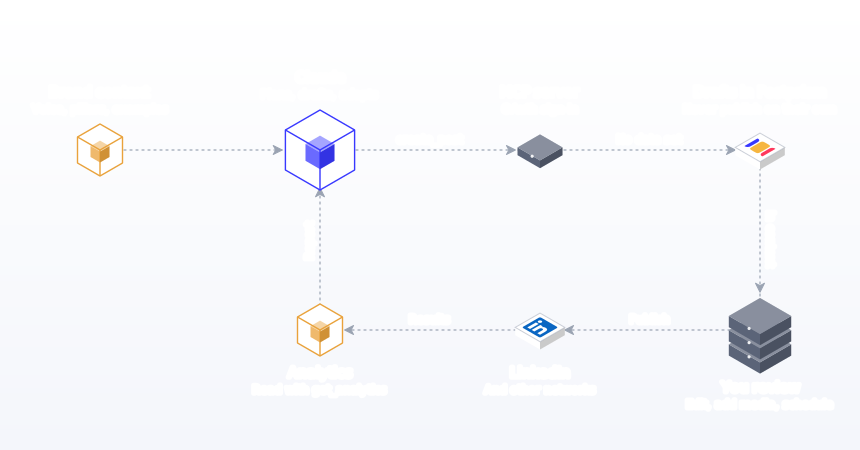
Setup for Claude Desktop
- In Claude Desktop, open Settings, then Developer, then Edit Config.
- Paste the Postprism server entry from the Claude setup guide under mcpServers and save. Claude Desktop runs the connector with npx, so Node.js 18 or later is required.
- Restart Claude. A browser tab opens to sign in to Postprism and approve access. No API key is needed.
- Ask "Which social accounts are connected in Postprism?" Claude calls list_platforms and lists them.
Setup for Claude Code
Run claude mcp add with the HTTP transport and the Postprism server URL (the exact command is on the Claude Code guide), then run /mcp inside Claude Code, choose postprism and authenticate in the browser. Claude Code's documentation explains the scopes: local (the default, "available only to you in the current project"), project ("shared with everyone in the project via the .mcp.json file") and user ("available to you across all projects").
What Claude can do in Postprism
| Tool | What it does | Typical prompt |
|---|---|---|
| list_platforms | Lists the social accounts connected to a workspace | "Which accounts can you post to?" |
| create_post | Creates a post with base content, target platforms and per-platform versions; a draft without a date, scheduled with one | "Save these three versions as one draft for Tuesday 9:30." |
| list_posts, get_post | Lists posts by status, reads one post | "What is scheduled for the next 14 days?" |
| update_post, delete_post | Changes copy, versions, media or time; deletes a post | "Move Friday's posts to Monday at the same time." |
| upload_media | Uploads JPEG, PNG, GIF, WebP, MP4 or MOV up to 10 MB and returns a URL to attach | "Attach launch.png to the LinkedIn draft." |
| get_analytics, get_post_analytics | Reads analytics records, filtered by post or platform | "Which five posts last month had the most engagement?" |
| list_workspaces, get_workspace_info | Lists your workspaces; shows the current workspace and plan | "Show drafts waiting in the client workspace." |
The full reference is in the MCP server documentation. The same actions exist in the REST API for automation tools on the Freelancer and Agency plans.
Step 6: Use a draft-first workflow
- Ask Claude to create posts as drafts for specific dates. A post created without a date is saved as a draft, and drafts never publish on their own.
- Open your Postprism content calendar and review each draft in context, with its per-platform versions.
- Attach images or video where needed. Pinterest Pins need an image, and TikTok and YouTube need a video.
- Edit, then schedule. Teams on plans with approvals can route Claude's drafts through the same review step as human-written posts.
"Plan next week's posts for LinkedIn and X around our autumn menu, one post per weekday, and save them as drafts at 9:30 AM." Claude calls create_post for each slot and the drafts appear on your calendar.
Step 7: Report with Claude
"Get analytics for posts published in the last 30 days. Which pillar and platform combinations drove the most engagement? Suggest three changes to test next month, and tell me which numbers each suggestion is based on."
Asking Claude to name the numbers behind each suggestion makes it easy to check. Verify the summary against the data before acting on it. Our metrics and KPIs guide helps you decide which numbers to ask about.
How to use Claude by role
Solo founders
Founders have the best raw material (opinions, customer conversations, build stories) and the least time. Use Claude to turn a weekly ten-minute voice memo into a week of posts, then spend your time on the edit. Keep one Project with your voice and a running "lessons this week" document.
In-house marketers
Marketers juggle campaigns, stakeholders and approvals. Use Claude for the plan, first drafts from briefs, platform versions and the monthly report. Keep a Project per campaign with the brief, key messages and approved claims, and let drafts flow into the approval queue.
Agencies and freelancers
One Project per client keeps voices separate. Through the Postprism MCP server, Claude can call list_workspaces and pass a workspace ID, so drafts land in the right client's calendar. The REST API and MCP both refuse a workspace you do not belong to rather than falling back to another one, so a post cannot land in the wrong client's calendar.
Developers and product teams
Point Claude Code at the changelog or the merged pull requests and ask for launch drafts for X, LinkedIn and Bluesky. Add a short "social voice" section to the repo's CLAUDE.md so every launch post follows the same rules.
| Role | Best Claude surface | Highest-value job | Keep human |
|---|---|---|---|
| Solo founder | Project plus Desktop | Voice memo to a week of drafts | Opinions and stories |
| In-house marketer | Project per campaign | Brief to plan to platform versions | Claims and approvals |
| Agency or freelancer | Project per client plus MCP | Month of drafts per client workspace | Client relationship and final edit |
| Developer | Claude Code plus MCP | Changelog to launch posts | Accuracy of technical claims |
How to use Claude by content type
Claude's usefulness varies by format. It is close to finished work on text posts and outlines, and a starting point at best for anything visual or spoken. Knowing where it stops saves frustration.
Text posts
LinkedIn, X, Threads, Bluesky and Facebook text posts are where Claude adds the most. Give it the source material and the platform rules and it will produce a usable draft. The edit is about specifics: replacing a general claim with the actual number, the actual customer, the actual mistake you made.
Carousels
Claude is good at structure: one idea per slide, a hook on the cover, a payoff on the last slide. Ask for a slide-by-slide outline with a headline and one supporting line per slide, then design the slides yourself or in your design tool. Ask it to keep each slide under a word count so the text is readable on a phone.
Short video scripts
For TikTok, Reels and Shorts, ask for a spoken script with timing, the on-screen text for each beat, and three alternative opening lines. Read it aloud before filming; anything that sounds written rather than spoken needs rewriting. Claude cannot judge your delivery or your footage, so treat the script as a rehearsal aid.
YouTube titles and descriptions
Give Claude the transcript and ask for five title options and a description with chapters. Titles benefit most from your judgement: pick the one that is accurate and specific rather than the most dramatic. Postprism publishes YouTube videos with title, description, tags, privacy, playlist and thumbnail, so the finished text can go straight into the post's YouTube version.
Replies and community management
Claude can suggest replies to common questions, but replies are where people expect a human. Use it to draft an FAQ of answers you can adapt, not to auto-reply. Buffer's 2026 engagement report estimates replying to comments lifts engagement by about 30% on LinkedIn and 21% on Instagram within the same account, which is reason enough to keep replies personal.
Images
Claude does not generate images itself in most workflows, but it writes good briefs: what the image should show, the composition, the text overlay and the alt text. Pair it with your own photos, a designer, or an image tool such as our Prismatic image generator, and remember that realistic AI images can trigger platform labels.
| Content type | How close Claude gets | What you add |
|---|---|---|
| Text posts | Usable draft | Specifics, opinion, final edit |
| Carousel outlines | Usable structure | Design, visuals, tightening |
| Video scripts | Rough draft | Delivery, footage, rewriting for speech |
| YouTube titles and descriptions | Strong options | Choosing the accurate one |
| Replies | Template answers | The actual reply, personally |
| Image briefs and alt text | Useful brief | The image itself |
Inside Postprism, the same split applies to the built-in AI content adaptation: it drafts platform versions from your base post, and you decide what publishes.
Prompt library for Claude
| Job | Prompt |
|---|---|
| Hooks | Give me ten first lines for this post. Each must use a specific detail from the draft. No questions, no clichés. |
| Repurpose | Turn this article into a LinkedIn post and an X post under 280 characters. Save them as one draft for Thursday. |
| Voice check | Compare these drafts with our example posts. Where does the voice drift? Quote the line and suggest an edit. |
| Limits check | List my scheduled posts this month and flag any version over its platform's character limit. |
| Gaps | Look at my scheduled posts for the next two weeks. Which days and platforms are empty? |
| Fact check | List every factual claim in these drafts and mark which ones appear in the source notes and which do not. |
| Clients | List my workspaces, then show the drafts waiting in the Juniper Roasters workspace. |
| Report | Using get_analytics, which posts from last month beat the median, and what do they have in common? |
For fifty more, organised by stage, see our AI prompts for social media.
Safety and guardrails
Giving any assistant access to a publishing tool deserves care. Anthropic's own connector guide warns that custom connectors "allow you to connect Claude to arbitrary services that have not been verified by Anthropic", that malicious servers may hide instructions, and that you should click "Allow always" only for tools you trust to run unsupervised. Claude Code's documentation adds that servers which fetch external content "can expose you to prompt injection risk". The OWASP guidance on prompt injection recommends least privilege and "human-in-the-loop controls for privileged operations".
- Drafts by default. Ask for drafts until you trust the output. Postprism's docs recommend starting with drafts for anything an AI writes.
- Connect only accounts you mean to use. Claude can post only to accounts already connected in Postprism, and connecting a new one always happens in Postprism through the network's own sign-in.
- Keep secrets out of chats. Claude signs in to Postprism with OAuth and never sees your social passwords or network tokens.
- Be careful with untrusted input. If you ask Claude to turn a web page or an email into a post, read the result closely; hidden instructions in that content are the classic prompt-injection route.
- Revoke when done. Every connected assistant is listed on the Developer page in Postprism, where you can revoke access.
- Mind the rate limit. 200 requests per hour per user is plenty for a month of posts, not for migrating thousands; see rate limits.
The step-by-step method: your first month with Claude
- Week 1, day 1: build the Project. Add who you are, pillars, voice rules, 3 to 5 example posts, platform rules, a never-do list and a facts sheet.
- Week 1, day 2: test the voice. Ask for five drafts from real notes. Mark every edit you make and add the patterns to the voice rules.
- Week 1, day 3: plan the month. Ask for a slot-by-slot plan and edit it.
- Week 1, day 4: connect the scheduler. Add the Postprism MCP server to Claude Desktop or Claude Code and check list_platforms.
- Week 1, day 5: draft week 2. Ask for drafts with dates; review them on the calendar; attach media; schedule.
- Week 2: draft weeks 3 and 4. Batch both weeks in one session once the voice is stable.
- Weeks 2 to 4: log edits. Keep a note of what you change in each draft. If you keep fixing the same thing, add a rule.
- Weeks 2 to 4: track time. Note minutes per post, including edits.
- End of week 4: report. Ask Claude to summarise performance against your previous month, and check its numbers.
- Decide. If time per post fell and performance held, keep the workflow. If performance dropped, tighten the edit step before anything else.
Worked example: a month for a cafe in one afternoon
A two-person agency prepares October for Juniper Roasters. The account lead pastes the month's key dates (autumn menu launch, a latte art evening) into the client's Project and asks for three X posts and two LinkedIn posts a week. She edits the plan in ten minutes. Claude then drafts each slot from the plan and the owner's notes, saving them as dated drafts in the Juniper Roasters workspace. Twenty drafts appear on the calendar. The writer edits every draft, adds details only the owner knows and attaches photos from the shoot. The owner reviews the month in Postprism and asks for changes on three posts. Approved posts are scheduled before October begins. The time saved was not in the editing, which still took care, but in planning, first drafts and the copy-paste step.
Claude Desktop, Claude Code or both?
Claude Desktop suits marketers and founders who plan and write in conversation and want drafts to appear on the calendar while they talk. Claude Code suits developers who want to turn changelogs, pull requests and documentation into launch posts without leaving the terminal, and it can share the server configuration with a whole team through the project scope. Both connect to the same Postprism MCP server, so a company can use each where it fits and still see every draft on one calendar, in one approval queue. Our comparison of the best AI agents for social media covers other assistants too.
What the evidence says about results
Buffer's 2024 study found AI-assisted posts outperformed human-only posts on median engagement on every network it measured, with the biggest gap on Threads (11.11% against 5.56%) and marginal differences on LinkedIn and YouTube. Buffer is careful about why: the most engaged users may be more likely to use the AI assistant, and only people who posted both ways were included. Its own hypothesis is that AI helps people post more often. A 2025 paper in Public Relations Review by Huang and Zhou reports that GPT-4-generated posts "outperform human-written messages in driving digital engagement" in its Fortune 500 Twitter dataset. On the other side, Pew Research Center's 2024 survey of 5,410 US adults found 51% more concerned than excited about AI in daily life, and 66% highly concerned about people getting inaccurate information from AI. The practical reading: AI help can lift output and consistency, and readers punish inaccuracy, so the edit and the fact check are where your effort belongs.
Common mistakes when using Claude for social media (and fixes)
- Starting without context. "Write a LinkedIn post about X" produces generic text. Fix: build a Project with voice rules and examples first.
- Describing your voice instead of showing it. "Friendly but professional" means nothing. Fix: add 3 to 5 real posts as examples.
- Letting it invent facts. Claude fills gaps confidently. Fix: instruct it to use only your source material and ask it to list its claims.
- Scheduling straight away. Skipping review is how mistakes go public. Fix: drafts by default; schedule after review.
- Same post everywhere. One caption pasted to every network reads as lazy. Fix: ask for a version per platform with each network's rules.
- Forgetting media. Visual platforms need images or video before a post can publish. Fix: plan the visual with the post and attach it before scheduling.
- One giant chat for everything. Long threads drift. Fix: fresh chats per task inside the Project.
- Trusting any connector. Unverified servers can carry hidden instructions. Fix: connect only servers from organisations you trust and review permissions.
- Turning untrusted pages into posts unread. Web pages and emails can contain prompt injections. Fix: read every draft built from outside content.
- Not logging edits. You fix the same issue every week. Fix: keep an edit log and update the Project rules.
- Measuring output, not results. More posts is not the goal. Fix: compare engagement and time per post with your previous month.
- Using AI images without checking labels. Realistic AI media can trigger labels and disclosure duties. Fix: check each platform's rules and disclose where required.
For a broader look at where AI fits across the whole workflow, see how to use AI for social media, and for the security side of connecting assistants, how AI agents get access to social media.
Give Claude a Calendar to Fill
Connect Claude to Postprism and let it draft posts straight onto your calendar for 6 networks, with you reviewing every one before it publishes.

Frequently Asked Questions
Can Claude post directly to social media?
Claude can create and schedule posts through a connected tool. With the Postprism MCP server connected, Claude can save drafts or scheduled posts to your Postprism calendar, and Postprism publishes scheduled posts to your connected accounts at the set time across X, Bluesky, LinkedIn, TikTok, YouTube and Pinterest.
Is it safe to let Claude schedule social media posts?
Use a draft-first workflow: ask Claude to save drafts, then review and schedule them yourself. Drafts never publish on their own. Claude signs in to Postprism with OAuth, never sees your social passwords, and can be disconnected from the Developer page in Postprism at any time.
Do I need a paid Claude plan to use it for social media?
No. Projects are available to all Claude users, with free accounts limited to five, and Anthropic lists custom remote MCP connectors on Free (one connector), Pro, Max, Team and Enterprise. Paid plans add larger Project knowledge and sharing. Check Anthropic's current plan details for limits.
Which Postprism plans include the MCP server?
The MCP server works on every Postprism plan, including the 7-day free trial. REST API keys for automation tools such as n8n are available on the Freelancer and Agency plans.
How do I make Claude write in my brand voice?
Put 3 to 5 of your best real posts, clear voice rules and your content pillars in a Claude Project, so every chat starts with that context. Tell Claude what to do rather than what to avoid, then log the edits you make and add recurring fixes to the rules.
Can Claude manage social media for several clients?
Yes. Keep one Claude Project per client for voice, and through the Postprism MCP server Claude can list your workspaces and create drafts in a specific client's workspace. A workspace you do not belong to is refused rather than swapped for another.
Can Claude upload images and videos to my posts?
Yes, through the upload_media tool. It accepts JPEG, PNG, GIF, WebP, MP4 and MOV files up to 10 MB and returns a URL to attach to a post. Many teams still attach visuals themselves so every image is checked.
Do I have to label posts written with Claude?
Platform AI labels mainly target realistic AI-generated images, video and audio. YouTube, for example, lists idea generation, caption creation and script help as uses that do not need disclosure. In the EU, AI-generated text on matters of public interest needs disclosure unless it has had human review and someone holds editorial responsibility, so keep a human edit and approval step.