The best way to use AI for social media in 2026 is as an assistant for the time-consuming middle of the work: brainstorming angles, drafting from your own notes, adapting one post for each platform, writing alt text, checking limits and summarising results. Keep strategy, first-hand stories, opinions, fact-checking, replies and the final edit with a person. That saves hours without making your feed sound generic.

Feeds are filling with posts that all sound alike: the same rhetorical questions, the same three-part lists, the same breathless tone. Audiences have learned to scroll past them. The opportunity is not to produce more of that. It is to use AI to free up time for the parts of social media only you can do, and to post consistently because the busywork got lighter. This guide sorts tasks into what to delegate and what to keep, breaks the advice down by platform, by business type and by tool, covers the labelling and legal rules that now apply, and gives you a weekly workflow and a 30-day plan.
Key findings: using AI for social media in 2026
- AI-assisted posts can perform. Buffer's analysis of 1.2 million posts from 15,000 people who posted both ways found AI-assisted posts at a 5.87% median engagement rate against 4.82% for human-only posts. Buffer notes the most engaged users may be the most likely to use AI.
- AI writing is now the norm on LinkedIn. Originality.ai's July 2026 sample of 5,000 long LinkedIn posts classified 81.2% as likely AI, up from roughly half of sampled long posts in late 2024. Sounding human is now a differentiator.
- The public is wary. Pew Research Center's survey of 5,410 US adults found 51% more concerned than excited about AI in daily life, and 66% highly concerned about people getting inaccurate information from AI.
- Some consumers penalise AI ads. Hootsuite's Social Media Trends 2026, citing eMarketer, reports that nearly a third of consumers say they are less likely to choose a brand that uses AI ads.
- Platforms label realistic AI media. Meta applies an "AI info" label, YouTube requires disclosure of meaningfully altered or generated photorealistic content, and TikTok requires creators to label realistic AI-generated content.
- Replies still need a human. Buffer's 2026 engagement report estimates that replying to comments lifts engagement by about 42% on Threads, 30% on LinkedIn and 21% on Instagram within the same account.
- There is no AI exemption from the law. In its September 2024 Operation AI Comply sweep, the US FTC acted against an AI tool that generated fake reviews, with Chair Lina Khan stating "there is no AI exemption from the laws on the books."
A simple test for any AI-assisted post: could a competitor have published exactly this? If yes, it needs a detail, a story or an opinion only you have before it goes out.
What has changed for AI and social media in 2026
AI writing became so common that it stopped standing out
When most long posts on a network are at least partly machine-written, the average post sounds the same. Originality.ai's figures are based on a detector and a sample of public posts, so treat the exact percentage carefully, but the direction matches what anyone scrolling LinkedIn has noticed. The practical consequence is that AI cannot be your differentiator. Your material, your opinions and your consistency have to be.
Platforms tightened labelling for AI media
Meta labels content as "AI info" when it detects industry-standard AI image indicators or when people disclose it, and says it will keep such content up unless it breaks other rules. YouTube's altered or synthetic content policy requires disclosure when creators "use AI to meaningfully alter or generate photorealistic content", while listing idea generation, caption creation and help with a script or thumbnail as uses that do not need it. TikTok auto-labels AI content from other platforms by reading C2PA Content Credentials and says more than 37 million creators have used its labelling tool. LinkedIn shows Content Credentials on signed images and video, which can include whether AI was used.
Originality became a recommendation rule
Instagram extended its originality rules to photos and carousels on 30 April 2026: accounts that mostly repost others' work "will no longer be shown in places where we recommend content". This targets reposting rather than AI, but the lesson overlaps. AI that helps you publish more of your own ideas is fine; AI that rewrites other people's posts is a liability.
The EU added disclosure duties
Article 50 of the EU AI Act applies from 2 August 2026 according to the Act's text. It requires disclosure of deepfake image, audio and video content, and of AI-generated text published to inform the public on matters of public interest, unless the text "has undergone a process of human review or editorial control" with someone holding editorial responsibility. Brands publishing to EU audiences have a legal reason, not just a quality reason, to keep a human edit.
Assistants started acting inside tools
Through the Model Context Protocol, assistants such as Claude and ChatGPT can now call tools directly, including a scheduler. Instead of copying text out of a chat, an assistant can save drafts on your calendar for review. That removes friction, and it makes guardrails such as draft-first workflows and approvals more important.
10 jobs AI does well
| Job | Example | Time saved | Risk |
|---|---|---|---|
| 1. Brainstorming angles | Twenty angles on "why our coffee costs more" | High | Low |
| 2. Drafting from raw material | A LinkedIn post from your voice-memo transcript | High | Medium: check facts |
| 3. Adapting for each platform | One post into X, Threads, Instagram and LinkedIn versions | Very high | Low |
| 4. Repurposing long content | Five posts from a blog article or webinar | High | Medium: keep context |
| 5. Writing hook variations | Ten first lines to choose from | Medium | Low |
| 6. Generating or briefing visuals | Backgrounds, illustrations, image briefs | Medium to high | Medium: labels and rights |
| 7. Alt text and captions | Descriptive alt text for every image | Medium | Low |
| 8. Checking drafts | Flagging posts over a character limit or off-voice | Medium | Low |
| 9. Summarising results | Plain-language summary of last month's analytics | Medium | Medium: verify numbers |
| 10. Translating and localising | A first-pass translation for a native speaker to edit | High | Medium: idiom and tone |
Why these jobs work
Each of these has a clear input and a checkable output. Adapting a post you already wrote is the safest of all, because every fact comes from your original. Drafting from raw material works because the material supplies the specifics; drafting from a bare topic does not. Summaries and translations save the most time but need a check, because a wrong number or a mistranslated idiom is easy to miss.
Alt text deserves a special mention
Many accounts skip alt text because it is tedious, and AI makes it nearly free. The W3C's images tutorial says alt text for an informative image should be "a short description conveying the essential information presented by the image", and that the right description depends on context. Ask AI for a draft, then shorten it to what matters in your post.
5 jobs to keep human
- Strategy and priorities. What the business needs this quarter, which audience matters most and what to stop doing. AI can suggest; it does not know your margins, your pipeline or your team.
- First-hand stories and opinions. The client conversation, the mistake you made, your view on an industry change. These are what make posts worth following and what no model can supply.
- Fact-checking and claims. Every number, quote, price and promise. Pew's finding that two thirds of US adults are highly concerned about inaccurate AI information is a warning about what readers will not forgive.
- Replies and community. People reply to people. Buffer's within-account data shows replies lift engagement across every network it measured.
- The final edit and approval. Someone accountable reads every post before it publishes. That is also what the EU's human review exception relies on.
How to use AI on each platform
| Platform | Where AI helps most | Where to be careful |
|---|---|---|
| Drafting from your notes, hook options, carousel outlines | Generic "lessons" posts; the feed is full of them | |
| X | Tightening to 280 characters, variations to test | Hot takes you would not defend in person |
| Captions, carousel structure, alt text | Realistic AI images and "AI info" labels | |
| Event and offer posts, community updates | Labelled AI imagery on a local business page | |
| Threads | Conversational rewrites, reply prompts | Replies themselves; keep them personal |
| TikTok | Script outlines, hook options, on-screen text | Realistic AI video that needs a label |
| YouTube | Titles, descriptions, chapters from transcripts | Photorealistic synthetic content that needs disclosure |
| Bluesky | Short, plain rewrites under 300 characters | An audience that values a human voice |
| Search-friendly titles and descriptions | Images that misrepresent the product |
Text-first networks
On LinkedIn, X, Threads and Bluesky, the words are the post. AI is excellent at structure and length, and poor at the specific detail that makes a text post land. Use it to produce three options, then rewrite the best one in your own words. Our guide to adapting content for every platform lists the norms to include in your instructions.
Visual networks
On Instagram, Pinterest and Facebook, the image does the work and the caption supports it. AI helps with captions and alt text, and image tools can produce backgrounds and illustrations. Be cautious with photorealistic AI images of people, places or products: they can be labelled, and if they misrepresent what you sell, they damage trust. Our Prismatic image tool focuses on on-brand graphics, illustrations and product-style scenes for social formats.
Video networks
On TikTok and YouTube, AI is a writing aid: outlines, hooks, titles, descriptions and chapters. The performance comes from you on camera or your footage. YouTube is explicit that script and outline help does not need disclosure; realistic synthetic footage does.
How to use AI by business type
Solo founders and creators
Your edge is your voice and your story. Record a short voice memo of the week's lessons, let AI turn it into drafts, and spend your time rewriting the openings. Keep AI away from your opinions; let it handle structure, length and platform versions. See our page for solo founders for the plan that fits.
Small local businesses
A cafe, salon or shop has great raw material (products, people, daily life) and little time. AI is most useful for captions, event posts, alt text and adapting one announcement for Instagram, Facebook and Google. Keep photos real; customers want to see the actual dish or the actual haircut.
B2B marketing teams
B2B teams sit on a mountain of long content: reports, webinars, case studies. AI is excellent at repurposing that into posts. The risk is sameness on LinkedIn, so feed it the specific data and customer quotes, and keep claims inside what legal has approved. Our guide to repurposing content across social media shows how to turn one asset into a month of posts.
Agencies and freelancers
Agencies gain the most from AI's speed and risk the most from voice drift between clients. Keep a separate voice document and example posts per client, and route every AI draft through the client's approval step. Workspaces per client keep drafts from landing in the wrong calendar.
| Business type | Best AI uses | Keep human | Watch out for |
|---|---|---|---|
| Solo founder or creator | Voice memo to drafts, platform versions | Opinions, stories, replies | Losing your voice |
| Local business | Captions, events, alt text, adaptation | Photos, reviews, replies | AI images of products or food |
| B2B team | Repurposing reports and webinars, hooks | Claims, customer quotes, POV | Generic LinkedIn posts |
| Agency or freelancer | Plans, drafts per client, reports | Client relationships, final edit | Voice drift between clients |
How to use AI at each stage of the workflow
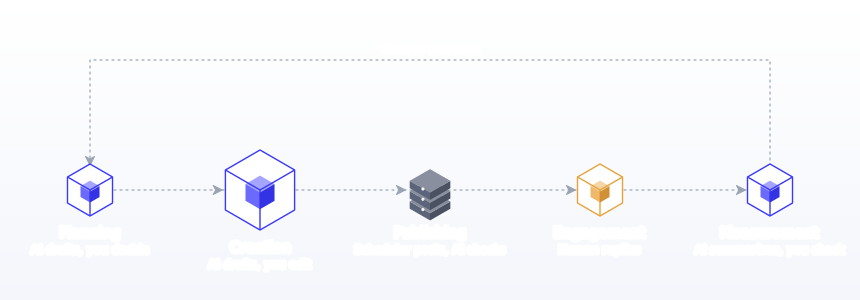
Another way to decide where AI belongs is to walk through the five stages every post passes through. AI's value is uneven across them.
Research and planning
AI is a useful thinking partner here: turning goals and dates into a draft plan, suggesting angles on a pillar, spotting a week that is too promotional. It cannot tell you what your business needs, so treat its plan as a first draft for you to cut and reorder. Ground the plan in a real strategy; our guide to creating a social media strategy covers the inputs.
Creation
This is where most of the time savings live: drafts from your material, hooks, platform versions, carousel outlines, video scripts, alt text. It is also where most of the quality risk lives, because the gap between a usable draft and a good post is your edit.
Publishing
Scheduling is mostly mechanical, and the mechanical parts are where tools help: putting posts on a calendar, checking each version against its platform's limits, catching a missing image before Pinterest rejects the post. Postprism handles publishing to each network; AI can help by flagging problems in drafts before you schedule them.
Engagement
Replies, comments, direct messages and community moments are human work. AI can draft an FAQ of answers to recurring questions, which saves typing, but each reply should be read and personalised. The engagement lift from replying, which Buffer measured across every network, comes from people feeling heard.
Measurement
AI is good at turning a table of numbers into plain-language observations and suggesting what to test. It is also capable of confidently misreading the table. Ask it to cite the numbers behind each observation, then check them. Our metrics and KPIs guide helps you ask better questions.
| Stage | AI role | Human role | Check before moving on |
|---|---|---|---|
| Research and planning | Draft plans, angles, balance checks | Priorities, cuts, dates | Does the plan serve this quarter's goal? |
| Creation | Drafts, versions, hooks, alt text | Specifics, opinions, final wording | Could a competitor have posted this? |
| Publishing | Limit and media checks on drafts | Approval and scheduling | Is every version correct for its network? |
| Engagement | FAQ drafts for common questions | Every reply | Would you say this face to face? |
| Measurement | Summaries and test ideas | Decisions | Do the numbers match the source? |
Choosing AI tools by type
"Which AI tool should I use?" has a different answer for each job. Most teams end up with two or three tools that each do one thing well.
| Need | Tool type | What to look for |
|---|---|---|
| Plan and draft in conversation | A general assistant such as Claude or ChatGPT | Projects or saved instructions for your voice; a connection to your scheduler |
| Adapt posts per platform in the composer | A scheduler with optional built-in AI | Brand voice profiles; editable versions per network |
| Create visuals | An image tool tuned for social formats | On-brand styles; correct aspect ratios; clear rights |
| Automate drafts from other systems | An automation platform calling your scheduler's API | Drafts by default; per-integration keys you can revoke |
| Summarise results | An assistant that reads your analytics or exports | Access to real data, not guesses |
For automation, Postprism's REST API (on the Freelancer and Agency plans) lets tools such as n8n create drafts from an RSS feed, a form or a spreadsheet row; the n8n guide shows the setup. For conversational work, the MCP server connects assistants on every plan.
Prompts that produce better posts
Good prompts for social media share four ingredients. Leave one out and quality drops noticeably.
- Real material. Notes, transcripts, data, customer questions. "Using only the notes below" stops the model filling gaps with invention.
- Role and audience. "You are writing for operations managers at mid-sized logistics firms" focuses tone and vocabulary.
- Format constraints. Platform, length, structure, number of options, hashtag policy.
- What to do instead. Anthropic's guidance is to tell the model what to do rather than what not to do: "Write in short, plain sentences like the examples" beats "Don't sound corporate".
Example: "Using only the call notes below, write three LinkedIn post options for operations managers at mid-sized logistics firms. Each under 1,200 characters, opening with a specific detail from the notes, ending with a question. Write in short, plain sentences like the example posts. List any claim you made that is not in the notes."
An AI use policy for teams and agencies
Once more than one person uses AI on the same accounts, write the rules down. A one-page policy prevents most problems and makes onboarding easier.
| Policy area | Example rule |
|---|---|
| Allowed uses | Ideas, drafts from approved material, platform versions, alt text, summaries |
| Not allowed | Reviews or testimonials, replies sent without reading, claims not in source material |
| Data | No client confidential data in tools without an agreement that covers it |
| Images | Photorealistic AI images of people or products need sign-off and labels where required |
| Review | Every post approved by a named person before scheduling |
| Assistants with tool access | Drafts only; scheduling done by a person; access revoked when a project ends |
| Disclosure | Follow platform labels; EU public-interest text needs human review and editorial responsibility |
Agencies should keep one voice document and example set per client, separate workspaces per client, and an approval step the client can see. If your team uses Postprism, editors' posts go to an approval queue and owners or admins approve them, whichever way the draft was written.
Guardrails that keep quality high
Feed it real material
AI writes best from your notes, transcripts, customer questions and data. Topics alone produce averages.
Give it your voice with examples
Anthropic's prompting guidance calls examples "one of the most reliable ways to steer" output and suggests 3 to 5. Three of your best posts teach more than a paragraph of adjectives. In Postprism, brand voice profiles keep that context with every adaptation.
Edit every draft
Rewrite the first line, add one specific detail, cut one generic sentence. That three-step edit takes two minutes and changes how a post reads.
Check facts, rights and labels
Verify every number and name. Do not use AI to write reviews or testimonials: the FTC's action against Rytr centred on AI-generated reviews that "often included specific details unrelated to users' input". Label realistic AI media where the platform asks.
Keep a human approval step
Whether a draft comes from a person, a built-in AI feature or an assistant connected through MCP, the same person approves it. Postprism's approvals and roles make that a step in the workflow rather than a good intention.
A weekly AI-assisted workflow
| Task | Who does it | Time |
|---|---|---|
| Collect raw material: notes, questions, wins, links | You, through the week | A few minutes a day |
| Choose the week's ideas from your pillars | You | 10 minutes |
| Draft core posts from the raw material | AI, then you edit | 30 minutes |
| Adapt each post for every platform | AI suggests, you check | 15 minutes |
| Create visuals and alt text | You with templates, AI for briefs and alt text | 20 to 40 minutes |
| Review, attach media and schedule the week | You | 15 minutes |
| Reply to comments and messages | You, daily | 10 to 15 minutes a day |
| Monthly results summary | AI summarises, you decide | 30 minutes |
Scheduling the week in one sitting is what turns AI's time savings into consistency. Our guide to batch content creation covers how to run that session.
Where AI fits in Postprism
Postprism is a social media scheduler first: you plan on a content calendar and publish to six networks. AI is optional and sits in four places:
- In the editor. Write your post, then let AI content adaptation suggest a version for each platform in your brand voice. You edit each version before scheduling.
- In bulk scheduling. The AI schedule assistant turns a chat description of the posts you want into rows with dates, times and platforms, which you review in a preview table before anything is scheduled.
- From your own assistant. Claude, ChatGPT, Cursor and Gemini CLI can connect to the Postprism MCP server and save drafts or scheduled posts on your calendar. See our AI agents guides.
- For visuals. Our Prismatic tool generates on-brand images for social formats.
The step-by-step method: introduce AI in 30 days
- Day 1: write your voice rules. Words you use and avoid, sentence length, emoji policy, claims you cannot make.
- Day 2: pick five example posts. Your best real posts across platforms, kept in one document.
- Day 3: baseline. Note last month's posts per week, time per post and median engagement.
- Week 1: adaptation only. Write core posts yourself; use AI only for platform versions and alt text.
- Week 2: drafting from material. Let AI draft educational posts from your notes; keep stories and opinions human.
- Week 2: add a check step. Ask AI to list every factual claim in each draft so you can verify them.
- Week 3: batch. Draft, edit and schedule the whole week in one session.
- Week 3: connect your assistant (optional). If you use Claude or ChatGPT, connect it to your scheduler and ask for drafts, not scheduled posts.
- Week 4: report. Ask AI to summarise results, then verify the numbers.
- Day 30: decide. If time per post fell and engagement held, keep the workflow and widen it. If engagement dropped, look at the edit step first.
Worked example: AI across one post's life
| Stage | What AI did | What the person did |
|---|---|---|
| Idea | Nothing | A bookkeeper notices three clients made the same budgeting mistake this month |
| Angles | Suggested ten angles | Picked "the spreadsheet tab nobody reads" because it is specific and true |
| Draft | Drafted from her voice-memo transcript | Rewrote the opening, added an anonymised client detail, cut a generic paragraph |
| Hooks | Offered eight first lines | Combined two into her own |
| Adapt | Suggested X, Threads and Bluesky versions | Checked each for tone and limits |
| Visual | Wrote an image brief and alt text | Made the graphic in her template and shortened the alt text |
| Schedule | Nothing | Scheduled all versions for Tuesday morning |
| Replies | Nothing | Replied to every comment personally |
| Review | Summarised the month's analytics | Made "mistakes clients make" a monthly series |
What the evidence says about AI and performance
The data is more encouraging than the backlash suggests, with important caveats. Buffer's 2024 study found AI-assisted posts ahead on every network measured, with the largest gap on Threads (11.11% against 5.56%) and marginal differences on LinkedIn (6.85% against 6.22%) and YouTube. A 2025 paper in Public Relations Review by Huang and Zhou reports that GPT-4-written posts outperformed human-written messages on engagement in a dataset of Fortune 500 Twitter posts, and that even trained PR professionals could not match it. Neither study shows that unedited, generic AI posts win; Buffer's own hypothesis is that AI helps people post more often. Read alongside Pew's findings on public concern, the consistent message is to use AI to post more of your own ideas, more consistently, and to keep accuracy and replies human. Our article on whether AI content performs goes deeper and includes a test you can run.
AI images on social media: what to know
Images raise different questions from text, because platforms can detect and label them, and because a picture makes a stronger claim than a sentence. Three questions decide whether an AI image is a good idea for a post.
Is it realistic?
Illustrations, abstract backgrounds, 3D icons and obviously stylised graphics rarely cause problems. Photorealistic images of people, places or events are the ones platforms label and the ones audiences feel misled by. YouTube's policy is a useful line: non-realistic and animated AI content may carry a label in the description, while photorealistic content may carry one in the player itself.
Does it represent your product honestly?
An AI image of a dish you do not serve, a room you have not renovated or a product feature that does not exist is a problem whatever the label says. Use AI imagery for concepts and backgrounds; use real photos for what customers will actually buy.
Is the metadata intact?
Many AI image tools attach C2PA Content Credentials. TikTok and LinkedIn read them, and Meta looks for industry-standard indicators. Stripping metadata to avoid a label is not a strategy; if the image is realistic enough to need a label, disclose it.
| Image type | Risk | Recommendation |
|---|---|---|
| Abstract background or texture | Low | Fine for quote cards and announcements |
| Illustration or 3D icon | Low | Good for explainers and carousels |
| Stylised product scene | Medium | Use for concepts; keep real photos for listings and menus |
| Photorealistic people or places | High | Avoid for brand accounts, or label clearly |
| Edited real photo (background cleanup) | Low to medium | Fine if it does not change what the photo shows |
AI and accessibility
One of the least controversial uses of AI on social media is making posts accessible. Alt text, video captions and plain-language summaries all take time that small teams rarely have. AI drafts of alt text are usually too long; the W3C guidance favours short descriptions of the essential information, so trim the draft to what matters for this post. For video, check auto-generated captions for names and numbers before publishing.
Measuring whether AI is actually helping
Run the comparison you would run for any process change: same accounts, same posting frequency, a month before and a month after. Track these four numbers.
| Metric | What good looks like | What a problem looks like |
|---|---|---|
| Minutes per published post | Down by a third or more | Flat, because editing takes longer than writing |
| Median engagement rate | Steady or up | Down, usually a sign of generic drafts |
| Posts published versus planned | Closer to 100% | Unchanged, so the time saved went elsewhere |
| Corrections after publishing | Zero | Any, which means the fact check is too light |
Signs you are over-relying on AI
- You cannot remember writing last week's posts.
- Your posts no longer mention customers, numbers or events by name.
- Replies to your comments are the same polite sentence.
- Engagement per post is falling even though you post more.
- Colleagues or clients say your posts "sound different".
If two or more of these apply, pull back for a fortnight. Write the core posts yourself, use AI only for platform versions and alt text, and reintroduce drafting once your own voice is back in the feed. The aim was never to remove yourself from your social media; it was to remove the parts that did not need you, so the parts that do get more of your attention.
Common mistakes when using AI for social media (and fixes)
- Prompting from a bare topic. Generic in, generic out. Fix: always paste real material.
- Describing your voice instead of showing it. Fix: give 3 to 5 example posts.
- Publishing unedited drafts. Fix: rewrite the first line, add a specific, cut a generic sentence.
- Same text on every network. Fix: ask for a version per platform with its norms and limits.
- Trusting numbers. AI states wrong figures confidently. Fix: verify every number against the source.
- AI-written reviews or testimonials. Fix: never; use real customer words with permission.
- Unlabelled realistic AI media. Fix: follow each platform's disclosure rules for photorealistic AI images and video.
- Automated replies. Fix: reply personally; use AI only to draft an FAQ of answers.
- Rewriting other people's posts. This risks originality penalties and rights issues. Fix: use AI on your own material.
- Letting an assistant publish directly from day one. Fix: drafts first, with a human approval step.
- Measuring volume. More posts is not the goal. Fix: track time per post and engagement per post together.
- Skipping consistency. AI saves time that then goes nowhere. Fix: schedule a week at a time so the savings turn into a steady rhythm.
For specific wording, our 50 AI prompts for social media are built around real material and a human edit, and our guide to using Claude for social media walks through one assistant end to end.
Plan Your Whole Strategy in One Calendar
Write it yourself or let optional AI suggest platform versions, then schedule everything to all 6 networks from one calendar.

Frequently Asked Questions
Is it OK to use AI for social media posts?
Yes, as long as the posts are accurate, specific and genuinely yours. Platforms label realistic AI-generated images and video rather than AI-assisted writing, and YouTube lists idea generation, captions and script help as uses that need no disclosure. Keep a human edit and approval step, and never use AI to write reviews or testimonials.
Can people tell when social media posts are written by AI?
Often, when posts are generic: stock phrases, three-part lists, no names or numbers. Edited posts built from real material are much harder to spot. With most long LinkedIn posts in one 2026 sample classified as likely AI, sounding specific and human is a real advantage.
Does AI-generated content perform worse on social media?
Not necessarily. Buffer's analysis of 1.2 million posts found AI-assisted posts at a 5.87% median engagement rate against 4.82% for human-only posts, though Buffer notes the most active users may be the ones using AI. Specificity and editing matter more than the tool.
Do I need to label AI content on social media?
Label realistic AI-generated or meaningfully altered images, video and audio where the platform requires it, as Meta, YouTube and TikTok do. In the EU, AI-generated text on matters of public interest needs disclosure from 2 August 2026 unless it has had human review with someone holding editorial responsibility.
What is the best AI tool for social media?
It depends on the job: a general assistant such as Claude or ChatGPT for planning and drafting, a scheduler with optional built-in adaptation and brand voice for platform versions, and an image tool for visuals. Postprism combines the scheduler with optional AI and connects to your assistant through MCP.
Will AI replace social media managers?
It replaces some tasks, not the role. Strategy, judgement, relationships, community management, approvals and first-hand insight remain human work, and they are what separates good accounts from generic ones.
How do I keep my brand voice when using AI?
Give the AI written voice rules and 3 to 5 real example posts, edit every draft, and record the edits you keep making so you can add them to the rules. Brand voice profiles in your scheduler keep that context consistent across every adaptation.
Can AI help me post on more platforms without more work?
Yes. Adapting one post into native versions for each platform is one of AI's most reliable jobs. Combined with a scheduler that publishes to every network from one calendar, you can cover more platforms in about the same time, as long as you check each version before it goes out.