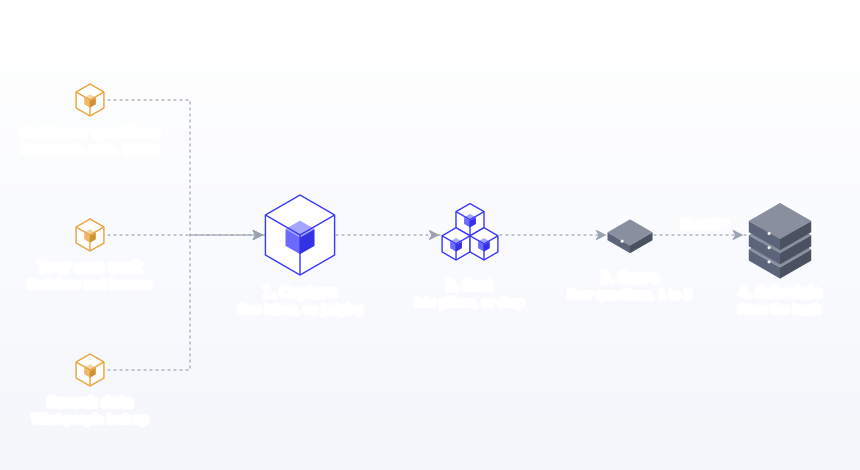
The simplest way to organize social media content ideas is a four-stage system: capture every idea in one inbox, sort it into a content pillar, score it on goal fit, audience interest, originality and effort, then move the best ones onto your calendar in a weekly planning session. One idea bank, one set of tags and one 20-minute weekly review is all you need.

Ideas are rarely the bottleneck. They arrive in the shower, in client calls, while reading comments or scrolling competitors. The problem is that they live in five different places, and when the posting slot arrives you cannot find any of them. This guide shows how to build an idea system that takes a few minutes a week to maintain and makes planning almost mechanical. It covers the four stages, a database layout you can copy, a scoring rubric, 15 reliable idea sources, how to organize by tool, team, platform and timing, two worked examples and the mistakes that turn an idea bank into a graveyard.
Key findings
- Originality is now a ranking issue. Since Meta's July 2025 update on unoriginal content, Facebook reduces distribution for accounts that repeatedly reuse others' content without meaningful changes, and lowers the reach of duplicate videos.
- Audiences want original ideas, not trend-chasing. In the 2025 Sprout Social Index (4,044 consumers), about half said original content makes their favourite brands stand out, and a third said jumping on viral trends is embarrassing for brands.
- Trends have a short shelf life. The same survey found 27% of consumers think trend-jumping only works within 24 to 48 hours of a trend's lifespan, which is why reactive ideas need their own fast lane.
- Creative fatigue is rising. Over a third of the 900 social practitioners in that Index said they feel more creative fatigue than a year ago, and 94% said they feel they have to be "chronically online" to do the job.
- Consistency depends on a full bank. In Buffer's 26-week study of 100,000+ users, people who posted in 20 or more weeks earned about 450% more engagement per post than those who posted in 4 weeks or fewer. You cannot post every week without ideas waiting.
- Format fit matters per network. Buffer's format analysis found carousels lead on Instagram (6.9% median engagement of reach), images on Facebook (5.20%) and text on X (3.56%), so tagging each idea with its best format pays off.
- Search data is a free idea source. Google says autocomplete predictions reflect real searches, and Pinterest Trends shows search and save trends going back up to two years.
What's changed about content ideas in 2026
Original ideas are rewarded, recycled ones are not
Meta's unoriginal content policy says reshares, reaction videos and trend participation are fine when you add your own commentary, but simply stitching clips together or adding a watermark does not count. That shifts the value of an idea bank from "things we could repost" to "things only we can say". Your own customer questions, data, stories and opinions are worth more than ever.
Every post gets judged on its own merit
TikTok's explanation of its For You feed says neither follower count nor previous high-performing videos are direct factors in recommendations. Instagram's Feed ranking, as described in Meta's transparency centre, predicts how likely each person is to enjoy, share or spend time on each post. When each post competes on its own, the quality of the idea matters more than the size of the account.
AI makes sorting cheap, judgement still matters
AI assistants can tag, group and expand a week of raw ideas in seconds. What they cannot do is know which customer question your audience is really asking. The scoring stage below keeps that judgement with you.
More networks per idea
With LinkedIn, Instagram, Facebook, Threads, TikTok, YouTube, Bluesky, Pinterest and X all in play, one strong idea can fill five or six slots. Organizing ideas now means tracking platform fit, not just topic.
The four-stage system at a glance
| Stage | When | Time | Output | Rule |
|---|---|---|---|---|
| 1. Capture | Any time | Under 15 seconds per idea | Raw ideas in one inbox | One place, no judging |
| 2. Sort | Weekly | 5 to 10 minutes | Tagged ideas in the bank | Every idea gets a pillar or is dropped |
| 3. Score | Weekly | 5 minutes | A ranked shortlist | Score on four questions, 1 to 3 each |
| 4. Schedule | Weekly, in your batching session | 5 minutes to pick, then batch | Ideas on the calendar | Fill slots from the bank, never from scratch |
Stage 1: Capture everything in one inbox
The capture rule is simple: one place, always within reach, no friction. If adding an idea takes more than 15 seconds, you will stop doing it. Good options include a note pinned to your phone's home screen, a dedicated channel in your team chat, or a single Notion or Airtable database with a quick-add form.
Capture raw ideas without judging them. The quality filter comes later. A good capture entry has three parts:
- The idea in one line: "Customers keep asking whether oat milk changes the taste of espresso."
- The source: "Counter conversation, Tuesday."
- Any asset: a photo, screenshot, voice memo or link, if you have one.
For teams, make the inbox shared. Sales calls, support tickets and product updates are some of the richest idea sources, and the people who hear them are rarely the people who post. A ten-second message in a shared channel, "Three customers asked about X this week", is worth more than an hour of brainstorming.
Capture tools compared
| Capture method | Speed | Best for | Watch out for |
|---|---|---|---|
| Phone note pinned to the home screen | Fastest | Solo creators and founders | Becomes a long unsorted list; empty it weekly |
| Voice memo | Fast | Ideas while walking or driving | Needs transcribing; do it in the weekly sort |
| Team chat channel | Fast | Teams where sales or support hear the questions | Ideas get buried in threads |
| Form linked to a database | Medium | Teams and agencies | Keep the form to three fields or nobody fills it |
| Screenshots folder | Fast | Visual inspiration | Add a one-line note or you will forget why you saved it |
| Draft posts in your scheduler | Medium | Ideas that are almost posts already | Keep raw ideas out; drafts should be near-ready |
Stage 2: Sort ideas into pillars
Once a week, empty the inbox into your idea bank and tag each idea with a content pillar. Pillars are the three to five recurring themes your account covers. If an idea does not fit any pillar, that is useful information: either it is off-strategy and should be dropped, or your pillars need updating. Our guide on how to create a social media strategy covers choosing pillars.
Add a few more tags while you are there:
| Tag | Options | Why it helps |
|---|---|---|
| Pillar | Teach, Show, Prove, Join, Offer (or your own) | Keeps the mix balanced |
| Format | Text, image, carousel, short video, long video, Pin | Tells you what production is needed |
| Platforms | Where it would work best | Lets you plan adaptations |
| Timing | Evergreen, seasonal, reactive | Evergreen ideas fill your buffer; reactive ideas need a fast lane |
| Effort | Quick, medium, big | Lets you match ideas to available time |
| Source | Customer, sales, team, search, own data, news | Shows which sources produce your best posts |
| Status | New, shortlisted, scheduled, published, retired | Stops you posting the same idea twice by accident |
Use fixed values for every tag. In Google Sheets, a dropdown from a range keeps the options on one settings tab; in Notion, select and multi-select properties do the same job.
Stage 3: Score ideas before you commit
Not every idea deserves a slot. A quick score helps you choose objectively when the bank is full. Rate each shortlisted idea from 1 to 3 on four questions and add them up.
| Question | 1 | 2 | 3 |
|---|---|---|---|
| Does it serve our current goal? | Loosely | Somewhat | Directly |
| Would our audience care? | Maybe | Probably | We have heard them ask |
| Can we say something specific or original? | Generic | A fresh angle | Our own data, story or opinion |
| Is the effort worth it? | Big effort for a small payoff | Balanced | Quick to make, high value |
Ideas scoring 10 to 12 go straight onto the calendar. Ideas at 7 to 9 stay shortlisted. Anything below 7 can be retired or reworked. The originality question matters most. Meta's policy on unoriginal content and the Sprout Index finding that about half of consumers value original content both point the same way: first-hand material is something only you can post.
A useful tie-breaker: if two ideas score the same, pick the one that came from a real customer. "We have heard them ask" is the strongest evidence of interest you will ever get.
Stage 4: Schedule from the bank, not from scratch
In your weekly planning session, fill each slot on the calendar from the bank. If Tuesday is a Teach slot, filter the bank by Teach, pick the highest-scoring idea that fits the week, and write it. Planning becomes a selection task instead of a creative crisis. Then write, adapt for each network and schedule the week in one batch, as described in our batch content creation guide.
The handover from bank to calendar is where many systems break: the idea is chosen but the post never goes out. Moving shortlisted ideas into a scheduler closes the loop. In Postprism, drafts sit on the content calendar next to scheduled and published posts, and the kanban board shows each post as a draft, scheduled or published, so the bank feeds straight into a plan that publishes itself across all 6 networks.
A simple idea bank database you can copy
If you use Notion, Airtable or a spreadsheet, a single table with these fields is enough.
| Field | Type | Example |
|---|---|---|
| Idea | Text | Does oat milk change espresso taste? |
| Source | Select | Customer |
| Pillar | Select | Make it better at home |
| Format | Multi-select | Short video, carousel |
| Platforms | Multi-select | Instagram, TikTok, Threads |
| Timing | Select | Evergreen |
| Effort | Select | Quick |
| Score | Number | 11 |
| Status | Select | Shortlisted |
| Owner | Person | Sam |
| Scheduled date | Date | Tue 21 Oct |
| Link to post | URL | Link once published |
Create four views of the same table: an inbox filtered to status New, a shortlist sorted by score, a calendar by scheduled date, and an archive of published ideas you can revisit. Notion supports this directly: its help page on views lists Table, Board, Timeline, Calendar, List, Gallery and Chart layouts over one database, with filters you can save for everyone or just yourself. A calendar view needs a date property, as Notion's calendar help notes.
15 reliable sources of content ideas
An idea bank needs feeding. These sources keep it full without forcing creativity. The "yield" column is our rough guide to how many usable ideas each source tends to produce per month for a small business.
| Source | What to look for | Typical pillar | Yield |
|---|---|---|---|
| Customer questions | Anything asked twice | Teach | High |
| Sales objections | Reasons people hesitate | Teach, Prove | High |
| Support tickets | Recurring problems | Teach | High |
| Comments on your posts | Follow-up questions and disagreements | Join, Teach | Medium |
| Your best past posts | New angles on proven topics | Any | Medium |
| Work in progress | Process, drafts, mistakes | Show | High |
| Results and case studies | Before and after, numbers | Prove | Medium |
| Industry news | Changes your audience will feel | Teach, Join | Medium |
| Competitor gaps | Questions nobody answers well | Teach | Medium |
| Search suggestions | Autocomplete for your topic | Teach | High |
| Google Trends | Rising and seasonal interest | Teach, Offer | Low to medium |
| Pinterest Trends | What people search and save | Teach, Offer | Medium for visual niches |
| Long-form content | Blog posts, podcasts, webinars | Teach | High |
| Seasonal moments | Holidays, events, seasons | Offer, Show | Medium |
| Your team | Expertise and daily work | Show, Teach | Medium |
Using search data well
Google's autocomplete help page explains that predictions are based on real searches, adjusted for language, location and rising interest. Type your topic followed by "how", "why", "best" or "vs" and you get a list of real questions. Google Trends shows relative interest on a 0 to 100 scale rather than absolute search counts, so use it to compare topics and spot seasons, not to size an audience. Pinterest Trends adds what people save to boards, which is useful for visual and seasonal niches, and its Moments feature shows when interest in an event builds and peaks.
For a longer list organized by format and network, see our collection of social media content ideas.
Organizing ideas by timing
Timing decides which lane an idea goes into. Mixing them is how reactive ideas go stale in the bank and evergreen ideas get rushed.
Evergreen ideas
Tips, explainers, customer stories and opinions that are true any month. They form most of the bank and all of your buffer: the two to four finished posts you keep in reserve for bad weeks. Our guide on how to stay consistent on social media explains how the buffer works.
Seasonal ideas
Holidays, seasons, industry events and annual dates. Tag them with the month, review them in your monthly planning, and schedule them two to four weeks ahead. Pinterest Trends' Moments are a good prompt for which seasonal topics are building.
Reactive ideas
News, trends and conversations that matter this week. They need a fast lane: capture, score and post within a day or two, or retire them. The Sprout Index finding that 27% of consumers think trend-jumping only works within 24 to 48 hours is a good rule of thumb. If a reactive idea has been in the bank for a week, it is probably dead.
Organizing ideas by platform fit
Some ideas suit one network naturally, and forcing them elsewhere wastes effort. Tag the primary platform in your bank, then decide adaptations during batching.
| If the idea is... | Lead network and format | Adapt to |
|---|---|---|
| Needs motion to make sense | TikTok or Instagram short video | YouTube Shorts, Facebook video |
| A list or a process | Instagram carousel | LinkedIn image post, Threads text |
| An opinion or a lesson | LinkedIn text post | Threads, Bluesky, X |
| A reference people will want later | Pinterest Pin or Instagram carousel | LinkedIn image post |
| A quick reaction | X, Threads or Bluesky | Usually none |
| A deep tutorial | YouTube video | Short clips, a carousel summary |
| A local update | Facebook Page and Instagram | None |
Buffer's format data backs up the broad pattern: carousels lead on Instagram, video leads on Threads and Pinterest, images lead on Facebook and text leads on X. Our guide to adapting content for each platform covers the rewriting itself.
How many ideas do you need? Sizing the bank
The right size for your idea bank depends on how often you post. Work backwards from your weekly slots, then keep about four weeks of shortlisted ideas ready. Remember that one strong idea usually fills two or three slots once you adapt it for several networks.
| Posting plan | Slots per week | Unique ideas per week | Shortlist to hold (4 weeks) |
|---|---|---|---|
| Solo: LinkedIn 2, Instagram 2 | 4 | 2 to 3 | 10 to 12 |
| Local business: Instagram 3, Facebook 3 | 6 | 3 | 12 |
| B2B team: LinkedIn 4, Instagram 3, Threads 5 | 12 | 5 to 6 | 20 to 24 |
| Consumer brand: 5 networks, daily | 30+ | 10 to 12 | 40 to 48 |
| Agency: per client | As contracted | About half the slots | Four weeks per client |
To set the number of slots, use the frequency research. Buffer's Instagram study of 2.1 million posts found 3 to 5 posts a week is where follower growth starts to pick up. Its LinkedIn study of more than 2 million posts found 2 to 5 posts a week added 1,182 impressions per post compared with posting once. Sprout Social's benchmark data puts the industry average at about one LinkedIn post a day and one Pinterest Pin a week. Pick a cadence you can sustain, then size the bank to match. Our guide on how often to post on social media has the full table.
Organizing ideas by industry
The four stages stay the same in every industry. What changes is where the best ideas come from and which pillars carry the most weight.
Restaurants and cafes
Best sources: the counter, the kitchen and the menu. Capture photos during service and questions from regulars. Pillars often look like menu, people, behind the scenes and events. Our guide to social media for restaurants has a full weekly plan.
Ecommerce
Best sources: product reviews, return reasons and customer service emails. Every return reason is an idea for a "how to choose" post. Tag each idea with the product it relates to so you can check stock before scheduling. See social media for ecommerce.
Real estate
Best sources: buyer and seller questions, local market changes and listings. Listings are reactive ideas with a short life; neighbourhood guides and buying explainers are evergreen. Our real estate guide covers both.
B2B software and services
Best sources: sales calls, support tickets, product releases and your own data. One customer question asked by four prospects is worth more than any brainstorm, as the HR software example above shows.
Professional services
Best sources: client questions (anonymised), regulation changes and common mistakes. Add a "needs expert review" tag, because accuracy matters more than speed in legal, finance and health content.
Creators and educators
Best sources: comments, questions from your community and your own learning. Comment sections are an idea bank that refills itself; capture the best questions weekly.
Measuring which idea sources work
The "source" tag in your bank pays off after a couple of months. Once each published idea links to its post, you can compare results by source: do posts from customer questions beat posts from industry news? In most accounts we have seen, first-hand sources win, but your data is the only answer that counts.
For posts that link to your site, tag each link with UTM parameters so you can see what visitors did. Google's Analytics help page recommends always setting utm_source, utm_medium and utm_campaign, and notes that values are case sensitive. You can use utm_content to record the idea source, for example utm_content=customer-question. Our free UTM builder keeps the tags consistent.
Organizing ideas for teams and clients
When several people contribute, add three rules.
Every shortlisted idea has an owner
Ideas without an owner sit in limbo. As soon as an idea is shortlisted, it gets a name.
One bank per brand
Agencies should keep one bank per client so ideas do not leak between accounts. A "client-suggested" tag helps, because ideas that come from the client get approved faster. Our agency social media workflow guide covers how idea banks plug into client approvals.
Ideas flow into review, not straight to publishing
For teams, the bank feeds drafts, drafts go to review, and only approved posts are scheduled. In Postprism, workspaces keep each brand's drafts separate, Editors submit posts for review, and Owners or Admins approve or request changes. See team collaboration for how roles work.
| Team type | Capture | Sort and score | Who picks |
|---|---|---|---|
| Solo | Phone note | You, weekly | You |
| Small in-house team | Shared chat channel | Social lead, weekly | Social lead, with a monthly team review |
| Marketing department | Form linked to a database | Social team, weekly | Content lead against campaign plan |
| Agency | One form per client | Account manager, weekly | Account manager, approved by client |
How to organize your ideas: a weekly method
- Open the inbox and read every new idea once.
- Merge duplicates. Three entries about the same customer question are one strong idea with three pieces of evidence.
- Tag each idea with a pillar, format, platforms, timing, effort and source.
- Drop off-strategy ideas that fit no pillar, or note them as a possible new pillar.
- Fast-track reactive ideas. Score them now and post within a day or two, or retire them.
- Score the shortlist on the four questions.
- Look at next week's empty slots on your calendar.
- Fill each slot with the highest-scoring idea for that slot's pillar.
- Check the pillar mix for the week. If it is all Teach, swap one for Show or Prove.
- Top up the buffer with one evergreen idea if you used a reserve post last week.
- Move chosen ideas to drafts in your scheduler, ready for the batching session.
- Retire stale ideas older than six months that never made the shortlist.
The whole routine takes about 20 minutes once the habit is set. The first few weeks take longer, because you are clearing a backlog of scattered notes and deciding on pillars and tags. Resist the urge to perfect the setup before you start using it. A rough bank that feeds next week's calendar is worth more than a beautiful database that nobody opens, and the tags will settle naturally after a month of real use.
Worked example: an idea bank for a coffee roaster
Here is what a week of capture and sorting looks like for Juniper Roasters, with pillars of Bean to cup, Make it better at home, Regulars and This week at the counter.
| Raw idea | Source | Pillar | Format | Score | Decision |
|---|---|---|---|---|---|
| Customers ask if oat milk changes espresso taste | Counter, Tuesday | Make it better at home | Short video | 11 | Schedule next week |
| New Ethiopian single origin arriving | Supplier email | Bean to cup | Carousel | 10 | Schedule with launch |
| A regular who has visited every weekday for a year | Barista | Regulars | Photo post, with permission | 10 | Ask permission, then schedule |
| Coffee meme trending this week | Scrolling | None | Image | 5 | Retire |
| How we clean the grinder | Closing shift | Bean to cup | Short video | 8 | Shortlist |
| Autumn menu tasting notes | Owner | This week at the counter | Carousel | 9 | Shortlist for October |
| "Pour over at home" searches rising | Google autocomplete | Make it better at home | Pin and carousel | 10 | Schedule in two weeks |
Seven raw ideas produced four posts for the calendar, two strong shortlisted ideas and one sensible retirement. The meme fitted no pillar, which is exactly the signal the system is designed to catch, and reposting a meme someone else made is the kind of unoriginal content Meta now discourages. The whole sort took about 15 minutes.
Worked example: a B2B software team
Priya leads marketing at a 40-person HR software company. Her bank is a Notion database fed by a form that sales and support can fill in under a minute. In one week it collected:
- Four sales notes about prospects asking how the product handles holiday accrual across countries.
- Two support tickets about exporting payroll reports.
- A product manager's note about a new approvals feature shipping next month.
- A customer success story with permission to share.
The four sales notes merged into one idea scoring 12: a LinkedIn post explaining holiday accrual across countries, adapted into an Instagram carousel and a short video. The export tickets became a how-to post. The feature note went into the campaign timeline for launch month. The success story became a LinkedIn post and a Facebook post. One week of capture filled two weeks of slots, and every post came from something a real customer said.
Turning one strong idea into several posts
High-scoring ideas deserve more than one post. When you move an idea onto the calendar, ask whether it can become a series or several formats:
- A question can become a short video answer, a carousel explaining it in more depth and a Threads post asking others how they handle it.
- A customer story can become a LinkedIn post, an Instagram carousel and a quote graphic.
- A product update can become an announcement, a how-to and a behind-the-scenes clip.
Our guide to repurposing content for social media covers the mechanics. Adapting each version to the network, rather than pasting the same text everywhere, is what keeps repurposed content original in the sense Meta and your audience care about.
Using AI to sort and expand ideas
AI assistants are useful at the sorting stage, as long as you keep the judgement. Paste a week of raw ideas and ask the assistant to tag each with a pillar and format, group duplicates, and suggest two angles for the strongest ones. Then apply your own scoring. AI is good at spotting that three ideas are really the same customer question; it is not good at knowing which one your audience cares about most.
If your assistant is connected to Postprism through its MCP server, you can go one step further: ask it to turn shortlisted ideas into drafts on your calendar for specific dates, then review, edit and schedule them yourself. Our Claude guide shows the setup, and our AI prompts for social media include prompts for grouping ideas and finding gaps.
Reviving old ideas
Your archive of published ideas is a resource. Every quarter, look at your ten best published posts and ask whether each could be updated, extended into a series, turned into a different format or answered from a new angle. Audiences change and grow, and most followers will not have seen a post from six months ago. Postprism's analytics show top-performing posts across networks, which makes picking the ten quick.
The monthly and quarterly idea review
The weekly routine keeps the bank moving. Two longer reviews keep it healthy.
Monthly: 30 minutes
- Check the pillar balance. Count published posts by pillar. If one pillar has carried the month, look for shortlisted ideas in the others.
- Check source quality. Which sources produced the posts that did best? Ask the people closest to those sources for more.
- Plan seasonal ideas. Pull next month's seasonal ideas forward and schedule them two to four weeks ahead.
- Clear the shortlist. Any idea that has been shortlisted for three months without being chosen is probably weaker than it looked. Retire it or rework it.
Quarterly: one hour
- Revisit pillars. If many dropped ideas pointed at the same missing topic, add a pillar. If a pillar keeps producing low scores, retire it.
- Revive winners. Take the ten best published posts and plan a new angle, format or update for each.
- Prune the archive. Retire stale raw ideas older than six months.
- Refresh capture. Remind sales, support and the wider team where ideas go. Capture habits fade unless someone asks.
Put both reviews in your calendar as recurring events. Like the weekly batching session, they only happen if they are booked.
Common mistakes when organizing content ideas
- Several capture places. If ideas go into three apps, you will only check one. Fix: one inbox, pinned where you will see it.
- Judging during capture. Filtering too early kills ideas that only needed a better angle. Fix: capture everything, judge weekly.
- Capture that takes too long. A ten-field form gets skipped. Fix: three fields at capture, everything else at sorting.
- No pillars. Without them, ideas are a random list. Fix: three to five pillars, and drop ideas that fit none.
- Free-text tags. "IG", "Insta" and "Instagram" break filters. Fix: fixed dropdown values.
- Reactive ideas in the slow lane. They are dead by the time they are scheduled. Fix: score and post within 48 hours, or retire.
- Relying on reposts. Reusing others' content without adding anything risks reduced reach under Meta's policy. Fix: add your own commentary, data or story.
- No retirement. A bank full of stale ideas is as useless as an empty one. Fix: retire ideas older than six months that never made the shortlist.
- Not tracking what was published. You repeat yourself or forget winners. Fix: mark ideas as published and link the post.
- Planning without scheduling. An idea on a list is not a post. Fix: shortlisted ideas move to drafts in your scheduler every week.
- One shared bank for all clients. Ideas and confidential details leak across brands. Fix: one bank per client.
- Letting AI pick. It cannot tell which question your customers really ask. Fix: AI tags and expands; you score and choose.
Plan Your Whole Strategy in One Calendar
Move your best ideas from the bank onto one calendar and let Postprism publish them on time across all 6 networks.

Frequently Asked Questions
What is the best app to organize social media content ideas?
The best app is the one you will open every time an idea appears. A phone note, a Notion or Airtable database, or a team chat channel all work for capture. What matters more is having one place, a weekly sorting routine and a clear handover from the bank to your scheduler.
How many content ideas should I keep in my idea bank?
Aim for at least four weeks of shortlisted ideas, plus an open pool of raw ideas. That is enough to plan comfortably without the bank becoming unmanageable. Retire ideas that sit untouched for six months.
How do I categorize social media content ideas?
Start with content pillars, then add tags for format, platforms, timing (evergreen, seasonal or reactive), effort, source and status. Pillars keep the mix balanced, and the other tags let you match ideas to the slots and time you have.
How do I decide which content ideas to post?
Score shortlisted ideas from 1 to 3 on goal fit, audience interest, originality and effort. Post the highest scorers first, favouring ideas where you can add your own data, story or opinion.
How often should I review my content ideas?
Once a week, in a 20-minute session before batching. Empty the capture inbox, tag new ideas, score the shortlist and fill next week's calendar slots. Review reactive ideas daily.
Where do I find content ideas when I am stuck?
Start with customer questions, sales objections and support tickets. Then check comments on past posts, your best past posts, search autocomplete for your topic and long-form content you have already published.
Is reposting other people's content a good way to fill the bank?
Only if you add something. Meta reduces distribution for accounts that repeatedly reuse others' content without meaningful changes. Adding your own commentary or perspective, and crediting the original, is the safe approach.
Can I move ideas from my idea bank straight into Postprism?
Yes. Create drafts on the content calendar, or import a batch from a CSV, XLSX or JSON file with bulk scheduling. If you use an AI assistant connected through Postprism's MCP server, it can create drafts from your shortlist for you to review and schedule.