
The best social media scheduling tool for AI agents in 2026 is Postprism. Its hosted MCP server gives Claude, ChatGPT, Cursor, Claude Code and Gemini CLI 11 tools to list, draft, schedule, edit and analyse posts across 6 networks, it signs agents in with OAuth instead of pasted keys, and any post created without a date lands as a draft on your calendar for a person to review.
That last detail matters more than tool counts. Every serious scheduler now advertises "AI agent support", but the products behave very differently once an assistant is holding the keys. Some publish immediately unless the agent remembers to ask for a draft. Some need an API key pasted into a config file. Some cover twelve networks; some only reach the ones their parent product supports. This guide compares nine options on what an agent can actually do, how it signs in, what happens by default, and what it costs to get started, using each vendor's own documentation and pricing pages as checked in October 2026.
Key findings
- MCP is now the default way in. In December 2025 Anthropic reported more than 10,000 active public MCP servers and 97 million monthly SDK downloads when it donated MCP to the Linux Foundation's Agentic AI Foundation.
- At least six schedulers now run an official MCP server: Postprism, Buffer, Metricool, Hootsuite, SocialPilot and Postiz, plus Ayrshare for developers. Their defaults differ sharply.
- Drafts are not always the default. Postiz's posting tool can "schedule, draft, or immediately publish". Postprism saves any post without a date as a draft.
- Entry prices range from free to $599 a month. Metricool's MCP works on its free plan (capped at 20 scheduled posts), Postprism's MCP starts at $19 a month, and Ayrshare's sub-profiles, which agencies need, require its Business plan from $599 a month.
- The networks still set the hard limits. Instagram caps accounts at 100 API-published posts in a rolling 24 hours, Threads at 250 posts and 500 characters, and no agent can get around them.
- Client apps add their own guardrails. ChatGPT "currently requires manual confirmation in any conversation before write actions can be taken", and Cursor asks for approval before using MCP tools by default.
What's changed in 2026
Twelve months ago, "AI for social media" mostly meant a caption box inside a scheduler. In 2026 the direction reversed: the assistant you already use became the front door, and schedulers raced to give it a way in. Five changes shape this ranking.
The big schedulers shipped MCP
Buffer announced on 10 June 2026 that Claude and ChatGPT can connect "with one click via OAuth" while Perplexity uses a Buffer API key. Hootsuite now runs four separate MCP servers (Perch for publishing, Nest for the inbox, Lumen for listening and Parliament for employee advocacy). SocialPilot published an MCP server with tools such as CreatePost, CreateDraft and DraftList. When the incumbents move, agent access stops being a differentiator on its own and the question becomes how well each one handles it.
MCP got a neutral home
In December 2025 Anthropic, Block and OpenAI co-founded the Agentic AI Foundation under the Linux Foundation, with MCP as a founding project and Google, Microsoft and AWS listed as supporters. For buyers, that lowers the risk of betting on a protocol that might fade. A scheduler with a good MCP server today should keep working with whichever assistant you switch to next year.
Remote servers replaced local installs
The Claude Code documentation now calls HTTP servers "the recommended option for connecting to remote MCP servers" and marks the older SSE transport as deprecated. Hosted servers with OAuth mean nobody on your team has to run a Node process or paste a long-lived API key into a text file.
Client apps added confirmation steps
ChatGPT asks for confirmation before write actions, Cursor asks before tool use, and Gemini CLI only skips confirmations if you set a server's "trust" option, which its docs say to use "only for servers you completely control". Those prompts help, but they are per-action checks inside a chat. They are not a substitute for a draft queue your team reviews on a calendar.
Security guidance caught up
OWASP's top risk for LLM applications is still prompt injection, including "indirect" injection from websites or files the model reads. Its recommended mitigations, human approval for high-risk actions and least privilege, map directly onto what a social media agent needs: drafts by default and access scoped to one workspace.
How we evaluated agent-ready schedulers
We scored each tool on the things that decide whether an agent is useful and safe on a real brand account, not on how many tools a server lists. A server with 30 tools that publishes by default is riskier than one with 11 that drafts by default.
| Criterion | What we checked | Why it matters |
|---|---|---|
| Official MCP server | Hosted by the vendor, documented, current | Community servers break when APIs change and rarely support OAuth |
| Sign-in method | OAuth versus API key in a config or URL | Keys in config files get shared, committed and forgotten |
| Default behaviour | What happens when the agent creates a post with no instructions about timing | The default is what happens on the day someone writes a vague prompt |
| Per-network versions | Can the agent write different copy for each network in one post? | One caption pasted everywhere underperforms and breaks character limits |
| Media | Can the agent upload images and video? | Instagram, TikTok and YouTube posts cannot publish without media |
| Analytics read access | Can the agent read results per post? | Agents that see results can propose the next post with evidence |
| Workspace scoping | Can one agent work across clients without mixing them? | Essential for agencies and freelancers |
| Human review | Do agent posts flow through the same calendar and approvals as human posts? | Review is the safety net when an agent gets a fact wrong |
| Cost of entry | Cheapest plan that includes agent access | Some vendors gate APIs behind plans that cost ten times more |
The 9 best social media scheduling tools for AI agents, ranked
1. Postprism: best overall for AI agents
What it is. Postprism is a social media scheduler that plans and publishes to 6 networks (LinkedIn, X, TikTok, YouTube, Bluesky and Pinterest) from one content calendar. Agents reach it two ways: a hosted MCP server for assistants, and a REST API for scripts and workflow tools. Both call the same API the app uses, so nothing an agent does bypasses your workspace rules.
What an agent can do. The MCP server exposes 11 tools: list_posts, create_post, get_post, update_post, delete_post, upload_media, get_analytics, get_post_analytics, list_platforms, list_workspaces and get_workspace_info. In practice that covers drafting a week of posts with a separate version per network, attaching an image or video (JPEG, PNG, GIF, WebP, MP4 or MOV, up to 10 MB), moving everything from Friday to Monday, reading which of last month's posts performed best, and switching to another client's workspace.
Standout strengths.
- Draft-first by default. A post created without scheduled_at is saved as a draft. The agent has to be told to schedule.
- OAuth sign-in, no keys for assistants. Claude, ChatGPT, Cursor, Claude Code and Gemini CLI sign in with your Postprism account in a browser tab, and every connected assistant can be revoked from the Developer page.
- Real per-network versions. create_post takes base content plus a platform_content field per network, so LinkedIn gets the story and X gets the one-liner.
- Agent drafts are ordinary posts. They appear on the same calendar and kanban board as everything else, and on the Freelancer and Agency plans editors' posts go through the Approvals queue before publishing.
- Flat pricing with agent access on every plan. The MCP server works on Solo ($19 a month), Freelancer ($49) and Agency ($99), and during the 7-day free trial. REST API keys come with Freelancer and Agency.
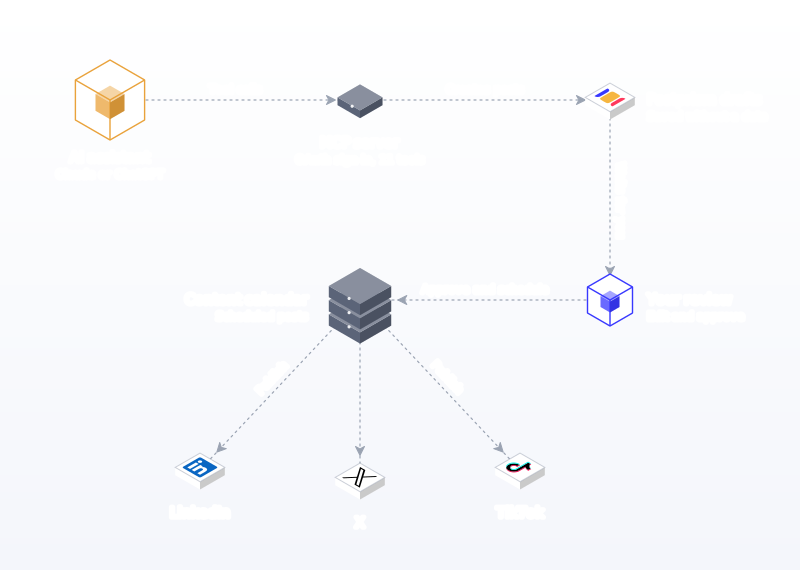
Honest limits. Agents can only post to accounts already connected in Postprism; connecting a new account always happens in the app through the network's own sign-in. The MCP server allows 200 requests per hour per user, which is plenty for planning a month but not for migrating thousands of old posts.
Who it is for. Founders, marketers, freelancers and agencies who want an assistant to do the drafting while a person keeps the final say on a calendar. Setup guides: Claude, ChatGPT, Claude Code, Cursor, Gemini CLI and n8n.
2. Buffer: best for teams already on Buffer
What it is. The long-running, simple scheduler. Buffer's June 2026 changelog says you can "manage your Buffer account from inside the AI tool you're already using", with one-click OAuth for Claude and ChatGPT.
Standout features. The Ideas board is a natural fit for agents: Buffer's own July 2026 write-up describes saving ideas from Claude straight onto the board. API keys are on every plan, including Free (1 key, 3,000 requests a month).
Limits. The same Buffer article says "you can't pull analytics through the MCP yet". Buffer prices per channel, and approvals only arrive on the Team plan. It publishes the same caption everywhere unless you edit each channel by hand.
Who it is for. Existing Buffer users who want to add an assistant without switching tools. Pricing: about $5 per channel per month on Essentials and $10 per channel on Team, as of October 2026 (Buffer pricing).
3. Metricool: best for analytics-led agents on a budget
What it is. A planner and analytics tool. Metricool calls its MCP "the official server that connects your Metricool account with Claude Code, Claude Desktop, Cursor, ChatGPT, Mistral Le Chat, Make, and n8n".
Standout features. The MCP "works with any Metricool plan, including the free account". It reads analytics from connected networks, lists competitors and their posts, and schedules with post_schedule_post. For an agent that should look at data before suggesting content, that breadth is useful.
Limits. The free account "can't access data older than 30 days or schedule more than 20 posts", and the free plan excludes LinkedIn and X. Approvals, team and client management and the Metricool API sit on the Advanced plan. Scheduling through the MCP creates scheduled posts rather than drafts, so review needs to happen in Metricool before the time arrives.
Who it is for. Solo marketers who want an agent to analyse competitors and performance. Pricing: Starter from about $20 a month billed annually and Advanced from about $53, as of October 2026 (Metricool pricing).
4. Hootsuite: best for enterprise teams already on Hootsuite
What it is. The enterprise suite, now with four MCP servers. Perch covers "publishing, drafts, media uploads, and cross-network analytics"; Nest handles inbox triage; Lumen covers listening; Parliament runs advocacy.
Standout features. The broadest agent surface of any suite: an agent can draft posts, triage the inbox and summarise brand mentions. ChatGPT and Claude use pre-built connectors.
Limits. Copilot and Gemini need a remote URL that the page says requires IT administrator access. Content approvals are only on the Advanced and Enterprise plans, according to the Hootsuite plans page, and access to each MCP server depends on which Hootsuite products you hold.
Who it is for. Large teams with inbox and listening needs. Pricing: the plans page FAQ says paid plans start at $99 for Standard and reach $399 for Advanced, per user per month, as of October 2026.
5. SocialPilot: best for agencies that want draft tools in the agent
What it is. An agency-focused scheduler whose MCP server works with Claude, Claude Code, ChatGPT and Cursor.
Standout features. A clear split between CreatePost and CreateDraft, plus monitoring tools such as ErrorPosts and UnscheduledPosts. The help article says "AI agents can only access accounts and data already available to the user".
Limits. The article does not say which plans include MCP, and Google Business Profile event and offer posts cannot be created through it. There are no analytics tools listed.
Who it is for. Agencies already on SocialPilot. Pricing: check their pricing page; client management and approvals start on Premium.
6. Postiz: best for self-hosting builders
What it is. A scheduler you can self-host, with an MCP server of 13 tools that runs inside the Postiz backend.
Standout features. integrationSchema returns each platform's posting rules before the agent writes, and clippingTool turns a long YouTube video into vertical clips and draft posts. Self-hosters can expose the server at /mcp with Bearer auth, /mcp/:apiKey or an OAuth endpoint.
Limits. One tool, schedulePostTool, handles scheduling, drafting and immediate publishing, so the prompt decides which happens. Putting an API key in the endpoint URL is convenient and easy to leak. Self-hosting means you run the reverse proxy, streaming and updates yourself.
Who it is for. Technical teams who want to own the stack. See our Postiz alternatives for hosted options.
7. Ayrshare: best for building a product on top
What it is. An API-first posting service. Its Action MCP exposes 33 tools at api.ayrshare.com/mcp over Streamable HTTP, covering publishing, history, analytics, comments and direct messages, and every call runs through the same authentication, rate limits and validation as the REST API.
Limits. It is built for developers rather than marketers, with no calendar for humans to review agent output. Profiles and sub-profiles, needed to post for multiple clients, require the Business plan or Enterprise.
Pricing: Premium is about $149 a month for one profile, Launch about $299 and Business from about $599, as of October 2026 (Ayrshare pricing).
8. Zapier MCP with any scheduler: best no-code bridge
What it is. Zapier MCP connects Claude, ChatGPT, Cursor and other clients to 9,000+ apps through one MCP URL, and it is "included in every Zapier plan".
Limits. Each tool call uses two tasks from your Zapier quota, and the agent works through whatever action Zapier exposes for your scheduler, so per-network versions, media and drafts depend on that integration. Useful when your scheduler has no MCP; a step backwards when it does.
9. n8n with a scheduler API: best for fixed pipelines
What it is. A workflow automation tool. For scheduling, most teams call a scheduler's REST API from an HTTP Request node, with an AI step earlier in the workflow to draft the copy.
Limits. You build and maintain the workflow. For hosted plans, check n8n's pricing page; a self-hosted version is also available. Our n8n guide shows a Postprism pipeline that creates drafts from new blog posts.
Agent-ready schedulers compared side by side
| Rank | Tool | Official MCP | Agent sign-in | Default when no time is given | Analytics via agent | Entry price with agent access (Oct 2026) |
|---|---|---|---|---|---|---|
| 1 | Postprism | Yes, 11 tools | OAuth | Draft | Yes | $19/month (MCP); $49/month adds REST keys |
| 2 | Buffer | Yes | OAuth (Claude, ChatGPT) | Not documented | Not yet via MCP | Free plan has API access |
| 3 | Metricool | Yes | OAuth or token | Schedules | Yes, plus competitors | Free (20 posts) |
| 4 | Hootsuite | Yes, 4 servers | Connectors; remote URL for Copilot and Gemini | Not documented | Yes | From $99 per user/month |
| 5 | SocialPilot | Yes | Not documented | Separate CreateDraft tool | No | Check pricing page |
| 6 | Postiz | Yes, 13 tools | API key or OAuth | Agent chooses | No | Self-host or hosted plans |
| 7 | Ayrshare | Yes, 33 tools | API key | Publishes via API | Yes | About $149/month |
| 8 | Zapier MCP | Bridge | Zapier account | Depends on app action | Depends | Any Zapier plan |
| 9 | n8n | Via REST APIs | Your workflow | Your workflow | Your workflow | Check pricing page, or self-host |
"Not documented" means the vendor page we checked did not say. It does not mean the feature is missing, so test it in a trial before you rely on it.
Which tool fits, broken down four ways
The ranking answers "which is best overall". Most buyers have a narrower question, so here is the same field cut by the assistant you use, by team type, by safety model and by network coverage.
By AI assistant
| Assistant | How it connects | Built-in guardrail | Best scheduler pairing |
|---|---|---|---|
| Claude (Desktop and claude.ai) | Custom connector with a remote MCP URL; Free plan limited to one custom connector | Tool permissions per connector | Postprism, for drafting a month in conversation |
| ChatGPT | Custom MCP server added in ChatGPT; plan availability set by OpenAI | Manual confirmation before write actions | Postprism or Buffer |
| Claude Code | claude mcp add --transport http, then /mcp to sign in | Approval prompts for project-scoped servers | Postprism, for launch posts from changelogs |
| Cursor | .cursor/mcp.json, OAuth supported | Asks before using MCP tools by default | Postprism |
| Gemini CLI | mcpServers in settings.json, OAuth via /mcp auth | Confirmations unless "trust" is set | Postprism or Metricool |
| n8n | REST API from HTTP Request nodes | Whatever you build | Postprism REST API on Freelancer or Agency |
Claude's custom connectors are available on Free, Pro, Max, Team and Enterprise, with Free users "limited to one custom connector". That is enough to test Postprism with Claude before paying for either. For ChatGPT, OpenAI's MCP documentation walks through adding a custom MCP server; check which plans OpenAI currently enables before you plan a team rollout.
By team type
Solo creators and founders. You want the shortest path from idea to calendar. Postprism Solo at $19 a month gives Claude or ChatGPT MCP access to all 6 networks with unlimited posts. Metricool's free plan is the cheapest way to experiment, as long as 20 posts a month and no LinkedIn or X is acceptable.
Small businesses. A café or a local gym needs a weekly rhythm more than a developer surface. The agent should draft, a person should approve on Monday morning, and the scheduler should publish while the owner is at work. Postprism fits; Buffer fits if you already use it and only post to a few channels. Our guide to using AI for social media covers the weekly routine.
Freelancers and agencies. Workspace scoping is the deciding feature. Postprism's list_workspaces lets one assistant draft for each client separately, the Freelancer plan includes 3 client workspaces and the Agency plan 10, and approvals apply to agent drafts the same way they apply to human ones. Ayrshare can do multi-client work but needs its Business plan. See our ranking of the best social media tools for agencies for the non-agent side.
Enterprise. If you need listening, inbox routing and SSO, Hootsuite's four servers cover more ground than any scheduler on this list, at enterprise prices. Many enterprise content teams still pair a focused scheduler with their suite for day-to-day drafting.
Developers and product teams. Claude Code or Cursor plus Postprism turns a changelog into draft launch posts in the same session the code shipped.
By safety model
There are three ways a scheduler can treat agent output, and the right one depends on how much a mistaken post would cost you.
- Draft-first. Anything without a date is a draft, and nothing publishes until a person or an explicit instruction schedules it. Postprism works this way. This is the right default for brand accounts.
- Opt-in drafts. The agent must remember a flag or pick a separate tool to draft. SocialPilot (CreateDraft) and Postiz (schedulePostTool modes) work this way. Fine for experienced users, risky with vague prompts.
- Direct publish. The API publishes what it receives. Ayrshare's API and most raw platform APIs work this way. Suitable for products and pipelines with their own review step upstream.
Client-side confirmations are a useful second layer, not the first. A ChatGPT "Confirm" button protects one action in one conversation. A draft queue on a shared calendar protects every post, from every assistant, for everyone on the team.
By network coverage
An agent can only post where the scheduler can. Postprism covers the 6 networks most brands use. Ayrshare lists 14+ networks. Buffer, Hootsuite, Metricool and SocialPilot cover their usual sets, and Metricool's free plan excludes LinkedIn and X.
Coverage also means respecting each network's rules. Instagram's API accepts only JPEG images and limits accounts to 100 API-published posts in 24 hours. A good scheduler handles those differences so the agent does not have to guess; Postprism's media requirements and per-network platform guides spell them out for agents and developers.
What it costs to give an agent access
Agent access is rarely its own line item. It is bundled into a plan, so the real cost is the cheapest plan that includes it, plus the assistant subscription you probably already have.
| Setup | Scheduler cost (Oct 2026) | Assistant cost (Oct 2026) | Notes |
|---|---|---|---|
| Postprism Solo + Claude Free | $19/month | $0 | One custom connector on Claude Free |
| Postprism Freelancer + Claude Pro | $49/month | $20/month ($17 annually) | 3 client workspaces, REST API keys, Claude Code included in Pro |
| Postprism Agency + Claude Team | $99/month | $25 per standard seat monthly | 10 client workspaces, up to 10 team members |
| Postprism + Cursor | From $19/month | Your existing Cursor plan | Good for product teams |
| Postprism + Gemini CLI | From $19/month | Free tier: 60 requests/min, 1,000/day | Personal Google account |
| Metricool Free + Claude Free | $0 | $0 | 20 posts, no LinkedIn or X |
| Ayrshare Business + any client | From about $599/month | Varies | For multi-client products |
Assistant prices come from Claude's pricing page and the Gemini CLI repository. For a wider look at scheduler costs without agents, see our scheduling tools pricing breakdown.
Worked example: a bike shop's agent-assisted month
Northwind Cycles is a two-person bike shop that posts to Pinterest, X, LinkedIn and Bluesky. The owner, Priya, uses Claude Pro; her part-time marketer, Dan, uses ChatGPT. Both are connected to the shop's Postprism workspace on the Freelancer plan.
- Monday planning (Claude). Priya pastes her service notes and asks: "Plan four posts for next week across Pinterest, X and LinkedIn: one repair tip, one customer ride, one new arrival, one event reminder. Save as drafts, 8:30 AM local time, with a version for each network." Claude calls list_platforms, then create_post four times. Four drafts appear on the calendar.
- Media (Claude). She drops two shop photos into the chat and asks Claude to attach them. Claude calls upload_media and update_post. Pinterest now has the image it needs.
- Review (Postprism). Dan opens the calendar, tightens the LinkedIn version, fixes a wrong price Claude invented for a tune-up, and submits for approval. Priya approves from the Approvals queue.
- Reporting (ChatGPT). On Friday Dan asks ChatGPT: "Get analytics for the last 30 days and tell me which post type got the most engagement on Pinterest." ChatGPT calls get_analytics and summarises.
- Next week. Priya feeds that summary back to Claude as context for the next plan.
Total human time: about 40 minutes a week, most of it on review. The wrong tune-up price is the reason the draft-first default matters: an agent that published directly would have put it in front of customers.
How to choose and set up an agent-ready scheduler
- List the jobs you want the agent to do. Drafting, rescheduling, reporting, inbox replies and media uploads need different tools. If replies matter, you need a suite with an inbox server; if drafting and scheduling matter, a focused scheduler is enough.
- Pick the assistant first, then confirm it supports remote MCP. Claude, ChatGPT, Cursor, Claude Code and Gemini CLI all do. Check plan limits such as Claude Free's single custom connector.
- Check the default. In a trial, ask the agent to "create a post about our opening hours" without giving a time. If it publishes or schedules, change tools or write the rule into every prompt.
- Check per-network versions. Ask for one post across LinkedIn and X. You should get two different texts, with the X version under 280 characters.
- Connect accounts in the scheduler, not the agent. In Postprism, connect each network through its own sign-in on the platforms page. Agents never see network passwords or tokens.
- Add the MCP server. For Claude Desktop, Cursor and Gemini CLI use the config snippet from Postprism's Developer page; for Claude Code run one command; for ChatGPT add a custom MCP server. Then sign in.
- Start read-only. Ask "Which accounts are connected?" and "List my workspaces." This proves the connection before anything is written.
- Create one draft, review it, then scale. Judge quality on a single post before you ask for a month. Our AI prompts for social media give tested briefs.
- Turn on approvals for anyone who is not the account owner. On Postprism's Freelancer and Agency plans, editors submit for review and owners or admins approve.
- Review connected assistants monthly. Revoke any you no longer use from the Developer page.
Prompts that produce usable drafts
| Job | Prompt | Tools the agent calls in Postprism |
|---|---|---|
| Launch | "Read this release note. Draft one post each for LinkedIn, X and Bluesky for Tuesday 9 AM, written for that network. Save as drafts." | list_platforms, create_post |
| Fill gaps | "List next week's scheduled posts. Find days with nothing on LinkedIn or X and draft one post for each gap." | list_posts, create_post |
| Learn from results | "Get the last 30 days of analytics. Which three posts had the best engagement and what do they share? Draft three ideas in that style." | get_analytics, create_post |
| Reschedule | "Move every post scheduled for Friday to Monday at the same times." | list_posts, update_post |
| Client work | "In the Harbor Dental workspace, list drafts awaiting review." | list_workspaces, list_posts |
Common mistakes when giving an agent your scheduler
- Letting the agent schedule on day one. Fix: ask for drafts for the first two weeks and review every one before scheduling.
- Pasting an API key into a chat or a shared config. Fix: use OAuth sign-in for assistants and keep API keys in your automation tool's credential store.
- One caption for every network. Fix: ask explicitly for a version per network and check X and Bluesky lengths against our character counter.
- Forgetting media rules. Fix: upload images and video through the scheduler's media tool first; Instagram, TikTok and YouTube will not publish text-only posts.
- Trusting facts the agent supplies. Fix: give it prices, dates and links in the prompt, and check every number during review.
- Feeding it untrusted web pages without care. Fix: treat content the agent reads from the web as untrusted, in line with OWASP's prompt-injection guidance, and keep drafts as the default.
- Mixing client workspaces. Fix: name the workspace in every agency prompt and use a scheduler that scopes tools by workspace.
- Setting Gemini CLI's trust option on a server you do not control. Fix: leave confirmations on for third-party servers.
- Ignoring rate limits during bulk jobs. Fix: plan a month at a time rather than migrating years of posts through an assistant; use CSV bulk scheduling for large imports.
- Choosing on tool count alone. Fix: test the default behaviour, per-network versions and review flow in a trial instead.
- Skipping the review habit once things look good. Fix: keep approvals on for any account where a wrong post would be costly.
- Not closing the loop. Fix: ask the agent to read analytics monthly and base the next plan on what worked.
The verdict
Postprism is the best social media scheduling tool for AI agents because it combines real agent access, a hosted MCP server with OAuth and a REST API, with the defaults a brand needs: drafts unless told otherwise, a separate version per network, workspace scoping and a shared calendar where a person makes the final call. It does that from $19 a month with unlimited posts on all 6 networks.
Buffer makes sense if your team already lives in Buffer and posts to a handful of channels. Metricool is the cheapest experiment. Hootsuite suits enterprises that want inbox and listening agents too. For more context, read our explainer on AI agent access to social media and the MCP server glossary entry.
Try Postprism Free for 7 Days
Connect Claude, ChatGPT, Cursor or Gemini CLI and let them draft posts for 6 networks straight onto your calendar for review.

Frequently Asked Questions
What is the best social media scheduler for AI agents?
Postprism, because its hosted MCP server lets Claude, ChatGPT, Cursor, Claude Code and Gemini CLI draft, schedule, edit and analyse posts on 6 networks, signs agents in with OAuth, and saves any post without a date as a draft for human review. It works on every plan from $19 a month.
What is an MCP server for social media?
An MCP server exposes a tool's actions, such as creating or listing posts, in the standard Model Context Protocol format so AI assistants can use them. A social media MCP server lets an assistant work inside your scheduler.
Can ChatGPT schedule social media posts?
Yes, once it is connected to a scheduler with an MCP server, such as Postprism or Buffer. ChatGPT asks for manual confirmation before write actions, and plan availability for custom MCP servers is set by OpenAI. Our ChatGPT guide covers the steps.
Is it safe to let an AI agent post on social media?
It is safe when the agent creates drafts that a person reviews before publishing, its access is scoped to one workspace, and it signs in with OAuth rather than a shared key. Avoid setups where the agent publishes directly to brand accounts.
Do I need a developer to connect an agent to a scheduler?
No. Claude, ChatGPT, Cursor and Gemini CLI connect to Postprism with a short configuration or connector setting and a browser sign-in. Developers are only needed for custom REST API pipelines.
Which Postprism plans include agent access?
The MCP server works on every plan, including the 7-day free trial. REST API keys for tools like n8n come with the Freelancer ($49 a month) and Agency ($99 a month) plans.
Can an AI agent upload images and video?
Yes, with Postprism's upload_media tool (JPEG, PNG, GIF, WebP, MP4 or MOV, up to 10 MB). The agent uploads the file, gets a URL and attaches it to a post. Links to files hosted elsewhere are rejected.
Can one agent manage several brands?
Yes. In Postprism the agent lists the workspaces you belong to and works inside the one you name, so an agency can draft for each client without mixing accounts. Freelancer includes 3 client workspaces and Agency 10.


