
The best bulk social media scheduling tool in 2026 is Postprism. You upload one CSV, XLSX or JSON file with your posts and times, pick the networks once for the whole upload, and a preview table checks every row (empty posts, character limits, past or invalid times, clashing slots) before anything is scheduled. Posts then publish automatically to any of 6 networks, with unlimited posts on every plan.
Bulk scheduling is what turns "we should post more consistently" into an actual habit. You write in one sitting, load the month in one step, and the calendar fills itself. The tools in this category differ more than their feature lists suggest: some cap each upload at a few hundred rows, some lock CSV import behind higher tiers, some skip validation and let errors surface after publishing. This guide ranks nine tools using each vendor's pricing and help pages as of October 2026, then breaks the choice down by team size, network mix, content type and posting volume, with a CSV template and a step-by-step monthly method.
Key findings
- 500 rows is a common ceiling. SocialPilot's help centre says you can bulk import up to 500 posts at once, and Publer's says you can create up to 500 posts with the CSV file.
- CSV import is often a higher-tier feature. Agorapulse lists up to 200 posts per CSV upload only from its Advanced plan ($149 per user a month billed annually), and SocialBee includes bulk import from Accelerate ($49 a month), not on Bootstrap.
- Consistency is what bulk scheduling buys. Buffer's analysis of 52 million posts found accounts that skipped a week consistently underperformed their own baseline growth, a "no-post penalty".
- Networks set hard limits a bulk file must respect. Threads caps text at 500 characters and rejects posts with more than five links from 22 December 2025; Instagram's API accepts only JPEG images and caps carousels at 10 items.
- Native schedulers do not scale to bulk. Instagram's own scheduler allows a maximum of 25 posts per day and 30 days in advance, one post at a time.
- Audiences span many networks. Pew's 2025 survey of 5,022 US adults found 84% use YouTube, 71% Facebook, 50% Instagram and 37% Pinterest, so a bulk file usually needs to reach more than one network.
What's changed in 2026 for bulk scheduling
Network rules got stricter, so validation matters more
A bulk upload is only as good as the rows that survive contact with each network. Threads now fails any post with more than five links at the media-creation step, a change Meta dated to 22 December 2025. Instagram's publishing API still accepts only JPEG images, crops every carousel image to the first image's aspect ratio and lets containers expire if they are not published within 24 hours. LinkedIn's Posts API lists which organic formats (text, image, video, multi-image, poll) third-party tools can publish. A bulk tool that checks rows against these limits before scheduling saves you from discovering them one failed post at a time.
Platforms are louder about duplicates
Facebook announced on 14 July 2025 that when its systems detect duplicate videos, it will reduce the distribution of the copies. YouTube renamed its "repetitious content" policy to "inauthentic content" a day later to cover content that is "repetitive or mass-produced". Neither change targets a brand sharing its own work across networks, but both reward bulk files where each network gets its own wording rather than one caption pasted nine times.
Assistants started writing the rows
Buffer announced on 10 June 2026 that Claude, ChatGPT and Perplexity can connect to it through MCP to draft a week of posts. Postprism goes a step further for bulk work: its AI schedule assistant turns a chat into a table of dated rows you can review and schedule, and its MCP server works on every plan. The spreadsheet is no longer the only way to produce a month of rows.
Trend windows are short
The 2025 Sprout Social Index found that 27% of consumers think trend participation only works within 24 to 48 hours. Bulk scheduling and timeliness are not enemies, but they need a plan: load the evergreen month in bulk and leave deliberate gaps for reactive posts.
Three ways tools handle bulk scheduling
"Bulk scheduling" covers three different mechanics. Knowing which one a tool uses tells you more than its marketing page does.
| Method | How it works | Best for | Watch out for |
|---|---|---|---|
| File import (CSV, XLSX, JSON) | Each row is a post with its own date and time; you upload the file and review a preview | Campaigns, launch months, content series with fixed dates | Row caps per upload, date formats, plan gating |
| Queue filling | You add many posts and the tool drops them into preset weekly time slots | Steady posting where the exact day matters less | Less control over which post lands when |
| Media bulk upload | You upload a folder of images or videos and each file becomes a draft post | Photo-led brands, product catalogues | Captions still need writing one by one |
| Conversational or API | An assistant or script produces the rows and sends them to the scheduler | Teams already drafting with AI or with a content database | Review discipline before anything goes live |
The best bulk tools support the first method well and add at least one of the others. Publer, for example, documents both a CSV route and a media bulk upload of up to 500 photos, videos and GIFs. Postprism supports file import and the conversational route through its schedule assistant and MCP server.
How we ranked the bulk scheduling tools
We weighted criteria by what goes wrong in real bulk uploads, not by what looks good in a demo.
| Criterion | Weight | What we checked |
|---|---|---|
| Validation before scheduling | High | Does a preview flag empty rows, over-length text and bad times before anything is queued? |
| Import limits and plan gating | High | Rows per upload, and whether CSV import is on the entry plan |
| Network coverage | High | How many networks one file can reach, including video and Pinterest |
| Post caps and pricing | Medium | Posts per month or per profile, per-seat and per-channel costs |
| After-import editing | Medium | Can imported posts be edited per network and moved on a calendar? |
| File formats | Low | CSV only, or also XLSX, JSON and media folders |
Where a vendor's pricing or help page did not state something, we say so rather than guess. Capabilities change often, so confirm the details in a trial.
Bulk scheduling tools compared
| Rank | Tool | Bulk import | Stated row limit | On entry plan? | Starting price (Oct 2026) |
|---|---|---|---|---|---|
| 1 | Postprism | CSV, XLSX, JSON, AI schedule assistant | No post cap on any plan | Yes | $19/month flat ($14 billed annually) |
| 2 | SocialPilot | CSV or text file | 500 posts per import | Yes | Check their pricing page |
| 3 | Publer | CSV, media bulk upload | 500 posts per CSV | Check plan | Check their pricing page |
| 4 | Sendible | Bulk scheduler and CSV uploads | Not stated on pricing page | Yes | Check their pricing page |
| 5 | SocialBee | CSV bulk import, bulk post editor | Not stated | No (from Accelerate) | About $49/month for Accelerate |
| 6 | Agorapulse | CSV bulk scheduling | 200 posts per CSV | No (from Advanced) | About $149/user/month billed annually for Advanced |
| 7 | Loomly | "Bulk posting" | Not stated | Yes | About $49/month billed annually |
| 8 | Vista Social | "Schedule in bulk using variety of formats" | Not stated | Yes | About $99/month |
| 9 | Hootsuite | Bulk scheduling (not available during trials) | Not stated on plans page | Paid plans | From about $99/user/month billed annually |
The 9 best bulk social media scheduling tools, ranked
1. Postprism: best overall bulk scheduler
What it is. A social media scheduler that publishes to 6 networks (LinkedIn, X, TikTok, YouTube, Bluesky and Pinterest) from one content calendar, with bulk scheduling built into the core rather than sold as an add-on.
How the import works.
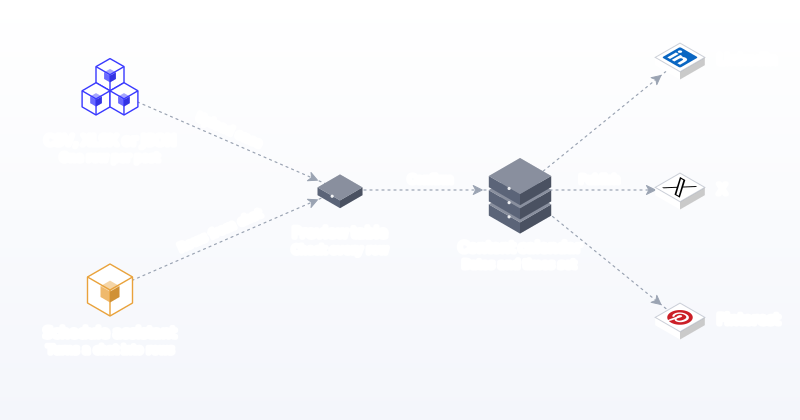
- Three file formats. Upload CSV, XLSX or JSON. The CSV needs a content column and a scheduled_at column, plus an optional media_url column for an image or video link.
- Networks once per upload. You pick the target networks for the whole file at upload time instead of repeating a platform column on every row. One row becomes one post to each selected network.
- A preview table that validates every row. Rows with no content, no time, an unreadable time or a time in the past are flagged as errors. Text longer than the strictest limit among your selected networks is flagged too, so a 400-character row is caught before it is sent to X or Bluesky. Two rows at the same time get a warning.
- A conversational route. The AI schedule assistant turns a chat ("three LinkedIn posts a week in November about our onboarding changes") into rows in the same kind of preview table, which you check and schedule.
- Everything lands on the calendar. Imported posts appear in month, week and day views and on the kanban board, where you can drag them to new slots or open any post to write a different version per network, by hand or with optional AI adaptation in your brand voice.
- Agents and code. The MCP server (11 tools, every plan) lets Claude, ChatGPT, Cursor or Gemini CLI create posts directly, and the REST API on Freelancer and Agency plans lets you push rows from your own scripts.
Limits to know. One file targets one set of networks, so if your LinkedIn and TikTok posts differ in timing, split them into two uploads or adjust per post afterwards on the calendar. There is no free plan; there is a 7-day free trial.
Pricing. $19 a month for Solo, $49 for Freelancer (3 workspaces, 3 team members, approvals) and $99 for Agency (10 workspaces, up to 10 team members, approvals), or $14, $36 and $75 billed annually. Unlimited posts on every plan, so a 300-row upload costs nothing extra.
Best for. Anyone loading a month at a time across several networks: solo creators, small businesses and agencies who want validation before posts go live and a calendar to fix things after.
2. SocialPilot: best for large CSV imports with media links
What it is. An agency-friendly scheduler whose pricing page lists "Bulk Scheduling & CSV Uploads" on all three plans.
How the import works. Its help centre is unusually specific. You can import up to 500 posts at once from a CSV or text file, saved as UTF-8. Media goes in the second column as direct image URLs (not web page URLs), up to 20 images per post separated by semicolons, or one video URL. You can add up to 10 tags per post, first comments only work for Facebook, Instagram and LinkedIn, and only one X account can be bulk scheduled at a time. Dates must follow the format set in your profile.
Limits. The single-X-account rule and profile-dependent date format catch people out. Pricing shown to us was in local currency, so check their pricing page for your region.
Best for. Agencies importing large, media-heavy files for many accounts. See our SocialPilot alternative page.
3. Publer: best for bulk media uploads
What it is. A budget-friendly scheduler with three bulk routes.
How the import works. Publer documents a CSV route for up to 500 posts, a bulk upload of up to 500 photos, videos and GIFs where each file becomes its own post, and a media-library route for selecting several items at once. Its help page also lists network constraints worth knowing: X allows at most 4 photos per post, Google Business Profile and Pinterest only support single-photo posts, and only Facebook, LinkedIn and X support GIFs through Publer.
Limits. Free and lower tiers have historically had smaller bulk limits, so confirm your plan's cap. Its pricing page did not load for us, so check their pricing page directly.
Best for. Photo-led brands that want each image to become a post quickly. Compare in our Publer alternative page.
4. Sendible: best for agency bulk workflows with client dashboards
What it is. An agency platform whose pricing page lists "Bulk scheduler & CSV uploads" on every plan, from Core (1 workspace, 6 profiles) to Enterprise (50 workspaces, 300 profiles), with unlimited users throughout.
Standout. Elite adds "bulk posting dynamic fields", useful when the same template needs client-specific values. Assignment and approvals are listed from Plus.
Limits. The pricing page we saw did not show prices or a per-upload row cap, so check their pricing page and help centre. See our Sendible alternative comparison.
5. SocialBee: best for category-based bulk libraries
What it is. A scheduler built around content categories that cycle on a schedule.
Standout. According to its pricing page, CSV bulk import and a bulk post editor arrive on Accelerate ($49 a month, or $40 billed annually), with 50 categories and up to 5,000 posts per category. Content recycling is listed on every plan, which suits evergreen libraries.
Limits. Bootstrap ($29 a month) has no bulk import. Users are counted per workspace (1 on Bootstrap and Accelerate). See SocialBee alternatives.
6. Agorapulse: best bulk scheduling inside a full social suite
What it is. A per-user suite with a strong inbox and reporting.
Standout. Its pricing page lists CSV bulk scheduling of up to 200 posts per upload on Advanced, alongside publishing queues, bulk approve and post labels.
Limits. Standard and Professional do not include CSV bulk scheduling. Advanced is about $199 per user a month, or $149 billed annually, so a three-person team pays roughly $447 a month on annual billing before extra profiles. See our Agorapulse alternative page.
7. Loomly: best for structured teams that already use its calendar
What it is. A calendar-first tool with approvals on every paid plan.
Standout. "Bulk posting" is included on Starter (12 social accounts, 3 users) and Beyond (60 accounts, unlimited users).
Limits. The pricing page does not list CSV import specifically, so confirm the import format in a trial. Starter is about $65 a month, or $49 billed annually; Beyond is about $332, or $249 billed annually. Our Loomly alternative page compares it with Postprism.
8. Vista Social: best for multi-format bulk uploads
What it is. A broad suite with publishing, inbox and listening.
Standout. Its pricing page describes scheduling "in bulk using variety of formats" from the Professional plan ($99 a month, 15 profiles) and multi-stage approvals from Advanced ($199 a month).
Limits. No free plan, only a 14-day trial, and the page does not name the formats or limits.
9. Hootsuite: best for enterprises already on Hootsuite
What it is. The long-standing enterprise suite.
Standout. Bulk scheduling exists on paid plans; the plans page notes it is unavailable during trials. The rest of the suite (inbox, listening, competitor benchmarking) is the reason most teams choose it.
Limits. Starting prices of $99 (Standard, 10 social accounts), $199 (Professional) and up to $399 (Advanced) per user a month on annual billing make it expensive if bulk scheduling is your main need, and you cannot test bulk uploads in the trial. See our Hootsuite alternative page.
Also considered: Buffer and Later
Buffer's pricing page does not mention CSV import or bulk upload; it is a queue-first tool priced per channel ($5 a channel on Essentials, $10 on Team). Later's pricing page does not list bulk scheduling either, and its Starter plan caps posts at 30 per profile a month. Both are good tools for steady posting, just not the first choice for importing a month from a spreadsheet. See our Buffer alternative page for a fuller comparison.
Bulk scheduling by team size
Solo creators and founders
You need a cheap entry plan with bulk import included and no post cap. Per-user suites are overkill. A solo plan that imports a CSV, lets you fix rows in a preview and shows the month on a calendar covers it. Budget for one batching session a month (see the method below) and keep two slots a week open for reactive posts. For a founder posting around a full-time job, that one session is the difference between a feed that goes quiet in busy weeks and one that does not.
Small marketing teams (2 to 5 people)
Bulk import plus an approval step. The common pattern is one person building the file, another approving the imported posts on the calendar. Watch per-seat pricing: at three people, a $149 per-user plan costs $447 a month, while a flat plan with three seats stays at one price. Our approval workflow guide covers the review step.
Agencies
The work multiplies by client, so you want one workspace per client, identical CSV columns across clients and approvals after import. Row caps matter more here: a 10-client agency posting daily to four networks schedules well over 1,000 posts a month. See Postprism for agencies and our guide to agency social media workflows.
Enterprise and regulated teams
Bulk import is rarely the deciding factor; audit trails, multi-level approvals and inbox coverage are. Import in smaller batches so each approval round stays reviewable.
Bulk scheduling by network
A bulk file that ignores network rules produces failed posts. These are the limits worth building into your sheet.
| Network | Limit to plan around | What it means for your file |
|---|---|---|
| JPEG images only via API; carousels up to 10 items; 100 API-published posts per 24 hours | Export images as JPEG; every row needs media | |
| Threads | 500 characters; 5 links max; 250 posts per 24 hours | Trim long rows; strip extra links |
| Organic posts can be text, images, video, multi-image or polls | Lead with a strong first line; attach an image or video where you have one | |
| TikTok | Content from unaudited API clients is restricted to private viewing | Use a scheduler with an audited integration |
| YouTube | The upload method costs 1 unit of a separate video upload quota | Keep YouTube rows for real videos with titles |
| 2:3 images recommended (1000 x 1500); titles up to 100 characters | Prepare vertical images and a destination link per row |
Sources: Instagram content publishing, Threads posts, LinkedIn Posts API, TikTok Content Posting API, and the YouTube and Pinterest developer and help documentation. The free social media character counter helps you check rows before upload.
Bulk scheduling by content type
Evergreen education and tips
The ideal bulk content. Tips, how-tos and FAQs rarely go out of date, so you can load four to eight weeks at once. Vary the wording across networks so nobody sees the same line twice.
Campaigns and launches
Fixed dates make a CSV perfect, but details change late. Load two to four weeks ahead and put a "check by" date in a spare column of your sheet so someone reviews the rows before launch week.
Product and price posts
Stock and prices move. Bulk schedule one to two weeks ahead at most, and keep the product link in the row so it is easy to update on the calendar if a price changes.
Video
Video rows need the file ready and hosted where the scheduler can fetch it. Keep a separate upload for video-first networks (TikTok, YouTube) so you can give each a proper title and description.
News, reactions and trends
Do not bulk schedule. These need to go out within hours, and the Sprout figure above suggests the window is often a day or two at most.
Bulk scheduling by posting volume
| Monthly volume | Typical account | What to prioritise |
|---|---|---|
| Up to 60 posts | Solo creator, 2 to 3 networks, 4 to 5 posts a week | No post caps, cheap entry plan, simple CSV |
| 60 to 300 posts | Small business on 4 to 6 networks | Validation, per-network editing after import, approvals if more than one person |
| 300 to 1,000 posts | Agency with 5 to 10 clients | Workspaces per client, row caps of 500 or more, flat pricing |
| 1,000+ posts | Larger agency or multi-brand company | API or MCP access, multi-level approvals, import in batches |
Post caps are where cheap plans get expensive. Later's Starter plan allows 30 posts per profile per month and Planable's Basic plan 60 posts per workspace. A 300-row upload breaks both. Postprism has unlimited posts on every plan.
A CSV template you can copy
Here is the shape Postprism's importer reads: one row per post, a content column, a scheduled_at column and an optional media_url. Networks are picked once when you upload, so the same file can go to LinkedIn, X and Bluesky together, and a second file can carry your Pinterest rows with images.
| content | scheduled_at | media_url |
|---|---|---|
| We spent October on the phone with 40 customers. Three things surprised us, and one changed our roadmap. | 2026-11-03 08:30 | |
| Behind the scenes of our new single-origin roast, from green bean to bag. | 2026-11-04 12:00 | https://example.com/roast.jpg |
| Monday tip: batch your captions in one sitting, then schedule the week in one upload. | 2026-11-09 09:00 | |
| New guide: how we cut our onboarding from 14 days to 5. Link in the comments. | 2026-11-11 10:00 |
Tips for a clean file:
- Use one unambiguous date format. 2026-11-03 cannot be misread; 03/11 means March in one country and November in another.
- Write to the strictest network in the upload. If X or Bluesky is selected, keep rows short enough for them, then lengthen the LinkedIn version on the calendar.
- Use direct media links. A link to a web page is not a link to an image. SocialPilot's help centre makes the same point.
- Keep a status column in your master sheet (planned, uploaded, published) so you never re-import the same rows.
If you start from a spreadsheet calendar, our free content calendar templates already use compatible columns.
Validation: the feature nobody demos
Bulk imports fail in boring ways, and the best tools catch them before the queue does.
| Check | Why it matters | How Postprism handles it |
|---|---|---|
| Empty content | Blank rows become blank posts or failures | Flagged as an error in the preview |
| Character limit | Over-length posts are truncated or rejected | Checked against the strictest selected network |
| Missing or unreadable time | Posts land at the wrong time or not at all | Flagged as an error |
| Time in the past | Rows for yesterday publish immediately or fail | Flagged as an error |
| Two posts at the same time | Bunched posts compete with each other | Flagged as a warning |
Ask every vendor in your shortlist the same five questions. If the answer is "it fails after scheduling and we email you", budget time for clean-up.
How to bulk schedule a month in one afternoon
This method works with any CSV-capable tool and maps directly onto Postprism's importer. Budget about three hours.
- List the month's fixed dates (15 minutes). Launches, events, holidays your audience cares about, and any campaign deadlines. These anchor the file.
- Fill the rest from your content pillars (30 minutes). Aim for 15 to 25 ideas. One idea per row, no writing yet. If you are stuck, list what your audience asked about last month in comments, DMs and sales calls, and turn each question into a post.
- Write the base version of each row (75 minutes). Write for the strictest network you will upload to. Keep the hook in the first line.
- Add times (15 minutes). Spread rows so no network gets more than one or two posts a day. Sprout Social's analysis of nearly 2 billion engagements found Tuesdays and Wednesdays, midday to late afternoon local time, strongest overall, but test against your own analytics.
- Split by network group (10 minutes). Make one file for text-friendly networks (LinkedIn, X, Bluesky) and one for media-first networks (Pinterest, TikTok, YouTube) with a media_url on every row.
- Upload and fix the preview (15 minutes). Choose the networks, upload, and fix every error row before confirming. Do not skip warnings without reading them.
- Tailor the posts that matter (30 minutes). On the calendar, open your three or four most important posts and write a proper version for each network, or use AI adaptation and edit the drafts.
- Check the month view (10 minutes). Look for empty days, clusters and posts that sit too close to sensitive dates. Drag to balance.
- Set a Friday review. Every week, read the next seven days of the queue so nothing goes out that no longer fits.
Three hours once a month replaces 15 to 20 minutes of posting every day. The return is not just time; it is the consistency that Buffer's data links to steadier growth.
Our guide to batch content creation goes deeper on the writing session, including how to keep a swipe file of hooks so step three gets faster every month.
Bulk scheduling for agencies: a worked example
Take a five-client agency, Northfield Studio, posting to LinkedIn, X and Pinterest for each client, four times a week. That is 12 posts per client per week, or roughly 260 posts a month across clients.
- One master sheet, one tab per client, each with the same content, scheduled_at and media_url columns plus internal columns (pillar, owner, status).
- Client sign-off on the sheet for themes and dates, before any copy is uploaded.
- Two uploads per client: a LinkedIn and X file, then a Pinterest file with images.
- Approval on the calendar. In Postprism, editors' posts go into the Approvals queue; owners or admins approve or request changes with a note.
- Monthly cost check. On a flat Agency plan the cost is $99 a month for up to 10 workspaces. On a per-user suite at $149 a seat, three staff would cost $447 a month before extra profiles.
How to test a bulk scheduler during a free trial
Most trials last 7 to 14 days, and some tools hold back bulk features until you pay. Use the trial to run a real upload rather than clicking through the demo account. This checklist takes about an hour across the week.
- Day 1: confirm bulk import is unlocked. Find the import screen before anything else. If it is greyed out or "available after upgrade", ask support whether you can test it; if not, weigh that risk.
- Day 1: download the vendor's template. Compare its columns with your master sheet. Note whether networks are a column per row or chosen per upload, and whether dates follow a fixed format or your profile setting.
- Day 2: upload a deliberately messy 20-row file. Include one empty row, one row 50 characters over the X limit, one row dated yesterday, two rows at the same minute and one row with a web page link instead of an image. Count how many problems the preview catches.
- Day 3: upload a clean 50-row file. Time the whole process from opening the file to seeing posts on the calendar.
- Day 4: edit after import. Change one post's LinkedIn wording without touching its X version, move three posts to new days and attach media to two. If this is painful, a month of real use will be worse.
- Days 5 to 7: let real posts publish. Watch at least ten go out across networks, and check the published posts on each network for formatting, link previews and image cropping.
- Day 7: price your real month. Multiply out seats, channels and post caps for the volume you actually plan, not the volume in the trial.
Run the same checklist on two or three tools and the decision usually makes itself. The tool that catches the most problems on day 2 and makes day 4 easiest will save you the most time over a year.
Common bulk scheduling mistakes (and how to fix them)
- Uploading without a time zone check. A month of posts at 3am is easy to create. Fix: set your workspace time zone before the first upload and spot-check three rows on the calendar.
- Ambiguous dates. 04/05 means two different days. Fix: use year-month-day with a 24-hour time.
- One caption for every network. Fast, but flat, and duplicate content is getting less reach on some networks. Fix: tailor your most important posts per network after import.
- Ignoring the strictest limit. A row written for LinkedIn breaks on X. Fix: write the base row to the shortest limit in the upload.
- Linking to pages instead of media. The import fails or attaches nothing. Fix: use direct image or video URLs.
- Missing media for media-first networks. Instagram, Pinterest, TikTok and YouTube need an image or video. Fix: keep them in a separate file where every row has a media_url.
- Re-importing the same rows. Every post doubles. Fix: a status column in your master sheet, updated after each upload.
- Filling every slot. No room for timely posts. Fix: leave one or two gaps a week on purpose.
- Bunching posts. Several posts in the same hour compete. Fix: read the duplicate-time warnings and spread rows.
- No pause plan. A cheerful queue during bad news looks careless. Fix: know how to pause or move a day's posts quickly, and review the week every Friday.
- Choosing a tool by headline price. Post caps or per-seat pricing make bulk volume expensive. Fix: price your real month (posts, networks, seats) before buying; our scheduler pricing comparison shows how.
- Skipping the trial upload. Some tools block bulk uploads in trials. Fix: ask before you start the trial, and upload a real 20-row file in week one.
The verdict
Postprism is the best bulk social media scheduling tool for most people in 2026: CSV, XLSX and JSON import with a validating preview, networks chosen once per upload, an AI schedule assistant for chat-built rows, 6 networks and flat pricing with unlimited posts. SocialPilot and Publer are strong for very large CSV imports and media folders, Sendible and Agorapulse suit agencies already invested in their suites, and Hootsuite makes sense only if you need the wider enterprise toolkit. For a broader view, see our ranking of the best social media scheduling tools.
Try Postprism Free for 7 Days
Upload a month of posts from one CSV, fix every flagged row in the preview, and publish to 6 networks from one calendar.

Frequently Asked Questions
What is bulk scheduling on social media?
Bulk scheduling means scheduling many posts at once, usually by uploading a spreadsheet where each row is a post with its text, time and optional media link, instead of creating each post by hand in each app.
Which tool is best for bulk scheduling in 2026?
Postprism, for most people: it imports CSV, XLSX or JSON, validates every row in a preview before scheduling, publishes to 6 networks and has unlimited posts on every plan from $19 a month. SocialPilot and Publer are good alternatives for very large single imports of up to 500 posts.
What columns does a bulk scheduling CSV need?
For Postprism: a content column, a scheduled_at column and an optional media_url column. Networks are selected once for the whole upload. Other tools use their own templates, so download the vendor's sample file first.
How many posts can I bulk schedule at once?
It depends on the tool. SocialPilot and Publer document 500 posts per import and Agorapulse 200 per CSV on its Advanced plan. Postprism has no post cap on any plan, so the practical limit is how far ahead you want to plan.
Can I bulk schedule to Instagram and TikTok?
Yes, with a scheduler that publishes to both. Every Instagram or TikTok row needs media: images (JPEG for Instagram) or video. In Postprism, keep TikTok rows in their own upload with a media_url on each.
Is bulk scheduling bad for reach?
Scheduling itself is not penalised. The risk is identical captions everywhere, which some networks now treat as duplicate content. Tailor important posts per network after import.
Can I edit posts after a bulk upload?
Yes. In Postprism, imported posts appear on the calendar and kanban board like any other post, so you can edit each network's version, add media, drag them to new times or delete them.
Can AI help me build a bulk schedule?
Yes. Postprism's AI schedule assistant turns a chat into rows in a preview table you review before scheduling, and its MCP server lets assistants such as Claude create posts directly on every plan.


