
To schedule social media posts, write and design them in advance, load them into a scheduler with a date, time and time zone for each, and let the tool publish automatically. Native tools work for one network at a time. A dedicated scheduler such as Postprism puts six major networks on one calendar, so a week of posts takes one sitting.

That is the short answer. The longer one matters because scheduling is where most social media plans quietly fail. Accounts rarely stall because individual posts are bad. They stall because a busy week turns into a quiet month, and the audience the account was building drifts away. This guide walks through what each network lets you schedule natively in 2026, when a dedicated tool pays for itself, a 10-step method for planning and loading a full month, how bulk scheduling works, and the mistakes that cause scheduled posts to fail or underperform. Every statistic is linked to the source it came from.
Key findings
- Consistency is measurable. Buffer's 2026 analysis of 4.8 million channel-weeks from about 161,000 profiles found accounts posting 10 or more times a week gained an average of 32 more followers per week than in weeks they did not post, and weeks with no posts underperformed the account's own baseline (Buffer).
- Weekly posting doubles LinkedIn Page engagement. LinkedIn says companies that post weekly see a 2x lift in engagement with their content (LinkedIn).
- Native windows are short and siloed. Pinterest lets you schedule Pins up to 30 days ahead with at most 10 scheduled at once (Pinterest Help); the Instagram app allows up to 30 days ahead and 25 posts a day, according to Hootsuite.
- APIs make scheduling reliable at volume. Instagram's official API allows 100 API-published posts per account in a rolling 24 hours, and Threads allows 250 (Meta for Developers, Threads API).
- Brands post far more than most people think. Sprout Social's 2025 benchmarks, covering nearly 3 billion messages from 1 million profiles, put the average brand at 9.5 posts per day across networks (Sprout Social).
- Timing studies disagree. Sprout's data (nearly 2 billion engagements, roughly 307,000 profiles) favours weekday midday to afternoon, while Hootsuite's analysis of over 1 million posts puts LinkedIn's best window at 4 to 6 AM (Sprout, Hootsuite). Your own data beats both.
What's changed in 2026
Scheduling in 2026 looks different from even two years ago, for four reasons.
More networks matter at once. Pew Research's 2025 survey of 5,022 US adults found 84% use YouTube, 71% Facebook, 50% Instagram and 37% TikTok, with Reddit at 26% and Threads and Bluesky at about one in ten or fewer (Pew Research Center). A brand that wants to be where its audience is now has five to nine places to publish, not two.
Engagement is shifting between networks. Buffer's study of more than 52 million posts across 10 platforms found median engagement rates in 2025 of about 6.2% on LinkedIn, 5.6% on Facebook, 5.5% on Instagram, 4.6% on TikTok and 2.5% on X. Instagram's median fell about 26% year over year while X's rose about 44% (Buffer). Calendars built around a single platform are riskier than they were.
APIs have matured. Threads now has a full publishing API that supports text, images, video and carousels of up to 20 items, with a 500-character limit on text posts and a cap of five links per post that has been enforced since December 22, 2025 (Threads API). LinkedIn's Posts API supports text, images, video, documents, articles, multi-image posts and polls for organic posts (LinkedIn on Microsoft Learn). Third-party schedulers can now do more than they could in 2023.
Recommendation feeds reward the post, not the follower count. TikTok has said publicly that "neither follower count nor whether the account has had previous high-performing videos are direct factors" in recommendations (TikTok Newsroom). Every scheduled post gets its own shot, which makes a steady pipeline more valuable than an occasional hit.
Why scheduling social media posts matters
It turns consistency into a system
Posting by hand depends on having a free 20 minutes at the right moment every day. Scheduling moves that work into one or two planned sessions a week. The Buffer frequency data above is the clearest evidence that steady output pays: the "no-post penalty" it found means a silent week does not just fail to grow the account, it drags it below its own normal (Buffer). Scheduling is the cheapest insurance against silent weeks. For more on the habit side, see our guide on how to stay consistent on social media.
It saves context-switching time
Writing ten posts in one block is faster than writing one post on ten different days, because you load the brand, the audience and the tone into your head once. The same goes for images: designing a week of graphics in one session reuses templates and colour choices. Our guide to batch content creation covers this in depth.
It lets you publish when your audience is online, not when you are
If your customers are in another time zone, or your audience scrolls in the evening while you work days, scheduling is the only practical way to post at the right hour. Every major scheduler lets you set the time zone so a 9 AM post means 9 AM for the people you care about.
It creates room for review
Scheduled posts sit in a queue before they go live. That gives a manager, a client or a second pair of eyes a chance to catch a typo, a broken link or a badly timed joke. Teams that publish on the fly skip that check by default.
Native scheduling on each network
Every major network now has some built-in scheduling. Native tools are free and always support the network's newest formats, but each one only covers its own platform, and the windows and limits vary. Here is what each offers, based on official help pages where they exist.
| Network | Native scheduling tool | Known limits (source) |
|---|---|---|
| Meta Business Suite Planner | Meta says Business Suite lets you "create or schedule posts, stories and ads" (Meta) | |
| In-app scheduling and Meta Business Suite | Up to 30 days ahead and 25 posts a day in the app, posts and Reels only (Hootsuite) | |
| Clock icon in the post composer | Launched in late 2022 with scheduling up to three months ahead (Social Media Today) | |
| YouTube | Schedule card in YouTube Studio upload | Video must be private or scheduled first; you choose date, time and time zone (YouTube Help) |
| Publish date option when creating a Pin | Up to 30 days ahead, maximum 10 scheduled Pins (Pinterest Help) | |
| TikTok, X, Threads, Bluesky | Varies by app and account type | Check each app; options change often and differ between mobile and desktop |
A few details are worth knowing. On YouTube, the "Published on" date on the watch page uses Pacific time, so a video scheduled for early morning in Europe can show the previous day's date. And if a channel has a Community Guidelines strike, a scheduled video will not go live during the penalty period; it is set to private and you need to reschedule it (YouTube Help). Pinterest's cap of 10 scheduled Pins is the tightest of any major network, which is why Pinterest-heavy brands tend to move to a dedicated tool first.
Native tools vs a dedicated scheduler
Native scheduling works well if you publish to one or two networks and post a few times a week. Once you add a third network, the hidden cost is not the scheduling itself; it is keeping several separate calendars in your head. A post that went out on LinkedIn on Tuesday has no visible relationship to the Instagram version scheduled for Thursday unless you track it somewhere else.
| Need | Native tools | Dedicated scheduler (for example Postprism) |
|---|---|---|
| Publish to one network | Good enough | Good |
| See every network on one calendar | Facebook and Instagram only, via Meta Business Suite | All connected networks in month, week and day views |
| Write once, adapt per network | Copy and paste between apps | Per-platform versions of one post in a single editor |
| Load a month in bulk | Not offered by most native tools | CSV, XLSX or JSON import with a preview table |
| Team approvals | Limited and network-specific | Roles and approval steps across all networks |
| Cross-network analytics | Separate dashboards per app | One analytics view with CSV export |
| Cost | Free | Paid; Postprism starts at $19/month |
If you are still choosing a tool, our ranked list of the best social media scheduling tools compares the leading options, and the native tools above cover the zero-cost end of the market.
Breakdown 1: How to schedule by platform
Each network rewards a different kind of post, and each has its own technical rules. Scheduling well means building those rules into the post before it enters the queue, not discovering them when it fails at 9 AM on a Tuesday.
LinkedIn is the highest-engagement network in Buffer's 2026 data, with a median engagement rate of about 6.2% (Buffer). Text-first posts with a strong first two lines, single images and native video all schedule cleanly. LinkedIn's own guidance for Pages is to post at least weekly and to schedule posts for the times your audience is most active (LinkedIn). In Postprism you can schedule to a personal profile and a Company Page from the same calendar. See the best time to post on LinkedIn for timing detail.
Instagram requires a professional (business or creator) account for API publishing, and only JPEG images are accepted through the official API. Carousels can hold up to 10 items, and every image in a carousel is cropped to match the first one (Meta for Developers). Our dedicated guide on how to schedule Instagram posts goes through every method.
Facebook Pages handle the widest mix of formats. In Buffer's data, image posts had the highest median engagement on Facebook at 5.20%, ahead of video at 4.84% and text at 4.76% (Buffer).
X
X rewards frequency and speed. Sprout Social's benchmark average is two posts per day on X (Sprout Social). Text posts had the highest median engagement on X in Buffer's study at 3.56% (Buffer). Postprism schedules single posts with up to four images; check lengths before you queue them, because a post that is a few characters over will fail at publish time rather than at scheduling time.
Threads and Bluesky
Threads text posts are limited to 500 characters and five links (Threads API). Postprism publishes Bluesky text posts with links, mentions and hashtags. Both networks reward conversation, so schedule posts for times you can be around to reply.
TikTok, YouTube and Pinterest
These three are discovery engines more than feeds. TikTok and YouTube Shorts need the video file finished before you schedule, and YouTube needs a title, description and thumbnail as well. Postprism publishes TikTok video and photo posts (as a direct post or an inbox draft), YouTube videos with title, description, tags, privacy, playlist and thumbnail, and Pinterest image Pins with board, title, description and link. Because Pinterest's native tool caps you at 10 scheduled Pins, a scheduler matters most here.
Breakdown 2: By account type
How you schedule depends on who is doing the work and how many brands they run.
| Account type | Typical networks | Planning horizon | Batching rhythm |
|---|---|---|---|
| Solo founder | LinkedIn, X, one visual network | 2 to 4 weeks | One 90-minute session a week |
| Creator | TikTok, Instagram, YouTube | 2 weeks, with room for trends | Film in blocks, schedule twice a week |
| Small business | Facebook, Instagram, Google-adjacent local channels | 1 month | One half-day a month plus a weekly top-up |
| B2B marketing team | LinkedIn Page, employee profiles, X | 1 quarter for campaigns, 1 month for always-on | Weekly content meeting, monthly bulk load |
| Agency or freelancer | Whatever each client needs | 1 month per client | Bulk load per client, approvals before go-live |
Solo founders
The constraint is time, not ideas. Keep the plan small: three posts a week on LinkedIn, the same ideas adapted for X, and one visual post. A single weekly session is enough. Our content calendar for solo founders has a ready-made weekly layout.
Creators
Creators need a mix of planned and reactive posts. Schedule the evergreen pieces (tutorials, series episodes) and leave open slots for trends. TikTok's own guidance, as reported by Sprout, is one to four posts a day, though the real average is closer to two videos a week (Sprout Social).
Small businesses
Local businesses do best with a monthly plan built around real events: seasonal offers, new stock, staff stories, customer reviews. Facebook and Instagram usually come first. Our ecommerce guide shows what a month looks like for an online store.
Agencies and freelancers
Agencies need separation between clients and a review step before anything goes live. In Postprism each client gets its own workspace, and roles (Owner, Admin, Editor, Viewer) plus an approval step, signed off by an Owner or Admin, keep drafts from publishing until they are approved. Our guide to social media workflows for agencies covers the full process.
Breakdown 3: By content type
Not every post should be scheduled the same way. Some are safe to queue a month out; others go stale in a day.
Evergreen educational posts
Tips, frameworks, how-tos and explainers do not depend on the news cycle. Schedule them furthest ahead, two to four weeks is typical. They are also the easiest to adapt across networks: a LinkedIn tip becomes an X post, a Threads post and an Instagram carousel.
Campaign and launch posts
Product launches, webinars and sales have fixed dates, so plan them backwards from the event: a teaser a week out, an announcement on the day, a reminder before the deadline. Schedule the whole sequence at once so nothing is forgotten in launch-week chaos.
Visual posts and carousels
Carousels perform strongly on both LinkedIn and Instagram. Buffer found LinkedIn carousels had a median engagement rate of 21.77%, far ahead of images at 6.52% and text at 3.18%, and Instagram carousels reached 6.90% engagement as a share of reach versus 4.44% for single images (Buffer). Because they take longer to make, batch them and schedule them a week or more ahead. Our Instagram carousel best practices guide covers structure.
Video
Video needs the longest lead time because filming, editing and captioning all happen before scheduling. Keep a buffer of at least one week of finished video in the queue.
Reactive and conversational posts
Replies to news, trend participation and community questions should not be scheduled far ahead. Buffer found replying to comments lifts engagement, by an estimated 30% on LinkedIn and 42% on Threads in its within-account models (Buffer). Scheduling the planned posts is what frees up time for that live work.
Breakdown 4: By time zone and region
Time zones are where scheduling most often goes wrong. A few rules keep it simple.
| Situation | What to do |
|---|---|
| Audience in one time zone, you in another | Set the workspace time zone to the audience's, not yours |
| Audience split across US coasts | Aim for times that overlap: late morning Eastern is early morning Pacific |
| Audience in US and Europe | Morning Eastern overlaps with afternoon in the UK and central Europe |
| Global audience | Rotate times across the week and compare results by slot |
| Daylight saving changes | Check a week of queued posts the week clocks change |
Sprout records its best-time data in each profile's local time, so its recommendations already describe local behaviour (Sprout Social). Hootsuite normalises across 118 countries (Hootsuite). Either way, the right time is your audience's local time. Postprism lets you choose the time zone, and the calendar shows every post in it.
Breakdown 5: By industry
Industry changes which networks lead and how far ahead you can plan.
B2B software and services
LinkedIn leads, X supports. Plan a month of thought-leadership posts and schedule them for weekdays, with founder and employee profiles carrying more of the reach than the Company Page.
Ecommerce and retail
Instagram, Facebook, Pinterest and TikTok lead. Plan around the retail calendar and product drops, and schedule Pins well ahead of seasonal peaks.
Restaurants and hospitality
Facebook and Instagram lead. Schedule menus, specials and events weekly, and leave room for same-day photos. Our restaurant guide has a sample week.
Real estate
Facebook, Instagram and YouTube lead. Schedule listings, neighbourhood guides and market updates; listings change fast, so keep the queue short and remove a scheduled listing post the moment a property goes under offer.
Agencies and consultancies
LinkedIn for the agency brand, everything else for clients. Use separate workspaces so client queues never mix.
Education and nonprofits
Facebook, Instagram and YouTube lead. Schedule around term dates, campaigns and events, and plan a quarter ahead for fundraising pushes.
Best times to schedule posts on each platform
Best-time studies are a starting point, not an answer. They also disagree, because they use different data, different time zones and different definitions of engagement. Here are two of the largest side by side.
| Platform | Sprout Social (local time) | Hootsuite |
|---|---|---|
| Tue and Wed 12 to 8 PM | Tuesday 9 AM | |
| Wed 12 to 9 PM; Tue 1 to 7 PM | Monday 3 to 9 PM | |
| Tue 11 AM to 5 PM; Wed 11 AM to 4 PM | Tue and Wed 4 to 6 AM | |
| TikTok | Wed 1 to 8 PM; Tue 2 to 6 PM | Thursday 7 to 11 AM |
| X | Tue to Thu 12 to 6 PM | Wed to Fri 9 to 11 AM |
| Wed 8 AM to 1 PM | Tue and Fri 12 PM |
Sources: Sprout Social (nearly 2 billion engagements, roughly 307,000 profiles, November 2025 to February 2026) and Hootsuite (over 1 million posts, published November 2025). Sprout names Sunday as the weakest day across networks. For network-by-network depth, our LinkedIn timing guide linked above is a good model of how to test your own slots.
How often to schedule posts
Frequency should be set by what you can sustain with quality, then nudged up as you build a backlog. These are the published benchmarks.
| Network | Benchmark average (Sprout Social) | Sustainable starting point |
|---|---|---|
| 1 post per day | 3 posts per week | |
| 1 to 2 posts per day | 3 to 4 feed posts per week | |
| 5 posts per day | 1 post per day | |
| X | 2 posts per day | 1 to 2 posts per day |
| 1 per week | A few Pins per week | |
| TikTok | About 2 videos per week (RivalIQ, via Sprout) | 2 to 3 videos per week |
Benchmarks from Sprout Social. Buffer adds an important caveat: reach per post tends to fall at higher frequencies, even as total growth rises (Buffer). Our full guide on how often to post on social media breaks this down further.
How to schedule a month of social media posts: a 10-step method
This is the process we recommend, and the one Postprism is built around. It takes most solo marketers three to four hours for a full month on three to five networks.
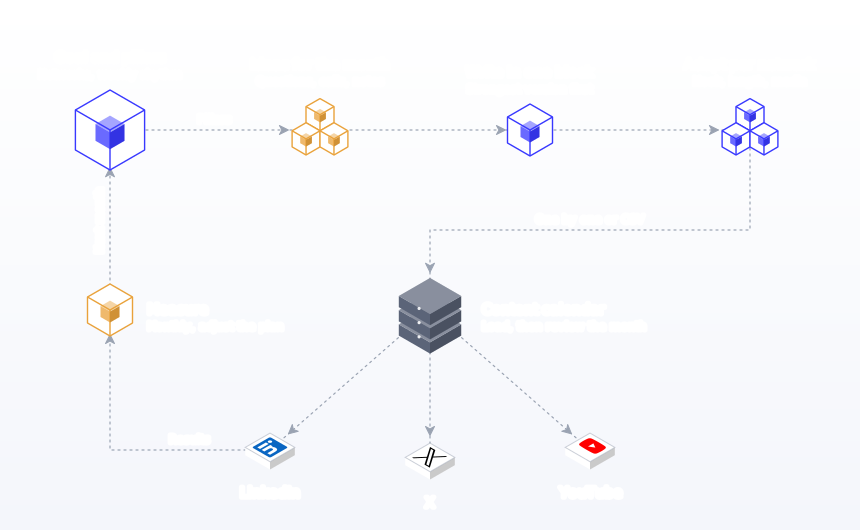
- Set your goal and networks. Pick one primary goal for the month (followers, leads, traffic or launches) and the two to five networks that serve it. Do not add a network you cannot keep up with.
- Choose three to five content pillars. Pillars are the recurring topics you post about, for example "how-tos", "customer stories", "behind the scenes" and "product". They make ideas easy to find and keep the mix balanced.
- Set a weekly rhythm. Map pillars to days: how-to on Monday, story on Wednesday, product on Friday. A fixed rhythm removes daily decisions.
- Collect ideas for the month. Pull from customer questions, sales calls, support tickets, comments and your own notes. A shared note or a draft column on a kanban board is enough, as long as everyone adds to the same place.
- Write the core posts in one block. Draft every post for the month in one sitting, without editing as you go. Write the strongest network version first, usually LinkedIn or Instagram.
- Adapt each post per network. Rewrite the hook and length for each platform. In Postprism the editor holds a version per network, and optional AI adaptation can draft those versions in your brand voice for you to edit. See AI content adaptation.
- Prepare images and video. Resize to each network's specs with our image resizer and check every caption against the network limit before it goes in the queue.
- Load the posts. Add posts one at a time on the content calendar, or import a CSV for the whole month (see the next section).
- Review the calendar view. Look at the month as a whole. Are pillars balanced? Are two promotional posts back to back? Drag posts to rebalance. Send to approval if a client or manager needs to sign off.
- Measure and adjust monthly. At the end of the month, check which posts and times performed, export the data, and shift next month's plan toward what worked.
Bulk scheduling with a CSV
For a month or more of posts, adding them one by one is slow. Bulk scheduling loads them all at once. In Postprism, bulk scheduling accepts CSV, XLSX or JSON. A CSV needs a content column and a scheduled_at column, with an optional media_url column, and you choose the target platforms once for the whole upload. A preview table shows every row before anything is scheduled, so you can catch errors first.
| content | scheduled_at | media_url |
|---|---|---|
| Three questions to ask before hiring an agency... | 2026-11-02 09:00 | (blank) |
| Behind the scenes: how we pack every order | 2026-11-04 12:30 | https://example.com/packing.jpg |
| New guide: planning Q1 content in one afternoon | 2026-11-06 10:00 | https://example.com/guide.jpg |
Two tips. First, keep one CSV per platform group, since platforms are chosen per upload: one file for LinkedIn and X text posts, another for Pinterest image Pins. Second, if you prefer to plan in conversation, Postprism's AI schedule assistant turns a chat ("three LinkedIn posts a week for November about hiring") into rows you can review. Whatever tool you use, run a three-row test import first so you can confirm the date format and time zone are read the way you expect before you load 60 rows.
Worked example: a four-person accounting firm
Consider "Northgate Accounting", a four-person firm targeting small-business owners. Its goal for November is consultation bookings. It picks LinkedIn (partner profiles and the Company Page), Facebook and Instagram.
- Pillars: tax deadlines, money tips for owners, client stories, the team.
- Rhythm: LinkedIn Monday, Wednesday and Friday; Facebook and Instagram Tuesday and Thursday.
- Batching: one Friday afternoon writes 12 LinkedIn posts. The same 8 ideas become Facebook and Instagram posts, with a carousel for the year-end checklist.
- Loading: a CSV for LinkedIn, a second for Facebook and Instagram with media URLs, both previewed and imported in minutes.
- Review: the managing partner approves the month in the calendar view on Monday.
- Live work: the time saved goes into replying to comments within the first hour, which Buffer's data links to higher engagement.
The whole month takes about four hours, and nothing depends on remembering to post.
Pre-flight checklist: before a post enters the queue
Most failed or embarrassing scheduled posts could have been caught by a 30-second check before scheduling. Run every post through this list, or make it the definition of "ready" on your kanban board so nothing moves to scheduled without it.
| Check | Why it matters | How to check quickly |
|---|---|---|
| Character count per network | Over-limit posts fail at publish time; Threads text caps at 500 characters | Look at the per-network counter in the editor |
| Image format and ratio | Instagram's API accepts JPEG only and crops carousel images to the first image | Export as JPEG, keep one ratio per carousel |
| Links | Broken or untracked links waste the click; Threads allows five links at most | Click every link and add UTM parameters |
| Date, time and time zone | The most common reason a post lands at the wrong moment | Read the time aloud in your audience's zone |
| Mentions and hashtags | A wrong handle tags a stranger | Search each handle on the network once |
| Tone against the calendar | A cheerful promo next to a sombre post reads badly | Look at the week view, not the single post |
| Approval | Clients and managers expect to see posts first | Send to approval before the post is scheduled |
The checklist takes about a minute per post, which sounds like a lot until you compare it with the cost of deleting a live post that tagged the wrong company. For teams, the value is that the checklist is shared: everyone means the same thing by "ready to schedule".
Managing your queue once it's loaded
A loaded calendar still needs light maintenance.
- Check the next 48 hours every morning. Make sure nothing scheduled clashes with news, a holiday or a crisis.
- Watch publishing statuses. Postprism shows each post's status per network, so a failed publish is visible straight away. Our guide on why scheduled posts fail to publish covers the usual causes and fixes.
- Reconnect expired accounts. OAuth tokens expire or get revoked when passwords change. Reconnect before the next post is due.
- Pause during breaking news. If something serious happens, review the next few days of posts for tone.
- Use the kanban board for drafts. Move ideas from draft to review to scheduled so the pipeline is visible.
How to measure whether scheduling is working
Three questions tell you whether your scheduling system is doing its job.
- Are you actually consistent? Count posts per week per network against your plan. Gaps show where the system broke.
- Is engagement rate holding steady as volume rises? Engagement rate is engagements divided by reach or followers; calculate it the same way every month so the numbers compare. If it falls sharply, you may be posting more than your quality can support.
- Which slots and pillars win? Group posts by time slot and pillar. After a month you will see which work for your audience.
Postprism's analytics show results across networks in one view and export to CSV, so you can run this review in a spreadsheet.
Common mistakes when scheduling social media posts
- Posting identical text everywhere. A LinkedIn post pasted into X gets truncated and reads oddly. Fix: keep the idea, rewrite the hook and length per network. Our cross-posting guide explains why.
- Using the wrong time zone. Posts go out at 3 AM for your audience. Fix: set the workspace time zone to your audience's and check it after daylight saving changes.
- Scheduling too far ahead for timely content. A reference to "this week's news" scheduled a month out reads as stale. Fix: schedule evergreen posts far out and timely posts within a week.
- Set and forget. Queued posts go out during a crisis and look tone-deaf. Fix: check the next 48 hours daily and pause when needed.
- Ignoring comments. Scheduling saves time, but the time is wasted if no one replies. Fix: block 15 minutes after key posts go live to reply.
- Overloading one network. Posting five times a day on a network where you have no audience yet. Fix: start at the sustainable level in the frequency table, then grow.
- Wrong image sizes. Images get cropped awkwardly or rejected. Fix: resize before scheduling; on Instagram, remember all carousel images crop to the first image's ratio.
- Letting account connections expire. A post fails because a token expired. Fix: watch publishing statuses and reconnect quickly.
- No review step for teams. A draft with a typo or wrong price goes live. Fix: use approvals so posts need sign-off before they publish.
- Too many links. Threads rejects posts with more than five links, and link posts were the lowest-engagement format on LinkedIn in Buffer's data at 3.81%. Fix: use one link where it matters.
- Treating best-time studies as rules. The big studies disagree. Fix: test two or three slots for a month and keep what works.
- Not measuring. A full calendar feels productive even when nothing works. Fix: review results monthly and change next month's plan.
Where Postprism fits
Postprism is a social media scheduler built around one content calendar. It auto-publishes to six networks: LinkedIn, X, TikTok, YouTube, Bluesky and Pinterest. You see every post in month, week or day view, drag to reschedule, and track drafts on a kanban board. Each post holds a version per network, with optional AI adaptation in your brand voice. Bulk import, approvals and roles, workspaces, analytics with CSV export, an MCP server for AI agents and a REST API on the Freelancer and Agency plans round it out. Plans start at $19 a month; see pricing.
Schedule to Every Platform From One Calendar
Plan a month of posts in one sitting and let Postprism publish them to all six networks on time.

Frequently Asked Questions
Is it better to schedule posts or publish them manually?
For planned content, scheduling is better: it keeps you consistent, lets you post at your audience's best times and gives room for review. Publish manually for reactive posts such as news responses and trends. Most accounts do best with mostly scheduled posts plus some live engagement.
Does scheduling hurt reach?
No major network says it penalises posts published through its official API. Ranking systems look at signals like predicted enjoyment, time spent and sharing, as Meta's Instagram Feed ranking explainer describes, not at which tool published the post. What hurts reach is low-quality or identical content, not scheduling itself.
How far in advance should I schedule social media posts?
Two to four weeks for evergreen posts and up to a quarter for campaign milestones. Keep timely posts within a week. Native tools have their own windows, such as Pinterest's 30 days.
How many networks can I schedule to at once?
With Postprism, up to six from one calendar: LinkedIn, X, TikTok, YouTube, Bluesky and Pinterest. Each post can have a different version for each network.
Can I schedule social media posts for free?
Yes, with each network's native tools, one network at a time. A dedicated scheduler costs money but saves time once you post to three or more networks. Postprism offers a free trial, and its plans start at $19 a month.
How do I schedule posts in bulk?
Prepare a CSV with content, scheduled_at and optional media_url columns, choose the platforms, preview the rows and import. Postprism also accepts XLSX and JSON, and its AI schedule assistant can turn a chat into rows.
Should I post the same content on every platform?
Share the same idea, but adapt the post. Change the hook, length, hashtags and format for each network. Our guide to cross-platform strategy covers how.
What is the best time to schedule social media posts?
Studies point to weekday late mornings and afternoons for most networks, but they disagree on details. Use them to pick two or three slots, test for a month and keep the winners. Our LinkedIn timing guide shows the testing method in detail.

