
To schedule Instagram posts, switch to a professional (business or creator) account, then either use the Schedule toggle in the Instagram app, Meta Business Suite's planner, or a scheduler. Native tools are free. A scheduler adds a calendar shared with your other networks, bulk loading and auto-publishing of feed posts and carousels.

Instagram is one of the most time-hungry networks to run well. Feed posts, carousels, Reels and Stories each want different assets and different captions, and the account that posts steadily beats the account that posts in bursts. Scheduling is how you get steady. This guide walks through every way to schedule Instagram posts in 2026, what Instagram's official API does and does not allow, how scheduling differs by post type, the best times and sizes to use, a nine-step method for batching a month of content in one sitting, and how to fix the errors that stop scheduled posts going out. Every number is linked to its source.
Key findings
- The Instagram app schedules up to 30 days ahead. According to Hootsuite, native in-app scheduling allows a maximum of 25 posts a day and 30 days in advance, for posts and Reels.
- The API allows 100 posts a day. Instagram's Content Publishing API limits accounts to 100 API-published posts in a rolling 24 hours, accepts JPEG images only and caps carousels at 10 items (Meta for Developers).
- Three to five posts a week is the sweet spot. Buffer's analysis of more than 2 million posts from about 102,000 accounts found 3 to 5 feed posts a week gave about 12% more reach per post than 1 to 2, and weeks with no posts fell below the account's baseline (Buffer).
- Carousels earn the most engagement. Socialinsider's study of 35 million posts from 447,613 pages put 2025 engagement at 0.55% for carousels, 0.52% for Reels and 0.37% for images (Socialinsider).
- Tuesday and Wednesday afternoons lead. Sprout Social's analysis of nearly 2 billion engagements across 307,000 profiles found Tuesdays and Wednesdays had the highest peaks, and weekends the lowest (Sprout Social).
- Originality now matters for photos too. On April 30, 2026, Instagram extended its originality rules to photos and carousels, and said 75% of US recommendations now come from original posts (Instagram).
What's changed in 2026
Originality rules expanded. Instagram's April 2026 update means accounts that mainly re-upload other people's photos or carousels lose recommendation eligibility, and "just adding a border, watermark, subtitles or a credit in the captions" does not make content original (Instagram). If your calendar relies on reposted memes or curated images, now is the time to rebalance toward your own photos and designs.
Engagement fell, so consistency matters more. Buffer's 2026 report, based on more than 52 million posts, found Instagram's median engagement rate dropped about 26% from 2024 to 2025, to about 5.5% (Buffer). Lower engagement per post makes a reliable posting rhythm more important, not less.
Carousels got longer in the app. Instagram raised the in-app carousel limit from 10 to 20 photos or videos in August 2024 (Metricool), while the publishing API still allows up to 10 items per carousel (Meta for Developers). Plan carousels of 10 or fewer if you want them scheduled through a tool.
The grid went rectangular and Reels got longer. In January 2025, Instagram moved profile grids from squares to a rectangular layout and extended Reels to three minutes (Engadget). Portrait images now show more of themselves on your profile.
Can you schedule Instagram posts?
Yes. Instagram gives you two free ways, and many accounts use both.
| Method | Cost | Post types | Best for |
|---|---|---|---|
| Instagram app (Schedule toggle) | Free | Posts and Reels; up to 30 days ahead, 25 a day (Hootsuite) | Occasional posts from your phone |
| Meta Business Suite | Free | Posts, Reels and Stories for Facebook and Instagram (Hootsuite) | Brands that only use Meta networks |
All of these rely on the same rule set. Instagram's API requires a professional account, accepts JPEG only, does not support shopping tags or filters, and crops every carousel image to the first image's aspect ratio (Meta for Developers). Knowing those rules before you design saves a lot of rejected uploads.
Requirements before you schedule anything
A professional account
Personal accounts cannot publish through the API. Switch to a business or creator account in Instagram's settings under account type and tools. Creator accounts suit individuals; business accounts suit brands that want contact buttons and shopping features. Both work for scheduling.
Page Publishing Authorization, if it applies
If your Instagram account is linked to a Facebook Page that requires Page Publishing Authorization, Meta says the account "cannot be published to until PPA has been completed" (Meta for Developers). If a scheduler cannot post, check this first.
The right media
Export images as JPEG. Instagram keeps photos at original resolution when they are between 320 and 1,080 pixels wide with an aspect ratio between 1.91:1 and 3:4; photos wider than 1,080 pixels are resized down and smaller ones are enlarged to 320 pixels (Instagram Help). Use our Instagram image resizer to hit the right size.
A pre-flight checklist
- Account is professional and connected to your scheduler.
- Images are JPEG and within the supported ratio.
- All images in a carousel share one aspect ratio.
- Caption is final and hashtags are chosen.
- Date, time and time zone are your audience's.
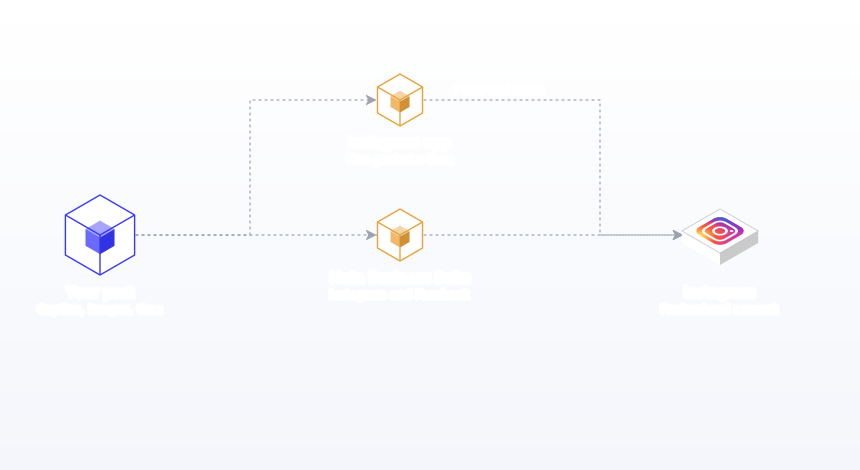
Method 1: schedule in the Instagram app
The quickest free option for a one-off post.
- Tap the plus button and create your post or Reel as usual.
- Add your caption, location and tags.
- Open Advanced settings, turn on Schedule, and choose a date and time.
- Go back and tap Share. The post is now queued.
- To edit or cancel, open your profile menu and select Scheduled content.
These steps follow Hootsuite's walkthrough, which notes the method works for posts and Reels but not Stories. The limitation is scale: each post is set up one at a time on a phone, and nothing connects it to your other networks.
Method 2: schedule in Meta Business Suite
Meta says Business Suite lets you "create or schedule posts, stories and ads for your business" (Meta). On desktop:
- Open Business Suite and choose Content, then Create post (or Create Reel, or Create story from the dropdown).
- Select your Instagram account, and your Facebook Page too if you want both.
- Upload media, write the caption and check the preview for each network.
- Turn on "Set date and time", pick the slot and click Schedule.
- Review everything in the Planner, which shows Facebook and Instagram together.
Business Suite is the best free option if Facebook and Instagram are your only networks. Once you add LinkedIn, TikTok, YouTube or anything else, you are back to managing several calendars.
Which method should you use?
The right method depends less on Instagram and more on what else you publish. Use this to decide.
| Your situation | Recommended method | Why |
|---|---|---|
| Instagram only, a few posts a week | Instagram app | Free, fast and supports every format |
| Instagram and Facebook only | Meta Business Suite | Free, one planner for both Meta networks |
| Live, reactive Stories | Instagram app, in the moment | Stories work best when they are current |
Most growing accounts end up with a hybrid: planned feed posts and carousels scheduled a few weeks ahead on one calendar with the rest of their networks, and Reels and Stories handled closer to the moment. That split also matches how the formats behave. Carousels and images are planned, considered pieces; Stories are conversation. Our Reels vs Stories guide covers when to use each.
Breakdown 1: how scheduling differs by post type
Single-image feed posts
The simplest to schedule. Use a portrait image so it fills more of the feed and the rectangular grid. Single images had the lowest engagement of the three main formats in Socialinsider's 2025 data at 0.37% (Socialinsider), so lean on them for strong photography, announcements and quotes rather than as your main format.
Carousels
Carousels are the best-performing format for engagement. Buffer's analysis found carousels drew 2.09 times the engagement rate of Reels and 1.55 times that of single images, while Reels reached more people (Buffer). Meta's own Feed ranking predicts "how likely you are to swipe through the whole carousel" (Meta Transparency Center), so a strong first slide and a reason to keep swiping matter. Schedule carousels of 10 images or fewer through a tool. Our carousel best practices guide covers structure.
Reels
Reels reach the most people: in Buffer's data, Reels reached 1.36 times as many people as carousels and 2.25 times as many as single images (Buffer). They can be up to three minutes long. The Instagram app and Meta Business Suite both schedule Reels. Film and edit in batches so a week of Reels is ready before you schedule.
Stories
Stories disappear after 24 hours and work best when they are live and conversational: polls, questions, behind-the-scenes. Meta Business Suite can schedule Stories (Hootsuite). Many accounts schedule the feed and post Stories in the moment. A simple rule: if it needs a reaction today, post it live; if it is useful next week too, schedule it.
| Format | Engagement rate 2025 (Socialinsider) | Average posts per month 2025 | Scheduling tip |
|---|---|---|---|
| Carousel | 0.55% | 5 | Keep to 10 slides or fewer for scheduled carousels |
| Reels | 0.52% | 8 | Batch-film; schedule in the app or Business Suite |
| Image | 0.37% | 7 | Use portrait JPEGs for the rectangular grid |
Source: Socialinsider, 35 million posts from 447,613 pages, January to December 2025. Note that Socialinsider measures engagement against followers, while Buffer measures it against reach, which is why the two studies' rates differ in size.
How Instagram ranking treats your scheduled posts
A common worry is that scheduled posts get less reach. Instagram's published explanations of its ranking systems give no reason to think so, and they say a lot about what does matter.
There is no single algorithm
Adam Mosseri's ranking explainer states that "Instagram doesn't have a singular algorithm that oversees what people do and don't see on the app" (Instagram). Feed, Stories, Explore and Reels each have their own system. For Feed, the most important signals, roughly in order, are the viewer's activity (likes, shares, saves and comments), information about the post, information about the person who posted, and the viewer's history of interacting with that account.
What Feed ranking predicts
Meta's Transparency Center lists the predictions behind Instagram Feed. They include how likely you are to swipe through a whole carousel, how likely you are to enjoy a post, how likely you are to skip it, how much time you will spend on the author's profile afterward, how likely you are to share it in a direct message and how much time you will spend on it (Meta Transparency Center). Notice what is missing: nothing about the tool used to publish. What counts is whether people stop, swipe, share and visit your profile.
What this means for scheduling
- Schedule for completion. Carousels with a strong first slide and a payoff on the last slide serve the carousel-completion prediction directly.
- Schedule for shares. Posts that people send to a friend (a useful checklist, a relatable observation) serve the DM-sharing prediction. Meta notes that recency within 90 days feeds that prediction, so even older evergreen posts can keep earning shares.
- Schedule when you can reply. Because viewer activity is the top signal, a post that collects early comments and gets replies tends to keep moving. Buffer estimates replying lifts Instagram engagement by about 21%, with about 63% of profiles performing better when they reply (Buffer).
- Schedule original work. With 75% of US recommendations now coming from original posts, your own photos, designs and videos are the safest material to fill a calendar with (Instagram).
For a deeper look, read how the Instagram algorithm works.
Breakdown 2: best times to schedule Instagram posts
Two of the largest studies give overlapping but different answers.
| Day | Sprout Social (local time) |
|---|---|
| Monday | 2 to 4 PM |
| Tuesday | 1 to 7 PM |
| Wednesday | 12 to 9 PM, plus an 11 PM spike |
| Thursday | 12 to 2 PM |
| Weekend | Lowest engagement overall |
Sprout's windows come from data between November 27, 2025 and February 27, 2026, in each profile's local time (Sprout Social). Hootsuite's analysis of over 1 million posts names Monday 3 to 9 PM as Instagram's best window (Hootsuite), and Buffer's timing data points to 6 to 9 PM on weekdays (Buffer). The overlap: weekday afternoons into early evening. Start there, then test. Our full guide to the best time to post on Instagram breaks it down by industry.
Breakdown 3: how often to schedule by account type
Buffer's fixed-effects analysis found follower growth rose with frequency: about +0.12% a week at 1 to 2 posts, +0.26% at 3 to 5, +0.44% at 6 to 9 and +0.66% at 10 or more, with diminishing returns at each step (Buffer). Sprout Social's benchmark is 1 to 2 posts a day for brands (Sprout Social). What you can sustain depends on who you are.
| Account type | Feed posts per week | Mix | Planning horizon |
|---|---|---|---|
| Solo founder or consultant | 3 | 2 carousels, 1 image | 2 to 4 weeks |
| Small business | 3 to 5 | Carousels, product photos, Reels | 1 month |
| Ecommerce brand | 5 to 7 | Product carousels, Reels, UGC (with permission and added value) | 1 month plus launches |
| Full-time creator | 6 to 10 | Reels-led with carousels | 2 weeks, with room for trends |
| Agency client | 3 to 5 | Agreed in the content plan | 1 month, approved in advance |
Solo founders
Three good carousels a week beats daily filler. Repurpose your best LinkedIn posts as carousels, which keeps ideas consistent across networks.
Small businesses
Post three to five times a week and build around real events: new stock, seasonal offers, team stories, customer photos. A café, for example, might schedule a weekly menu carousel, a Friday team photo and a monthly event post, and photograph daily specials live.
Ecommerce brands
Product carousels and Reels do the heavy lifting. Plan around launches and the retail calendar, and remember the April 2026 originality rules: reposting customer photos needs your own creative input to count as original.
Creators
Reels lead discovery. Schedule evergreen posts and keep open slots for trends.
Agencies
Plan a month per client, get approval before anything is scheduled, and keep each client in its own workspace.
Breakdown 4: by industry
Retail and ecommerce
Carousels for collections, Reels for product use, single images for drops. Schedule launch sequences a week ahead.
Food and hospitality
Daily specials benefit from same-day posting, but menus, events and team stories can be scheduled a week out.
B2B and professional services
Educational carousels perform well. Turn checklists and frameworks into 5 to 8 slides and schedule twice a week.
Beauty and fashion
Reels and carousels lead. Batch shoot looks and tutorials, then schedule across two weeks.
Real estate
Listings as carousels, neighbourhood Reels, market updates as single images. Keep the queue short because listings change.
Fitness and wellness
Workout carousels and Reels. Schedule a weekly programme and post check-ins live in Stories.
Breakdown 5: by time zone and audience location
Instagram audiences are often spread across regions, and the time you schedule should follow the audience, not you. Sprout's best-time data is recorded in each profile's local time (Sprout Social), so its windows describe when people in a given place engage.
One-region audiences
Set your scheduler's time zone to the audience's and use the weekday afternoon windows above. A London brand selling to the UK schedules for 1 to 4 PM UK time, wherever the social media manager sits.
US-wide audiences
Schedule for mid-afternoon Eastern, which lands in late morning to lunchtime Pacific. That catches the Eastern afternoon peak and the start of the Pacific day.
US and Europe
Late morning Eastern time is mid to late afternoon in the UK and central Europe, which overlaps both audiences' strongest windows.
Global audiences
Rotate slots across the week (for example, Monday in the Americas window, Wednesday in Europe's, Friday in Asia-Pacific's) and compare reach by slot after a month. Check your audience's top locations in Instagram's insights first; a "global" audience is often concentrated in one or two regions.
Daylight saving weeks
The US and Europe change clocks on different dates, so for a week or two each spring and autumn the gap between them shifts by an hour. Check that week's queue.
Recommended Instagram image sizes for scheduling
| Format | Recommended size | Notes |
|---|---|---|
| Portrait feed image | 1080 x 1350 px | Shows the most in feed; JPEG for API publishing |
| Square feed image | 1080 x 1080 px | Safe default |
| Landscape feed image | 1080 x 566 px | Within the 1.91:1 limit, but small in feed |
| Carousel | Same ratio for every slide | All slides crop to the first slide's ratio |
| Reels and Stories | 1080 x 1920 px | Keep text inside the safe zone |
The width range (320 to 1,080 pixels) and ratio limits (1.91:1 to 3:4) come from Instagram Help. Check text placement with our Instagram safe zone tool, and see our Instagram aspect ratios guide for every format.
Captions, hashtags and the first line
Scheduled captions should be written for the feed, where only the first line or two show before "more". Because the top Feed signal is viewer activity (Instagram), captions that invite a reply, a save or a share have a structural advantage. Writing every caption in one sitting, before you load the month, makes them more consistent and quicker to produce.
Hook templates that work in a scheduled queue
| Hook type | Template | Example |
|---|---|---|
| Number | [Number] [things] that [result] | 5 candle habits that double burn time |
| Mistake | Stop [common habit]. Do this instead. | Stop trimming wicks with scissors. Do this instead. |
| Question | Do you [relatable problem]? | Do your candles tunnel after one burn? |
| Before and after | [Old state] to [new state] in [time] | Cluttered shelf to calm corner in 10 minutes |
| Save prompt | Save this for [moment] | Save this for your next gift list |
Body and call to action
Keep paragraphs to one or two short lines. Tell the reader what the carousel or image is about, add one detail they could not get from the visual, and end with a single call to action: comment, save, share or visit the link in bio. Three calls to action in one caption usually means none get done.
Hashtags
Use a handful of specific hashtags that describe the post, rather than a block of broad ones. Put them at the end of the caption so they do not push the hook down. Our hashtag generator suggests relevant ones.
How to batch and schedule a month of Instagram posts: a 9-step method
- Pick your weekly rhythm. For example, carousel Monday, Reel Wednesday, image Friday. Three to five feed posts a week is the range Buffer's data supports.
- Choose three to four content pillars, such as education, product, people and proof.
- List 12 to 20 ideas for the month, one per slot, balanced across pillars.
- Shoot and design in one session. Photograph products, film Reels and design carousels in batches using templates.
- Export correctly. JPEG, one ratio per carousel, 1080 pixels wide.
- Write every caption in one pass, hook first, with hashtags and one call to action.
- Load the month. Schedule each post on the calendar, or import a CSV with content, scheduled_at and media_url columns.
- Review the month as a grid and a calendar. Check the visual flow with our feed planner, and check pillars are balanced.
- Leave gaps for timely posts and plan Stories daily in the moment.
Worked example: a candle brand's November
"Ember and Oak", a small candle maker, posts to Instagram, Facebook and Pinterest. In one Saturday it photographs the winter collection and designs four carousels. On Sunday it writes 16 captions. The single-image posts go in as a CSV for Instagram and Facebook, the carousels are built as Instagram posts in the editor, and the Pinterest Pins go in a second CSV. The month has four "how to burn candles safely" carousels, four product carousels, four customer-photo posts (with permission, re-styled and captioned with the brand's own story to meet originality rules) and four behind-the-scenes images. Reels are filmed on the same Saturday and scheduled in the Instagram app. The owner spends weekday mornings replying to comments instead of posting.
Scheduling Instagram for teams and clients
When more than one person touches an account, the risk shifts from "we forgot to post" to "the wrong thing went out". A simple workflow prevents that.
- Drafts live on a board, not in chat. A kanban board moves each post from idea to draft to review to scheduled, so everyone can see where it is.
- Roles match responsibilities. Editors create and edit, Admins approve and connect accounts, Viewers (often clients) can see the calendar without changing it.
- Approval happens before scheduling. The client or manager approves the month in one sitting on the calendar view, not post by post over email.
- One workspace per brand. Agencies keep each client's Instagram, assets and calendar separate, so a post can never go to the wrong account.
- A named owner watches publishing statuses. One person checks each morning that yesterday's posts went out and reconnects any expired account.
This takes about an hour to set up and saves the endless "can you send me the caption again?" messages that slow most client work.
Worked example: a B2B consultant's three-a-week plan
"Clearpath Advisory" is a one-person operations consultancy. Instagram is its third network after LinkedIn and X, so it needs to cost very little time. The founder repurposes the week's best LinkedIn post into a 6-slide carousel every Monday, shares a single portrait photo from a client workshop on Wednesday, and posts a quote card on Friday. All three are written alongside their LinkedIn and X versions, so one idea becomes three native posts across networks. The Instagram version gets a shorter hook, a save prompt and a few specific hashtags; the LinkedIn version keeps the long-form story. Each Sunday the founder loads the coming week in about 40 minutes. After two months, the analytics export shows carousels earn most of the saves and Wednesday afternoon outperforms Friday morning, so the plan moves the quote card to Thursday at 1 PM. No new tools, no daily posting, and Instagram stops being the network that always slips.
Troubleshooting Instagram scheduling errors
| Error | Likely cause | Fix |
|---|---|---|
| Account cannot be published to | Personal account, expired connection or pending Page Publishing Authorization | Switch to professional, reconnect, complete PPA |
| Image rejected | PNG or other non-JPEG format, or unsupported ratio | Export as JPEG within 1.91:1 to 3:4 |
| Carousel slides cropped | Slides with different ratios | Use one ratio for all slides |
| Carousel too long | More than 10 items through the API | Trim to 10 or post in the app |
| Posting limit hit | More than 100 API posts in 24 hours | Spread posts across days |
| Shopping tags missing | Not supported through the API | Add tags in the app after publishing |
All limits from Meta for Developers. For more fixes, see why scheduled posts fail to publish.
How to measure whether your Instagram schedule is working
Scheduling is only half the job. Once a month, check whether the plan is producing results and adjust the next month's calendar.
| Metric | What it tells you | What to change if it is weak |
|---|---|---|
| Reach per post | Whether Instagram is showing your posts to people | Try more Reels and carousels; test new time slots |
| Saves | Whether posts are useful enough to keep | Make more checklists, guides and how-tos |
| Shares | Whether people send posts to friends | Write more relatable, specific posts |
| Comments and replies | Whether posts start conversations | Ask clearer questions; reply faster |
| Profile visits and follows | Whether posts make people curious about you | Tighten your bio and pin your best posts |
| Posts published vs planned | Whether the schedule itself is holding | Batch earlier; lower frequency to a sustainable level |
Group posts by pillar and by time slot: after two or three months, you will see which topics and times work for your audience specifically, which is worth more than any published study.
Scheduling Instagram alongside your other networks
Very few brands use Instagram alone. Pew's 2025 survey found 50% of US adults use Instagram, compared with 71% for Facebook and 84% for YouTube (Pew Research Center), so most audiences are spread across several networks. The efficient approach is to plan one idea and publish native versions everywhere: a carousel on Instagram, a text post with the key points on LinkedIn, a short post on X and Threads, and a Pin on Pinterest. In Postprism the LinkedIn, X and Pinterest versions live inside the same post, on the same calendar, so a change to the idea is easy to carry across. Our cross-platform strategy guide explains how to adapt without copy-pasting.
Common mistakes when scheduling Instagram posts
- Using a personal account. Fix: switch to business or creator before connecting a scheduler.
- Uploading PNGs. Fix: export JPEG for anything going through the API.
- Mixing ratios in a carousel. Fix: design every slide at the same ratio as slide one.
- Building 20-slide carousels for scheduling. Fix: keep scheduled carousels to 10 slides.
- Reposting without adding anything. Fix: since April 2026, add real creative input or create your own content.
- Posting in bursts. Fix: schedule steady weekly slots; Buffer found weeks with no posts fall below baseline.
- Ignoring the first line. Fix: write the hook first and keep it short.
- Using the same caption on every network. Fix: adapt per network; see our Instagram and Facebook cross-posting guide.
- Trusting one best-time study. Fix: test two or three slots for a month.
- Not replying after posts go live. Fix: Buffer estimates replies lift Instagram engagement by about 21%; spend the saved time in comments.
- Forgetting the grid. Fix: preview the month's feed before scheduling.
- Not measuring. Fix: review saves, shares and reach monthly; our Instagram metrics guide explains which matter.
Schedule to Every Platform From One Calendar
Plan a month of posts for LinkedIn, X, TikTok, YouTube, Bluesky and Pinterest on one calendar, and let Postprism publish them on time.
Frequently Asked Questions
Can you schedule Instagram posts for free?
Yes. The Instagram app's Schedule toggle and Meta Business Suite are both free.
How far in advance can I schedule Instagram posts?
In the Instagram app, up to 30 days ahead and 25 posts a day, according to Hootsuite's guide. Schedulers that use the API are limited to 100 published posts per account per 24 hours.
Do I need a business account to schedule Instagram posts?
You need a professional account, which can be business or creator. Personal accounts cannot publish through the API.
Can I schedule Instagram carousels?
Yes. Through the API, carousels can hold up to 10 images or videos, and every slide is cropped to the first slide's ratio.
Can you schedule Instagram Reels and Stories?
Reels can be scheduled in the Instagram app and Meta Business Suite. Stories can be scheduled in Meta Business Suite.
Does scheduling hurt Instagram reach?
Instagram's ranking signals are about your audience's activity and the post itself, not how it was published. None of the signals Instagram has published relate to which tool published a post.
What is the best time to schedule Instagram posts?
Weekday afternoons, especially Tuesday and Wednesday, according to Sprout Social's 2026 data. Test against your own audience.
How often should I schedule Instagram posts?
Three to five feed posts a week is the sweet spot in Buffer's analysis of over 2 million posts, with the biggest jump in reach per post coming from moving up from one or two a week. Post more only if quality holds, and remember that a steady three posts every week beats ten one week and none the next, because weeks with no posts fall below your account's own baseline.

