When scheduled posts do not publish, the cause is almost always one of five things: the account connection expired or lost permissions, the post breaks a network rule, the media file is the wrong format or size, the post was saved as a draft, or the network had an outage or hit a limit.

The pattern of failures tells you most of the answer. If every post to one network fails, look at that connection. If only posts with media fail, look at the files. If everything fails at once, look at the post or the scheduler. If a post went out at the wrong time, look at the time zone. This guide works through 14 causes in the order worth checking them, with the rule behind each one taken from the networks' own developer documentation, then gives you a ten-minute diagnosis method, per-network checks and a prevention routine. It applies to any scheduler that publishes through official network integrations, including Postprism.
Key findings
- LinkedIn access tokens are issued with a 60-day lifespan and LinkedIn "does not generate long-lived access tokens", per its OAuth documentation. Connections need refreshing, and if that fails, reconnecting.
- Facebook long-lived user tokens last "about 60 days", while Page tokens have no fixed expiry but can be invalidated "under certain conditions" (Meta for Developers).
- Instagram's publishing API accepts only JPEG images, between 4:5 and 1.91:1, up to 8 MB, with captions capped at 2,200 characters, 30 hashtags and 20 @ tags (Instagram Platform reference).
- Every network caps how much an app can publish. Instagram limits accounts to 100 API-published posts in a moving 24 hours (Instagram), Threads to 250 (Threads API), and YouTube's upload method to 100 calls a day per project (YouTube Data API).
- On X, a link always counts as 23 characters and each emoji as 2 toward the 280-character limit (X developer docs), so posts that look short can still be rejected.
- Some failures are rules, not bugs. TikTok restricts content from unaudited apps to private viewing (TikTok for Developers), and YouTube holds scheduled videos during a Community Guidelines strike (YouTube Help).
What's changed in 2026
Most causes of failed posts are old. A few have become more common this year.
X moved its API to pay per use
X now charges developers per request: $0.015 to create a post and $0.200 to create a post with a URL, per its API pricing page. That has pushed some tools to drop X from free plans or limit X posting. If your X posts stopped publishing after a plan change, check whether your plan still includes X before you look for a technical fault.
Meta tightened media rules for API publishing
Native apps are forgiving: they crop, convert and compress for you. The publishing APIs that schedulers use are strict. Instagram's API states that "JPEG is the only image format supported", that extended JPEG formats such as MPO and JPS are not, and that "the media must be hosted on a publicly accessible server at the time of the attempt" (Instagram Platform). A PNG or a phone photo in an unusual format that posts fine in the app can fail through a scheduler unless the tool converts it first.
Platform enforcement now affects scheduled posts
YouTube notes that if your channel has a Community Guidelines strike, "your scheduled video won't be published during the penalty period", and you need to reschedule it after the penalty ends (YouTube Help). That looks like a scheduling failure but is an account issue.
More posts are created by AI assistants and APIs
With MCP servers and APIs, posts are increasingly created by AI assistants and automations. Those posts often arrive as drafts without a date, by design, so a person can check them. A draft never publishes on its own, which is now one of the most common reasons a post "did not go out".
Why a silent failure costs more than one post
A failed post is not just one missing update. Buffer's 2026 analysis of more than 52 million posts found that accounts which skipped a week underperformed their own baseline growth rate (Buffer), and its study of more than 100,000 users found that people who posted in 20 or more weeks out of 26 got around 450% more engagement per post than those active in four weeks or fewer (Buffer). Neither study proves a single missed post causes harm, but both show that consistency is what scheduling is meant to protect. A queue that fails without anyone noticing undoes the reason you scheduled in the first place. That is why the daily status check in this guide matters as much as any fix.
Quick diagnosis table
Start here. Find the symptom that matches, then jump to the cause.
| Symptom | Most likely cause | Check first |
|---|---|---|
| Every post to one network fails | Expired or revoked connection | Reconnect the account |
| Connection looks fine, publishing fails | Missing permission or admin role | Your role on the Page or company account |
| Only posts with media fail | File format, size or aspect ratio | That network's media requirements |
| Instagram, TikTok, YouTube or Pinterest fail, others work | Required media missing | Image or video attached for that network |
| Short posts to X fail | Length after links and emojis are counted | Character count with links at 23 |
| Post went out at the wrong time | Time zone setting | Scheduler time zone |
| Nothing happened, no error | Saved as a draft | Post status on the calendar |
| Everything failed for an hour, then recovered | Platform outage or rate limit | The network's status page |
| Post published but nobody can see it | Private visibility or moderation | Visibility setting and app notifications |
Connection and permission causes
These cause the most failures, and they usually affect every post to one network at once.
1. The account connection expired
Symptom: all posts to one network fail, often with an authorisation error. Why: schedulers publish using an access token the network issues when you connect. Tokens expire and are revoked. LinkedIn issues every access token with a 60-day lifespan (LinkedIn). Facebook long-lived user tokens last about 60 days (Meta). Changing your password, removing the app in the network's settings, or a security check can revoke access early. Fix: reconnect the account through the network's own sign-in. Prevent: reconnect as soon as your tool warns a connection needs attention, and avoid scheduling launch posts straight after a password change.
2. Permissions were not fully granted
Symptom: the connection looks fine, but publishing fails. Why: some networks let you untick permissions during sign-in, and LinkedIn notes that if an app requests a different set of scopes, earlier tokens are invalidated. Fix: reconnect and accept every requested permission. Prevent: when a tool asks you to reconnect after an update, do it, because the request often adds a permission the tool needs.
3. You are not an admin of the Page or company account
Symptom: posts to a Facebook Page or LinkedIn Page fail, while posts to your own profile work. Why: on LinkedIn, only the Super admin and Content admin roles can create posts on a Page; an Analyst cannot post (LinkedIn Help). Facebook Pages have similar role rules. Fix: ask a Super admin to give you a posting role, then reconnect. Prevent: when someone leaves the team, move Page roles before removing their account, or every connection they made will fail.
4. The account type cannot publish through an app
Symptom: Instagram posts fail from the very first one. Why: Instagram's publishing API works with an "Instagram professional account" (Instagram Platform). Personal accounts cannot be published to by schedulers. Pinterest likewise requires a business account for scheduling (Pinterest Help). Fix: switch to a professional or business account in the app's settings, then reconnect. Prevent: check account types when you first connect each network.
Content and media causes
These affect individual posts, usually ones with media or long captions.
5. A required image or video is missing
Symptom: text-only posts to some networks fail. Why: Instagram posts need an image or video, TikTok and YouTube need a video (TikTok also accepts photo posts), and Pinterest Pins need an image. Fix: attach the required media to that network's version, or remove the network from text-only posts. Prevent: in your batching checklist, list which networks each post is for and what each needs.
6. The image is the wrong format
Symptom: image posts fail on Instagram but work on Facebook and LinkedIn. Why: the Instagram API supports JPEG only. Fix: export as JPEG. Prevent: make JPEG the default export in your design tool, or use a scheduler that converts on upload.
7. The file is too large or the wrong shape
Symptom: posts with media fail while text posts work. Why: each network sets limits. Instagram feed images must be between 4:5 and 1.91:1 and up to 8 MB; Reels video through the API runs 3 seconds to 15 minutes and up to 300 MB (Instagram reference). Pinterest recommends 2:3 and accepts PNG or JPEG up to 20 MB on desktop (Pinterest Help). Fix: resize and compress. Our free image compressor and social media image resizer handle both. Prevent: keep an export preset per network; our image size guide lists them.
8. The caption is over the limit
Symptom: posts to X, Bluesky or Threads fail, especially long ones. Why: X caps standard posts at 280 weighted characters, with URLs at 23 and emojis at 2 (X). Threads text posts are limited to 500 characters (Threads API). Bluesky allows 300 (see our Bluesky platform notes). Instagram captions allow 2,200 characters, 30 hashtags and 20 @ tags. Fix: shorten that network's version. Prevent: check each version with a character counter before scheduling.
9. The post is a duplicate
Symptom: a recurring X post fails although an identical one went out before. Why: networks can reject or limit posts that repeat a recent post from the same account, and Meta reduces distribution of duplicate videos. Fix: change the wording of recurring posts. Prevent: write recurring series as templates with a new line each time, not one post reused.
10. A link or mention was rejected
Symptom: posts with certain links fail or are flagged. Why: networks block some link shorteners and links flagged as spam, and some limit mentions. Fix: use the full, UTM-tagged URL rather than an unknown shortener, and open the link to check it works. Prevent: build links with a UTM builder and test them during batching.
Timing and status causes
11. The post was saved as a draft
Symptom: nothing happened at the expected time, and there is no error. Why: the post was saved without a publish date, or the date was removed while editing. Drafts never publish on their own. This is especially common when posts are created by an AI assistant or API, where drafts are the safe default. Fix: open the post, set a date and time, and schedule it. Prevent: in the weekly review, filter for drafts dated this week. In Postprism, each post shows Draft, Scheduled, Publishing, Published or Failed; see publishing statuses explained.
12. The time zone is wrong
Symptom: posts went out, but hours early or late. Why: the scheduler is set to a different time zone from your audience, or someone scheduled natively in their own. Facebook's native scheduler, for example, uses "your current time zone" (Facebook Help Centre), which changes when you travel. Fix: set the correct time zone and check a few upcoming posts on the calendar. Prevent: set the time zone once for the whole team.
Platform-side causes
13. The network had an outage or a limit was reached
Symptom: posts to one network failed for a short window, then worked again. Why: networks have outages, and they limit how much apps can publish. Instagram limits accounts to 100 API-published posts in a moving 24 hours; Threads profiles to 250 published posts in 24 hours, and Threads recommends waiting about 30 seconds before publishing a media container (Threads API); YouTube's upload method is limited to 100 calls a day per project (YouTube). Fix: check the network's status page, such as Meta's business status page, and retry once the issue clears. Prevent: spread large bulk uploads instead of publishing dozens of posts in the same minute.
14. The post published but is not visible
Symptom: the tool says Published, but followers cannot see the post. Why: visibility was set to private, the network removed or restricted it after moderation, or a platform rule applied. TikTok restricts all content posted by unaudited apps to private viewing (TikTok for Developers), and YouTube videos stay private until their scheduled date (YouTube Help). Fix: check the post's visibility in the app and any moderation notice; appeal if you think it is a mistake. Prevent: set privacy deliberately for each YouTube and TikTok post, and read each network's guidelines for regulated topics.
Diagnose by failure pattern
The fastest way to find the cause is to look at what failed together.
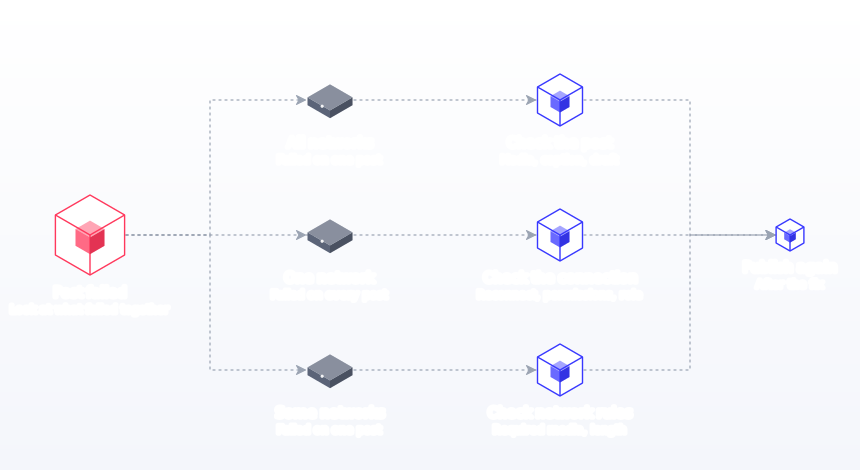
All networks failed on one post
The problem is the post, not the connections. Look at the media first (format, size), then the caption, then whether the post was a draft. If several posts failed at once across networks, check whether your scheduler had an incident.
One network failed on every post
The problem is the connection. Reconnect, accept all permissions, and confirm your role on the Page. This is cause 1, 2 or 3 almost every time.
Some networks failed on one post
Compare what the failed networks require that the others do not. Media-first networks (Instagram, TikTok, YouTube, Pinterest) fail when media is missing or wrong. Short-text networks (X, Bluesky, Threads) fail when the caption is long. Postprism records each network's result separately, so a post can be Published on LinkedIn and Failed on TikTok, with the error shown on the failed network.
The post published at the wrong time
Time zone, every time. Check the scheduler setting and whether someone scheduled natively. Also check daylight saving changes: a post scheduled weeks before the clocks move can land an hour away from where you expected if two tools disagree about the zone.
The post says published but is missing
Visibility or moderation. Check privacy settings and notifications in the app.
Checks by network
Keep this table next to your batching checklist. It turns most failures into a quick check before scheduling instead of a scramble after.
| Network | Check before scheduling | What Postprism publishes |
|---|---|---|
| Right profile or Page selected; Super admin or Content admin on Pages | Text, a single image or a video, to profiles and Company Pages | |
| X | 280 weighted characters with links at 23, emojis at 2; not a repeat of a recent post | Single posts with up to 4 images |
| TikTok | Video or photos attached; vertical format; privacy set | Video and photo posts, as a direct post or an inbox draft |
| YouTube | Video attached; title, description and privacy set; no active strike | Video with title, description, tags, privacy, playlist and thumbnail; short vertical videos become Shorts |
| Business account; image attached; board chosen; link works | Image Pins with board, title, description and link | |
| Bluesky | Text within 300 characters | Text, with links, mentions and hashtags |
For the full technical limits per network, see our media requirements reference. For Instagram specifically, our guide to how to schedule Instagram posts walks through account setup.
Network-by-network troubleshooting notes
The table above lists what to check. These notes add the context that explains the most common failure on each network.
Instagram fails more scheduled posts than any other network because its publishing API is strict where the app is forgiving. The usual culprits, in order: a personal account rather than a professional one, a PNG or HEIC image, an image wider than 1.91:1 or taller than 4:5, and a carousel whose later slides do not match the first slide's ratio, since "carousel images are all cropped based on the first image in the carousel" (Instagram Platform). Our Instagram aspect ratio guide has the safe sizes.
Facebook failures are mostly about the Page. Someone lost their role, the Page was unpublished, or the connection was made by a person who has since left. Page tokens do not expire on a fixed schedule, but Meta notes they can be invalidated "under certain conditions" (Meta for Developers), such as a role change. Reconnect from an account that is still an admin.
LinkedIn connections age out. With 60-day access tokens, a connection that is not refreshed in time stops working. The other common cause is posting to a Company Page without the Super admin or Content admin role. If you post to both a profile and a Page, check that the post was set to the one you intended.
X
X failures are usually length. Because links count as 23 characters and emojis as 2, a post that reads as 250 characters can weigh more than 280. The other cause is repetition: recurring posts with identical text. Our X character counter uses the weighted count.
TikTok
TikTok needs a video or a photo post, vertical by preference, and a privacy setting. If a post published but nobody can see it, check whether it went out as private, or as a draft to your TikTok inbox for you to finish in the app. Those are deliberate options, not failures.
YouTube
YouTube uploads fail on missing fields, very large files on slow connections, and quota. Scheduled videos also stay private until their publish time and are held during a Community Guidelines strike. If a scheduled video did not go live, check the channel's status in YouTube Studio before anything else.
Pinterest needs a business account, an image, a board and ideally a destination link. Pins with a ratio taller than 2:3 "might get cut off in people's feeds" (Pinterest Help), which is not a failure but looks like one. Titles over 100 characters or descriptions over 800 will need trimming.
Threads
Threads failures are mostly length and pace. Text is limited to 500 characters, carousels need between two and 20 items, and publishing many posts in quick succession can hit the 250-posts-a-day limit or the recommended 30-second wait per media container (Threads API).
Bluesky
Bluesky has no native scheduler, so all scheduled Bluesky posts come from third-party tools. The common failure is length: Bluesky counts 300 characters. Links and mentions also need to be valid so they render as links rather than plain text.
Diagnose by tool type
Where the post was scheduled changes where to look.
Native schedulers
Native tools rarely fail on format, because the app checks your post as you build it. They fail on limits and visibility instead: a post outside the scheduling window, a TikTok scheduled from the app when scheduling sits in the web uploader, or a scheduled YouTube video held by a strike. They also split your queue across apps, which makes missing posts harder to see.
Third-party schedulers
Schedulers publish through the network's API, which is stricter than the app. Most failures are connections, permissions and media rules. A good tool shows the network's error message on the failed post and lets you retry only the networks that failed.
Automations and workflows
If posts come from a spreadsheet, Zapier, Make or n8n flow, failures often happen before the post reaches the scheduler: a blank cell, a date in the wrong format, a media URL that is not public. Check the automation's run history before the scheduler's.
AI assistants and APIs
When an assistant such as Claude creates posts through an MCP server or API, check whether it created drafts or scheduled posts, and whether the times are in the right time zone. Our API error reference and rate limits pages explain the responses you may see.
| Where the post was scheduled | Most common failure | Where to look first |
|---|---|---|
| Native app | Outside the scheduling window, held by a strike | The app's scheduled posts list |
| Scheduler | Expired connection, media rules | The failed network's error message |
| Automation | Blank fields, bad dates, private media URLs | The automation's run history |
| AI assistant or API | Created as draft, wrong time zone | Post status and scheduled time |
Diagnose by team setup
Who connects and manages accounts changes which failures you are most likely to see.
Solo founders and creators
One person connects everything, so the usual cause is a forgotten reconnect after a password change or a phone upgrade. A monthly five-minute connection check on the first Monday of each month prevents almost all of it. Keep a note of which email address owns each account, since signing in with the wrong one is the second most common cause of a broken connection.
Small teams
In a team, connections belong to whoever made them. When that person changes role, leaves, or loses a Page role, every post through their connection fails. Decide who owns connections, make sure that person is an admin on every Page, and write the process down so a handover is a checklist rather than a mystery.
Agencies and freelancers
Agencies depend on clients' accounts, which clients can change at any time: a new password, a removed admin, an account switched from business to personal. Keep a separate workspace per client so failures are easy to trace, assign one person to check each client's statuses daily, and agree with each client that they tell you before changing account access.
| Team setup | Most likely failure | Prevention |
|---|---|---|
| Solo | Expired connection after a password change | Monthly connection check |
| Small team | Connection owner left or lost a Page role | Named connection owner who is admin everywhere |
| Agency | Client changed access without notice | Workspace per client, daily status check, access agreement |
The ten-minute diagnosis method
Follow these steps in order. Most failures are found by step four.
- Read the error on the failed post. It usually names the cause, such as missing media, an expired token or a caption over the limit.
- Note which networks failed and which worked. Use the failure patterns above.
- Check the connection for every failed network. Reconnect if your tool shows a warning or the error mentions authorisation.
- Check the media against that network's rules: format, size, aspect ratio, length.
- Check the caption length with links and emojis counted the way the network counts them.
- Check the status and time. Was it scheduled or a draft? Was the time in the right time zone?
- Check the network's status page for outages if nothing else explains it.
- Fix that network's version only, leaving the versions that published untouched.
- Retry or reschedule. In Postprism, "Retry Failed Platforms" re-sends only to the networks that failed. If the moment has passed, edit the copy so it does not mention a time that is now wrong.
- Check the rest of the queue for the same issue, and add the cause to your checklist so it does not recur.
Worked example: diagnosing a failed launch post
A fictional candle shop, Ember and Wick, scheduled a launch post to Instagram, Facebook, X and TikTok for 10:00. At 10:15, only Facebook and X had published.
- Which networks failed? Instagram and TikTok. Facebook and X worked, so the problem was not the whole post or the connections in general.
- What do they have in common? Both are media-first. The post had one landscape PNG attached.
- TikTok: the post had no video and no photo post format chosen, so TikTok could not publish it. Fix: add a short vertical video version.
- Instagram: the PNG was rejected; the API takes JPEG only, and the 16:9 image was wider than the 1.91:1 limit. Fix: export as JPEG at 4:5, then retry Instagram only.
- Prevention: the shop added "JPEG, 4:5, video for TikTok" to its batching checklist and saved an export preset.
The diagnosis took five minutes because the team started from the pattern of failures rather than guessing.
A prevention routine
| When | Check | Time |
|---|---|---|
| Daily | Publishing statuses for anything marked Failed | 1 minute |
| Weekly | Upcoming queue: every post scheduled, not a draft; times right | 5 minutes |
| Monthly | Every account connection healthy; reconnect any with warnings | 5 minutes |
| During batching | Required media attached, formats and sizes right, lengths checked, links tagged | Built in |
| After any team change | Page roles moved, connections remade by a current admin | 15 minutes |
Most failures are visible before they happen. Missing media, long captions, PNG files and draft statuses can all be caught in a five-minute weekly queue review, which is far less painful than a launch post that never went out.
Postprism helps here by publishing through each network's official integration, tracking each post's status per network, showing the network's error on any failure, and letting you retry only what failed. Postprism's analytics also show your publishing success rate over time, so a network that keeps failing stands out. If you are setting up from scratch, start with connecting your first platform.
Common mistakes when troubleshooting failed posts
- Retrying before fixing the cause. Fix: read the error first; a retry with the same expired token or PNG fails the same way.
- Re-sending the whole post. Fix: retry only the failed networks, or you will publish twice on the ones that worked.
- Deleting and recreating the post. Fix: edit the failed network's version so you keep the history and the other results.
- Reconnecting with a different account. Fix: confirm you are signed in to the right profile, Page or business account in the browser first.
- Skipping permissions on the consent screen. Fix: accept every requested permission when reconnecting.
- Assuming an outage. Fix: check the network's status page; most failures are local to your account.
- Ignoring partial failures. Fix: check every network on the post, not just the overall status.
- Removing a departing admin before moving their roles. Fix: transfer Page roles and remake connections first.
- Converting files in a way that adds metadata or odd formats. Fix: export plain JPEG and MP4 from your design tool.
- Not checking the rest of the queue. Fix: search for posts with the same media or network after every failure.
- Not writing the cause down. Fix: keep a short failure log; repeated causes become checklist items.
- Retrying a post that actually published. Fix: check the network itself before retrying, to avoid duplicates.
When to contact support
Contact your scheduler's support if a post fails with no clear error, if reconnecting does not restore publishing, or if failures affect many accounts at once. Include the post, the network, the time, the time zone and the exact error message. A screenshot of the failed post and a note of anything that changed recently, such as a password reset, a new admin or a different export setting, will usually halve the time it takes to find the cause. If the network itself is at fault, support can tell you whether other customers are affected and when to retry, which saves you reconnecting accounts that were never broken. For broader scheduling habits that prevent failures, see our guide to social media scheduling mistakes and our full walkthrough of how to schedule social media posts.
Schedule to Every Platform From One Calendar
See every post's status across all 6 networks in one place, read the error on anything that fails, and retry only what needs it.

Frequently Asked Questions
Why did my scheduled Instagram post not publish?
The most common reasons are a missing image or video, an account that is not a professional account, an expired connection, or a file that is not a JPEG between 4:5 and 1.91:1 and under 8 MB. Check those four first.
Why do my scheduled posts keep failing on one network only?
When every post to one network fails, the connection has usually expired or lost permissions. LinkedIn and Facebook user tokens last about 60 days. Reconnect through the network's sign-in and accept all permissions.
Can a scheduled post fail without any error message?
If a post never tried to publish, it is usually still a draft without a date. Check its status on your calendar. Posts that tried and failed are normally marked Failed with a reason.
Do scheduled posts publish if my computer is off?
Yes, with a cloud scheduler. Posts are published from the scheduler's servers at the scheduled time, so your device does not need to be on or online.
Why did my post publish at the wrong time?
The time zone. Either the scheduler is set to a different zone from your audience, or someone scheduled natively in their own. Set one time zone for the team and check upcoming posts.
How do I stop scheduled posts from failing in future?
Attach required media for each network, keep captions within limits, export JPEG and MP4, check statuses daily, review the queue weekly, and reconnect accounts as soon as your tool warns a connection needs attention.
Can a scheduled post publish twice?
It is rare, but it happens when a post is duplicated in the queue or retried after it had actually published. Check the network before retrying, and retry only the networks that failed.
Why is my published TikTok or YouTube video private?
Check the privacy setting chosen when it was scheduled. TikTok restricts posts from unaudited apps to private viewing, and YouTube keeps scheduled videos private until their publish time.