The YouTube algorithm recommends videos by predicting, for each viewer, which video they will choose to watch and feel was worth their time. It learns from clicks, watch time, likes, dislikes, shares, "Not interested" taps and satisfaction surveys, then ranks candidates separately for Home, Suggested, Search and the Shorts feed. It follows viewers, not channels, so every video earns its own reach.
That is the short version, and it is consistent with everything YouTube has published over the last decade. The long version matters because the details change what you should do on Monday morning: why a video with a "bad" click-through rate can be a hit, why taking a month off rarely kills a channel, why Shorts and long-form behave like two different products, and why a 2,000-subscriber channel can outrank a 2-million-subscriber one in search. This guide works from YouTube's own help centre, engineering blog and research papers, adds independent research where it exists, and is explicit about where the official story ends and creator observation begins.
How the YouTube Algorithm Works in One Paragraph
Think of the YouTube algorithm as a matchmaker with a very long memory. When someone opens the app, the system pulls a few hundred plausible videos out of an enormous library, scores each one for that specific person at that moment, and shows the top handful. Google engineers described exactly this two-stage design (a "candidate generation" model followed by a separate "ranking" model) in the 2016 paper Deep Neural Networks for YouTube Recommendations by Paul Covington, Jay Adams and Emre Sargin. The models have changed many times since, but the shape has not: find candidates, predict satisfaction, rank, show, learn from what happens, repeat.
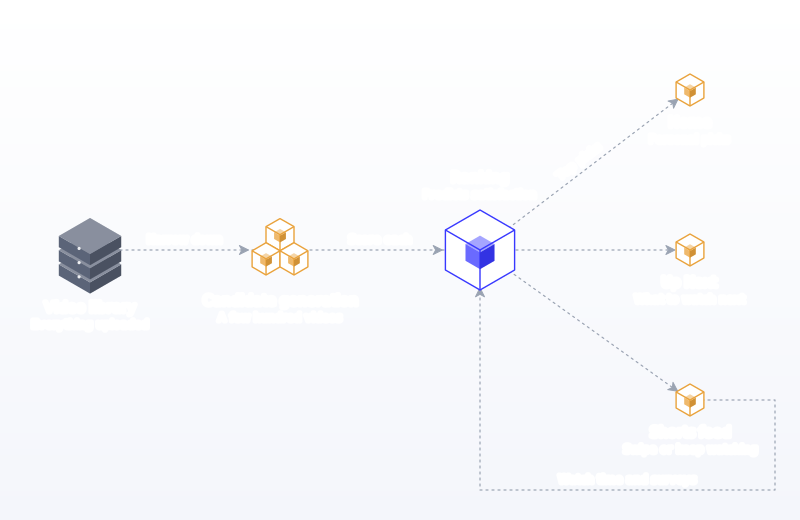
What gets predicted has changed more than the architecture. In 2021 YouTube's VP of Engineering Cristos Goodrow wrote, in On YouTube's recommendation system, that the system once leaned on clicks, found them unreliable, and added watch time in 2012, a change that initially caused a 20% drop in views. It then added survey responses so it could optimise for what YouTube calls "valued watch time": time spent on videos viewers rate four or five stars out of five. The same post says the system learns from over 80 billion signals, and that recommendations drive more viewership than channel subscriptions or search.
Key Findings
- Satisfaction, not raw views, is the target. YouTube counts only videos rated four or five stars in its surveys toward "valued watch time", according to Cristos Goodrow's 2021 explainer.
- Half of all channels and videos sit between 2% and 10% impressions click-through rate, per YouTube's impressions and CTR FAQ, and CTR naturally falls when a video is pushed on the homepage.
- Breaks and upload gaps do not predict view loss. YouTube says it studied thousands of channels that took a break and found no correlation between break length and changes in views, in its performance FAQ.
- Thumbnail and title tests are judged on watch time share, not clicks. YouTube's A/B testing tool compares up to 3 titles and thumbnails and picks the winner by watch time.
- Shorts are now a 200-billion-views-a-day surface. Neal Mohan's January 2026 letter puts average daily Shorts views at 200 billion, and a Shorts "view" now counts every start or replay since 31 March 2025.
- Viewer controls are blunt instruments. Mozilla's 2022 study of 22,722 participants and 567,880,195 recommended videos found "Don't recommend channel" prevented 43% of unwanted recommendations, while "Not interested" prevented 11%.
- YouTube is the TV. Nielsen's April 2026 Gauge gave YouTube 13.4% of all US TV viewing, which changes how you should think about length, thumbnails and pacing.
What's Changed in 2026
The core matching logic is stable. What changed over the last eighteen months is the environment it runs in: what counts as a view, which tools creators get, how YouTube treats mass-produced content, and where people watch.
Shorts views were redefined, and engaged views took over the old job
Since 31 March 2025, YouTube counts a Shorts view every time a Short starts playing or replays, with no minimum watch time. The previous metric, which needed an undisclosed amount of watching, was renamed "engaged views" and sits in Advanced Mode in YouTube Analytics, as PPC Land's report of the TeamYouTube announcement explains. Monetisation stays tied to engaged views. The practical consequence: your Shorts view counts went up, but they stopped being a reliable measure of whether people chose to keep watching. Compare Shorts on engaged views, or on the ratio of engaged views to views.
Title testing joined thumbnail testing
At Made on YouTube on 16 September 2025, YouTube announced title A/B testing alongside Ask Studio (a conversational assistant inside YouTube Studio), Collaborations and Inspiration tab updates. YouTube's help page now describes testing up to three titles and thumbnails, run on desktop in YouTube Studio, with the winner chosen by watch time. Shorts, scheduled live streams and premieres cannot be tested. This matters for the algorithm because it removes guesswork from the single biggest lever on whether a video gets a fair trial.
"Inauthentic content" got a name, and AI slop got a public target
On 15 July 2025 YouTube renamed its "repetitious content" monetisation guideline to "inauthentic content". A TeamYouTube community manager called it "a minor update to our longstanding guideline on repetitious content", per PPC Land. The YouTube Partner Program policies list templated videos where "characters are put in the same situation over and over again with the same outcome" and AI-generated content "made with generic or unoriginal templates" as ineligible to earn. In January 2026, CEO Neal Mohan wrote that YouTube is building on its existing anti-spam and anti-clickbait systems to reduce low-quality, repetitive content, which he called "AI slop" (From the CEO: What's coming to YouTube in 2026). Monetisation policy and recommendations are separate systems, but the direction is the same: originality is being measured more aggressively.
AI disclosure does not cost you reach
Creators must disclose realistic altered or synthetic content, such as making a real person appear to say something they did not. YouTube's GenAI disclosure page states plainly that disclosing "won't limit a video's audience or impact its eligibility to earn money." Repeatedly failing to disclose can lead to removal or suspension from the Partner Program. If you use AI tools, label honestly; there is no algorithmic upside to hiding it.
Shorts is absorbing more formats, and the TV is the main screen
Mohan's 2026 letter says image posts will be integrated directly into the Shorts feed this year, and that YouTube has been number one in US streaming watch time for nearly three years. Nielsen's April 2026 Gauge report, released 25 June 2026, put YouTube at 13.4% of all US TV viewing, with streaming overall at 47.6%. For long-form creators, that means a growing share of your impressions are on a living-room screen, where thumbnails are seen from across a room and viewers sit through longer videos.
Hype gives small channels a non-algorithmic lift
Hype lets viewers in 39 countries push long-form videos from Partner Program creators with 500 to 500,000 subscribers onto a weekly leaderboard, within seven days of upload. According to YouTube's Hype help page, each viewer gets three hypes per week, and points are weighted toward smaller channels: one hype on a 500-subscriber channel is worth 7,500 points, against 50 points on a 500,000-subscriber channel. It is not the recommendation system, but it is a deliberate discovery boost for exactly the creators the recommendation system is slowest to trust.
The Signals, and What YouTube Has Actually Said About Each
YouTube describes its inputs in several places that do not perfectly agree in wording, so it helps to put them side by side. The table below lists each signal with where YouTube says it, and what it means for your decisions.
| Signal | What YouTube has said | What it means for you |
|---|---|---|
| Clicks (impressions CTR) | Clicks alone proved unreliable, so watch time was added in 2012 (Goodrow, 2021) | CTR earns a video more trials, but only if the watch time that follows justifies it |
| Watch time | Relative watch time matters more for short videos, absolute watch time for longer ones (performance FAQ) | A 6-minute video needs a high percentage viewed; a 40-minute video needs many minutes, not a perfect curve |
| Satisfaction surveys | Help the system understand "satisfaction, not just watch time" (How YouTube recommendations work) | Videos that keep people watching but leave them feeling tricked are recommended less over time |
| Likes and dislikes | "Some of the hundreds of signals we consider for ranking" (performance FAQ) | Worth asking for, but not a lever on their own |
| Not interested, Don't recommend channel | Signal content to avoid (How YouTube recommendations work) | Off-target thumbnails shown to the wrong people can create negative feedback |
| Watch and search history | Watch history is the main factor for homepage suggestions (How YouTube recommendations work) | Your audience is defined by what your viewers also watch, not by your niche label |
| Channel reputation and quality | Considered "just like on Search", alongside external evaluators (How YouTube Works) | Matters most for news, health and other topics where accuracy is judged |
| Context: time of day, device | YouTube's Todd Beaupré is quoted saying time of day and device are "some of the signals" (Sprout Social, February 2026) | TV evenings and mobile lunch breaks favour different videos from the same viewer |
Two things are missing from that table on purpose. Subscriber count is not a ranking signal for recommendations. YouTube's FAQ notes viewers are subscribed to "dozens of channels" on average, so a subscription is weak evidence that someone wants your next video. And upload time is not a ranking signal for long-form: the same FAQ says publish time "is not known to impact a video's long-term performance." Our guide to the best time to post on YouTube explains why timing still matters a little for the first hours, and much more for live streams and premieres.
Breakdown 1: How the Algorithm Works on Each Surface
YouTube is not one feed. It is at least five, each with a different job, different candidates and different weighting. Buffer's write-up of interviews with YouTube staff makes the same point, describing separate systems for Home, suggested videos, Shorts and search, each with its own mix of signals.
Home
Home is the most personalised surface. YouTube's performance FAQ says Home ranks videos mainly on performance (how well a video satisfied similar viewers) and on the viewer's own watch and search history. When signed in, Home mixes personalised recommendations, subscriptions and news, per How YouTube Works. Buffer quotes Beaupré describing the homepage as "automating word of mouth": if viewers like you enjoyed a video, it gets offered to you. Home is also where CTR looks worst, because a video shown to thousands of loosely matched people will be ignored by most of them.
Suggested (Up Next)
Suggested sits beside or below the video someone is already watching. YouTube says it aims at the video the viewer is most likely to watch next, often related to the current one and sometimes personalised by watch history. This is the surface where series, follow-ups and "part two" videos shine, because the strongest candidate for "what next" is often the same creator continuing the same story. It also explains why reacting to or answering a large creator's video can borrow their audience: your video becomes a sensible next step from theirs.
Search
Search is the least personalised and most intent-driven surface. YouTube's How YouTube search works page names three elements: relevance (how well the "title, tags, description, and video content" match the query), engagement (including "the watch time of a particular video for a particular query"), and quality (signals of "expertise, authoritativeness, and trustworthiness"). The performance FAQ adds a sentence every creator should remember: "Search results are not a list of the most-viewed videos for a given search." A small channel with the most satisfying answer to a specific question can and does rank first.
Shorts feed
The Shorts feed works on a different interaction. In a 2023 interview reported by TechCrunch, Shorts product lead Todd Sherman explained that in long-form "people are tapping on videos to watch", while on Shorts "people are swiping through content not knowing what comes next." Viewers flip through hundreds of Shorts against perhaps 10 or 20 long-form videos, so the feed deliberately favours diversity. The core signal is the choice to keep watching rather than swipe, and because a thumbnail is rarely seen, the first second of the video does the job a thumbnail does in long-form.
Subscriptions, notifications and Explore
The subscriptions feed is chronological-ish and small. Notifications go to subscribers who opted in. Explore and trending surfaces add editorial and popularity elements, and Hype adds a leaderboard. These surfaces seed the first audience, but for most channels they account for a minority of lifetime views. The recommendation surfaces above do the heavy lifting once a video has proved itself.
| Surface | Main question the system asks | Strongest signals | Your best lever |
|---|---|---|---|
| Home | What will this person enjoy right now? | Watch history, performance with similar viewers, satisfaction | Thumbnail and title that read clearly at a glance, on a phone and a TV |
| Suggested | What should they watch after this video? | Topic relationship, co-watching patterns, watch history | Series, follow-ups, playlists, videos that answer popular videos |
| Search | Which video best answers this query? | Relevance, watch time for that query, authority | Specific titles and descriptions, answering fast, covering the question fully |
| Shorts feed | Will they keep watching or swipe? | Viewed vs swiped away, loops, shares, likes | A first second that earns the second second |
| Subscriptions and notifications | Has someone they chose to follow uploaded? | Subscription, notification setting, recency | Consistent, recognisable packaging so subscribers spot you |
Breakdown 2: By Stage of Distribution
Creators often talk about the "first 24 hours" as if YouTube grades a video once. In practice a video passes through overlapping stages, and each stage rewards something different. YouTube does not publish a timeline, so treat the stages below as a model built from its statements, not a published schedule.
Stage 1: The core audience (roughly the first hours)
The first impressions mostly come from people with a demonstrated interest in you: subscribers with notifications, viewers who have watched several of your videos, and people on Home whose history makes you an obvious match. Their response is your video's first evidence. YouTube's CTR FAQ notes that new videos, "like those less than a week old", and videos with under 100 views show a wider CTR range, which is a polite way of saying early numbers are noisy. Do not delete a video after six hours. Sherman told TechCrunch that deleting and reposting carries "the risk that's seen as spam".
Stage 2: Lookalike expansion (days)
If the core audience responds well, YouTube starts showing the video to people who behave like your core viewers but have not watched you before. This is where CTR typically drops and total impressions rise sharply, and it is the stage most creators misread as a problem. A falling CTR during expansion is the system reaching less obvious viewers, which is exactly what you want. The question to ask is whether average view duration holds as CTR drops.
Stage 3: Search and Suggested equilibrium (weeks)
After the burst, a video settles into whatever steady traffic it earns from search queries and from being suggested next to related videos. Evergreen tutorials, reviews and explainers can sit at this stage for years. Sprout Social notes in its February 2026 guide that older videos can be recommended again when their topic trends, and Hootsuite reports that new Shorts are tested with small audiences and can take off weeks or months after posting.
Stage 4: The long tail and revivals
Because the system follows viewers, a video can come back whenever viewer interest does: a product launch, a news event, a season. This is also why upload gaps are less dangerous than creators fear. YouTube's FAQ is direct: "growth in views across uploads is not correlated with time between uploads." Your library keeps working while you rest.
| Stage | Who is seeing the video | What to watch in Analytics | What a healthy pattern looks like |
|---|---|---|---|
| Core audience | Subscribers, returning viewers, close matches on Home | CTR, first-30-second intro retention, returning viewers | CTR at or above your channel's usual range; intro retention close to your typical |
| Lookalike expansion | New viewers similar to your core | Impressions, new viewers, average view duration | Impressions climb, CTR dips, view duration holds |
| Search and Suggested | Searchers and viewers of related videos | Traffic sources, search terms, suggested video sources | Steady daily views from a few clear queries or source videos |
| Long tail | Anyone whose interest rises later | Lifetime views by month, returning spikes | Periodic revivals tied to seasons, news or trends |
Breakdown 3: By Content Format
Long-form videos
For long-form, YouTube's FAQ says absolute watch time matters more as videos get longer, while relative watch time matters more for short ones. A 12-minute video at 50% retention delivers six minutes per view; a 3-minute video at 70% delivers about two. Neither is "better" in isolation. The right length is the length the topic needs without filler, because survey-based satisfaction penalises padding that pure watch time would reward. The Analytics audience retention report helps here: YouTube's key moments page defines "intro" as the percentage still watching after the first 30 seconds, and lets you compare against "typical retention" across your 10 latest videos of similar length.
Shorts
Shorts are videos up to three minutes long that are square or vertical; YouTube's A/B testing help page confirms uploads up to three minutes that are "square or taller" are treated as Shorts. The Shorts feed is personalised "to reflect what we think you want to see next", in YouTube's words on How YouTube recommendations work. Sherman said YouTube does not think of Shorts "as cannibalizing long-form", and the Shorts and long-form systems are tuned for different behaviour. Our YouTube Shorts strategy guide covers hooks, length and how to connect Shorts back to long videos.
Live streams and Premieres
Live and Premieres are the one place where timing is a real ranking input, because the experience happens at a time. YouTube's performance FAQ says timing matters more for Live and Premieres than for standard uploads. Live is also big: YouTube said at Made on YouTube 2025 that over 30% of daily logged-in viewers watched live content in Q2 2025. Live archives can be A/B tested; scheduled lives and premieres cannot until they convert to normal videos.
Made for kids content
Marking a video as made for kids changes where it can appear. YouTube's FAQ notes that the designation affects which videos it is recommended alongside, mostly other kids' content, and A/B tests are unavailable for made-for-kids videos. Set it accurately: it is a legal setting, not a growth tactic.
| Format | Primary success signal | Packaging that matters | Testing available |
|---|---|---|---|
| Long-form (over 3 minutes, or horizontal) | Valued watch time: CTR followed by sustained viewing and good survey responses | Thumbnail and title | Up to 3 titles and thumbnails, judged on watch time |
| Shorts (up to 3 minutes, square or vertical) | Viewed vs swiped away, engaged views, loops, shares | First second, on-screen text, title for search | Not available in Test & Compare |
| Live and Premieres | Concurrent viewers and chat, then archive performance | Scheduled thumbnail and title, notification timing | Live archives only |
| Made for kids | Satisfaction among kids' content viewers | Thumbnail and title | Not available |
Breakdown 4: By Channel Size and Type
New channels (under about 1,000 subscribers)
New channels have little history, so each video's first audience is small and its early data noisy. YouTube's Rene Ritchie told Buffer that showing new channels to likely-fit viewers is "entirely on purpose" and "part of YouTube's experiments to help newer channels grow." The practical advice is narrow topics with clear search demand, so search can carry videos the recommendation system has no history for. Our guide on how to get more YouTube subscribers goes deeper on the first 1,000.
Growing channels (roughly 1,000 to 500,000 subscribers)
This is the band where packaging improvements compound fastest, where title and thumbnail tests produce clear winners (they need enough impressions), and where Hype applies for Partner Program members. It is also where channels most often stall by drifting topic. Because the audience is defined by co-watching, a video on a different subject is effectively a video for a different, unknown audience, and the core audience's lukewarm response can hold it back in Stage 1.
Large channels
Large channels have the opposite problem: huge Home exposure means CTR looks low and each video's audience is a mix of loyal fans and casual viewers. YouTube's CTR FAQ explains that heavy homepage impressions naturally lower CTR. Large channels benefit most from tracking returning viewers and from catalog-wide retention, which Buffer reports Ritchie recommending over single-video analysis.
Brands and businesses
Business channels often publish ads, launch videos and webinar recordings that were made for another context. Those videos rarely satisfy a YouTube viewer who did not ask for them, so they collect impressions and little else. Brands that grow on YouTube treat it as a library of answers: product how-tos, comparisons, problem-solving tutorials, customer stories with a real narrative. If you run social for a company, the B2B marketing page shows how Postprism fits a team that publishes across networks.
| Channel type | Main constraint | Surface to lean on | Metric that tells the truth |
|---|---|---|---|
| New creator | No viewer history to match against | Search, Shorts | Search impressions and intro retention |
| Growing creator | Topic drift, inconsistent packaging | Home and Suggested | CTR during expansion vs average view duration |
| Large creator | Low CTR from mass Home exposure | Home | Returning viewers and catalog retention |
| Brand or business | Content made for other channels | Search and Suggested | Watch time per search query, subscribers per 1,000 views |
Breakdown 5: What YouTube Says vs What Creators Observe
A lot of YouTube advice confuses official statements, creator experiments and folklore. Here is the honest split.
| Topic | Official position | What creators and studies observe | Practical takeaway |
|---|---|---|---|
| Upload frequency | Growth is "not correlated with time between uploads" (performance FAQ) | Channels that post more often get more total chances to hit | Upload as often as you can keep quality, and keep a calendar so gaps are planned |
| Taking a break | No correlation between break length and view changes in a study of thousands of channels | Returning videos sometimes start slower while core viewers re-engage | Breaks are safe; come back with a strong, on-topic video |
| Tags | Tags are one relevance input for search (How YouTube search works) | Hootsuite reports YouTube says tags play a minimal role in discovery | Add a few for misspellings and variants; spend your time on titles |
| CTR targets | Half of channels and videos fall between 2% and 10% (CTR FAQ) | CTR falls as impressions grow | Compare a video against your own past videos at the same stage, not against a universal number |
| Shorts hurting long-form | YouTube does not view Shorts as cannibalising long-form (TechCrunch) | Shorts viewers often do not convert to long-form viewers | Use Shorts as a separate audience funnel, not a long-form growth hack |
| User controls | Not interested and Don't recommend channel tell the system what to avoid | Mozilla found controls prevented less than half of unwanted recommendations | Expect negative feedback to be noisy; aim your packaging precisely |
| AI-made content | Disclosure does not limit reach (GenAI disclosure) | Templated AI channels lose monetisation under the inauthentic content policy | Use AI as a tool inside original work, not as the work |
The Mozilla research deserves a closer look because it is one of the few large independent studies of YouTube's recommendations. Using its RegretsReporter extension, Mozilla collected data from more than 20,000 participants and surveyed 2,758 of them, as described in its September 2022 announcement. Popular Science's write-up of the study lists the prevention rates: "Don't recommend channel" 43%, "Remove from watch history" 29%, "Dislike" 12% and "Not interested" 11%. The sample was self-selected, and the data is from 2022, but the lesson for creators holds: once a viewer starts getting your videos, they keep getting them unless the topic itself stops appealing. Reach is earned on the way in.
Reading YouTube Analytics With the Algorithm in Mind
The algorithm optimises for viewer satisfaction, and YouTube Analytics is the closest view you get of how it judges your work. Read metrics in pairs, never alone.
| What you see | Likely cause | What to change |
|---|---|---|
| Low CTR, high average view duration | Good video, weak or confusing packaging | Run a title and thumbnail test; make the promise more specific |
| High CTR, low average view duration | Packaging over-promised, or a slow start | Deliver the promise in the first 30 seconds; match thumbnail to opening shot |
| Steep drop in the first 30 seconds | Long intro, logo sting, throat-clearing | Start with the payoff or the problem; cut the intro |
| Sharp dip mid-video | Viewers skipping a sponsor read, tangent or slow section | Shorten or move it; YouTube says dips mean viewers are "abandoning or skipping" |
| Spike mid-video | Rewatching or sharing a moment, or confusion | Make more of what spiked, or clarify if it was confusion |
| Impressions rose, CTR fell, views up | Healthy expansion to new viewers | Nothing; this is the system working |
| Shorts views high, engaged views low | Swipes counted as views since March 2025 | Judge Shorts on engaged views and viewed vs swiped away |
For engagement benchmarks across your own videos, our YouTube engagement calculator gives a consistent number to compare, and the glossary entries on click-through rate and impressions explain how platforms define them.
A Worked Example: Two Channels, One Topic
Imagine two coffee channels publishing the same week. Northline Roasters, a small roaster with 3,200 subscribers, uploads "Why Your Pour-Over Tastes Bitter (5 Fixes)". Bean Theory, a hobby channel with 180,000 subscribers, uploads "My Coffee Week".
Northline's video gets modest early impressions. Its thumbnail shows a bitter face over a pour-over cone with the words "BITTER?", and its CTR among subscribers comes in high. The first fix arrives at 0:25, so intro retention stays close to the channel's typical. Over the next week, search for "pour over bitter" starts sending steady traffic because the title matches the query and viewers who arrive from that query watch for a long time. Suggested traffic follows from bigger brewing videos. Three months later it is the channel's top video.
Bean Theory's video gets a large first wave from subscribers, but the title promises nothing specific, so Home expansion stalls: new viewers have no reason to click, and those who do leave within a minute. The channel's size bought it an audience for a day, not a recommendation.
The difference is not the algorithm favouring small channels or punishing big ones. It is that one video made a clear promise to a defined viewer and kept it, which is the only thing the system can reliably reward.
A Step-by-Step Method to Work With the YouTube Algorithm
This is the process we recommend to creators and brand channels. It assumes you already know who you make videos for. If you don't, start with our guide to creating a social media strategy.
- List the questions your viewers already ask. Use YouTube search suggestions, your comments, and the Inspiration tab in YouTube Studio. Pick topics with clear demand where you can be the most satisfying answer, not just another answer.
- Write the title and thumbnail before you film. If you cannot describe the promise in under 60 characters and one image, the video is not focused enough. Draft two or three versions now so you can test them later. Our YouTube character counter keeps titles and descriptions within limits.
- Script the first 30 seconds around the promise. Show or state the payoff immediately. YouTube's intro metric measures exactly this window, and it is where most viewers decide.
- Cut for satisfaction, not length. Remove anything a viewer would skip. Satisfaction surveys reward videos people feel were worth their time, and padding risks the "dip" pattern in retention.
- Write a description that answers the query. Put the core answer and the main keywords in the first two lines, then add timestamps and links. The YouTube description generator gives a structured first draft you can edit.
- Prepare a thumbnail that reads on a phone and a TV. Large subject, three words or fewer, high contrast. Check sizes with our YouTube image resizer.
- Schedule the upload when your core audience is active. Timing does not affect long-term ranking, but it shapes who gives the first signals. Use YouTube Analytics' "When your viewers are on YouTube" report, then schedule the video in advance so the slot never slips.
- Cut two or three Shorts from the video. Treat them as their own pieces with their own hook, not trailers. Our guide to repurposing content across platforms covers picking the moments.
- Run a title and thumbnail test. Upload alternates in Test & Compare on desktop. Let it run until YouTube reports a result; tests can take up to two weeks.
- Review at 48 hours, 7 days and 28 days. At 48 hours check CTR and intro retention against your typical. At 7 days check whether impressions expanded and view duration held. At 28 days check traffic sources: search, suggested or browse.
- Feed the result into the next video. Make a follow-up for anything that sustained search traffic, and add it to a playlist with related videos so Suggested has an obvious next step.
A copy-ready upload checklist
| Field | Template | Example |
|---|---|---|
| Title | [Specific problem or outcome] + [qualifier] | Why Your Pour-Over Tastes Bitter (5 Fixes) |
| Thumbnail text | Three words or fewer, adds to the title rather than repeating it | BITTER? |
| Description, line 1 | Direct answer to the query in one sentence | Bitter pour-over usually means over-extraction: grind coarser and drop water to 92°C. |
| Description, line 2 | What the viewer gets from the video | Five fixes, tested side by side with the same beans. |
| Tags | Three to five variants and common misspellings | pour over bitter, pourover bitter, v60 bitter |
| Playlist | The series a viewer should watch next | Brewing Fixes |
| Audience | Made for kids: only when it truly is | No |
Where a Scheduler Fits
No tool can make a video satisfying. What a scheduler can do is remove the friction that makes channels inconsistent and launches rushed. Postprism is a social media scheduler that publishes to 6 networks from one content calendar. For YouTube, it uploads your video with its title, description, tags, category, privacy setting (public, private or unlisted) and made-for-kids setting, sets a custom thumbnail for verified channels (JPEG or PNG under 2MB), and adds the video to one of your playlists, all at the time you choose. The YouTube scheduler page shows the workflow.
The bigger benefit is everything around the upload. The Shorts you cut, the LinkedIn post announcing the video, the TikTok clip and the Facebook post all sit on the same calendar, so a launch goes out as one coordinated plan instead of five separate tasks. If you batch a month of content at once, bulk scheduling handles the queue, and AI adaptation is there if you want help rewriting a caption for each network, though you can write every word yourself. For the habits behind a steady upload rhythm, see how to stay consistent on social media.
Schedule to Every Platform From One Calendar
Upload your YouTube video with its title, tags, thumbnail and playlist set, and schedule the Shorts and posts that promote it on every other network from the same calendar.

Common Mistakes, and How to Fix Them
- Chasing a "good" CTR number. YouTube says half of channels sit between 2% and 10%, and CTR falls as reach grows. Fix: compare each video with your own videos at the same age and traffic mix.
- Clickbait that the video does not pay off. High clicks followed by fast exits and poor survey answers teach the system to stop showing the video. Fix: put the promised payoff in the first 30 seconds.
- Deleting and re-uploading underperformers. YouTube's Shorts lead warned that re-posting risks being seen as spam. Fix: change the title and thumbnail, or run a test, instead.
- Long branded intros. A 15-second logo sequence spends the intro window on nothing. Fix: open on the problem or the result and put branding in the thumbnail and voice.
- Topic drift. A video for a different audience gets lukewarm signals from your current one. Fix: if you want a new audience, give it a series rather than a one-off, so the system can learn who it is for.
- Judging Shorts on views. Since March 2025 every start counts. Fix: use engaged views and viewed vs swiped away.
- Treating Shorts as trailers. A Short that ends with "watch the full video" rarely satisfies the Shorts viewer. Fix: make each Short complete on its own.
- Stuffing tags and descriptions. Relevance comes from title, description and the video itself, and tags matter little. Fix: write a clear title and a two-line answer at the top of the description.
- Posting ads as videos. A video made for a paid campaign rarely satisfies an organic viewer. Fix: turn the same message into a how-to or story a searcher would want.
- Reading 6-hour data as a verdict. YouTube says videos under a week old and under 100 views show wide CTR ranges. Fix: review at 48 hours, 7 days and 28 days.
- Templated, mass-produced uploads. The inauthentic content policy removes monetisation from repetitive or template videos. Fix: make each video's idea, script or story different, even in a recurring format.
- Skipping playlists and follow-ups. Suggested traffic needs an obvious next video. Fix: group related videos in playlists and plan sequels for anything that sustains search traffic.
How YouTube Compares With Other Algorithms
YouTube shares the "follow the viewer" idea with TikTok, but its search engine and long-form library make it far more durable: a good YouTube video earns views for years, while most short-video feeds are about the first few days. LinkedIn and Facebook rely more on network and relationships. Our overview of how social media algorithms work compares the main platforms, and the explainer on how the TikTok algorithm works is the closest comparison for Shorts.
Reach matters because the audience is enormous. Pew Research Center's 2025 social media fact sheet, based on a survey of 5,022 US adults from February to June 2025, found 84% of US adults use YouTube, rising to 95% of those aged 18 to 29. Neal Mohan's 2026 letter says YouTube has paid over $100 billion to creators, artists and media companies over four years. The algorithm is the gatekeeper to both the audience and the money, which is why it pays to understand what it is actually optimising for.
Frequently Asked Questions
What is the most important factor in the YouTube algorithm?
Viewer satisfaction. YouTube combines clicks, watch time, likes, dislikes, shares and survey answers to estimate whether a viewer was glad they watched. Its engineering blog describes "valued watch time" as time spent on videos people rate four or five stars. Clicks get a video tried; satisfaction gets it recommended again.
Does the YouTube algorithm favour big channels?
Not directly. Recommendations are based on how each video performs with viewers, not on subscriber count, and search "is not a list of the most-viewed videos." Big channels get larger first audiences, but a small channel with a better answer can outrank them, and YouTube says it deliberately tests new channels with likely-fit viewers.
How long does it take for YouTube to push a video?
There is no fixed window. Most videos get their first test within hours, expand over days if the response is good, and then settle into search and suggested traffic. Videos can also revive weeks or months later when interest in their topic rises. Judge a video at 48 hours, 7 days and 28 days.
What is a good click-through rate on YouTube?
YouTube says half of all channels and videos have an impressions CTR between 2% and 10%. CTR falls as a video reaches more people on Home, so a lower CTR on a video with more impressions is normal. Compare against your own past videos, and look at view duration alongside it.
Do YouTube Shorts help or hurt long-form videos?
YouTube says it does not see Shorts as cannibalising long-form, and the two use different recommendation systems. Shorts rarely hurt long-form, but they also rarely convert many viewers to long-form on their own. Treat Shorts as a separate audience channel with its own goals.
Does posting time matter on YouTube?
Not for long-term performance. YouTube says publish time "is not known to impact a video's long-term performance." It matters for live streams and premieres, and posting when your viewers are online gives a video a quicker first test. Scheduling uploads in advance makes that easy to do consistently.
Do tags still matter on YouTube?
A little. YouTube lists tags among relevance inputs for search, but titles, descriptions and the video content matter far more. Add a handful of tags for variants and common misspellings, then spend your time on the title and thumbnail.
Will using AI tools hurt my reach on YouTube?
Not by itself. YouTube says disclosing realistic AI content will not limit a video's audience. What gets penalised is mass-produced, repetitive content, which is ineligible for monetisation under the inauthentic content policy, and low-quality content YouTube is working to reduce. Use AI inside original work, and disclose when required.