
A content calendar is where you plan what to post, where and when; a social media scheduler is the software that publishes those posts automatically at the set time. A calendar alone still leaves someone posting by hand every day, and a queue-only scheduler hides the big picture. Most teams in 2026 need one tool that does both: a calendar that publishes.
The two terms get used interchangeably, and that confusion costs real hours. Teams build beautiful planning spreadsheets, then lose 20 minutes a day copying posts into apps. Others buy a scheduler, fill a queue, and only notice a three-week gap in LinkedIn posts when someone asks why engagement dropped. This guide explains exactly what each tool does, where each falls short, which setup suits your team, your networks and your planning horizon, and how to turn the planning sheet you already have into a calendar that publishes itself.
Key findings
- Consistency is measurable. Buffer's study of about 2.1 million Instagram posts found accounts posting 3 to 5 times a week got about 12% more reach per post than accounts posting once or twice, and up to 24% more at 10 or more posts a week.
- Gaps cost growth. Buffer's 2026 engagement report found accounts that skipped a week underperformed their own baseline follower growth; it calls this the no-post penalty.
- Weekly posting doubles engagement on LinkedIn Pages. LinkedIn says companies that post weekly see a 2x lift in engagement.
- Native schedulers have limits. LinkedIn's native scheduler, launched in 2022, schedules posts up to three months ahead, one account at a time.
- Audiences are spread out. The average internet user is on 6.75 social platforms a month, per GWI data in DataReportal's Digital 2026 report, so most plans span several networks.
- One caption everywhere is riskier than before. Meta now reduces distribution for duplicate content, so calendars need room for per-network versions.
What's changed in 2026
Per-network rules got stricter
Each network now enforces its own limits at publishing time. Threads rejects API posts with more than 5 unique links from 22 December 2025 and caps text at 500 characters. Instagram's API accepts JPEG images only and up to 10 carousel items. A planning sheet with one "caption" column cannot enforce any of that; a scheduler with per-network versions can.
Originality became a ranking factor you can see
Meta said on 14 July 2025 that Pages and profiles get the most distribution when they mainly share original content, and that accounts which repeatedly reuse others' posts lose reach. LinkedIn said in September 2026 that it had cut views of AI slop by 40%, defining it as generic or recycled content without a point of view. The practical effect for planning: a calendar slot is no longer "one post", it is one idea with a version per network.
AI assistants started writing into calendars
Buffer announced on 10 June 2026 that users can connect Buffer to Claude, ChatGPT and Perplexity through MCP. Postprism's MCP server does the same with 11 tools on every plan. Planning by conversation, where you ask an assistant to draft next week and it lands on your calendar as drafts, only works if the calendar and the scheduler are the same tool.
Networks multiplied
Threads reached 500 million monthly active users in June 2026, and Bluesky grew to 41.41 million users by the end of 2025. Every new network adds a column to a spreadsheet calendar and another app to post in by hand.
The difference in one table
| Question | Content calendar | Social media scheduler | Calendar that publishes |
|---|---|---|---|
| Main job | Plan themes, dates, owners and ideas | Publish posts at set times | Both, in one place |
| Typical tools | Spreadsheets, Notion, Airtable, Trello | Native schedulers, queue-based tools | Postprism and similar calendar-first schedulers |
| Publishes posts | No | Yes | Yes |
| Shows gaps across the month | Yes | Only with a calendar view | Yes |
| Holds per-network versions | Only as extra columns | In good schedulers | Yes, side by side |
| Checks format and length limits | No | Usually | Yes, per network |
| Tracks status (draft, approved, published) | Manually | Varies | Yes |
| Shows what actually went live | Only if someone updates it | Yes | Yes, on the same calendar |
| Typical cost | Often free | Free plans to paid | Paid, from about the price of one tool |
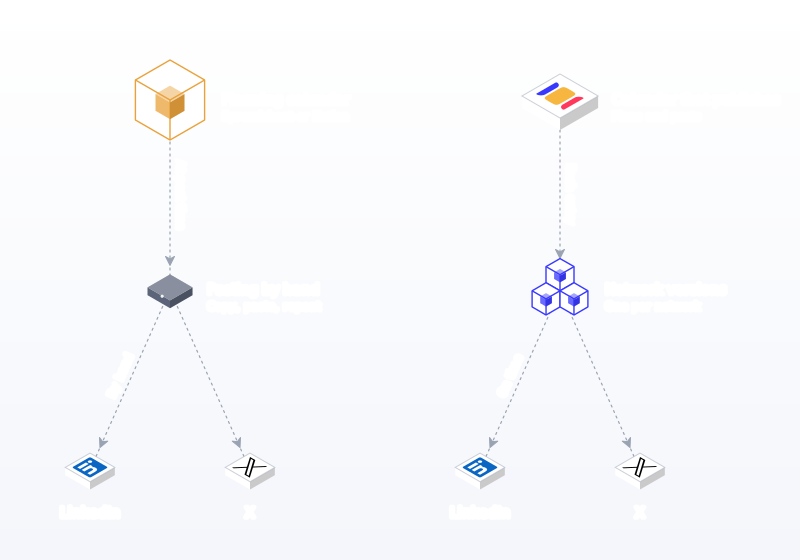
What a content calendar is good at
A content calendar answers planning questions. What are this month's themes? Which launch needs posts, and on which days? Who writes what, and when is it due? Where are the empty days? A calendar is also the right home for ideas that are not ready, such as a customer story waiting on approval or a seasonal post for next quarter. Hootsuite's planning guide treats building a content calendar as a core step of any strategy, alongside a rough 80/20 balance of educational and entertaining posts to promotional ones.
Planning also protects quality. When posts are decided a few weeks ahead, there is time to gather a customer quote, shoot proper photos, check facts and get sign-off. Sprout's strategy guide recommends basing content pillars on your goals and posting on a timely schedule, and notes that only 44% of marketing leaders rate their teams as expert at measuring social's business impact. A calendar that ties each post to a pillar and a goal makes that measurement much easier later, because you can compare pillars rather than individual posts.
Where a calendar alone falls short
- Someone still has to post. Every slot on the sheet becomes a manual task on the day: open the app, paste, resize, publish.
- Plan and reality drift apart. The sheet says five LinkedIn posts went out this week. Three did, because two days were busy.
- Per-network versions rot. Extra columns for X, Threads and Instagram copy are filled in for a month, then abandoned.
- No limits are checked. Nobody notices a 600-character Threads post until it fails.
- Results live elsewhere. Performance data sits in nine native apps, never next to the plan.
What a social media scheduler is good at
A scheduler removes the daily act of posting. You prepare posts once, set times, and they publish automatically through each network's official connection. Most networks offer some native scheduling: YouTube lets you schedule a private video to go public at a specific time and time zone, and LinkedIn lets you schedule posts up to three months ahead. A dedicated scheduler adds every network in one place, per-network editing, bulk uploads, team approvals and one view of what went live.
Where a scheduler alone falls short
- Queues hide the month. Queue-first tools show the next ten posts, not whether the month is balanced across pillars and networks.
- Unready ideas have no home. Some schedulers only accept posts with a date and time.
- Team status may be missing. Simpler tools have no draft, review or approved states.
- Native schedulers are single-network. They schedule one account at a time and cannot show you the whole plan.
The real question is not "calendar or scheduler" but "who closes the gap between the plan and the published post?" If the answer is "a person, every day", a calendar that publishes removes that job entirely.
The combined approach: a calendar that publishes
The most efficient setup is a scheduler built around a calendar. In Postprism, the content calendar has month, week and day views with drag and drop, plus a kanban board where drafts, scheduled posts and published posts sit in their own columns. Each calendar entry holds a separate, editable version for each network you choose: LinkedIn, X, TikTok, YouTube, Bluesky and Pinterest. Drag a post to another day and it moves on the schedule. Empty days stand out, so gaps get fixed before they happen. Teams on Freelancer and Agency plans add approvals, so each entry shows whether it is a draft, waiting for review or scheduled.
Your planning sheet is not wasted either. Postprism's bulk scheduling imports a CSV with content, scheduled_at and optional media_url columns, or an XLSX or JSON file, with platforms chosen once for the upload and a preview table before anything is scheduled. An AI schedule assistant can also turn a conversation ("three posts a week on hiring, Tuesday to Thursday at 9am") into rows. Optional AI adaptation then rewrites each post for each network in your brand voice.
Breakdown 1: by number of networks
The more networks you publish to, the more a standalone calendar costs you in manual posting time.
| Networks | Manual posts per week at 4 ideas a week | Recommended setup |
|---|---|---|
| 1 | 4 | A simple calendar plus the network's native scheduler |
| 2 to 3 | 8 to 12 | A scheduler with a calendar view; native tools become tedious |
| 4 to 6 | 16 to 24 | A calendar that publishes, with per-network versions |
| 7 to 9 | 28 to 36 | A calendar that publishes, bulk import and approvals |
At four ideas a week across six networks, a spreadsheet plan means 24 manual posting sessions a week. Even at five minutes each, that is two hours of copying and pasting, every week, forever.
One network
If you only post to Instagram or only to LinkedIn, a notes app or a simple sheet plus native scheduling is genuinely enough. Use LinkedIn's clock icon or YouTube Studio's schedule card and keep your plan wherever you like.
Two to three networks
This is where native tools start to hurt. You now plan in one place and schedule in three. A scheduler with a calendar view pays for itself in the first month.
Four or more networks
Per-network versions become the main job. A calendar that holds a LinkedIn version, an X version and a TikTok caption on one entry is the only setup that stays tidy. See multi-platform posting.
Breakdown 2: by team size
Solo founder or creator
You are the planner, writer, designer and publisher. Your enemy is the busy week. Plan monthly, batch weekly, and let a calendar that publishes carry out the plan. Postprism Solo covers all 6 networks with unlimited posts for $19 a month. Our content calendar for solo founders shows a simple structure.
Small team of two to five
Now status matters. Who is writing Thursday's post? Has the owner seen the launch copy? A calendar with drafts, review and approval states replaces the "did you post it?" messages. Postprism Freelancer adds 3 team members, approvals and 3 workspaces for $49.
Agency
Each client needs its own calendar, voice and approver. One shared spreadsheet across clients is how posts end up on the wrong account. Separate workspaces, with clients invited as Viewers to approve, keep everything apart. Postprism Agency covers 10 client workspaces and up to 10 team members for $99. See our agency workflow guide.
In-house marketing team
Larger teams often run a wider editorial calendar for blog, email, events and paid media in a project tool, and a social calendar that publishes for the posts themselves. That split is healthy: the marketing calendar decides the campaign, the social calendar carries it out network by network.
Breakdown 3: by planning horizon
| Horizon | What you plan | Best home | Example |
|---|---|---|---|
| Year | Launches, seasons, events, budget | Marketing calendar or sheet | Q2 product launch, Black Friday, annual conference |
| Quarter | Themes, campaigns, content pillars | Marketing calendar, mirrored as drafts | "Customer stories" quarter with one story a week |
| Month | Specific posts per pillar and network | Calendar that publishes, as drafts | 12 posts across LinkedIn, X and Bluesky |
| Week | Final copy, media, approvals, times | Calendar that publishes, scheduled | Monday batch session; everything approved by Wednesday |
| Day | Replies, reactive posts, fixes | Native apps and the calendar's day view | Responding to comments, adding a timely post |
The pattern is that the further out you plan, the less a tool needs to publish; the closer to the day, the more it must. That is why a calendar that also publishes covers the month, week and day, and a broader planning sheet can cover the year.
Breakdown 4: by tool type
Spreadsheets
Free, flexible and familiar. Great for yearly and quarterly planning and for drafting a month in bulk. Weak at everything after planning. The best use of a sheet in 2026 is as an import file: plan in rows, then upload to your scheduler. Our free content calendar templates are built with import-ready columns.
Notion, Airtable and Trello
Better views than a sheet, with statuses, owners and boards. Still cannot publish. Teams often end up maintaining the board and the scheduler separately, which doubles the work.
Native schedulers
Free and reliable for their own network. LinkedIn, YouTube and Meta's tools all schedule. None of them show you the other eight networks, and none of them hold your plan.
Queue-based schedulers
Fill slots in order. Great for steady cadence, weaker for campaigns tied to dates and for seeing the whole month.
Calendar-first schedulers
Plan and publish in one place, with per-network versions, approvals and bulk import. This is where Postprism sits, and it is the setup we recommend for anyone on three or more networks. For a ranked list, see our best social media calendar tools and best social media scheduling tools.
Breakdown 5: by content type
Different kinds of posts need different amounts of planning, and that changes how much of the work belongs in a calendar versus a scheduler.
| Content type | Planning lead time | Where it starts | How it gets published |
|---|---|---|---|
| Campaign posts (launches, sales, events) | 4 to 12 weeks | Marketing calendar | Drafted as a set, approved together, scheduled on exact dates |
| Pillar series (weekly tips, customer stories) | 2 to 4 weeks | Social calendar, one pillar per weekday | Batched monthly, scheduled weekly |
| Evergreen posts (how-tos, FAQs, product explainers) | Any time | Undated drafts | Dropped into empty slots when the calendar shows a gap |
| Reactive posts (news, trends, replies) | Same day | The day view | Written and scheduled within hours |
| User-generated and partner content | 1 to 2 weeks (permissions) | Ideas list | Scheduled once rights and credits are confirmed |
A pure planning sheet handles the first two rows well and the last three badly. A pure queue handles the middle row well and the first row badly. A calendar that publishes handles all five, because undated drafts, dated campaigns and same-day posts live in one place. Be careful with reactive trend posts: the 2025 Sprout Social Index found that 27% of consumers think trend participation only works within 24 to 48 hours of a trend's lifespan, and about a third find trend-jumping embarrassing for brands. Planned, original posts should carry most of your calendar.
Breakdown 6: by industry
Restaurants and cafés
Daily specials, weekend events and seasonal menus. The calendar is short-horizon and the posting is frequent, so automatic publishing matters more than long-range planning. Facebook and Instagram usually lead. See social media for restaurants.
Ecommerce brands
Product drops, sales and evergreen product education, across Instagram, TikTok and Pinterest. Campaign planning months ahead plus a steady weekly cadence. Bulk import shines for large catalogue pushes. See social media for ecommerce.
Real estate
Listings, open houses and local market updates. Dates matter, listings change and approvals are common when brokers sign off. A calendar with drafts and approvals fits well.
B2B software
Product updates, customer stories and founder thought leadership on LinkedIn and X. Per-network versions matter most here, because a LinkedIn story and an X post about the same release read very differently.
Nonprofits
Campaigns, events and giving days planned well in advance, with small teams. A calendar that publishes keeps the organisation visible between campaigns without daily effort.
Agencies
Many calendars at once. Separate client workspaces and approvals are not optional; they are how you avoid posting the wrong brand's content.
What every calendar entry should hold
Whether you plan in a sheet or straight on a scheduler's calendar, each entry needs the same fields. In a calendar that publishes, most of these are built in.
| Field | Why it matters | In a sheet | In Postprism |
|---|---|---|---|
| Date and time | Consistency and audience timing | Column | Calendar slot, in your selected time zone |
| Networks | Where it goes | Column per network | Choose networks on the post |
| Copy per network | Native posts perform better | Extra columns, often abandoned | A separate version per network, side by side |
| Media | Format rules differ by network | Link to a folder | Attached to the post, with a media library |
| Pillar or campaign | Balance across the month | Column | Your naming or notes on the post |
| Owner and status | Who does what, and what is approved | Columns updated by hand | Roles, approvals and kanban columns |
| Tracking link | Proves traffic and conversions | Column | UTM-tagged link in the copy |
| Result | What to repeat | Copied in by hand, if ever | Analytics across all 6 networks |
The hidden cost of a calendar that does not publish
Manual posting looks free because the spreadsheet is free. Put a number on it. A small brand posting four ideas a week to five networks makes 20 manual posts a week. At six minutes each, counting opening the app, pasting, resizing an image and checking the result, that is two hours a week, or roughly 100 hours a year. Add the cost of missed days: Buffer's data links skipped weeks to slower follower growth than an account's own baseline, and LinkedIn says Pages that post weekly see twice the engagement. Against that, a calendar that publishes costs $19 a month on Postprism Solo. The maths is rarely close, and the hours you win back are the ones you most need for making better content, replying to your community and reviewing what worked.
A real week, both ways
Here is the same week for a small skincare brand, Fernleaf, posting to TikTok, LinkedIn and Pinterest.
With a spreadsheet calendar only
- Monday: plan the week in the sheet, one caption per day.
- Every day: open each app, paste the caption, rework it for that network, upload media, publish. Around 20 minutes a day.
- Wednesday: a meeting runs long. The LinkedIn post does not go out.
- Friday: the sheet says five posts went out on each network. Three actually did on LinkedIn, and the Pinterest Pins used square images that Pinterest recommends replacing with 2:3 vertical images.
With a calendar that publishes
- Monday: plan and write the week in Postprism in about an hour, with a version per network: a hook-led TikTok, a founder-voice LinkedIn post and a vertical Pin with a keyword title.
- Every day: posts publish on their own. Fifteen minutes goes on replying to comments.
- Wednesday: the meeting runs long. Nothing is missed.
- Friday: the calendar shows exactly what published, and analytics show what worked.
Both weeks were well planned. The difference is whether a person had to carry out the plan every day.
A sample month on a calendar that publishes
To make the combined approach concrete, here is the first two weeks of a month for Maya, an independent operations consultant who posts on LinkedIn, X and Bluesky. She has three pillars: client lessons on Tuesday, frameworks on Thursday and a personal note on Friday. Everything is drafted in one afternoon at the end of the previous month.
| Day | Idea | X and Bluesky | |
|---|---|---|---|
| Tue, week 1 | Client lesson: the meeting that should have been a checklist | 250-word story with the checklist at the end | One-line lesson plus the checklist as an image |
| Thu, week 1 | Framework: the 3-column handover doc | Text post with a single image of the template | Short post linking to the template |
| Fri, week 1 | Personal: what a week of no meetings taught me | Reflective post | Two-sentence version |
| Tue, week 2 | Client lesson: onboarding that took 3 days instead of 3 weeks | Story with numbers | The before and after in one line |
| Thu, week 2 | Framework: weekly operating review agenda | Agenda as text | Agenda as an image |
Maya's calendar shows every slot filled two weeks ahead, the kanban board shows nothing stuck in drafts, and publishing happens without her. She spends ten minutes a day replying to comments. When a client win arrives mid-week, she drags Thursday's framework to the following week and drops the win into its slot. That is the flexibility a planning sheet promises and only a calendar that publishes delivers.
Do networks penalise scheduled posts?
A common worry is that posts published by a scheduler reach fewer people than posts made in the app. The networks' own explanations of ranking give no reason to think so. Instagram says it has no single algorithm, and that Feed ranking draws on signals such as your activity, information about the post including how quickly people engage with it, and your history with the poster. TikTok says its For You feed ranks videos on user interactions, video information and device settings. None of these signals is "how the post was published".
What does matter is everything a scheduler should help you do well: publishing at a time your audience is awake, giving each network a native version instead of a copy, and being around to reply when comments arrive. Schedulers that publish through each network's official API, as Postprism does, create the same post the app would. The thing that hurts reach is not scheduling; it is scheduling the same generic caption everywhere and then disappearing.
Planning with AI assistants
In 2026, a growing share of planning starts in a chat window. You ask an assistant to turn a product brief into a month of posts, or to fill next week's gaps with evergreen tips. Where those drafts land decides whether the exercise saves time. If they land in a document, someone still has to copy them into a calendar and then into nine apps. If they land on a calendar that publishes, you review and approve.
Postprism's MCP server exposes 11 tools to assistants such as Claude, ChatGPT and Cursor on every plan; anything without a date is saved as a draft, so nothing goes live without you. Inside the app, the AI schedule assistant turns a conversation into bulk-schedule rows. See Postprism for Claude and the MCP documentation. Keep the human parts human: LinkedIn now shows authors privately when members flag a post as AI slop, so bring the idea and the point of view yourself.
Signs you have outgrown a planning-only calendar
- You regularly discover posts that were planned but never published.
- You spend more time copying posts into apps than writing them.
- Per-network columns in your sheet are blank more often than filled.
- Teammates ask "did this go out?" in chat.
- Performance data never makes it back into the plan.
- You avoided adding a network because it meant another app to post in by hand.
Two or more of these is a strong signal to move publishing into the calendar itself. The move usually takes an afternoon, and the first full week without manual posting tends to settle the question for good.
Moving from Notion, Trello or a spreadsheet
- Export your board or sheet to CSV, keeping the post text and the planned date and time.
- Rename columns to content, scheduled_at and media_url. Dates should be in a standard date-time format.
- Import in batches by network group. Platforms are chosen once per upload, so upload LinkedIn and X posts together, then TikTok and Pinterest.
- Review the preview table and fix any rows with missing dates or broken media links.
- Tailor versions for each network on the calendar, then send them for approval.
- Archive the old board as an ideas backlog only; from now on, the calendar is the source of truth.
How to turn your planning sheet into a calendar that publishes: 8 steps
- Pick your networks. List where your audience is. Pew's 2025 survey of 5,022 US adults found 84% use YouTube, 71% Facebook, 50% Instagram and 37% TikTok; B2B audiences add LinkedIn.
- Set a cadence per network. Start from guidance such as Hootsuite's 3 to 5 Instagram posts a week or Sprout's data showing an industry average of about 1 LinkedIn post a day, then scale to what you can sustain. Our posting frequency guide helps.
- Define 3 to 5 content pillars. Give each a weekday so the calendar fills itself in your head before it fills on screen.
- Draft a month in your sheet. One row per post: content, date and time, and an optional media URL.
- Import it. Upload the CSV, XLSX or JSON to Postprism's bulk scheduler, pick the platforms for the upload and check the preview.
- Shape each network's version. Open each entry and adjust per network: shorter for X and Bluesky, a stronger opening for LinkedIn, a keyword title for Pinterest. Use AI adaptation if you want a first draft.
- Approve and schedule. Route drafts to reviewers, then schedule. Set your time zone so posts go out when your audience is awake.
- Review monthly. Check analytics, move what worked into next month's pillars, and drop what did not.
Common mistakes
- Treating a planning sheet as a publishing system. Fix: let software publish; keep the sheet for planning and imports.
- Using one caption column for every network. Fix: give each network its own version.
- Planning too far ahead in detail. Fix: plan themes yearly, posts monthly and final copy weekly.
- Filling a queue without looking at the month. Fix: use a calendar view to check balance across pillars and networks.
- No status for drafts. Fix: use draft, review and scheduled states so nothing publishes unapproved.
- Ignoring format rules. Fix: prepare media to spec, such as JPEG images for Instagram and 2:3 Pins for Pinterest.
- Forgetting time zones. Fix: schedule in your audience's time zone.
- Letting the plan and the live feed drift. Fix: use one tool so the calendar shows what actually published.
- Overloading launch weeks and starving quiet weeks. Fix: hold a minimum cadence every week; Buffer's data shows skipped weeks hurt growth.
- Keeping performance data separate. Fix: review analytics next to the calendar and tag links with UTM parameters. Google Analytics recommends always using utm_source, utm_medium and utm_campaign; our UTM builder helps.
- No home for unready ideas. Fix: save ideas as undated drafts so they are ready when a slot opens.
Terms that get mixed up
| Term | Meaning |
|---|---|
| Content calendar | A plan of what to post, where and when |
| Editorial calendar | A wider plan covering blog, email, events and social |
| Social media scheduler | Software that publishes posts automatically at set times |
| Posting queue | A list of posts that fill preset time slots in order |
| Bulk scheduling | Scheduling many posts at once, usually from a spreadsheet file |
| Per-network version | A copy of a post tailored to one network's format, length and audience |
| Approval workflow | The review steps a post passes before it is scheduled |
Our verdict
A content calendar is the right tool for deciding what to say. A social media scheduler is the right tool for saying it on time. For anyone publishing to more than one or two networks, the best answer is a single tool that does both, so the plan you make is the plan that goes live. Postprism is our pick: a month, week and day calendar with drag and drop, a kanban board for status, a separate version per network across 6 networks, bulk import from your existing sheet and approvals for teams, from $19 a month. The glossary entries for content calendar and social media scheduler give short definitions if you need them for a brief.
Try Postprism Free for 7 Days
Plan on a calendar that publishes to 6 networks, with a tailored version of every post.

Frequently Asked Questions
What is the difference between a content calendar and a social media scheduler?
A content calendar is a plan of what to post, where and when. A social media scheduler is software that publishes those posts automatically at the set time. A calendar that publishes, such as Postprism, combines both so your plan goes live without manual posting.
Do I need both a content calendar and a scheduler?
You need both functions, but not necessarily two tools. If you post to one network, a simple plan plus native scheduling works. From three networks up, one tool that plans and publishes saves the most time and keeps the plan and the live feed in sync.
Can a spreadsheet be a content calendar?
Yes, and it is a good one for yearly and quarterly planning. It cannot publish, so use it as an import file. Postprism imports CSV, XLSX or JSON with content, scheduled_at and optional media_url, with a preview before scheduling.
Is Notion or Trello a social media scheduler?
No. Notion, Trello and Airtable are planning tools; they cannot publish posts to social networks. Many teams plan in them and then schedule in a separate tool, which doubles the work.
Are native schedulers enough?
For one network, often yes. LinkedIn schedules posts up to three months ahead, and YouTube lets you schedule a video to go public at a set time. Each native tool covers one account on one network, so they get tedious from two or three networks up.
What should a content calendar include?
Date and time, network, content pillar, the post copy per network, media, owner, status and a link for tracking. In a calendar that publishes, most of those fields are built in, so you only add the copy and media.
How far ahead should I schedule social media posts?
Plan themes a quarter ahead, posts a month ahead and final copy a week ahead. Scheduling one to four weeks out keeps you consistent while leaving room for timely posts.
What is the best tool that does both?
Postprism. It has month, week and day calendar views with drag and drop, a kanban board, a separate version of each post for each of 6 networks, bulk import from spreadsheets, approvals and analytics, from $19 a month with unlimited posts.


