
What is the best AI tool for X (Twitter) in 2026? Postprism is the best AI tool for X because Enhance with AI condenses your idea into a 280-character post written for X, writes versions for up to 5 other networks in the same request, and schedules posts with up to 4 images. Plans start at $19 a month with 150 AI adaptations.
If X is your only network, specialists are worth a look. Typefully is a writing-first editor for X, LinkedIn and Threads, Hypefury automates growth with autoplugs and auto DMs, Tweet Hunter pairs a viral post library with an AI writer and CRM, Grok is X's own assistant, Buffer is the budget pick, Canva makes images and ChatGPT or Claude help with ideas. This guide ranks all eight, with vendor pricing checked in October 2026 and a source for every figure.
Key findings
- 280 characters still rules. X's developer documentation says "Posts on X can contain up to 280 characters", and every link counts as 23 characters however long it is. AI that pastes a LinkedIn paragraph into X will not fit.
- X-only tools are cheap to start. Hypefury's Flexible plan is $6 a month for one channel, and Tweet Hunter starts at $29 a month, though its AI writer begins on the $49 Grow plan.
- "Trained on your posts" is the new standard pitch. Hypefury lists "AI trained on your posts" on its Full plan, and Tweet Hunter offers custom-trained AI on Enterprise.
- X has its own AI. Grok is built into X and available as a standalone app, with standalone SuperGrok widely reported at $30 a month.
- Most marketers already use AI. HubSpot reports 80% of marketers use AI for content creation, which makes unedited AI posts easy to spot in a fast-moving feed.
The 8 best AI tools for X at a glance
| Rank | Tool | Best for | AI does | Entry price (checked Oct 2026) |
|---|---|---|---|---|
| 1 | Postprism | X posts that come from the same idea as every other network | 280-character X version, other networks, scheduling with images | $19/month, 7-day free trial |
| 2 | Typefully | Writers who want a clean, distraction-free editor | Writing and rewriting help | See its pricing page |
| 3 | Hypefury | Growth automation on X | AI trained on your posts, autoplugs, auto DMs | $6/month per channel |
| 4 | Tweet Hunter | X-only creators who study viral posts | AI writer, rewrites, viral library, CRM | $29/month (AI from $49) |
| 5 | Grok | Real-time context from inside X | Answers, summaries, image generation | Built into X; SuperGrok about $30/month |
| 6 | Buffer | Budget-conscious solo posters | Rewrite and repurpose drafts | Free, then $5 per channel |
| 7 | Canva | Images, charts and quote cards for X | Image generation and design | Free plan; Pro varies by region |
| 8 | ChatGPT or Claude | Ideas, angles and editing | Brainstorms, drafts, critiques | Free tiers; ChatGPT Plus $20/month |
What changed for AI on X in 2026
The feed got faster and more crowded
X's ranking rewards posts that get replies and reposts quickly. AI makes it easy to post more, so the feed is fuller of competent but forgettable posts. What stands out now is a specific claim, a number or a strong opinion in the first line. Our guide to the X algorithm in 2026 covers the signals.
X brought AI in-house
Grok sits inside X, which means the platform's own assistant can summarise conversations, explain trending topics and generate images. For writing, it is a capable brainstorming partner with real-time context; for publishing a planned calendar, you still need a scheduler.
Voice-trained AI went mainstream
X-focused tools now pitch AI that learns from your own past posts. The aim is right: on X, voice is the product. The trade-off is that these tools cover X (and sometimes a few more networks) rather than your full set of channels.
Agents can post for you
With MCP, Claude or ChatGPT can schedule posts directly in a tool like Postprism. "Turn today's product update into an X post with the screenshot, for 2pm" becomes a single request. See AI agents for social media.
The five jobs AI does on X
| Job | What good looks like | Strongest tools |
|---|---|---|
| Condensing ideas | One sharp point within 280 characters, with the strongest words first | Postprism, Typefully |
| Finding angles | Ten possible takes on a topic, ranked by specificity | ChatGPT, Claude, Grok |
| Growth automation | Recycling evergreen posts, plugging an offer on posts that take off | Hypefury, Tweet Hunter |
| Images | Charts, screenshots and quote cards that make a post easier to read | Canva, Grok |
| Scheduling and reuse | Posts on time with images, plus versions of the same idea for other networks | Postprism |
How we ranked these X AI tools
- Does the output fit X? Short, specific, punchy, under 280 characters, with no filler.
- Does it sound like you? Brand context or voice learning, versus generic output.
- From idea to scheduled post. How many steps and tools sit in between.
- Value. Price for the AI you actually get, from each vendor's page in October 2026.
- Your other networks. Whether the tool helps when the same idea also belongs on LinkedIn, Threads or Instagram.
1. Postprism: best AI tool for X overall
What it is. Postprism is a social media scheduler for 6 networks, including X, with AI built into the composer. For X it publishes single posts with up to 4 images.
How the AI works for X
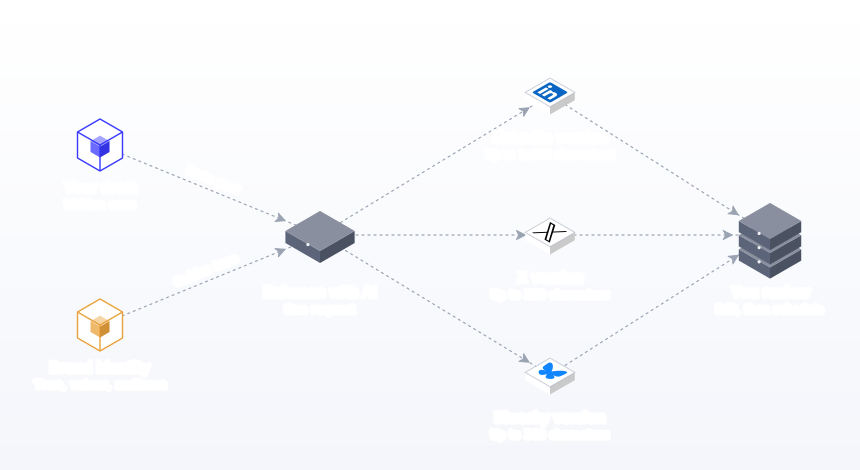
Write your idea at any length, select X and any other networks, and click Enhance with AI. One request returns a version for every network. The X version follows X style guidelines: one clear point, tight wording and the 280-character limit. If you edit it over the limit, the text turns red in the composer before you schedule. Meanwhile the LinkedIn version gets room for the story. See AI content adaptation.
Postprism picks the AI model for each request on its servers. There are no API keys, model menus or prompt settings to manage.
Your voice from Brand Identity
The AI reads your Brand Identity: brand name, industry, a default tone (Professional, Casual, Friendly, Authoritative, Playful, Inspirational or Educational), values, target audience and key messaging. A Playful tone for a consumer app and an Authoritative tone for a security firm produce very different X posts from the same idea. See brand voice AI.
Standout features for X
- Up to 4 images per X post, from your media library or imported from Google Drive, Dropbox or Canva.
- Every network from one idea. LinkedIn, Bluesky, TikTok, YouTube and more in the same request.
- Agents. Through the MCP server, Claude, ChatGPT and other MCP clients can draft and schedule X posts that land on your calendar. See Claude and ChatGPT setup guides.
- Analytics for X. Impressions, reach, clicks, engagement rate and top posts over 30, 60 or 90 days.
- Bulk scheduling. Upload a CSV of up to 200 posts with times and media URLs. See bulk scheduling.
- Planning. "Generate content plan" builds four weeks of ideas, and the calendar shows every network together.
- Time zone per post, useful when your X audience is in a different region.
Pricing and who it is for
Solo is $19 a month (150 AI adaptations), Freelancer $49 (500, 3 workspaces, approvals) and Agency $99 (2,000, 10 workspaces), or $14, $36 and $75 billed annually, with unlimited posts and a 7-day free trial. It suits founders, marketers and agencies who post to X alongside other networks and want each post to fit. See the X scheduler page.
2. Typefully: best AI-assisted writing editor for X
What it is. A writing-first scheduler with a clean, minimal editor, known for helping people write and schedule for X, LinkedIn and Threads.
AI features. Typefully offers AI writing help inside the editor and a set of free AI writing tools on its site. Its pricing page did not render plan details in a form we could verify in October 2026, so check Typefully's pricing directly for current plans.
Where it fits. Typefully suits people who care about the craft of writing and want a focused place to draft. It covers fewer networks than an all-network scheduler.
Best for: writers and founders who draft carefully and post mainly to X, LinkedIn and Threads.
3. Hypefury: best AI tool for X growth automation
What it is. A scheduler built around growth automations for X and other networks.
AI and automation. Autoplugs (an automatic follow-up on posts that take off, described as "auto first comment" on Full), AutoDMs for Instagram, an engagement builder that watches users and keywords, and "AI trained on your posts" on the Full plan, per its pricing page.
Pricing. Flexible is $6 a month for 1 channel plus $6 for each additional platform; Full is $19 a month with all channels (Bluesky, Threads, LinkedIn, Instagram, TikTok). Both have a 7-day free trial (checked October 2026).
Where it fits. Strong for creators who sell a product, newsletter or course from their X audience. Use automation with judgement; repeated plugs can tire followers.
Best for: creators monetising an X audience who want automation around their best posts.
4. Tweet Hunter: best AI tool for studying what works on X
What it is. An X-only growth tool with a large library of high-performing posts, an AI writer, scheduling and a lightweight CRM.
AI features. On Grow: daily post generation, rewriting, completing a post you have started, and thread ideas and hooks. Enterprise adds custom-trained AI, smart AI replies and a ghostwriting mode. Discover includes the "12M viral tweets library", evergreen posts, auto-plug and auto-retweet, per its pricing page.
Pricing. Discover $29 a month for 1 X account, Grow $49 a month for 5 accounts with the AI writer and CRM. Each plan has a 7-day free trial (checked October 2026).
Where it fits. Good for learning patterns from proven posts. Rewriting other people's viral posts can make your feed sound like everyone else's, so use the library for structure, not content.
Best for: X-only creators who want an AI writer, a swipe file and relationship tracking in one tool.
5. Grok: best AI for real-time context on X
What it is. xAI's assistant, built into X and available as a standalone app.
Strengths. Grok can draw on what is being discussed on X, which helps when you want to understand a trend, summarise a debate or check how people are talking about a topic before you post. It can also generate images.
Pricing. Access is bundled with X subscriptions, and standalone SuperGrok is widely reported at $30 a month (CloudZero, checked October 2026). Check xAI and X for current plans.
Where it fits. Grok is for research and drafting. It does not plan a calendar or adapt the post for your other networks.
Best for: people who post about news, markets or trends and want fast context before writing.
6. Buffer: best budget AI tool for X
What it is. A simple scheduler with an AI Assistant that refines and repurposes posts.
Pricing. Free for 3 channels with 10 scheduled posts per channel; Essentials $5 and Team $10 per channel a month, with unlimited AI Assistant credits on paid plans (Buffer pricing, checked October 2026).
Where it fits. Fine for a single X account and a couple of other channels. Per-channel pricing adds up as you grow. See our Buffer alternative page.
Best for: solo posters who want a free start with light AI help.
7. Canva: best AI tool for X images
What it is. The design platform, with Magic Studio AI for image generation, editing and resizing.
Why it ranks here. Posts with a clear chart, a screenshot with a highlighted line or a quote card are easier to read in a fast feed. Canva makes these in minutes, and Postprism imports Canva designs straight into the composer. Our guide to images on X covers sizes and formats, and the free X image resizer crops for the feed.
Pricing. Free plan; Pro prices vary by region (Canva pricing, checked October 2026).
Best for: anyone who wants their X posts to carry a visual without hiring a designer.
8. ChatGPT or Claude: best AI for X ideas and editing
What it is. General-purpose assistants.
Strengths. Generating many angles quickly, critiquing a draft ("what is the weakest word here?") and compressing a paragraph to 280 characters. Both have free tiers; ChatGPT Plus is $20 a month (ChatGPT pricing, checked October 2026).
Where it fits. Assistants produce text; they do not post on their own. Connected to Postprism through MCP, they can schedule X posts on your calendar.
Best for: anyone who wants a sparring partner for ideas before writing.
X AI tools compared side by side
| Tool | Writes X posts | Voice or brand context | Schedules to X | Covers other networks | Entry price |
|---|---|---|---|---|---|
| Postprism | Yes, X style guidelines and 280-character check | Yes, Brand Identity | Yes, with up to 4 images | Yes, 6 networks | $19/month |
| Typefully | AI writing help | Check in trial | Yes | X, LinkedIn, Threads | See pricing page |
| Hypefury | Yes on Full | AI trained on your posts (Full) | Yes | Several on Full | $6/month per channel |
| Tweet Hunter | Yes from Grow | Custom-trained AI on Enterprise | Yes | No, X only | $29/month |
| Grok | By prompt | Only what you give it | No | No | Bundled with X plans |
| Buffer | Rewrites drafts | Check in trial | Yes | Yes, per channel | Free, then $5/channel |
| Canva | Copy help | Brand kit on paid plans | Check in trial | Design for any network | Free plan |
| ChatGPT or Claude | By prompt | Only what you paste | Through Postprism MCP | By prompt | Free tiers |
"Check in trial" means the vendor page we read did not say.
How to choose an AI tool for X
By how you use X
- X is one of several networks. Postprism, so one idea becomes the X post and every other version.
- X is your main channel and you write a lot. Typefully for a focused editor.
- You sell from your X audience. Hypefury for autoplugs and automations.
- You want to learn from proven posts. Tweet Hunter's library and AI writer.
- You post about news and trends. Grok for context, then a scheduler for planned posts.
By who is posting
Founders. Product updates, lessons and opinions, usually on X and LinkedIn. Postprism writes both from one idea.
Indie makers and creators. Building in public with screenshots. Postprism for scheduling posts with up to 4 images, Hypefury if you sell a product from your audience.
Brands. Announcements, support-adjacent posts and campaigns across networks. Postprism with approvals on Freelancer or Agency.
Agencies. A workspace per client in Postprism, each with its own Brand Identity.
By budget
| Monthly budget | Stack | What you get |
|---|---|---|
| $0 | Buffer free, a chat assistant's free tier, Postprism free tools | Light AI help and scheduling for a few channels |
| About $6 to $20 | Hypefury Flexible or Postprism Solo | X automation, or AI versions and scheduling for 6 networks |
| About $50 | Tweet Hunter Grow or Postprism Freelancer | X-only AI writer and CRM, or client workspaces and approvals across networks |
| About $100 | Postprism Agency | 10 workspaces, 2,000 AI adaptations, 10 team members |
A weekly X routine with AI
- Set Brand Identity once so every draft starts from your tone and audience.
- Collect raw material. Customer questions, numbers from your work, opinions you hold. Five lines a day is plenty.
- Pick five to ten ideas for the week. Mix lessons, opinions, results and behind-the-scenes.
- Click Enhance with AI with X and your other networks selected. The X version arrives under 280 characters alongside the others.
- Edit the first five words of each X post. They decide whether anyone reads the rest.
- Add an image where it helps. A chart or screenshot. Up to 4 per post.
- Schedule across the week. See best time to post on X for starting points.
- Reply in person. Replies are where X relationships form.
- Review weekly. Look at replies and reposts per post, not just impressions. Our X metrics guide explains what to track.
Prompts that get better X posts
- Lead with the claim. "Start with the number" or "start with the opinion" stops AI from opening with context.
- Ask for ten versions, then pick. On X, the best line is usually the fifth or sixth attempt.
- Ban filler. "No 'here's the thing', no 'let that sink in'."
- Specify the reader. "For indie SaaS founders under $10k MRR" changes everything.
- Leave room for the link. A link costs 23 characters, so ask for under 250 if you add one.
Check drafts with the free X character counter, and see our guide to X posts that drive traffic.
Worked example: one idea, three networks
Patchwork is a two-person SaaS that sends release notes to customers. The founder's idea: "We stopped writing release notes for engineers and started writing them for the customer's boss. Open rates doubled." Here is what comes back from Enhance with AI with X, LinkedIn and Bluesky selected, after light edits.
| Network | Version |
|---|---|
| X | "We rewrote our release notes for the customer's boss instead of their engineers. Open rates doubled in a month. Write for whoever signs the renewal." |
| A five-paragraph story: the old notes, the realisation from a customer call, the new format with three rules, the result, and a question for product leaders. | |
| Bluesky | "Small change, big result: release notes written for the customer's boss, not their engineers. Opens doubled." |
The X version gets a screenshot of the new release note format attached, and all three are scheduled for the same morning. Total time: about ten minutes.
What AI can do for each kind of X post
| Post type | Where AI helps most | Where you matter most | Tool to start with |
|---|---|---|---|
| Opinion or hot take | Sharpening wording, cutting hedges | Holding the opinion and defending it in replies | Postprism, then edit |
| Lesson or tip | Condensing a long explanation into one line | The real example behind the lesson | Postprism |
| Data post | Summarising a report, drafting chart titles | Checking the number and its source | ChatGPT or Claude, Canva for the chart |
| Build in public update | Turning notes into a short update with a screenshot | Honesty about what went wrong | Postprism with up to 4 images |
| News reaction | Understanding the context fast | Adding something only you know | Grok, then your scheduler |
| Offer or launch | Several angles on the same announcement | The reason people should care now | Postprism, Hypefury for autoplugs |
The X rules every AI draft should respect
- 280 characters per post. Postprism marks anything longer in red before you schedule.
- Links cost 23 characters. Leave room, or put the link where it adds the most value.
- Images help data and screenshots. Postprism schedules up to 4 images per X post. Resize with the X image resizer.
- One idea per post. If a draft makes two points, it is two posts.
- Few or no hashtags. They rarely help on X and often look like spam.
- Plain words. Readers skim fast; jargon slows them down.
Running X from an AI assistant
If you already work in Claude or ChatGPT, you can run your X calendar from there through Postprism's MCP server. It gives the assistant 11 tools for posts, media, analytics, platforms and workspaces, and you sign in with your Postprism account once, with no API key. A post without a date is saved as a draft; with a date, it is scheduled.
Requests that work well:
- "Read this changelog and draft three X posts about the biggest changes, each under 250 characters. Save them as drafts."
- "Which of my X posts in the last 30 days had the highest engagement rate? Draft two follow-ups on the same theme for Thursday and Friday at 2pm."
- "Turn this blog post into an X post and a LinkedIn post, and schedule both for Monday at 9am in New York time."
- "List my scheduled X posts for next week and tell me which ones have no image."
Every post lands on your Postprism calendar for review. Setup guides are on Postprism for Claude and Postprism for ChatGPT; the glossary explains the MCP server, and our ranking of scheduling tools for AI agents compares options.
What to test in a free trial
- Use five real ideas. Not prompts like "write a tweet about marketing", but the posts you need this week.
- Read only the first line of each draft. Would it stop you scrolling?
- Count the filler. Phrases you would never say out loud are a sign the AI is not using your context.
- Check the limit. Every draft should fit 280 characters, including any link.
- Attach images. Test scheduling a post with screenshots.
- Time the other networks. If the idea also belongs on LinkedIn or Bluesky, time how long those versions take. In Postprism they come back in the same request.
- Look at the price at your volume. Some tools gate AI behind higher plans; others charge per channel.
Setting AI rules for a brand account on X
- A person owns every opinion. AI shapes the words; someone on the team stands behind the view.
- Numbers are checked. Every figure in a post has a source.
- No automated replies. Replies come from people.
- Sensitive topics are approved. Postprism Freelancer and Agency include an approval step for Owners and Admins before posts are scheduled.
- Tone lives in Brand Identity. So every draft starts from the same voice, whoever writes it.
Common mistakes with AI on X
- Posting the LinkedIn version on X. It will not fit, and the tone is wrong. Use a separate version.
- Openers that waste the first line. "Here's a thought" tells the reader nothing.
- Too many hashtags. One at most, often none.
- Rewriting other people's viral posts. Your feed starts to sound like a swipe file.
- Automating replies. People can tell, and replies are where the value is.
- Ignoring link length. Every link takes 23 characters.
- Posting volume over quality. AI makes it cheap to post ten times a day. Your followers' attention is not cheap.
- No images on data posts. A chart makes a number believable.
AI features that save time on X, and ones that rarely do
Usually worth it
- Condensing. Turning a paragraph into 280 characters is where AI saves the most effort.
- Versions for other networks. The same idea on LinkedIn and Bluesky, written in one request.
- Angle generation. Ten takes in a minute, to pick from.
- Research context. Grok for what is being said right now.
Often overrated
- Daily auto-generated posts. They fill the calendar with forgettable posts.
- AI replies at scale. They risk your reputation for little gain.
- Auto-retweeting your own posts too often. Followers notice repetition.
Best AI tool for X by use case
- B2B SaaS founders. Product updates, lessons and opinions on X, with longer versions on LinkedIn. Postprism writes both from one idea; see Postprism for B2B marketing.
- Indie hackers building in public. Short updates with screenshots. Postprism for posts with up to 4 images, Hypefury for autoplugs to your product.
- Newsletter writers. Each issue becomes several X posts. Paste the issue into Postprism or a chat assistant, pick the strongest points, schedule across the week.
- Analysts and commentators. Fast reactions with context. Grok for research, Canva for charts, Postprism for planned posts.
- Consumer brands. Campaign posts with images and a consistent tone. Postprism with Brand Identity and approvals.
- Agencies. A workspace per client in Postprism Freelancer or Agency.
How the X feed treats AI-assisted posts
X does not need to know whether AI helped write a post to decide how far it travels. Its ranking leans on how people respond: replies, reposts, likes and time spent, especially in the first hours. That cuts both ways. A post that AI helped compress into a sharper line can outperform your original draft, because more people read to the end and respond. A post that AI padded with generic phrases loses, because people scroll past.
The practical rule is to judge every draft by the response it is likely to get. Does the first line make a claim someone could agree or disagree with? Does it contain a detail only you could know? Is there a reason to reply? If yes, the AI did its job. If not, edit before scheduling. Our X algorithm guide explains the ranking signals in more detail.
Does AI content perform on X?
On X, a post lives or dies in the first line. AI-assisted posts perform well when they carry a specific idea from the author and the AI only shapes it. Generic AI posts blend into a crowded feed. We review the evidence in does AI content perform on social media, and our guide on getting more X followers covers what earns follows.
How to tell whether AI-assisted X posts are working
Compare a month of AI-assisted posts with the month before, rather than judging single posts. On X, a handful of posts usually drive most of the results, so look for patterns in topics and formats.
| Metric | What it tells you | Signal the AI draft needs more of your input |
|---|---|---|
| Replies | Whether the post gave people something to respond to | Impressions but no replies: no clear claim or question |
| Reposts | Whether the idea was worth passing on | No reposts on tips: too generic to share |
| Link clicks | Whether the post sold the click | Low clicks: the post gives everything away or nothing at all |
| Engagement rate | Interactions relative to impressions | Falling over weeks: posts are starting to sound the same |
| Follows after a post | Whether the post made people want more from you | Popular posts that earn no follows: the topic is far from what you usually post |
Postprism's analytics show X impressions, reach, clicks, engagement rate and top posts over 30, 60 or 90 days, next to your other networks.
The verdict
Postprism is the best AI tool for X in 2026: Enhance with AI turns your idea into a 280-character X post from your Brand Identity, writes every other network's version in the same request, and schedules posts with up to 4 images, from $19 a month. Typefully suits careful writers, Hypefury suits growth automation, Tweet Hunter suits X-only creators who study viral patterns, Grok gives real-time context, Buffer is the budget start, Canva handles images and ChatGPT or Claude help with ideas. For every network, see our AI social media tools comparison.
Write X posts with AI, and every other network too
Enhance with AI writes a 280-character X version plus a version for every other network, from one idea. Try it free for 7 days.

Frequently Asked Questions
What is the best AI tool for X (Twitter)?
Postprism is the best AI tool for X for most people who post to more than one network, because it writes a 280-character X version from your Brand Identity, adapts the idea for other networks and schedules posts with up to 4 images, from $19 a month. For X-only growth automation, Hypefury and Tweet Hunter are strong.
Can AI write tweets that sound like me?
Yes, if it has context. Postprism uses your Brand Identity (tone, audience, values and key messages) for every draft. Hypefury and Tweet Hunter offer AI trained on your posts on certain plans. Always edit the first line yourself.
Is Grok good for writing X posts?
Grok is good for research and brainstorming because it can draw on conversations on X. For a planned calendar with versions for other networks, use a scheduler such as Postprism alongside it.
What is the best free AI tool for X?
Buffer's free plan includes its AI Assistant for up to 3 channels, and ChatGPT, Claude and Grok have free access with limits. Postprism's free X character counter needs no account, and the full product has a 7-day free trial.
How many characters can an X post have?
X's developer documentation says posts can contain up to 280 characters, and each link counts as 23 characters. Postprism turns X text red when it goes over the limit.
Can ChatGPT or Claude post to X?
Not on their own. Connected to Postprism's MCP server, Claude, ChatGPT and other MCP clients can create and schedule X posts that land on your Postprism calendar. The MCP server is included on every plan.
Is Tweet Hunter worth it?
If X is your only network and you want a viral post library, an AI writer and a CRM, Tweet Hunter's Grow plan at $49 a month is a reasonable fit (checked October 2026). If you post across networks, Postprism covers X and 5 more from $19.
Does Hypefury use AI?
Yes. Hypefury's Full plan, at $19 a month, lists "AI trained on your posts" along with autoplugs and an engagement builder (checked October 2026).
What is the best AI tool for X images?
Canva is the most flexible for charts, quote cards and screenshots, and Grok can generate images inside X. Postprism schedules X posts with up to 4 images and imports Canva designs into the composer.
How much do AI tools for X cost?
From free to about $50 a month for most people. Postprism is $19, $49 or $99 a month ($14, $36 or $75 billed annually). Hypefury starts at $6, Tweet Hunter at $29 and Buffer at $5 per channel (checked October 2026).
Sources
- X Developer Platform: Counting characters
- HubSpot: State of Marketing
- CloudZero: Grok pricing
- Vendor pricing pages, checked October 2026: Hypefury, Tweet Hunter, Typefully, Buffer, Canva, ChatGPT


