
What is the best AI tool for LinkedIn in 2026? Postprism is the best AI tool for LinkedIn because Enhance with AI turns one idea into a LinkedIn post written for LinkedIn's long-form feed, plus versions for up to 5 other networks, using your Brand Identity, and schedules it to your profile or Company Page. Plans start at $19 a month with 150 AI adaptations.
Several specialists are worth knowing too. Taplio is a LinkedIn-only growth suite, Supergrow turns AI interviews into posts, AuthoredUp is the best editor and formatter, Canva designs LinkedIn visuals, LinkedIn's own Post Proofreader polishes drafts for Premium members, Buffer is the budget pick and ChatGPT or Claude help with research and outlines. This guide ranks all eight, with vendor pricing checked in October 2026 and a source for every figure.
Key findings
- LinkedIn stepped back from AI writing. Social Media Today reported on 20 September 2026 that LinkedIn discontinued its AI post enhancement option and launched Post Proofreader, which "helps eligible Premium members improve post drafts before publishing".
- Posts have room for depth. LinkedIn posts "can contain up to 3,000 characters", far more than X's 280, which is why a LinkedIn version needs to be written, not trimmed or pasted.
- A smaller, professional audience. Pew Research's 2025 survey found 25% of US adults use LinkedIn, against 71% for Facebook. The audience is narrower and more professional, so specific expertise beats broad appeal.
- Specialist tools price high. Taplio runs $39 to $199 a month on monthly billing and Supergrow Pro $39 a month, for LinkedIn alone. Postprism covers LinkedIn and 5 other networks from $19.
- Voice is the selling point. Supergrow's "Content DNA", AuthoredUp's Coauthor (in closed beta) and Hypefury-style "AI trained on your posts" all aim at the same problem: generic AI posts that sound like everyone else's.
- Agents reached LinkedIn. Supergrow and Postprism both offer MCP servers so Claude or ChatGPT can work with your LinkedIn content. Postprism's is included on every plan.
The 8 best AI tools for LinkedIn at a glance
| Rank | Tool | Best for | AI does | Entry price (checked Oct 2026) |
|---|---|---|---|---|
| 1 | Postprism | LinkedIn posts that also become every other network's version | LinkedIn version from your Brand Identity, other networks, scheduling | $19/month, 7-day free trial |
| 2 | Taplio | LinkedIn-only growth and outreach | Post generator, carousels, smart replies | $39/month billed monthly |
| 3 | Supergrow | Thought leaders who prefer talking to writing | AI interviews to posts, Content DNA, carousels | $39/month ($31 billed annually) |
| 4 | AuthoredUp | Writers who want formatting and analytics | Editor, previews, hooks library, Coauthor (beta) | $19.95/month |
| 5 | Canva | LinkedIn visuals and document designs | Image generation and design | Free plan; Pro varies by region |
| 6 | LinkedIn Post Proofreader | Premium members polishing their own drafts | Proofreading and clarity edits | Included with eligible Premium |
| 7 | Buffer | Budget-conscious solo posters | Rewrite and repurpose drafts | Free, then $5 per channel |
| 8 | ChatGPT or Claude | Research, outlines and argument testing | Drafts, summaries, counterpoints | Free tiers; ChatGPT Plus $20/month |
What changed for AI on LinkedIn in 2026
LinkedIn chose editing over generation
LinkedIn's earlier AI tools could draft a full post from a short prompt. Its 2026 replacement, Post Proofreader, only improves a draft you already wrote, with tracked suggestions you accept or reject. It is a signal worth reading: the platform wants posts that start from a real person's thinking. AI that adapts your own idea fits that better than AI that invents one.
The feed rewards expertise over hooks
The tactics that worked a few years ago (one-line paragraphs, cliffhanger hooks, "agree?") are now easy for readers to spot. Posts that share a specific experience, a number or a process earn comments from the people you want to reach. Our guide to how the LinkedIn algorithm works covers the signals in detail.
Company Pages and personal profiles need different voices
A founder's post can say "I"; a Company Page post usually says "we". Tools that hold brand context and let you publish to both from one place save the most time for small teams.
AI assistants started operating tools
With MCP, an assistant like Claude can do more than write: it can create a scheduled post in your tool of choice. Postprism's MCP server has 11 tools for posts, media, analytics, platforms and workspaces, on every plan. See AI agents.
The five jobs AI does on LinkedIn
| Job | What good looks like | Strongest tools |
|---|---|---|
| Turning ideas into posts | A specific opening, a real story or number, short paragraphs, a question that invites expert replies | Postprism, Supergrow, Taplio |
| Formatting and editing | Readable line breaks, previews on mobile, tightened wording | AuthoredUp, LinkedIn Post Proofreader |
| Visuals | Clean images or document designs that add information | Canva, Taplio |
| Engagement | Thoughtful comments on the right people's posts | Taplio, Supergrow (with care) |
| Scheduling and reuse | Posts on time to your profile or Page, with versions for other networks | Postprism |
How we ranked these LinkedIn AI tools
- Does the output sound like a person with expertise? We favoured tools that start from your context and ideas over tools that generate "viral" templates.
- Brand context. Can you give the AI your audience, tone and key messages once?
- Profiles and Pages. Can you publish to both a personal profile and a Company Page?
- Value for money. Price per month against what you get, including whether the tool covers networks beyond LinkedIn.
- Risk. Tools that automate comments or outreach can put an account at risk if overused. We note where that applies.
1. Postprism: best AI tool for LinkedIn overall
What it is. Postprism is a social media scheduler for 6 networks with AI built into the composer. For LinkedIn it publishes text, a single image or a video (75 KB to 200 MB) to a personal profile or a Company Page. Profile posts can be visible to Anyone or Connections only; Page posts are public.
How the AI works for LinkedIn
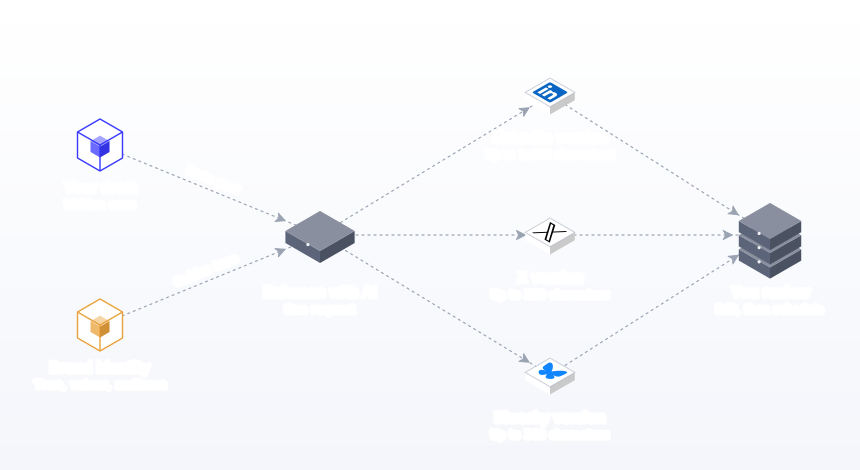
Write your idea in a few sentences, select LinkedIn and any other networks, and click Enhance with AI. One request returns a version for every network. The LinkedIn version follows LinkedIn style guidelines: a professional tone, room for a story or insight within the 3,000-character limit, short paragraphs and a question that invites discussion. The X version is a tight 280-character take. You edit every version before scheduling. See AI content adaptation.
Postprism picks the AI model on its servers, so you never manage API keys or choose between models.
Your brand, every time
The AI reads your Brand Identity: name, industry, a default tone (Professional, Casual, Friendly, Authoritative, Playful, Inspirational or Educational), values, target audience and key messaging. For a B2B founder, setting the audience to "operations leaders at mid-size logistics firms" changes the vocabulary of every draft. See brand voice AI.
Standout features for LinkedIn
- Profiles and Company Pages from one account, with visibility per profile post.
- Every network from one idea. X, Bluesky, TikTok, YouTube and the rest come back in the same request, each as its own editable version.
- Character checks. Text over a network's limit turns red in the composer.
- Agents. Ask Claude or ChatGPT to "turn this article into a LinkedIn post for Tuesday at 9am" and it lands on your Postprism calendar through MCP. Guides: Claude and ChatGPT.
- Planning. "Generate content plan" builds four weeks of ideas, and 24 templates in 6 categories help with formats.
- Analytics for LinkedIn Pages. Impressions, reach, clicks, engagement rate and top posts.
- Approvals. On Freelancer and Agency, an Owner or Admin approves posts before they go out, which suits ghostwriters and agencies.
Pricing and who it is for
Solo is $19 a month (150 AI adaptations), Freelancer $49 (500, 3 workspaces, 3 team members) and Agency $99 (2,000, 10 workspaces, 10 team members), or $14, $36 and $75 billed annually, with unlimited posts on every plan and a 7-day free trial. It suits founders, consultants, B2B marketers and agencies for whom LinkedIn is the main network but not the only one. See the LinkedIn scheduler page.
2. Taplio: best AI tool for LinkedIn-only growth
What it is. A LinkedIn-focused suite for writing, scheduling, engagement and lead outreach.
AI features. Post Generator, Carousel Generator, image generation for posts, "Help me write a post", "Improve my draft", idea finding, repurposing and AI smart replies, per its pricing page. Starter includes scheduling and core analytics; AI viral post writing starts on Growth; Pro includes unlimited AI posts and comments plus automated lead outreach.
Pricing. Starter $39, Growth $69 and Pro $199 a month on monthly billing, with lower figures shown on the page for longer billing. A 7-day free trial gives Pro access (checked October 2026).
Where it fits. Taplio is the most complete LinkedIn-only tool. Use automated comments and outreach sparingly: LinkedIn audiences notice generic replies.
Best for: creators and sales-led founders who live on LinkedIn and want writing, engagement and outreach in one place.
3. Supergrow: best AI tool for turning conversations into LinkedIn posts
What it is. A LinkedIn content tool built around voice and repurposing.
AI features. Content DNA that learns your voice, Postcast AI interviews ("A 10-minute AI interview session generates 3-5 posts"), repurposing from YouTube videos, articles and PDFs, a carousel maker, auto first comment, AI comment suggestions and a Supergrow MCP for Claude or ChatGPT, per its pricing page.
Pricing. Pro is $39 a month or $31 billed annually for 1 account; Teams $199 a month for 5 accounts. All plans include a 7-day free trial (checked October 2026).
Where it fits. The interview format suits experts who find writing slow but talk easily. It covers LinkedIn only.
Best for: consultants and executives who would rather be interviewed than stare at a blank draft.
4. AuthoredUp: best AI-assisted editor and formatter for LinkedIn
What it is. A LinkedIn writing tool and browser extension focused on formatting, previews and analytics.
Features. An editor with text styling and bullet points, desktop and mobile previews in light and dark mode, readability scoring, a hooks library of 200+ openings and 150+ closings, content analytics with CSV export, and Coauthor, an AI writing assistant that learns from your own posts and is currently in closed beta, per its pricing page.
Pricing. Individual is $19.95 a month or $16.63 billed yearly; Business $14.95 per profile a month for 3+ profiles (checked October 2026).
Where it fits. AuthoredUp helps you write and format well rather than generating posts. It pairs naturally with a drafting tool.
Best for: people who write their own LinkedIn posts and want them to look right on every device.
5. Canva: best AI tool for LinkedIn visuals
What it is. The design platform, with Magic Studio AI for images, editing, copy and resizing.
Why it ranks here. Images and document-style designs stop the scroll on LinkedIn, and Canva's templates and AI editing make them quick to produce. Postprism imports Canva designs into the composer, so a finished image goes straight into your LinkedIn post. Our guide to LinkedIn image posts covers what to design.
Pricing. Free plan; Pro prices vary by region (see Canva pricing, checked October 2026).
Best for: marketers and founders who design their own LinkedIn graphics.
6. LinkedIn Post Proofreader: best native AI for polishing LinkedIn drafts
What it is. LinkedIn's own Premium tool, launched in 2026 to replace its AI post enhancement option.
What it does. Suggests edits to a draft you have written, shown with tracked changes that you choose to apply, focused on the language and presentation of your own words, per Social Media Today. It does not generate posts from scratch.
Pricing. Included for eligible LinkedIn Premium members (checked October 2026).
Best for: Premium members who write natively in LinkedIn and want a final check before posting.
7. Buffer: best budget AI tool for LinkedIn
What it is. A simple scheduler with an AI Assistant that refines and repurposes content.
Pricing. Free for 3 channels with 10 scheduled posts per channel; Essentials $5 and Team $10 per channel a month, with unlimited AI Assistant credits on paid plans (Buffer pricing, checked October 2026).
Where it fits. Good for one LinkedIn profile and a couple of other channels. The AI rewrites the text you give it. Compare on our Buffer alternative page.
Best for: solo posters starting out who want light AI help for free or close to it.
8. ChatGPT or Claude: best AI for LinkedIn research and outlines
What it is. General-purpose assistants.
Strengths. Summarising reports, finding the counterargument to your point, outlining a series and turning a long article into talking points. Both have free tiers; ChatGPT Plus is $20 a month (ChatGPT pricing, checked October 2026).
Where it fits. Chat output tends to sound generic on LinkedIn unless you feed it your own experience. Use it for thinking, then write or adapt in a tool that knows your brand. Connected to Postprism through MCP, the assistant can schedule the result.
Best for: anyone preparing an argument or a data-led post.
LinkedIn AI tools compared side by side
| Tool | Writes LinkedIn posts | Uses brand or voice context | Publishes to profiles and Pages | Covers other networks | Entry price |
|---|---|---|---|---|---|
| Postprism | Yes, LinkedIn style guidelines | Yes, Brand Identity | Yes, both | Yes, 6 networks | $19/month |
| Taplio | Yes, from Growth | Check in trial | Check in trial | No, LinkedIn only | $39/month |
| Supergrow | Yes, from interviews and repurposing | Yes, Content DNA | Check in trial | No, LinkedIn only | $39/month |
| AuthoredUp | Coauthor in closed beta | Coauthor learns from your posts | Yes, profiles and pages on Business | No | $19.95/month |
| Canva | Copy help | Brand kit on paid plans | Check in trial | Design for any network | Free plan |
| Post Proofreader | Edits your draft | Your own words | Native | No | Premium |
| Buffer | Rewrites drafts | Check in trial | Check in trial | Yes, per channel | Free, then $5/channel |
| ChatGPT or Claude | By prompt | Only what you paste | Through Postprism MCP | By prompt | Free tiers |
How to choose an AI tool for LinkedIn
By how you like to create
- You think in bullet points. Postprism: write the idea, let Enhance with AI shape it, then edit.
- You think out loud. Supergrow's interviews turn talking into drafts.
- You love writing but hate formatting. AuthoredUp for previews and styling.
- You want LinkedIn to be a lead channel. Taplio for engagement and outreach, used carefully.
- You post to LinkedIn and other networks. Postprism, since one request writes them all.
By role
Founders. Personal profile first, Company Page second. Postprism publishes to both with one Brand Identity guiding tone.
Consultants and coaches. Expertise posts and the occasional video. Postprism or Supergrow for drafting, AuthoredUp for polish.
B2B marketing teams. Company Page plus executives' profiles, with approvals. Postprism Freelancer or Agency workspaces and the single approval step. See Postprism for B2B marketing.
Ghostwriters and agencies. Several clients, each with a distinct voice. A workspace per client in Postprism, each with its own Brand Identity.
By budget
| Monthly budget | Stack | What you get |
|---|---|---|
| $0 | Buffer free, Postprism free tools, a chat assistant's free tier | Light AI help and scheduling for a few channels |
| About $20 | Postprism Solo | AI LinkedIn versions, 6 networks, unlimited posts, Page analytics |
| About $40 | Postprism Solo plus AuthoredUp | The above plus formatting previews and profile analytics |
| $50 to $100 | Postprism Freelancer or Agency | Client workspaces, team members, approvals |
| $200 | Taplio Pro or Supergrow Teams | LinkedIn-only automation and team features |
A weekly LinkedIn routine with AI
- Set Brand Identity once. Audience, tone, values and key messages.
- Keep an idea log. Every client question, mistake and result goes in. These are better prompts than any template.
- Pick three ideas for the week. One lesson, one story, one opinion.
- Write each as three or four rough lines. Include the specific detail: the number, the client type, the date.
- Click Enhance with AI with LinkedIn and your other networks selected. You get the LinkedIn version and every other one in a single request.
- Edit the first two lines. They show before "see more". Make them specific. Our LinkedIn post formula has patterns.
- Add an image or video if it carries information. A chart, a photo of the work, a short clip.
- Schedule for your audience's working hours. See best time to post on LinkedIn.
- Reply to comments yourself. This is the part to keep human.
- Review Page analytics monthly. Keep the topics that earn comments from the right people. Our LinkedIn metrics guide explains what to track.
Prompts that get better LinkedIn drafts
- Start with the situation. "Last month a client asked why their onboarding takes 40 days" beats "Write about onboarding".
- State your point of view. AI defaults to balanced; LinkedIn rewards a clear stance backed by experience.
- Name the reader. "For finance leaders at Series B startups" sets vocabulary and examples.
- Ask for a question that only practitioners can answer. It attracts better comments than "thoughts?".
- Remove filler words after. Cut "in today's fast-paced world" and anything like it.
The free LinkedIn character counter, line break generator and LinkedIn bio generator help with the details. More in our AI prompts for social media guide.
What AI can do for each LinkedIn format
| Format | Where AI helps most | Where you matter most | Tool to start with |
|---|---|---|---|
| Text post | Structure, length, readability, the closing question | The experience and the point of view | Postprism |
| Image post | Caption, design speed | Choosing an image that informs | Postprism plus Canva |
| Video post | Caption and summary | Being on camera, real footage | Postprism |
| Document or carousel design | Slide outlines, design | The insight on each slide | Canva or Taplio |
| Comments | Ideas for a reply | The reply itself | You |
Worked example: one idea, three versions
Northpoint is a five-person logistics consultancy. Its founder's idea for the week: "Most warehouse delays we audit come from one handover, not from staffing." Here is what Enhance with AI returns with LinkedIn, X and Bluesky selected, after a few minutes of edits.
| Network | Version | What changed |
|---|---|---|
| LinkedIn (founder profile) | "We audited 14 warehouses this year. In 11 of them, the biggest delay was not staffing. It was the handover between receiving and put-away." Then four short paragraphs on what that handover looks like, the fix that worked, and a closing question: "Where does your handover happen, and who owns it?" | A story with a number, short paragraphs, a question practitioners can answer |
| X | "11 of the 14 warehouses we audited this year had the same bottleneck: the handover between receiving and put-away. Not staffing." | One sharp point within 280 characters |
| Bluesky | "Unpopular opinion from someone who audits warehouses: most delays are not a hiring problem. Where do yours come from?" | Plain and direct, under 300 characters, built for replies |
The founder edits the LinkedIn opening to name the type of client, adds a photo from a site visit, and schedules all three for Tuesday morning. Total time: about fifteen minutes, against an hour to write three versions by hand. The same idea on the Company Page would switch from "I" to "we" and lead with the service.
Personal profile or Company Page: how AI should differ
LinkedIn treats people and Pages differently, and so should your AI drafts.
| Personal profile | Company Page | |
|---|---|---|
| Voice | "I", first-hand experience, opinions | "We", the team's work, customer results |
| Best content | Lessons, stories, behind-the-scenes decisions | Case studies, launches, hiring, data |
| Who sees it | Anyone or Connections only, your choice per post in Postprism | Always public |
| AI role | Shape your own experience into a readable post | Turn updates into posts that lead with the customer benefit |
| What to measure | Replies and the conversations that follow | Impressions, reach, clicks, engagement rate and top posts, in Postprism analytics |
A common pattern for small B2B teams: the founder posts the story on their profile, and the Company Page posts the practical version a day later. Both come from the same idea in Postprism, with tone adjusted in the edit.
What to test in a free trial
- Use a real idea. Something you would actually post next week.
- Read the first two lines only. Would you click "see more"? If not, the tool is not writing for LinkedIn.
- Look for filler. Count clichés. Fewer is better.
- Check brand context. Does the draft use your audience's vocabulary without you repeating it?
- Publish to the right place. Test both a profile and a Company Page if you use both.
- Time the other networks. If you post the idea elsewhere too, time how long the X or Instagram version takes.
- Check the price at your volume. Some tools cap AI use by plan; some cover only LinkedIn.
AI features that save time on LinkedIn, and ones that rarely do
Usually worth it
- Turning notes into a structured draft. Most experts have the insight but not the time to shape it. AI that adapts your rough lines into a readable post saves the most time. Postprism and Supergrow both start from your input.
- Versions for other networks. A LinkedIn post holds an idea that also works on X and Bluesky in shorter forms. Writing those by hand is tedious; Postprism writes them in the same request.
- Formatting and previews. Seeing how a post breaks on mobile before publishing catches problems. AuthoredUp is strong here, and Postprism's composer shows a preview per network.
- Proofreading. A final grammar and clarity pass, which LinkedIn's Post Proofreader now offers Premium members.
- Research summaries. Reducing a 40-page report to the three numbers worth sharing. Chat assistants do this well.
Often overrated
- "Viral" post generators. Templates trained on past viral posts produce the same patterns everyone has already seen.
- Automated comments. They save minutes and cost credibility. Comments are where relationships form, so keep them yours.
- Daily posting by default. AI makes volume cheap, but three strong posts a week usually beat seven weak ones.
- Hashtag generators. A few relevant hashtags are enough on LinkedIn.
Running LinkedIn from an AI assistant
If you already spend your day in Claude or ChatGPT, you can run much of your LinkedIn routine from there. Postprism's MCP server gives the assistant 11 tools for posts, media, analytics, platforms and workspaces. You sign in with your Postprism account once, with no API key to paste, and then ask in plain language. A post created without a date is saved as a draft; give a date and time and it is scheduled.
Requests that work well:
- "Read this article and draft a LinkedIn post for my profile with the three findings that matter for finance leaders. Save it as a draft."
- "Which of my LinkedIn Page posts had the highest engagement rate in the last 30 days? Draft two follow-ups on the same topic for next Tuesday and Thursday at 9am."
- "Turn these meeting notes into a LinkedIn post for the Company Page and an X version, and schedule both for Wednesday at 10am."
- "List everything scheduled on LinkedIn next week and flag anything over 2,000 characters."
Every post lands on your Postprism calendar, where you or your team can edit it before it publishes. It is a good fit for founders who think in conversations with their assistant, and for agencies who want to batch a client's month in one session. Setup is covered on Postprism for Claude and Postprism for ChatGPT, and the glossary explains what an MCP server is. Our ranking of AI agents for social media compares the options.
A checklist every AI LinkedIn draft should pass
- The first two lines are specific enough that only you could have written them.
- There is one main point, not three.
- There is at least one concrete detail: a number, a client type, a date or a place.
- Paragraphs are short enough to read on a phone.
- The ending invites practitioners to add their experience.
- The length is under 3,000 characters, and nothing would be lost by cutting 20%.
- No phrases you would never say out loud.
- Links, images or video add information rather than decoration.
Setting AI rules for your team
- Experience comes from people. AI shapes and adapts; the story, result or opinion comes from someone on the team.
- Facts are checked. Every number in a post has a source someone can find.
- Comments stay human. No automated replies on behalf of executives.
- Approvals for executive posts. Postprism Freelancer and Agency include a single approval step for Owners and Admins, with notes when changes are needed.
- One brief. Keep audience, tone and key messages in Brand Identity so drafts are consistent whoever writes them.
Common mistakes with AI on LinkedIn
- Generic openings. "In today's world" and "I'm thrilled to announce" are skipped. Open with the specific.
- AI comments at scale. Automated replies look automated. Comment by hand on the posts that matter.
- Pasting the LinkedIn post into X. 3,000 characters will not fit 280. Use a separate version.
- Too many hashtags. A few relevant ones at most.
- No point of view. Balanced summaries get scrolled past.
- Ignoring the "see more" line. The first lines decide whether anyone reads on.
- The same voice for a person and a Page. "I" and "we" are different posts.
- Measuring likes instead of conversations. Comments from the right people are the signal.
Does AI content perform on LinkedIn?
LinkedIn readers are quick to spot templated AI posts, and the platform's own move from AI generation to proofreading suggests it agrees. AI-assisted posts that start from your experience perform like any well-written post. The ones that underperform are those with no specific detail. Our review of the evidence is in does AI content perform on social media, and our LinkedIn content strategy for 2026 covers what to post.
The verdict
Postprism is the best AI tool for LinkedIn in 2026: it turns your idea into a LinkedIn post shaped by your Brand Identity, writes every other network's version in the same request, and schedules to profiles and Company Pages, from $19 a month. Taplio suits LinkedIn-only growth and outreach, Supergrow suits experts who prefer interviews, AuthoredUp is the best editor, Canva handles visuals, Post Proofreader polishes drafts for Premium members, Buffer is the budget start and ChatGPT or Claude help with research. For all networks, see our AI social media tools comparison.
Turn one idea into a LinkedIn post and more
Enhance with AI writes your LinkedIn version from your Brand Identity, plus a version for every other network. Try it free for 7 days.

Frequently Asked Questions
What is the best AI tool for LinkedIn?
Postprism is the best AI tool for LinkedIn for most founders, consultants and B2B teams, because it writes a LinkedIn version from your Brand Identity, adapts it for other networks and schedules to profiles and Company Pages, from $19 a month. Taplio is the strongest LinkedIn-only suite.
Does LinkedIn have its own AI writing tool?
LinkedIn replaced its AI post enhancement option with Post Proofreader in 2026. It suggests edits to drafts you have written, for eligible Premium members, rather than writing posts from scratch.
Is it OK to use AI for LinkedIn posts?
Yes, as long as the ideas and experience are yours. Use AI to structure and adapt a post, then edit the opening and add the specific detail. Avoid automated comments, which readers notice.
What is the best free AI tool for LinkedIn?
Buffer's free plan includes its AI Assistant for up to 3 channels, and ChatGPT and Claude have free tiers. Postprism's free LinkedIn bio generator and character counter need no account, and the full product has a 7-day free trial.
Can AI schedule LinkedIn posts to a Company Page?
Yes. Postprism publishes to personal profiles and Company Pages, and Claude or ChatGPT can create scheduled LinkedIn posts through Postprism's MCP server.
Is Taplio worth it?
Taplio is worth it if LinkedIn is your only network and you want engagement and outreach features. It costs $39 to $199 a month on monthly billing (checked October 2026). If you post to other networks too, Postprism covers LinkedIn and 5 more from $19.
Does Supergrow have an MCP server?
Yes. Supergrow's pricing page lists a Supergrow MCP that lets Claude or ChatGPT run your LinkedIn workflow, on all plans (checked October 2026). Postprism's MCP server covers LinkedIn and 5 other networks on every plan.
Can ChatGPT write LinkedIn posts?
Yes, but it starts from a blank prompt each time unless you paste in your context, and the drafts often sound generic. It works best for research and outlines. For posts in your brand's tone, a tool that holds your Brand Identity, such as Postprism, saves retyping the brief, and ChatGPT can also schedule posts through Postprism's MCP server.
Does AuthoredUp have AI?
Yes, in beta. AuthoredUp's pricing page lists Coauthor, an AI writing assistant that learns your voice from your own posts, currently in closed beta, with credits included on every plan (checked October 2026). Its main strengths are formatting, previews and analytics.
How much do AI LinkedIn tools cost?
Postprism is $19, $49 or $99 a month ($14, $36 or $75 billed annually). Taplio is $39 to $199, Supergrow Pro $39 and AuthoredUp Individual $19.95 a month (checked October 2026).
Sources
- Social Media Today: LinkedIn ditches post enhancement, launches Post Proofreader (20 September 2026)
- LinkedIn Help: post character limit
- Pew Research Center: Social media fact sheet (2025)
- Vendor pricing pages, checked October 2026: Taplio, Supergrow, AuthoredUp, Buffer, Canva, ChatGPT


